> ## Documentation Index
> Fetch the complete documentation index at: https://docs.portkey.ai/docs/llms.txt
> Use this file to discover all available pages before exploring further.
# C# (.NET)
> Integrate Portkey in your `.NET` app easily using the OpenAI library and get advanced monitoring, routing, and enterprise features.
Designed for Fortune 500 needs – security, compliance, observability, and Azure integration out of the box.

## Building Enterprise LLM Apps with .NET
`.NET` is Microsoft's battle-tested framework trusted by Fortune 500 companies. It's now easier than ever to build LLM apps. You get:
| | |
| -------------------------- | ----------------------------------------------------------------------- |
| **Battle-Tested Security** | Built-in identity management, secret rotation, and compliance standards |
| **Production Performance** | High-throughput processing with advanced memory management |
| **Azure Integration** | Seamless Azure OpenAI and Active Directory support |
Combined with Portkey's enterprise features, you get everything needed for mission-critical LLM deployments. Monitor costs, ensure reliability, maintain compliance, and scale with confidence.
## Portkey Features
| | |
| :------------------------- | :---------------------------------------------------------------------------------------------------- |
| **Complete Observability** | Monitor costs, latency, and performance metrics |
| **Provider Flexibility** | Route to 250+ LLMs (like Claude, Gemini, Llama, self-hosted etc.) without code changes |
| **Smart Caching** | Reduce costs & time by caching frequent requests |
| **High Reliability** | Automatic fallback and load balancing across providers |
| **Prompt Management** | Use Portkey as a centralized hub to version, experiment with prompts, and call them using a single ID |
| **Continuous Improvement** | Improve your app by capturing and analyzing user feedback |
| **Enterprise Ready** | Budget controls, rate limits, model-provisioning, and role-based access |
## Supported Clients
| | |
| ----------------- | ----------------- |
| `ChatClient` | ✅ Fully Supported |
| `EmbeddingClient` | ✅ Fully Supported |
| `ImageClient` | 🚧 Coming Soon |
| `BatchClient` | 🚧 Coming Soon |
| `AudioClient` | 🚧 Coming Soon |
## Implementation Overview
1. Install OpenAI SDK
2. Create Portkey client by extending OpenAI client
3. Use the client in your application to make requests
### 1. Install the NuGet package
Add the OpenAI [NuGet](https://www.nuget.org/) package to your .NET project:
```sh theme={"system"}
dotnet add package OpenAI
```
### 2. Create Portkey Client Extension
The OpenAI package does not support directly modifying the base URL or passing additional headers. So, we write a simple function to extend OpenAI's `ChatClient` or `EmbeddingClient` to create a new `PortkeyClient`.
```csharp theme={"system"}
using OpenAI;
using OpenAI.Chat;
using System.ClientModel;
using System.ClientModel.Primitives;
public static class PortkeyClient
{
private class HeaderPolicy : PipelinePolicy
{
private readonly Dictionary _headers;
public HeaderPolicy(Dictionary headers) => _headers = headers;
public override void Process(PipelineMessage message, IReadOnlyList pipeline, int index)
{
foreach (var header in _headers) message.Request.Headers.Set(header.Key, header.Value);
if (index < pipeline.Count) pipeline[index].Process(message, pipeline, index + 1);
}
public override ValueTask ProcessAsync(PipelineMessage message, IReadOnlyList pipeline, int index)
{
Process(message, pipeline, index);
return ValueTask.CompletedTask;
}
}
public static OpenAIClient CreateClient(Dictionary headers)
{
var options = new OpenAIClientOptions { Endpoint = new Uri("https://api.portkey.ai/v1") };
options.AddPolicy(new HeaderPolicy(headers), PipelinePosition.PerCall);
return new OpenAIClient(new ApiKeyCredential("dummy"), options);
}
public static ChatClient CreateChatClient(Dictionary headers, string model)
{
var client = CreateClient(headers);
return client.GetChatClient(model);
}
}
```
```csharp theme={"system"}
using OpenAI;
using OpenAI.Embeddings;
using System.ClientModel;
using System.ClientModel.Primitives;
public static class PortkeyClient
{
private class HeaderPolicy : PipelinePolicy
{
private readonly Dictionary _headers;
public HeaderPolicy(Dictionary headers) => _headers = headers;
public override void Process(PipelineMessage message, IReadOnlyList pipeline, int index)
{
foreach (var header in _headers) message.Request.Headers.Set(header.Key, header.Value);
if (index < pipeline.Count) pipeline[index].Process(message, pipeline, index + 1);
}
public override ValueTask ProcessAsync(PipelineMessage message, IReadOnlyList pipeline, int index)
{
Process(message, pipeline, index);
return ValueTask.CompletedTask;
}
}
public static EmbeddingClient CreateEmbeddingClient(Dictionary headers, string model)
{
var options = new OpenAIClientOptions { Endpoint = new Uri("https://api.portkey.ai/v1") };
options.AddPolicy(new HeaderPolicy(headers), PipelinePosition.PerCall);
return new OpenAIClient(new ApiKeyCredential("dummy"), options).GetEmbeddingClient(model);
}
}
```
### 3. Use the Portkey Client
After creating the extension above, you can pass any [Portkey supported headers](/api-reference/inference-api/headers) directly while creating the new client.
```csharp theme={"system"}
// Define Portkey headers
var headers = new Dictionary {
// Required headers
{ "x-portkey-api-key", "..." }, // Your Portkey API key
{ "x-portkey-provider", "@openai-prod" }, // Provider slug from Model Catalog
// Optional headers
{ "x-portkey-trace-id", "my-app" }, // Custom trace identifier
{ "x-portkey-config", "..." }, // Send Config ID
// Add any other Portkey headers as needed
};
// Create client
var client = PortkeyClient.CreateChatClient(
headers: headers,
model: "gpt-4o"
);
// Make request
var response = client.CompleteChat(new UserChatMessage("Hello!"));
Console.WriteLine(response.Value.Content[0].Text);
```
Add providers in the [Model Catalog](/product/model-catalog) to get a provider slug (e.g., `@openai-prod`). The legacy `x-portkey-virtual-key` header is still supported.
```csharp theme={"system"}
// Define Portkey headers
var headers = new Dictionary {
// Required headers
{ "x-portkey-api-key", "..." }, // Your Portkey API key
{ "x-portkey-provider", "@openai-prod" }, // Provider slug from Model Catalog
// Optional headers
{ "x-portkey-trace-id", "..." }, // Custom trace identifier
{ "x-portkey-config", "..." }, // Send Config ID
// Add any other Portkey headers as needed
};
// Create embedding client through Portkey
var client = PortkeyClient.CreateEmbeddingClient(
headers: headers,
model: "text-embedding-3-large"
);
// Text that we want to embed
string description = "Best hotel in town if you like luxury hotels. They have an amazing infinity pool, a spa,"
+ " and a really helpful concierge. The location is perfect -- right downtown, close to all the tourist"
+ " attractions. We highly recommend this hotel.";
// Generate embedding
var embeddingResult = client.GenerateEmbedding(description);
var vector = embeddingResult.Value.ToFloats();
Console.WriteLine($"Full embedding dimensions: {vector.Length}");
```
While we show common headers here, you can pass any Portkey-supported headers to enable features like custom metadata, fallbacks, caching, retries, and more.
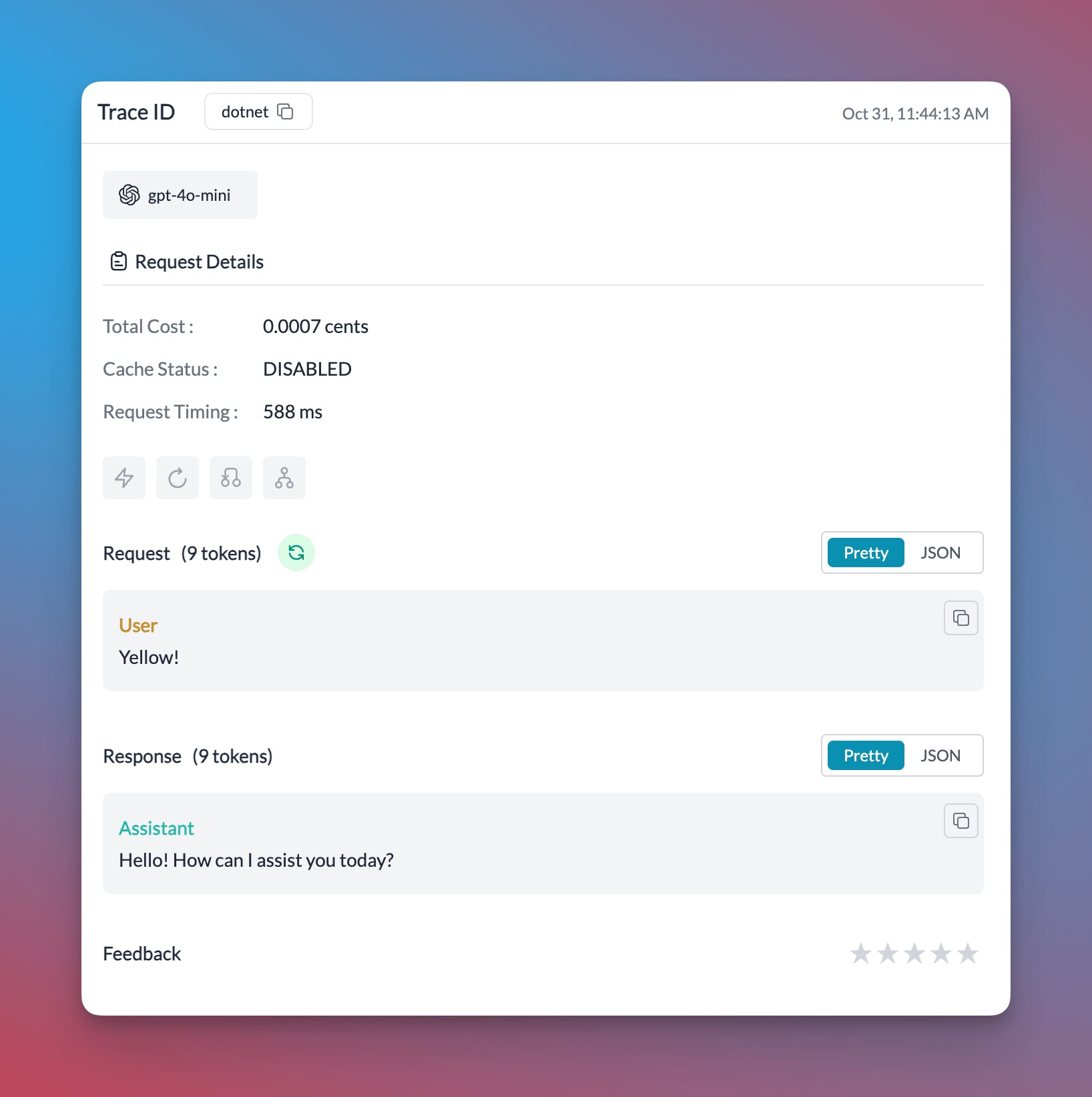
### 4. View Your Request in Portkey Logs
This request will now be logged on Portkey:
 ## Chat Completions Example
Add your Azure OpenAI details in the [Model Catalog](/integrations/llms/azure-openai#portkey-sdk-integration-with-azure-openai) to get a provider slug.
```csharp [expandable] theme={"system"}
using OpenAI;
using OpenAI.Chat;
using System.ClientModel;
using System.ClientModel.Primitives;
public static class Portkey
{
private class HeaderPolicy : PipelinePolicy
{
private readonly Dictionary _headers;
public HeaderPolicy(Dictionary headers) => _headers = headers;
public override void Process(PipelineMessage message, IReadOnlyList pipeline, int index)
{
foreach (var header in _headers) message.Request.Headers.Set(header.Key, header.Value);
if (index < pipeline.Count) pipeline[index].Process(message, pipeline, index + 1);
}
public override ValueTask ProcessAsync(PipelineMessage message, IReadOnlyList pipeline, int index)
{
Process(message, pipeline, index);
return ValueTask.CompletedTask;
}
}
public static ChatClient CreateChatClient(Dictionary headers, string model)
{
var options = new OpenAIClientOptions { Endpoint = new Uri("https://api.portkey.ai/v1") };
options.AddPolicy(new HeaderPolicy(headers), PipelinePosition.PerCall);
return new OpenAIClient(new ApiKeyCredential("dummy"), options).GetChatClient(model);
}
}
public class Program
{
public static void Main()
{
var client = Portkey.CreateChatClient(
headers: new Dictionary {
{ "x-portkey-api-key", "PORTKEY API KEY" },
{ "x-portkey-provider", "@azure-openai-prod" }, // Provider slug from Model Catalog
{ "x-portkey-trace-id", "dotnet" }
},
model: "gpt-4o" // Model name configured in your Azure deployment
);
Console.WriteLine(client.CompleteChat(new UserChatMessage("1729")).Value.Content[0].Text);
}
}
```
## Embedding Example
```csharp [expandable] theme={"system"}
using OpenAI;
using OpenAI.Embeddings;
using System.ClientModel;
using System.ClientModel.Primitives;
public static class PortkeyClient
{
private class HeaderPolicy : PipelinePolicy
{
private readonly Dictionary _headers;
public HeaderPolicy(Dictionary headers) => _headers = headers;
public override void Process(PipelineMessage message, IReadOnlyList pipeline, int index)
{
foreach (var header in _headers) message.Request.Headers.Set(header.Key, header.Value);
if (index < pipeline.Count) pipeline[index].Process(message, pipeline, index + 1);
}
public override ValueTask ProcessAsync(PipelineMessage message, IReadOnlyList pipeline, int index)
{
Process(message, pipeline, index);
return ValueTask.CompletedTask;
}
}
public static EmbeddingClient CreateEmbeddingClient(Dictionary headers, string model)
{
var options = new OpenAIClientOptions { Endpoint = new Uri("https://api.portkey.ai/v1") };
options.AddPolicy(new HeaderPolicy(headers), PipelinePosition.PerCall);
return new OpenAIClient(new ApiKeyCredential("dummy"), options).GetEmbeddingClient(model);
}
}
class Program
{
static void Main()
{
// Define Portkey headers
var headers = new Dictionary {
// Required headers
{ "x-portkey-api-key", "..." }, // Your Portkey API key
{ "x-portkey-provider", "@openai-prod" }, // Provider slug from Model Catalog
// Optional headers
{ "x-portkey-trace-id", "..." }, // Custom trace identifier
{ "x-portkey-config", "..." }, // Send Config ID
// Add any other Portkey headers as needed
};
// Create embedding client through Portkey
var client = PortkeyClient.CreateEmbeddingClient(
headers: headers,
model: "text-embedding-3-large"
);
// Text that we want to embed
string description = "Best hotel in town if you like luxury hotels. They have an amazing infinity pool, a spa,"
+ " and a really helpful concierge. The location is perfect -- right downtown, close to all the tourist"
+ " attractions. We highly recommend this hotel.";
// Generate embedding
var embeddingResult = client.GenerateEmbedding(description);
var vector = embeddingResult.Value.ToFloats();
Console.WriteLine($"Full embedding dimensions: {vector.Length}");
}
}
```
## Microsoft Semantic Kernel Example
We can make use of the [Portkey client we created above](/api-reference/inference-api/sdks/c-sharp#2-create-portkey-client-extension) to initialize the Semantic Kernel.
(Please make use of the `CreateClient` method and not `CreateChatClient` method to create the client)
```csharp [expandable] theme={"system"}
using Microsoft.SemanticKernel;
using Microsoft.SemanticKernel.ChatCompletion;
public class Program
{
public static async Task Main()
{
var headers = new Dictionary {
// Required headers
{ "x-portkey-api-key", "..." }, // Your Portkey API key
{ "x-portkey-provider", "@openai-prod" }, // Provider slug from Model Catalog
// Optional headers
// { "x-portkey-trace-id", "my-app" }, // Custom trace identifier
// { "x-portkey-config", "..." }, // Send Config ID
// Add any other Portkey headers as needed
};
// Create client
var client = PortkeyClient.CreateClient(headers);
var builder = Kernel.CreateBuilder().AddOpenAIChatCompletion("gpt-4", client);
Kernel kernel = builder.Build();
var chatCompletionService = kernel.GetRequiredService();
var history = new ChatHistory();
// Initiate a back-and-forth chat
string? userInput;
do {
// Collect user input
Console.Write("User > ");
userInput = Console.ReadLine();
// Add user input
history.AddUserMessage(userInput);
// Get the response from the AI
var result = await chatCompletionService.GetChatMessageContentAsync(
history,
null,
kernel: kernel);
// Print the results
Console.WriteLine("Assistant > " + result);
// Add the message from the agent to the chat history
history.AddMessage(result.Role, result.Content ?? string.Empty);
} while (userInput is not null);
}
}
```
## More Features
You can also use the `PortkeyClient` to send `Async` requests:
```csharp theme={"system"}
var completion = await client.CompleteChatAsync(new UserChatMessage("Hello!"));
Console.WriteLine(completion.Value.Content[0].Text);
```
Use the `SystemChatMessage` and `UserChatMessage` properties from the OpenAI package to create multi-turn conversations:
```csharp theme={"system"}
var messages = new List
{
new SystemChatMessage("You are a helpful assistant."),
new UserChatMessage("What is the capital of France?")
};
var completion = client.CompleteChat(messages);
messages.Add(new AssistantChatMessage(completion));
```
Switching providers is just a matter of changing your AI Provider slug. Change it to Anthropic, set the model name, and start making requests to Anthropic from the OpenAI .NET library.
```csharp {41,44} [expandable] theme={"system"}
using OpenAI;
using OpenAI.Chat;
using System.ClientModel;
using System.ClientModel.Primitives;
public static class Portkey
{
private class HeaderPolicy : PipelinePolicy
{
private readonly Dictionary _headers;
public HeaderPolicy(Dictionary headers) => _headers = headers;
public override void Process(PipelineMessage message, IReadOnlyList pipeline, int index)
{
foreach (var header in _headers) message.Request.Headers.Set(header.Key, header.Value);
if (index < pipeline.Count) pipeline[index].Process(message, pipeline, index + 1);
}
public override ValueTask ProcessAsync(PipelineMessage message, IReadOnlyList pipeline, int index)
{
Process(message, pipeline, index);
return ValueTask.CompletedTask;
}
}
public static ChatClient CreateChatClient(Dictionary headers, string model)
{
var options = new OpenAIClientOptions { Endpoint = new Uri("https://api.portkey.ai/v1") };
options.AddPolicy(new HeaderPolicy(headers), PipelinePosition.PerCall);
return new OpenAIClient(new ApiKeyCredential("dummy"), options).GetChatClient(model);
}
}
public class Program
{
public static void Main()
{
var client = Portkey.CreateChatClient(
headers: new Dictionary {
{ "x-portkey-api-key", "PORTKEY API KEY" },
{ "x-portkey-provider", "@anthropic-prod" }, // Provider slug from Model Catalog
{ "x-portkey-trace-id", "dotnet" }
},
model: "claude-sonnet-4-20250514"
);
Console.WriteLine(client.CompleteChat(new UserChatMessage("1729")).Value.Content[0].Text);
}
}
```
Similarly, just change your provider to the Vertex AI Provider:
```csharp {41,44} [expandable] theme={"system"}
using OpenAI;
using OpenAI.Chat;
using System.ClientModel;
using System.ClientModel.Primitives;
public static class Portkey
{
private class HeaderPolicy : PipelinePolicy
{
private readonly Dictionary _headers;
public HeaderPolicy(Dictionary headers) => _headers = headers;
public override void Process(PipelineMessage message, IReadOnlyList pipeline, int index)
{
foreach (var header in _headers) message.Request.Headers.Set(header.Key, header.Value);
if (index < pipeline.Count) pipeline[index].Process(message, pipeline, index + 1);
}
public override ValueTask ProcessAsync(PipelineMessage message, IReadOnlyList pipeline, int index)
{
Process(message, pipeline, index);
return ValueTask.CompletedTask;
}
}
public static ChatClient CreateChatClient(Dictionary headers, string model)
{
var options = new OpenAIClientOptions { Endpoint = new Uri("https://api.portkey.ai/v1") };
options.AddPolicy(new HeaderPolicy(headers), PipelinePosition.PerCall);
return new OpenAIClient(new ApiKeyCredential("dummy"), options).GetChatClient(model);
}
}
public class Program
{
public static void Main()
{
var client = Portkey.CreateChatClient(
headers: new Dictionary {
{ "x-portkey-api-key", "PORTKEY API KEY" },
{ "x-portkey-provider", "@vertex-ai-prod" }, // Provider slug from Model Catalog
{ "x-portkey-trace-id", "dotnet" }
},
model: "gemini-2.0-flash"
);
Console.WriteLine(client.CompleteChat(new UserChatMessage("1729")).Value.Content[0].Text);
}
}
```
# Next Steps
* [Call local models](/integrations/llms/byollm)
* [Enable cache](/product/ai-gateway/cache-simple-and-semantic)
* [Setup fallbacks](/product/ai-gateway/fallbacks)
* [Loadbalance requests against multiple instances](/product/ai-gateway/load-balancing)
* [Append metadata with requests](/product/observability/metadata)
# Need Help?
Ping the Portkey team on our [Developer Forum](https://portkey.wiki/community) or email us at [support@portkey.ai](mailto:support@portkey.ai)
## Chat Completions Example
Add your Azure OpenAI details in the [Model Catalog](/integrations/llms/azure-openai#portkey-sdk-integration-with-azure-openai) to get a provider slug.
```csharp [expandable] theme={"system"}
using OpenAI;
using OpenAI.Chat;
using System.ClientModel;
using System.ClientModel.Primitives;
public static class Portkey
{
private class HeaderPolicy : PipelinePolicy
{
private readonly Dictionary _headers;
public HeaderPolicy(Dictionary headers) => _headers = headers;
public override void Process(PipelineMessage message, IReadOnlyList pipeline, int index)
{
foreach (var header in _headers) message.Request.Headers.Set(header.Key, header.Value);
if (index < pipeline.Count) pipeline[index].Process(message, pipeline, index + 1);
}
public override ValueTask ProcessAsync(PipelineMessage message, IReadOnlyList pipeline, int index)
{
Process(message, pipeline, index);
return ValueTask.CompletedTask;
}
}
public static ChatClient CreateChatClient(Dictionary headers, string model)
{
var options = new OpenAIClientOptions { Endpoint = new Uri("https://api.portkey.ai/v1") };
options.AddPolicy(new HeaderPolicy(headers), PipelinePosition.PerCall);
return new OpenAIClient(new ApiKeyCredential("dummy"), options).GetChatClient(model);
}
}
public class Program
{
public static void Main()
{
var client = Portkey.CreateChatClient(
headers: new Dictionary {
{ "x-portkey-api-key", "PORTKEY API KEY" },
{ "x-portkey-provider", "@azure-openai-prod" }, // Provider slug from Model Catalog
{ "x-portkey-trace-id", "dotnet" }
},
model: "gpt-4o" // Model name configured in your Azure deployment
);
Console.WriteLine(client.CompleteChat(new UserChatMessage("1729")).Value.Content[0].Text);
}
}
```
## Embedding Example
```csharp [expandable] theme={"system"}
using OpenAI;
using OpenAI.Embeddings;
using System.ClientModel;
using System.ClientModel.Primitives;
public static class PortkeyClient
{
private class HeaderPolicy : PipelinePolicy
{
private readonly Dictionary _headers;
public HeaderPolicy(Dictionary headers) => _headers = headers;
public override void Process(PipelineMessage message, IReadOnlyList pipeline, int index)
{
foreach (var header in _headers) message.Request.Headers.Set(header.Key, header.Value);
if (index < pipeline.Count) pipeline[index].Process(message, pipeline, index + 1);
}
public override ValueTask ProcessAsync(PipelineMessage message, IReadOnlyList pipeline, int index)
{
Process(message, pipeline, index);
return ValueTask.CompletedTask;
}
}
public static EmbeddingClient CreateEmbeddingClient(Dictionary headers, string model)
{
var options = new OpenAIClientOptions { Endpoint = new Uri("https://api.portkey.ai/v1") };
options.AddPolicy(new HeaderPolicy(headers), PipelinePosition.PerCall);
return new OpenAIClient(new ApiKeyCredential("dummy"), options).GetEmbeddingClient(model);
}
}
class Program
{
static void Main()
{
// Define Portkey headers
var headers = new Dictionary {
// Required headers
{ "x-portkey-api-key", "..." }, // Your Portkey API key
{ "x-portkey-provider", "@openai-prod" }, // Provider slug from Model Catalog
// Optional headers
{ "x-portkey-trace-id", "..." }, // Custom trace identifier
{ "x-portkey-config", "..." }, // Send Config ID
// Add any other Portkey headers as needed
};
// Create embedding client through Portkey
var client = PortkeyClient.CreateEmbeddingClient(
headers: headers,
model: "text-embedding-3-large"
);
// Text that we want to embed
string description = "Best hotel in town if you like luxury hotels. They have an amazing infinity pool, a spa,"
+ " and a really helpful concierge. The location is perfect -- right downtown, close to all the tourist"
+ " attractions. We highly recommend this hotel.";
// Generate embedding
var embeddingResult = client.GenerateEmbedding(description);
var vector = embeddingResult.Value.ToFloats();
Console.WriteLine($"Full embedding dimensions: {vector.Length}");
}
}
```
## Microsoft Semantic Kernel Example
We can make use of the [Portkey client we created above](/api-reference/inference-api/sdks/c-sharp#2-create-portkey-client-extension) to initialize the Semantic Kernel.
(Please make use of the `CreateClient` method and not `CreateChatClient` method to create the client)
```csharp [expandable] theme={"system"}
using Microsoft.SemanticKernel;
using Microsoft.SemanticKernel.ChatCompletion;
public class Program
{
public static async Task Main()
{
var headers = new Dictionary {
// Required headers
{ "x-portkey-api-key", "..." }, // Your Portkey API key
{ "x-portkey-provider", "@openai-prod" }, // Provider slug from Model Catalog
// Optional headers
// { "x-portkey-trace-id", "my-app" }, // Custom trace identifier
// { "x-portkey-config", "..." }, // Send Config ID
// Add any other Portkey headers as needed
};
// Create client
var client = PortkeyClient.CreateClient(headers);
var builder = Kernel.CreateBuilder().AddOpenAIChatCompletion("gpt-4", client);
Kernel kernel = builder.Build();
var chatCompletionService = kernel.GetRequiredService();
var history = new ChatHistory();
// Initiate a back-and-forth chat
string? userInput;
do {
// Collect user input
Console.Write("User > ");
userInput = Console.ReadLine();
// Add user input
history.AddUserMessage(userInput);
// Get the response from the AI
var result = await chatCompletionService.GetChatMessageContentAsync(
history,
null,
kernel: kernel);
// Print the results
Console.WriteLine("Assistant > " + result);
// Add the message from the agent to the chat history
history.AddMessage(result.Role, result.Content ?? string.Empty);
} while (userInput is not null);
}
}
```
## More Features
You can also use the `PortkeyClient` to send `Async` requests:
```csharp theme={"system"}
var completion = await client.CompleteChatAsync(new UserChatMessage("Hello!"));
Console.WriteLine(completion.Value.Content[0].Text);
```
Use the `SystemChatMessage` and `UserChatMessage` properties from the OpenAI package to create multi-turn conversations:
```csharp theme={"system"}
var messages = new List
{
new SystemChatMessage("You are a helpful assistant."),
new UserChatMessage("What is the capital of France?")
};
var completion = client.CompleteChat(messages);
messages.Add(new AssistantChatMessage(completion));
```
Switching providers is just a matter of changing your AI Provider slug. Change it to Anthropic, set the model name, and start making requests to Anthropic from the OpenAI .NET library.
```csharp {41,44} [expandable] theme={"system"}
using OpenAI;
using OpenAI.Chat;
using System.ClientModel;
using System.ClientModel.Primitives;
public static class Portkey
{
private class HeaderPolicy : PipelinePolicy
{
private readonly Dictionary _headers;
public HeaderPolicy(Dictionary headers) => _headers = headers;
public override void Process(PipelineMessage message, IReadOnlyList pipeline, int index)
{
foreach (var header in _headers) message.Request.Headers.Set(header.Key, header.Value);
if (index < pipeline.Count) pipeline[index].Process(message, pipeline, index + 1);
}
public override ValueTask ProcessAsync(PipelineMessage message, IReadOnlyList pipeline, int index)
{
Process(message, pipeline, index);
return ValueTask.CompletedTask;
}
}
public static ChatClient CreateChatClient(Dictionary headers, string model)
{
var options = new OpenAIClientOptions { Endpoint = new Uri("https://api.portkey.ai/v1") };
options.AddPolicy(new HeaderPolicy(headers), PipelinePosition.PerCall);
return new OpenAIClient(new ApiKeyCredential("dummy"), options).GetChatClient(model);
}
}
public class Program
{
public static void Main()
{
var client = Portkey.CreateChatClient(
headers: new Dictionary {
{ "x-portkey-api-key", "PORTKEY API KEY" },
{ "x-portkey-provider", "@anthropic-prod" }, // Provider slug from Model Catalog
{ "x-portkey-trace-id", "dotnet" }
},
model: "claude-sonnet-4-20250514"
);
Console.WriteLine(client.CompleteChat(new UserChatMessage("1729")).Value.Content[0].Text);
}
}
```
Similarly, just change your provider to the Vertex AI Provider:
```csharp {41,44} [expandable] theme={"system"}
using OpenAI;
using OpenAI.Chat;
using System.ClientModel;
using System.ClientModel.Primitives;
public static class Portkey
{
private class HeaderPolicy : PipelinePolicy
{
private readonly Dictionary _headers;
public HeaderPolicy(Dictionary headers) => _headers = headers;
public override void Process(PipelineMessage message, IReadOnlyList pipeline, int index)
{
foreach (var header in _headers) message.Request.Headers.Set(header.Key, header.Value);
if (index < pipeline.Count) pipeline[index].Process(message, pipeline, index + 1);
}
public override ValueTask ProcessAsync(PipelineMessage message, IReadOnlyList pipeline, int index)
{
Process(message, pipeline, index);
return ValueTask.CompletedTask;
}
}
public static ChatClient CreateChatClient(Dictionary headers, string model)
{
var options = new OpenAIClientOptions { Endpoint = new Uri("https://api.portkey.ai/v1") };
options.AddPolicy(new HeaderPolicy(headers), PipelinePosition.PerCall);
return new OpenAIClient(new ApiKeyCredential("dummy"), options).GetChatClient(model);
}
}
public class Program
{
public static void Main()
{
var client = Portkey.CreateChatClient(
headers: new Dictionary {
{ "x-portkey-api-key", "PORTKEY API KEY" },
{ "x-portkey-provider", "@vertex-ai-prod" }, // Provider slug from Model Catalog
{ "x-portkey-trace-id", "dotnet" }
},
model: "gemini-2.0-flash"
);
Console.WriteLine(client.CompleteChat(new UserChatMessage("1729")).Value.Content[0].Text);
}
}
```
# Next Steps
* [Call local models](/integrations/llms/byollm)
* [Enable cache](/product/ai-gateway/cache-simple-and-semantic)
* [Setup fallbacks](/product/ai-gateway/fallbacks)
* [Loadbalance requests against multiple instances](/product/ai-gateway/load-balancing)
* [Append metadata with requests](/product/observability/metadata)
# Need Help?
Ping the Portkey team on our [Developer Forum](https://portkey.wiki/community) or email us at [support@portkey.ai](mailto:support@portkey.ai)