> ## Documentation Index
> Fetch the complete documentation index at: https://docs.portkey.ai/docs/llms.txt
> Use this file to discover all available pages before exploring further.
# Data Plane Deployment (Hybrid)
> Step-by-step instructions to deploy the Portkey data plane inside your infrastructure.
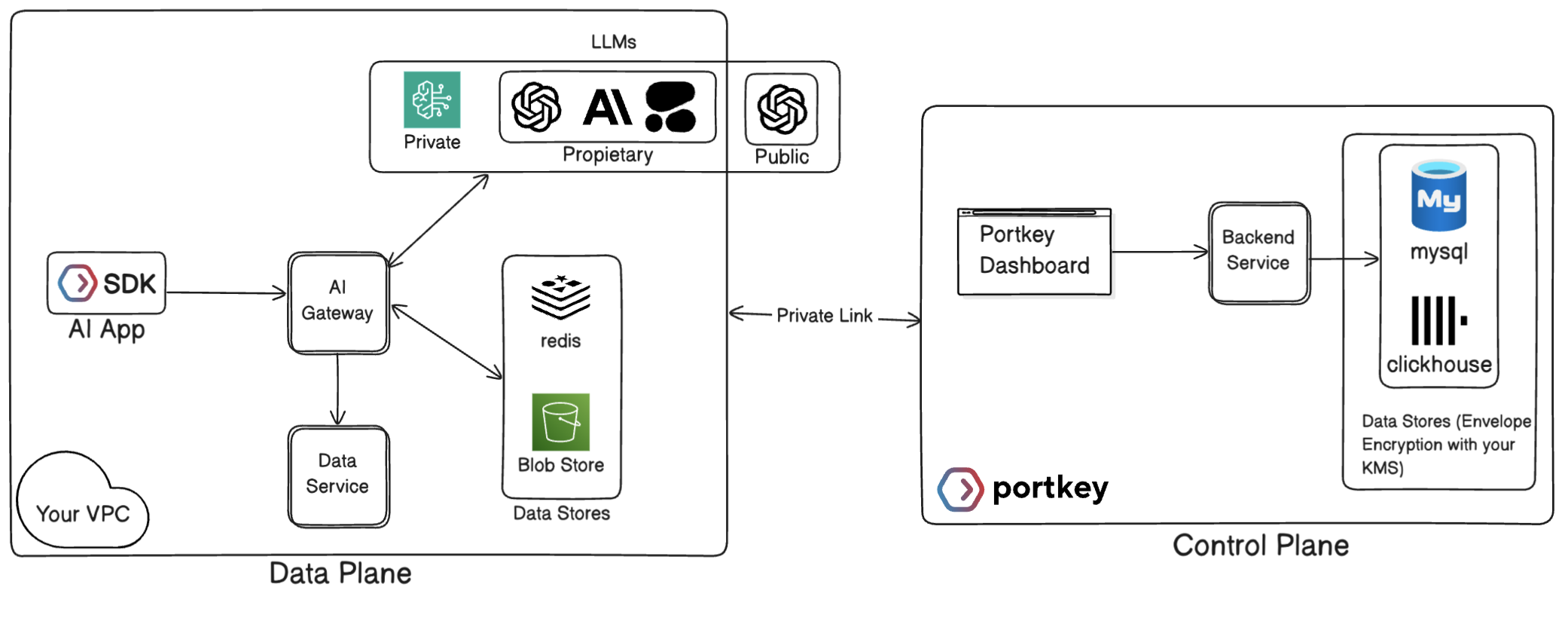 ## Deploy a Hybrid Data Plane in 4 Steps
### Step 1: Prepare Your Environment
#### 1.1 Environment readiness
| Requirement | Notes |
| - | - |
| **Kubernetes** | v1.24+ (Helm 3.x) |
| **Outbound HTTPS** | Gateway must reach `control.portkey.ai` |
| **Container Registry Access** | Docker Hub / Portkey ECR for gateway image |
| **Resource Sizing** | CPU 1–2 cores, RAM 2–4 GB per Gateway |
| **Storage** | Depends on log retention (object storage or Mongo) |
#### 1.2 Dependencies
| Component | Option A (auto) | Option B (bring-your-own) |
| - | - | - |
| Cache | Redis installed via Helm chart | External Redis/ElastiCache |
| Log Store | S3-compatible bucket (AWS S3, Wasabi, MinIO, GCS, NetApp) | MongoDB / DocumentDB |
### Step 2: Obtain Credentials and Helm Repo
1. **Docker credentials** – you’ll receive a 1Password link with `` and ``.
2. **Helm repo** – add Portkey charts and create the registry secret:
```sh Shell theme={"system"}
helm repo add portkey https://portkey-ai.github.io/helm
helm repo update
# Registry secret in kube-system (adjust namespace if needed)
kubectl create secret docker-registry portkeyenterpriseregistrycredentials \
--docker-server=https://index.docker.io/v1/ \
--docker-username= \
--docker-password=
```
### Step 3: Configure `values.yaml`
Only a handful of parameters are required for a first-run. Start from the minimal template below and expand as needed.
```yaml values.yaml (minimal) theme={"system"}
image:
repository: portkey/enterprise-gateway
tag: "1.10.24"
imageCredentials:
- name: portkeyenterpriseregistrycredentials
create: false # already created above
environment:
data:
SERVICE_NAME: polar-gateway
CACHE_STORE: redis
REDIS_MODE: standalone
LOG_STORE: wasabi # s3 | gcs | mongo | netapp | s3_assume
LOG_STORE_REGION: us-east-1
LOG_STORE_GENERATIONS_BUCKET: polar-pk-logs
LOG_STORE_ACCESS_KEY:
LOG_STORE_SECRET_KEY:
PORTKEY_CLIENT_AUTH:
```
### Step 4: Install and Validate the Gateway
```bash theme={"system"}
helm upgrade --install portkey-gateway portkey/gateway \
-n portkey --create-namespace \
-f values.yaml
```
Watch pods until health probes pass:
```bash theme={"system"}
kubectl -n portkey get pods
kubectl -n portkey logs -f deploy/portkey-gateway
```
Validate the Gateway:
```bash theme={"system"}
export GATEWAY=http://$(kubectl -n portkey get svc portkey-gateway -o jsonpath='{.spec.clusterIP}'):7000
curl "$GATEWAY/v1/health"
```
***
## Additional Resources
***
Contact Us
## Related topics
- [SCM Deployment Mode Architecture](/docs/self-hosting/hybrid-deployments/scm-architecture.md)
- [Feature Comparison](/docs/product/product-feature-comparison.md)
- [GCP](/docs/self-hosting/hybrid-deployments/gcp.md)
- [Enterprise Architecture](/docs/self-hosting/hybrid-deployments/architecture.md)
- [AKS](/docs/self-hosting/hybrid-deployments/azure/aks.md)
This documentation is built and hosted on [Mintlify](https://mintlify.com), a developer documentation platform.
## Deploy a Hybrid Data Plane in 4 Steps
### Step 1: Prepare Your Environment
#### 1.1 Environment readiness
| Requirement | Notes |
| - | - |
| **Kubernetes** | v1.24+ (Helm 3.x) |
| **Outbound HTTPS** | Gateway must reach `control.portkey.ai` |
| **Container Registry Access** | Docker Hub / Portkey ECR for gateway image |
| **Resource Sizing** | CPU 1–2 cores, RAM 2–4 GB per Gateway |
| **Storage** | Depends on log retention (object storage or Mongo) |
#### 1.2 Dependencies
| Component | Option A (auto) | Option B (bring-your-own) |
| - | - | - |
| Cache | Redis installed via Helm chart | External Redis/ElastiCache |
| Log Store | S3-compatible bucket (AWS S3, Wasabi, MinIO, GCS, NetApp) | MongoDB / DocumentDB |
### Step 2: Obtain Credentials and Helm Repo
1. **Docker credentials** – you’ll receive a 1Password link with `` and ``.
2. **Helm repo** – add Portkey charts and create the registry secret:
```sh Shell theme={"system"}
helm repo add portkey https://portkey-ai.github.io/helm
helm repo update
# Registry secret in kube-system (adjust namespace if needed)
kubectl create secret docker-registry portkeyenterpriseregistrycredentials \
--docker-server=https://index.docker.io/v1/ \
--docker-username= \
--docker-password=
```
### Step 3: Configure `values.yaml`
Only a handful of parameters are required for a first-run. Start from the minimal template below and expand as needed.
```yaml values.yaml (minimal) theme={"system"}
image:
repository: portkey/enterprise-gateway
tag: "1.10.24"
imageCredentials:
- name: portkeyenterpriseregistrycredentials
create: false # already created above
environment:
data:
SERVICE_NAME: polar-gateway
CACHE_STORE: redis
REDIS_MODE: standalone
LOG_STORE: wasabi # s3 | gcs | mongo | netapp | s3_assume
LOG_STORE_REGION: us-east-1
LOG_STORE_GENERATIONS_BUCKET: polar-pk-logs
LOG_STORE_ACCESS_KEY:
LOG_STORE_SECRET_KEY:
PORTKEY_CLIENT_AUTH:
```
### Step 4: Install and Validate the Gateway
```bash theme={"system"}
helm upgrade --install portkey-gateway portkey/gateway \
-n portkey --create-namespace \
-f values.yaml
```
Watch pods until health probes pass:
```bash theme={"system"}
kubectl -n portkey get pods
kubectl -n portkey logs -f deploy/portkey-gateway
```
Validate the Gateway:
```bash theme={"system"}
export GATEWAY=http://$(kubectl -n portkey get svc portkey-gateway -o jsonpath='{.spec.clusterIP}'):7000
curl "$GATEWAY/v1/health"
```
***
## Additional Resources
***
Contact Us
## Related topics
- [SCM Deployment Mode Architecture](/docs/self-hosting/hybrid-deployments/scm-architecture.md)
- [Feature Comparison](/docs/product/product-feature-comparison.md)
- [GCP](/docs/self-hosting/hybrid-deployments/gcp.md)
- [Enterprise Architecture](/docs/self-hosting/hybrid-deployments/architecture.md)
- [AKS](/docs/self-hosting/hybrid-deployments/azure/aks.md)
This documentation is built and hosted on [Mintlify](https://mintlify.com), a developer documentation platform.