> ## Documentation Index
> Fetch the complete documentation index at: https://docs.portkey.ai/docs/llms.txt
> Use this file to discover all available pages before exploring further.
# A/B Test Prompts and Models
> A/B testing with large language models in production is crucial for driving optimal performance and user satisfaction.
It helps you find and settle on the best model for your application (and use-case).
**This cookbook will guide us through setting up an effective A/B test where we measure the performance of 2 different prompts written for 2 different models in production.**
If you prefer to follow along a **python notebook**, you can find that [here](https://colab.research.google.com/drive/1ZCmLHh9etOGYhhCw-lUVpEu9Nw43lnD1?usp=sharing).
## The Test
We want to test the **blog outline generation** capabilities of OpenAI's `gpt-3.5-turbo` model and Google's `gemini-pro` models which have similar pricing and benchmarks. We will rely on user feedback metrics to pick a winner.
Setting it up will need us to
1. Create prompts for the 2 models
2. Write the config for a 50-50 test
3. Make requests using this config
4. Send feedback for responses
5. Find the winner
Let's get started.
## 1. Create prompts for the 2 models
Portkey makes it easy to create prompts through the playground.
We'll start by clicking **Create** on the **Prompts** **tab** and create the first prompt for OpenAI's gpt-3.5-turbo.
You'll notice that I'd already added providers for OpenAI and Google in my account. Add them by going to [Model Catalog](https://app.portkey.ai/model-catalog) and clicking **Add Provider** - this ensures that your original API keys remain secure.
Let's start with a simple prompt. We can always improve it iteratively. You'll notice that we've added variables to it for `title` and `num_sections` which we'll populate through the API later on.
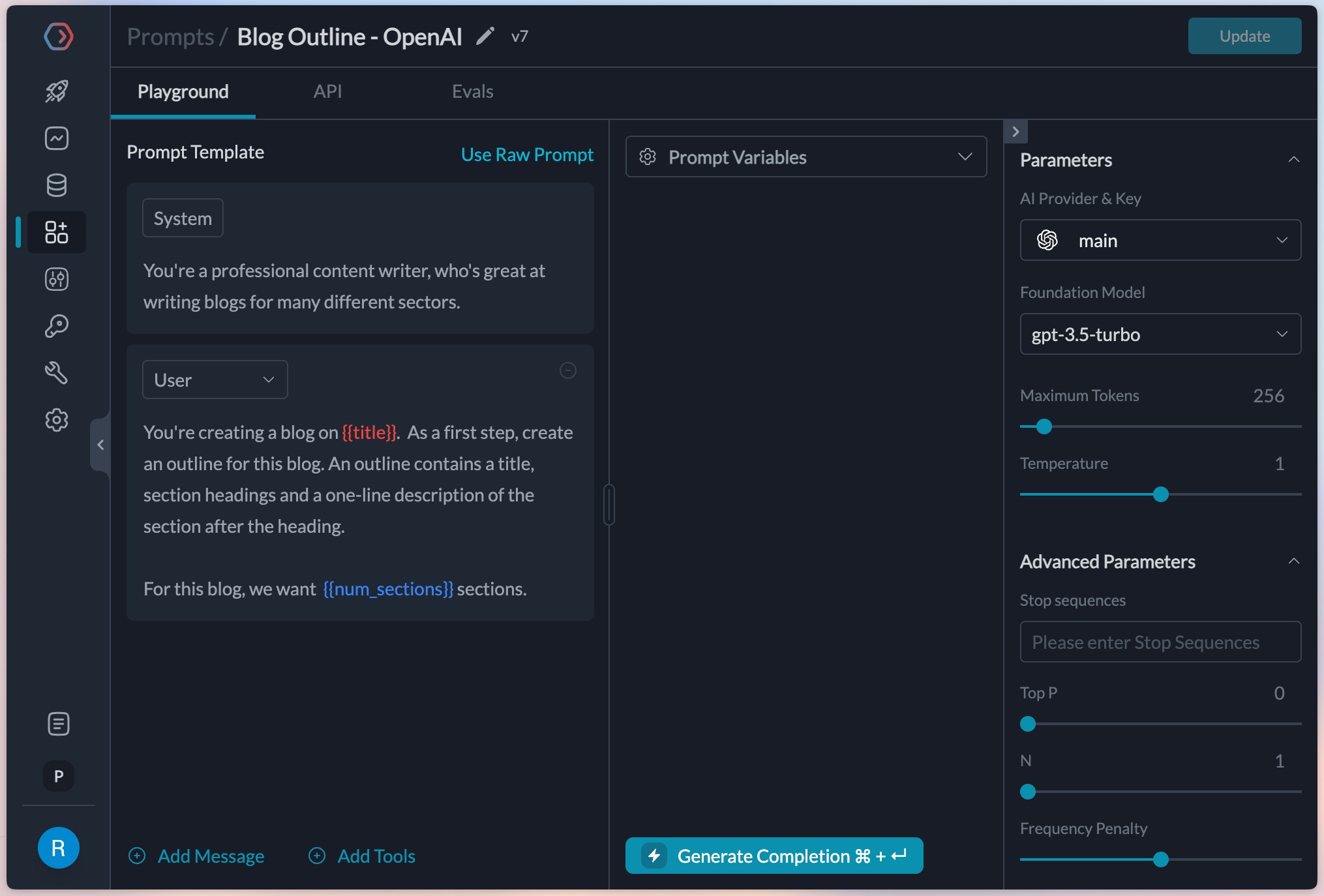 Great, this is setup and ready now.
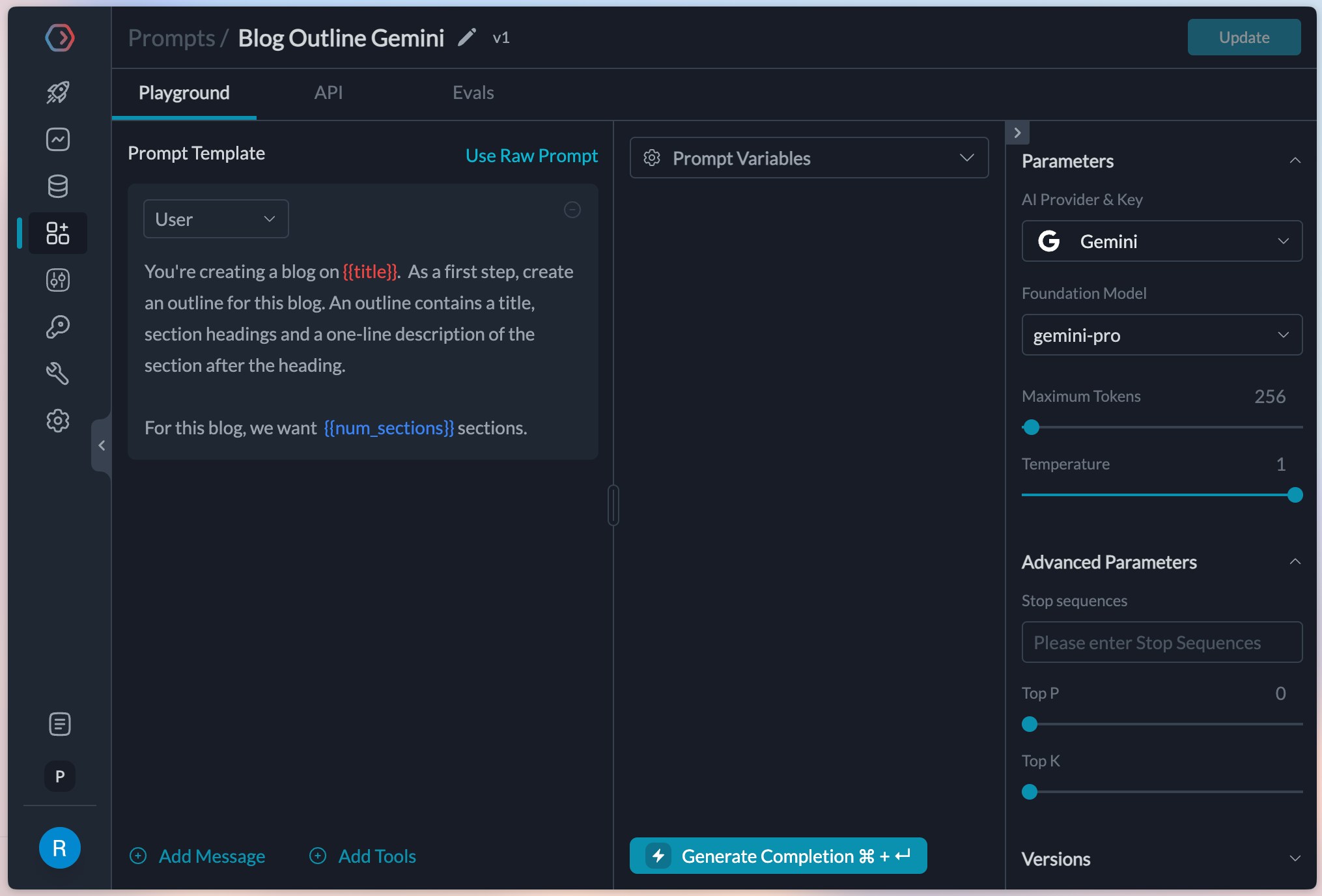
The gemini model doesn't need a `system` prompt, so we can ignore it and create a prompt like this.
Great, this is setup and ready now.
The gemini model doesn't need a `system` prompt, so we can ignore it and create a prompt like this.
 ## 2. Write the config for a 50-50 test
To run the experiment, lets create a [config](/product/ai-gateway/configs) in Portkey that can automatically route requests between these 2 prompts.
We pulled the `id` for both these prompts from our Prompts list page and will use them in our config. This is what it finally looks like.
```json theme={"system"}
{
"strategy": {
"mode": "loadbalance"
},
"targets": [{
"prompt_id": "0db0d89c-c1f6-44bc-a976-f92e24b39a19",
"weight": 0.5
},{
"prompt_id": "pp-blog-outli-840877",
"weight": 0.5
}]
}
```
We've created a load balanced config that will route 50% of the traffic to each of the 2 prompt IDs mentioned in it. We can save this config and fetch its ID.
## 2. Write the config for a 50-50 test
To run the experiment, lets create a [config](/product/ai-gateway/configs) in Portkey that can automatically route requests between these 2 prompts.
We pulled the `id` for both these prompts from our Prompts list page and will use them in our config. This is what it finally looks like.
```json theme={"system"}
{
"strategy": {
"mode": "loadbalance"
},
"targets": [{
"prompt_id": "0db0d89c-c1f6-44bc-a976-f92e24b39a19",
"weight": 0.5
},{
"prompt_id": "pp-blog-outli-840877",
"weight": 0.5
}]
}
```
We've created a load balanced config that will route 50% of the traffic to each of the 2 prompt IDs mentioned in it. We can save this config and fetch its ID.
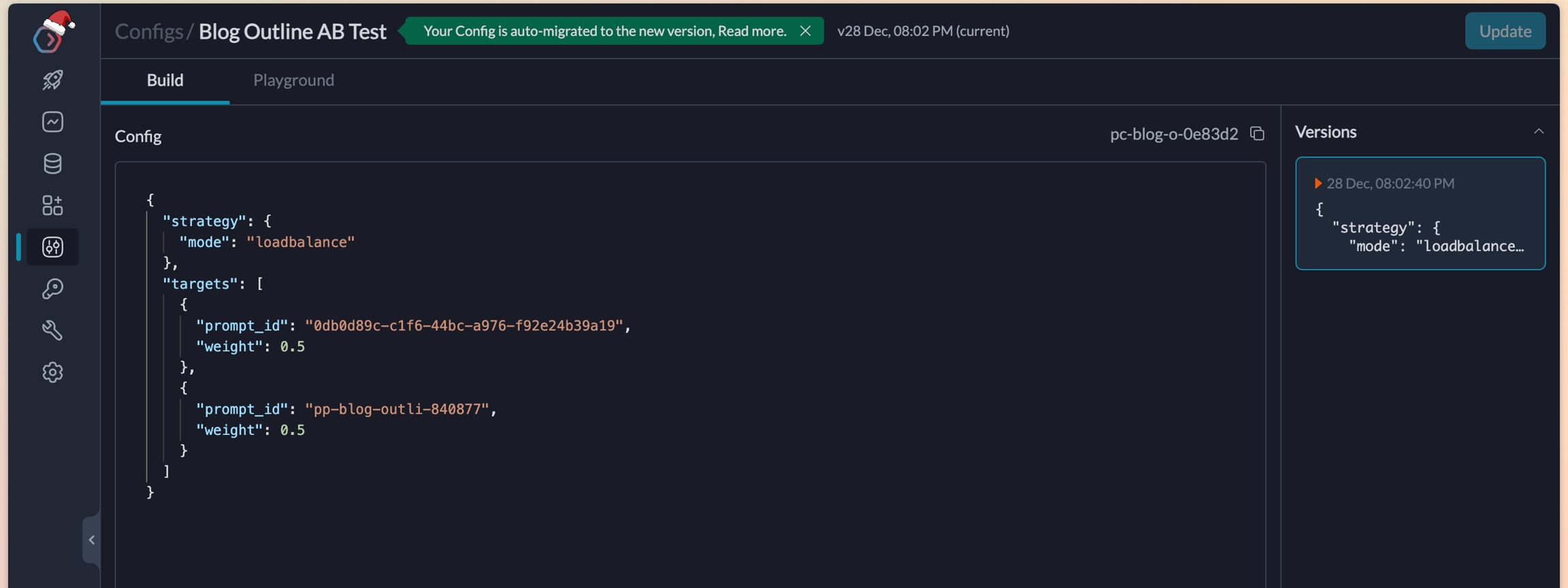 Create the config and fetch the ID
## 3. Make requests using this config
Lets use this config to start making requests from our application. We will use the [prompt completions API](/portkey-endpoints/prompts/prompt-completion) to make the requests and add the config in our headers.
```js theme={"system"}
import Portkey from 'portkey-ai'
const portkey = new Portkey({
apiKey: "PORTKEY_API_KEY",
config: "pc-blog-o-0e83d2" // replace with your config ID
})
// We can also override the hyperparameters
const pcompletion = await portkey.prompts.completions.create({
promptID: "pp-blog-outli-840877", // Use any prompt ID
variables: {
"title": "Should colleges permit the use of AI in assignments?",
"num_sections": "5"
},
});
console.log(pcompletion.choices)
```
```python theme={"system"}
from portkey_ai import Portkey
client = Portkey(
api_key="PORTKEY_API_KEY",
config="pc-blog-o-0e83d2" # replace with your config ID
)
pcompletion = client.prompts.completions.create(
prompt_id="pp-blog-outli-840877", # Use any prompt ID
variables={
"title": "Should colleges permit the use of AI in assignments?",
"num_sections": "5"
}
)
print(pcompletion)
```
```sh theme={"system"}
curl -X POST "https://api.portkey.ai/v1/prompts/pp-blog-outli-840877/completions" \ # You can use any of the A/B prompt IDs here
-H "Content-Type: application/json" \
-H "x-portkey-api-key: $PORTKEY_API_KEY" \
-H "x-portkey-config": "pc-blog-o-0e83d2" \ # Replace with your config ID
-d '{
"variables": {
"title": "Should colleges permit the use of AI in assignments?",
"num_sections": "5"
}
}'
```
As we make these requests, they'll show up in the Logs tab. We can see that requests are being routed equally between the 2 prompts.
Let's setup feedback for these APIs so we can begin our tests!
## 4. Send feedback for responses
Collecting and analysing feedback allows us to find the real performance of each of these 2 prompts (an in turn `gemini-pro` and `gpt-3.5-turbo`)
The Portkey SDK allows a `feedback` method to collect feedback based on trace IDs. The pcompletion object in the previous request allows us to fetch the trace ID that portkey created for it.
```js theme={"system"}
// Get the trace ID of the request we just made
const reqTrace = pcompletion.getHeaders()["trace-id"]
await portkey.feedback.create({
traceID: reqTrace,
value: 1 // For thumbs up or 0 for thumbs down
});
```
```python theme={"system"}
req_trace = pcompletion.get_headers()['trace-id']
client.feedback.create(
trace_id=req_trace,
value=0 # For thumbs down or 1 for thumbs up
)
```
```sh theme={"system"}
curl -X POST "https://api.portkey.ai/v1/feedback" \
-H "Content-Type: application/json" \
-H "x-portkey-api-key: $PORTKEY_API_KEY" \
-d '{
"trace_id": "",
"value": 0
}'
```
## 5. Find the winner
We can now compare the feedback for the 2 prompts from our feedback dashboard
Create the config and fetch the ID
## 3. Make requests using this config
Lets use this config to start making requests from our application. We will use the [prompt completions API](/portkey-endpoints/prompts/prompt-completion) to make the requests and add the config in our headers.
```js theme={"system"}
import Portkey from 'portkey-ai'
const portkey = new Portkey({
apiKey: "PORTKEY_API_KEY",
config: "pc-blog-o-0e83d2" // replace with your config ID
})
// We can also override the hyperparameters
const pcompletion = await portkey.prompts.completions.create({
promptID: "pp-blog-outli-840877", // Use any prompt ID
variables: {
"title": "Should colleges permit the use of AI in assignments?",
"num_sections": "5"
},
});
console.log(pcompletion.choices)
```
```python theme={"system"}
from portkey_ai import Portkey
client = Portkey(
api_key="PORTKEY_API_KEY",
config="pc-blog-o-0e83d2" # replace with your config ID
)
pcompletion = client.prompts.completions.create(
prompt_id="pp-blog-outli-840877", # Use any prompt ID
variables={
"title": "Should colleges permit the use of AI in assignments?",
"num_sections": "5"
}
)
print(pcompletion)
```
```sh theme={"system"}
curl -X POST "https://api.portkey.ai/v1/prompts/pp-blog-outli-840877/completions" \ # You can use any of the A/B prompt IDs here
-H "Content-Type: application/json" \
-H "x-portkey-api-key: $PORTKEY_API_KEY" \
-H "x-portkey-config": "pc-blog-o-0e83d2" \ # Replace with your config ID
-d '{
"variables": {
"title": "Should colleges permit the use of AI in assignments?",
"num_sections": "5"
}
}'
```
As we make these requests, they'll show up in the Logs tab. We can see that requests are being routed equally between the 2 prompts.
Let's setup feedback for these APIs so we can begin our tests!
## 4. Send feedback for responses
Collecting and analysing feedback allows us to find the real performance of each of these 2 prompts (an in turn `gemini-pro` and `gpt-3.5-turbo`)
The Portkey SDK allows a `feedback` method to collect feedback based on trace IDs. The pcompletion object in the previous request allows us to fetch the trace ID that portkey created for it.
```js theme={"system"}
// Get the trace ID of the request we just made
const reqTrace = pcompletion.getHeaders()["trace-id"]
await portkey.feedback.create({
traceID: reqTrace,
value: 1 // For thumbs up or 0 for thumbs down
});
```
```python theme={"system"}
req_trace = pcompletion.get_headers()['trace-id']
client.feedback.create(
trace_id=req_trace,
value=0 # For thumbs down or 1 for thumbs up
)
```
```sh theme={"system"}
curl -X POST "https://api.portkey.ai/v1/feedback" \
-H "Content-Type: application/json" \
-H "x-portkey-api-key: $PORTKEY_API_KEY" \
-d '{
"trace_id": "",
"value": 0
}'
```
## 5. Find the winner
We can now compare the feedback for the 2 prompts from our feedback dashboard
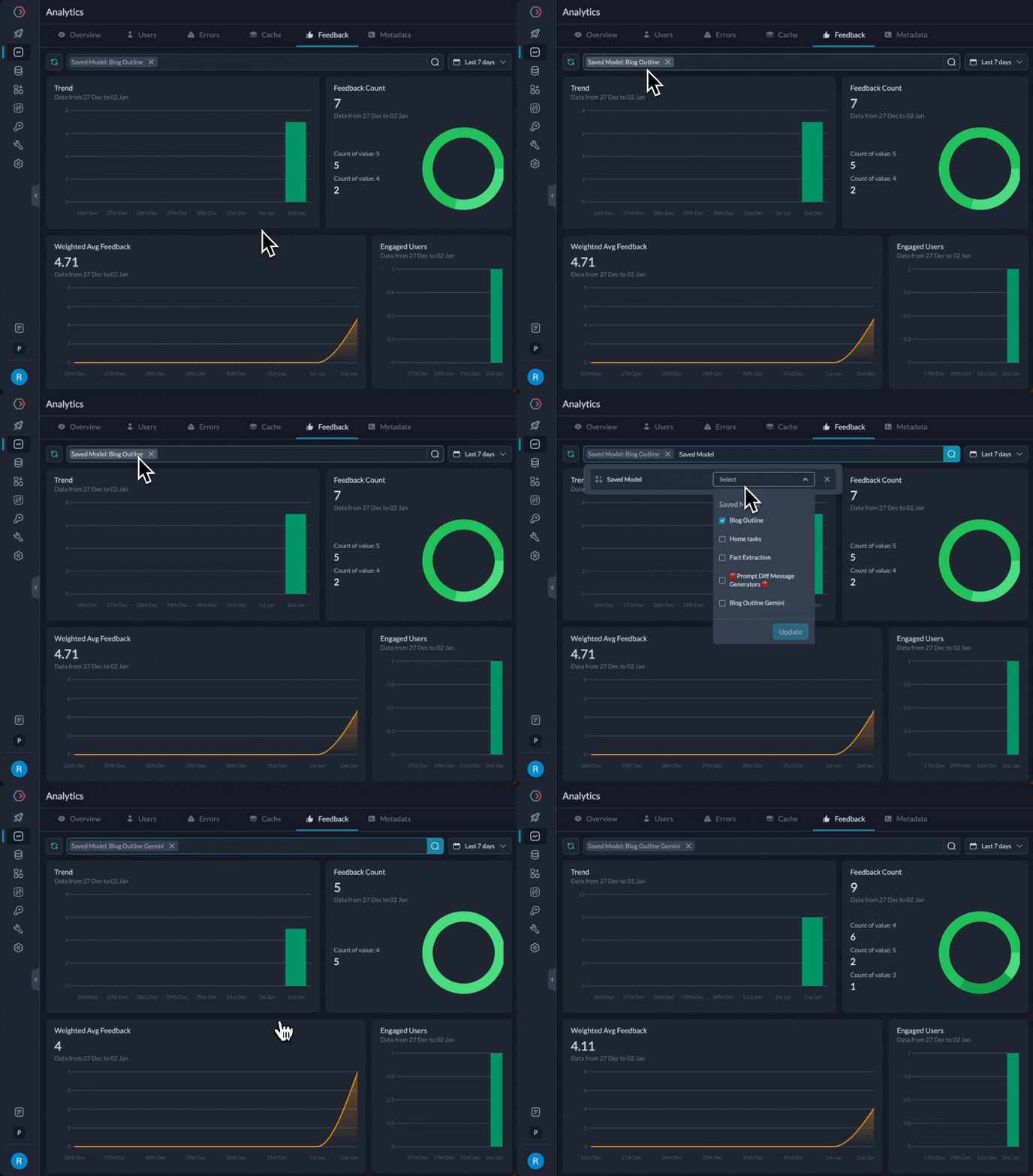 We find that the `gpt-3.5-turbo` prompt is at 4.71 average feedback after 20 attempts, while `gemini-pro` is at 4.11. While we definitely need more data and examples, let's assume for now that we wanted to start directing more traffic to it.
We can edit the `weight` in the config to direct more traffic to `gpt-3.5-turbo`. The new config would look like this:
```json theme={"system"}
{
"strategy": {
"mode": "loadbalance"
},
"targets": [{
"prompt_id": "0db0d89c-c1f6-44bc-a976-f92e24b39a19",
"weight": 0.8
},{
"prompt_id": "pp-blog-outli-840877",
"weight": 0.2
}]
}
```
This directs 80% of the traffic to OpenAI.
And we're done! We were able to set up an effective A/B test between prompts and models without fretting.
## Next Steps
As next explorations, we could create versions of the prompts and test between them. We could also test 2 prompts on `gpt-3.5-turbo` to judge which one would perform better.
Try creating a prompt to create tweets and see which model or prompts perform better.
Portkey allows a lot of flexibility while experimenting with prompts.
## Bonus: Add a fallback
We've noticed that we hit the OpenAI rate limits at times. In that case, we can fallback to the gemini prompt so the user doesn't experience the failure.
Adjust the config like this, and your fallback is setup!
```json theme={"system"}
{
"strategy": {
"mode": "loadbalance"
},
"targets": [{
"strategy": {"mode": "fallback"},
"targets": [
{
"prompt_id": "0db0d89c-c1f6-44bc-a976-f92e24b39a19",
"weight": 0.8
}, {
"prompt_id": "pp-blog-outli-840877"
}]
},{
"prompt_id": "pp-blog-outli-840877",
"weight": 0.2
}]
}
```
If you need any help in further customizing this flow, or just have more questions as you run experiments with prompts / models, please reach out to us at [hello@portkey.ai](mailto:hello@portkey.ai) (We reply fast!)
We find that the `gpt-3.5-turbo` prompt is at 4.71 average feedback after 20 attempts, while `gemini-pro` is at 4.11. While we definitely need more data and examples, let's assume for now that we wanted to start directing more traffic to it.
We can edit the `weight` in the config to direct more traffic to `gpt-3.5-turbo`. The new config would look like this:
```json theme={"system"}
{
"strategy": {
"mode": "loadbalance"
},
"targets": [{
"prompt_id": "0db0d89c-c1f6-44bc-a976-f92e24b39a19",
"weight": 0.8
},{
"prompt_id": "pp-blog-outli-840877",
"weight": 0.2
}]
}
```
This directs 80% of the traffic to OpenAI.
And we're done! We were able to set up an effective A/B test between prompts and models without fretting.
## Next Steps
As next explorations, we could create versions of the prompts and test between them. We could also test 2 prompts on `gpt-3.5-turbo` to judge which one would perform better.
Try creating a prompt to create tweets and see which model or prompts perform better.
Portkey allows a lot of flexibility while experimenting with prompts.
## Bonus: Add a fallback
We've noticed that we hit the OpenAI rate limits at times. In that case, we can fallback to the gemini prompt so the user doesn't experience the failure.
Adjust the config like this, and your fallback is setup!
```json theme={"system"}
{
"strategy": {
"mode": "loadbalance"
},
"targets": [{
"strategy": {"mode": "fallback"},
"targets": [
{
"prompt_id": "0db0d89c-c1f6-44bc-a976-f92e24b39a19",
"weight": 0.8
}, {
"prompt_id": "pp-blog-outli-840877"
}]
},{
"prompt_id": "pp-blog-outli-840877",
"weight": 0.2
}]
}
```
If you need any help in further customizing this flow, or just have more questions as you run experiments with prompts / models, please reach out to us at [hello@portkey.ai](mailto:hello@portkey.ai) (We reply fast!)