> ## Documentation Index
> Fetch the complete documentation index at: https://docs.portkey.ai/docs/llms.txt
> Use this file to discover all available pages before exploring further.
# Comparing DeepSeek Models Against OpenAI, Anthropic & More Using Portkey
DeepSeek R1 has emerged as a groundbreaking open-source AI model, challenging proprietary solutions with its MIT-licensed availability and state-of-the-art performance.
It has outperformed the top models by each provider in almost all the major benchmarks. But this is not the first time a new model has broken records. The most interesting part about this model is this model has Open Sourced its code and training weights with a fraction of costs of any other model.
While its Chinese origins initially raised data sovereignty concerns, major cloud providers have rapidly integrated DeepSeek R1, making it globally accessible through compliant channels.
In this guide, we will explore:
* How to access DeepSeek R1 through different providers
* Real-world performance comparisons with top models from each provider
* Implementation patterns for various use cases
All of this is made possible through Portkey's AI Gateway, which provides a unified API for accessing DeepSeek R1 across multiple providers
## Accessing DeepSeek R1 Through Multiple Providers
DeepSeek R1 is available across several major cloud providers, and with Portkey's unified API, the implementation remains consistent regardless of your chosen provider. All you need is the AI Provider slug for your desired provider.
### Basic Implementation
```python Python icon="python" theme={"system"}
from portkey_ai import Portkey
# Initialize Portkey client
client = Portkey(
api_key="your-portkey-api-key",
provider="@together-prod" # Just change this to switch providers
)
# Make completion call - same code for all providers
response = client.chat.completions.create(
model="deepseek-ai/DeepSeek-R1",
messages=[{"role": "user", "content": "Your prompt here"}]
)
```
### Available Providers and Models
#### Together AI
* `DeepSeek-R1`
* `DeepSeek R1 Distill Llama 70B`
* `DeepSeek R1 Distill Qwen 1.5B`
* `DeepSeek R1 Distill Qwen 14B`
* `DeepSeek-V3`
#### Groq
* `DeepSeek R1 Distill Llama 70B`
#### Cerebras
* `DeepSeek R1 Distill Llama 70B`
#### Fireworks
* `DeepSeek R1 671B`
#### Azure OpenAI
* `DeepSeek R1 671B`
#### AWS Bedrock
* `DeepSeek R1 671B`
### Accessing DeepSeek Models Across Providers
Portkeu provides a unified API for accessing DeepSeek models across multiple providers. All you need to do start using DeepSeek models is to
1. Get your API Key from one of the providers mentioned above
2. Get your Portkey API key from [Portkey's Dashboard](https://app.portkey.ai)
3. Add your provider in [Model Catalog](https://app.portkey.ai/model-catalog). Name it (e.g., `together-prod`) to get a provider slug. You can set budget limits and rate limits for each provider.
Here's how you can use Portkey's unified API
```bash icon="square-terminal" theme={"system"}
pip install portkey-ai
```
```python Python icon="python" theme={"system"}
client = Portkey(
api_key="your-portkey-api-key",
provider="@together-prod" # Your provider slug from Model Catalog
)
response = client.chat.completions.create(
model="deepseek-ai/DeepSeek-R1", # Model name for together-ai
messages=[{"role": "user", "content": "Your prompt here"}]
)
print(response.choices[0].message.content)
```
That's all you need to access DeepSeek models across different providers - the same code works everywhere.
## Comparing DeepSeek R1 Against Leading Models
We've created a comprehensive cookbook comparing DeepSeek R1 with OpenAI's o1, o3-mini, and Claude 3.5 Sonnet. This cookbook compares deepseek R1 model from `together-ai` with top models form OpenAI and Anthropic. We will be comparing the models on three different types of prompts:
1. Simple Reasoning
```python theme={"system"}
prompt = "How many times does the letter 'r' appear in the word 'strrawberrry'?"
```
2. Numerical Comparison
```python theme={"system"}
prompt2 = """Which number is bigger: 9.111 or 9.9?"""
```
3. Complex Problem Solving
```python theme={"system"}
prompt3 = """In a village of 100 people, each person knows a unique secret. They can only share information one-on-one, and only one exchange can happen per day. What is the minimum number of days needed for everyone to know all secrets? Explain your reasoning step by step."""
```
4. Coding
```python theme={"system"}
prompt4 = """Given an integer N, print N rows of inverted right half pyramid pattern. In inverted right half pattern of N rows, the first row has N number of stars, second row has (N - 1) number of stars and so on till the Nth row which has only 1 star."""
```
Here's the link to the cookbook to follow along as well as results of the comparison.
[ ](https://colab.research.google.com/drive/1IdvfXz3Dy_G8JbjU0fZqcOIORYGBAmab?usp=sharing)
```bash icon="square-terminal" theme={"system"}
pip install portkey-ai
```
```python Python icon="python" theme={"system"}
# Configuration - use provider slugs from Model Catalog
MODELS = [
["o1", "openai"],
["o3-mini", "openai"],
["claude-3-5-sonnet-latest", "anthropic"],
["deepseek-ai/DeepSeek-R1", "together-ai"]
]
# Map provider names to their slugs from Model Catalog
PROVIDER_SLUGS = {
"openai": "@openai-prod",
"anthropic": "@anthropic-prod",
"together-ai": "@together-prod"
}
PORTKEY_API_KEY = "PORTKEY_API_KEY"
```
```python Python icon="python" theme={"system"}
from portkey_ai import Portkey
from IPython.display import Markdown, display
from tabulate import tabulate
def final_answer(prompt):
def run_comparison_models(prompt):
outputs = {}
for model, provider in MODELS:
client = Portkey(
api_key=PORTKEY_API_KEY,
provider=PROVIDER_SLUGS[provider] # Use provider slug
)
# Set the token limit based on the model
token_param = 'max_tokens' if model not in ['o1', 'o3-mini'] else 'max_completion_tokens'
token_value = 8000
try:
response = client.chat.completions.create(
model=model,
messages=[
{"role": "system", "content": "You are a helpful assistant that shows step-by-step reasoning."},
{"role": "user", "content": prompt}
],
**{token_param: token_value}
)
outputs[model] = response.choices[0].message.content
except Exception as e:
outputs[model] = f"Error: {str(e)}"
return outputs
def print_model_outputs(outputs):
table_data = []
for model, output in outputs.items():
table_data.append([model, output.strip()])
headers = ["Model", "Output"]
table = tabulate(table_data, headers, tablefmt="grid")
print(table)
final_result = run_comparison_models(prompt)
print_model_outputs(final_result)
```
Do this for however many prompts you want to try out.
```python Python icon="python" theme={"system"}
prompt1 = """How many times does the letter 'r' appear in the word 'strrawberrry'?"""
final_answer(prompt1)
```
You can view the result of this comparison in the [cookbook](https://colab.research.google.com/drive/1IdvfXz3Dy_G8JbjU0fZqcOIORYGBAmab?usp=sharing) and see how DeepSeek R1 compares against the top models from OpenAI and Anthropic.
## DeepSeek R1 on top benchmarks
](https://colab.research.google.com/drive/1IdvfXz3Dy_G8JbjU0fZqcOIORYGBAmab?usp=sharing)
```bash icon="square-terminal" theme={"system"}
pip install portkey-ai
```
```python Python icon="python" theme={"system"}
# Configuration - use provider slugs from Model Catalog
MODELS = [
["o1", "openai"],
["o3-mini", "openai"],
["claude-3-5-sonnet-latest", "anthropic"],
["deepseek-ai/DeepSeek-R1", "together-ai"]
]
# Map provider names to their slugs from Model Catalog
PROVIDER_SLUGS = {
"openai": "@openai-prod",
"anthropic": "@anthropic-prod",
"together-ai": "@together-prod"
}
PORTKEY_API_KEY = "PORTKEY_API_KEY"
```
```python Python icon="python" theme={"system"}
from portkey_ai import Portkey
from IPython.display import Markdown, display
from tabulate import tabulate
def final_answer(prompt):
def run_comparison_models(prompt):
outputs = {}
for model, provider in MODELS:
client = Portkey(
api_key=PORTKEY_API_KEY,
provider=PROVIDER_SLUGS[provider] # Use provider slug
)
# Set the token limit based on the model
token_param = 'max_tokens' if model not in ['o1', 'o3-mini'] else 'max_completion_tokens'
token_value = 8000
try:
response = client.chat.completions.create(
model=model,
messages=[
{"role": "system", "content": "You are a helpful assistant that shows step-by-step reasoning."},
{"role": "user", "content": prompt}
],
**{token_param: token_value}
)
outputs[model] = response.choices[0].message.content
except Exception as e:
outputs[model] = f"Error: {str(e)}"
return outputs
def print_model_outputs(outputs):
table_data = []
for model, output in outputs.items():
table_data.append([model, output.strip()])
headers = ["Model", "Output"]
table = tabulate(table_data, headers, tablefmt="grid")
print(table)
final_result = run_comparison_models(prompt)
print_model_outputs(final_result)
```
Do this for however many prompts you want to try out.
```python Python icon="python" theme={"system"}
prompt1 = """How many times does the letter 'r' appear in the word 'strrawberrry'?"""
final_answer(prompt1)
```
You can view the result of this comparison in the [cookbook](https://colab.research.google.com/drive/1IdvfXz3Dy_G8JbjU0fZqcOIORYGBAmab?usp=sharing) and see how DeepSeek R1 compares against the top models from OpenAI and Anthropic.
## DeepSeek R1 on top benchmarks
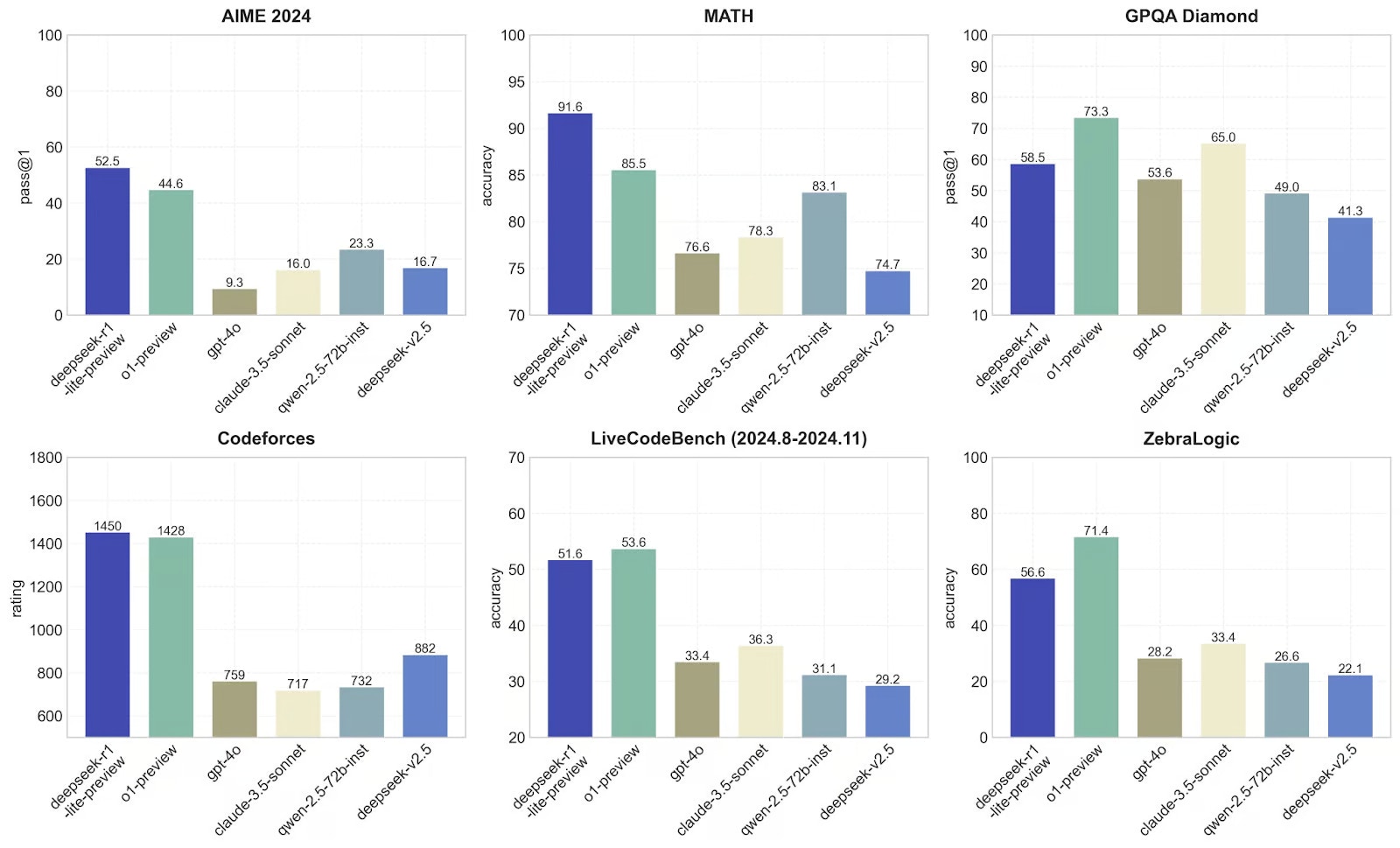 DeepSeek R1 has outperformed the top models from each provider in almost all major benchmarks. It has achieved 91.6% accuracy on MATH, 52.5% accuracy on AIME, and a Codeforces rating of 1450. This makes it one of the most powerful reasoning model available today.
## Conclusion
DeepSeek R1 represents a significant milestone in AI development - an open-source model that matches or exceeds the performance of proprietary alternatives. Through Portkey's unified API, developers can now access this powerful model across multiple providers while maintaining consistent implementation patterns.
Explore Portkey further and integrate it into your own projects. Visit the Portkey documentation at [https://docs.portkey.ai/](https://docs.portkey.ai/) for more information on how to leverage Portkey's capabilities in your workflow.
DeepSeek R1 has outperformed the top models from each provider in almost all major benchmarks. It has achieved 91.6% accuracy on MATH, 52.5% accuracy on AIME, and a Codeforces rating of 1450. This makes it one of the most powerful reasoning model available today.
## Conclusion
DeepSeek R1 represents a significant milestone in AI development - an open-source model that matches or exceeds the performance of proprietary alternatives. Through Portkey's unified API, developers can now access this powerful model across multiple providers while maintaining consistent implementation patterns.
Explore Portkey further and integrate it into your own projects. Visit the Portkey documentation at [https://docs.portkey.ai/](https://docs.portkey.ai/) for more information on how to leverage Portkey's capabilities in your workflow.