> ## Documentation Index
> Fetch the complete documentation index at: https://docs.portkey.ai/docs/llms.txt
> Use this file to discover all available pages before exploring further.
# Few-Shot Prompting
> LLMs are highly capable of following a given structure. By providing a few examples of how the assistant should respond to a given prompt, the LLM can generate responses that closely follow the format of these examples.
Portkey enhances this capability with the ***raw prompt*** feature of prompt templates. You can easily add few-shot learning examples to your templates with *raw prompt* and dynamically update them whenever you want, without needing to modify the prompt templates!
## How does it work?
Let's consider a use case where, given a candidate profile and a job description, the LLM is expected to output candidate notes in a specific JSON format.
### This is how our raw prompt looks:
```json theme={"system"}
[
{"role": "system", "message": "You output candidate notes in JSON format when given a candidate profile and a job description."},
{{few_shot_examples}},
{"role": "user", "message": "Candidate Profile: {{profile}} \n Job Description: {{jd}}"}
]
```
### Let's define our variables:
As you can see, we have added variables `few_shot_examples`, `profile`, and `jd` in the above examples.
```
profile = "An experienced data scientist with a PhD in Computer Science and 5 years of experience working with machine learning models in the healthcare industry."
jd = "We are seeking a seasoned data scientist with a strong background in machine learning, ideally with experience in the healthcare sector. The ideal candidate should have a PhD or Master's degree in a relevant field and a minimum of 5 years of industry experience."
```
### And now let's add some examples with the expected JSON structure:
```json theme={"system"}
few_shot_examples = [
{
"role": "user",
"content": "Candidate Profile: Experienced software engineer with a background in developing scalable web applications using Python. Job Description: We're looking for a Python developer to help us build and scale our web platform."
},
{
"role": "assistant",
"content": "{'one-line-intro': 'Experienced Python developer with a track record of building scalable web applications.', 'move-forward': 'Yes', 'priority': 'P1', 'pros': '1. Relevant experience in Python. 2. Has built and scaled web applications. 3. Likely to fit well with the job requirements.', 'cons': 'None apparent from the provided profile.'}"
},
{
"role": "user",
"content": "Candidate Profile: Recent graduate with a degree in computer science and a focus on data analysis. Job Description: Seeking a seasoned data scientist to analyze large data sets and derive insights."
},
{
"role": "assistant",
"content": "{'one-line-intro': 'Recent computer science graduate with a focus on data analysis.', 'move-forward': 'Maybe', 'priority': 'P2', 'pros': '1. Has a strong educational background in computer science. 2. Specialized focus on data analysis.', 'cons': '1. Lack of professional experience. 2. Job requires a seasoned data scientist.'}"
}
]
```
In this configuration, `{{few_shot_examples}}` is a placeholder for the few-shot learning examples, which are dynamically provided and can be updated as needed. This allows the LLM to adapt its responses to the provided examples, facilitating versatile and context-aware outputs.
## Putting it all together in Portkey's prompt manager:
1. Go to the "Prompts" page on [https://app.portkey.ai/](https://app.portkey.ai/organisation/4e501cb0-512d-4dd3-b480-8b6af7ef4993/9eec4ebc-1c88-41a2-ae5d-ed0610d33b06/collection/17b7d29e-4318-4b4b-a45b-1d5a70ed1e8f) and **Create** a new Prompt template with your preferred AI provider.
2. Selecting Chat mode will enable the Raw Prompt feature:
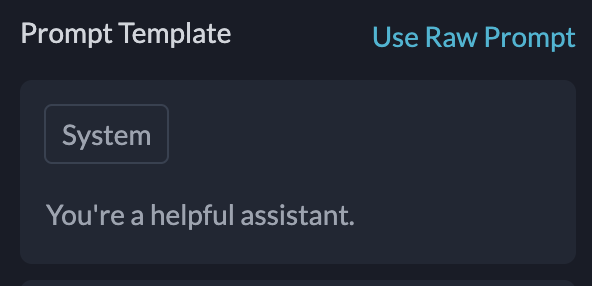 1. Click on it and paste the [raw prompt code from above](/guides/use-cases/few-shot-prompting#this-is-how-our-raw-prompt-would-look). And that's it! You have your **dynamically updatable** few shot prompt template ready to deploy.
## Deploying the Prompt with Portkey
Deploying your prompt template to an API is extremely easy with Portkey. You can use our [Prompt Completions API](/portkey-endpoints/prompts/prompt-completion) to use the prompt we created.
```python theme={"system"}
from portkey_ai import Portkey
client = Portkey(
api_key="PORTKEY_API_KEY", # defaults to os.environ.get("PORTKEY_API_KEY")
)
prompt_completion = client.prompts.completions.create(
prompt_id="Your Prompt ID", # Add the prompt ID we just created
variables={
few_shot_examples: fseObj,
profile: "",
jd: ""
}
)
print(prompt_completion)
```
```python theme={"system"}
# We can also override the hyperparameters
prompt_completion = client.prompts.completions.create(
prompt_id="Your Prompt ID", # Add the prompt ID we just created
variables={
few_shot_examples: fseObj,
profile: "",
jd: ""
}
max_tokens=250,
presence_penalty=0.2
)
print(prompt_completion)
```
```js theme={"system"}
import Portkey from 'portkey-ai'
const portkey = new Portkey({apiKey: "PORTKEY_API_KEY"})
// Make the prompt creation call with the variables
const promptCompletion = await portkey.prompts.completions.create({
promptID: "Your Prompt ID",
variables: {few_shot_examples: fseObj, profile: "", jd: ""}
})
// We can also override the hyperparameters
const promptCompletionWithOverrides = await portkey.prompts.completions.create({
promptID: "Your Prompt ID",
variables: {few_shot_examples: fseObj, profile: "", jd: ""},
max_tokens: 250,
presence_penalty: 0.2
})
```
```sh theme={"system"}
curl -X POST "https://api.portkey.ai/v1/prompts/:PROMPT_ID/completions" \
-H "Content-Type: application/json" \
-H "x-portkey-api-key: $PORTKEY_API_KEY" \
-d '{
"variables": {
few_shot_examples: fseObj,
profile: "",
jd: ""
},
"max_tokens": 250, # Optional
"presence_penalty": 0.2 # Optional
}'
```
You can pass your dynamic few shot learning examples with the `few_shot_examples` variable, and start using the prompt template in production!
## Detailed Guide on Few-Shot Prompting
We recommend [this guide](https://www.promptingguide.ai/techniques/fewshot) detailing the research as well as edge cases for few-shot prompting.
## Support
Facing an issue? Reach out on [support@portkey.ai](mailto:support@portkey.ai) for a quick resolution.
1. Click on it and paste the [raw prompt code from above](/guides/use-cases/few-shot-prompting#this-is-how-our-raw-prompt-would-look). And that's it! You have your **dynamically updatable** few shot prompt template ready to deploy.
## Deploying the Prompt with Portkey
Deploying your prompt template to an API is extremely easy with Portkey. You can use our [Prompt Completions API](/portkey-endpoints/prompts/prompt-completion) to use the prompt we created.
```python theme={"system"}
from portkey_ai import Portkey
client = Portkey(
api_key="PORTKEY_API_KEY", # defaults to os.environ.get("PORTKEY_API_KEY")
)
prompt_completion = client.prompts.completions.create(
prompt_id="Your Prompt ID", # Add the prompt ID we just created
variables={
few_shot_examples: fseObj,
profile: "",
jd: ""
}
)
print(prompt_completion)
```
```python theme={"system"}
# We can also override the hyperparameters
prompt_completion = client.prompts.completions.create(
prompt_id="Your Prompt ID", # Add the prompt ID we just created
variables={
few_shot_examples: fseObj,
profile: "",
jd: ""
}
max_tokens=250,
presence_penalty=0.2
)
print(prompt_completion)
```
```js theme={"system"}
import Portkey from 'portkey-ai'
const portkey = new Portkey({apiKey: "PORTKEY_API_KEY"})
// Make the prompt creation call with the variables
const promptCompletion = await portkey.prompts.completions.create({
promptID: "Your Prompt ID",
variables: {few_shot_examples: fseObj, profile: "", jd: ""}
})
// We can also override the hyperparameters
const promptCompletionWithOverrides = await portkey.prompts.completions.create({
promptID: "Your Prompt ID",
variables: {few_shot_examples: fseObj, profile: "", jd: ""},
max_tokens: 250,
presence_penalty: 0.2
})
```
```sh theme={"system"}
curl -X POST "https://api.portkey.ai/v1/prompts/:PROMPT_ID/completions" \
-H "Content-Type: application/json" \
-H "x-portkey-api-key: $PORTKEY_API_KEY" \
-d '{
"variables": {
few_shot_examples: fseObj,
profile: "",
jd: ""
},
"max_tokens": 250, # Optional
"presence_penalty": 0.2 # Optional
}'
```
You can pass your dynamic few shot learning examples with the `few_shot_examples` variable, and start using the prompt template in production!
## Detailed Guide on Few-Shot Prompting
We recommend [this guide](https://www.promptingguide.ai/techniques/fewshot) detailing the research as well as edge cases for few-shot prompting.
## Support
Facing an issue? Reach out on [support@portkey.ai](mailto:support@portkey.ai) for a quick resolution.