> ## Documentation Index
> Fetch the complete documentation index at: https://docs.portkey.ai/docs/llms.txt
> Use this file to discover all available pages before exploring further.
# Claude Agent SDK
> Use Portkey with Claude Agent SDK for production-ready AI agents with observability and governance
[Claude Agent SDK](https://github.com/anthropics/claude-agent-sdk-python) is Anthropic's Python SDK for building AI agents powered by Claude. It wraps the Claude Code CLI, providing a programmatic interface for creating agents with tools, hooks, and MCP servers.
Add Portkey to get:
* **Multiple Claude Providers** - Route through Anthropic, Bedrock, or Vertex AI
* **Observability** - Track costs, tokens, and latency for every agent interaction
* **Reliability** - Automatic fallbacks, retries, and caching
* **Governance** - Budget limits, usage tracking, and team access controls
Learn more about Claude Agent SDK's core concepts and features
## Quick Start
```bash theme={"system"}
pip install claude-agent-sdk
```
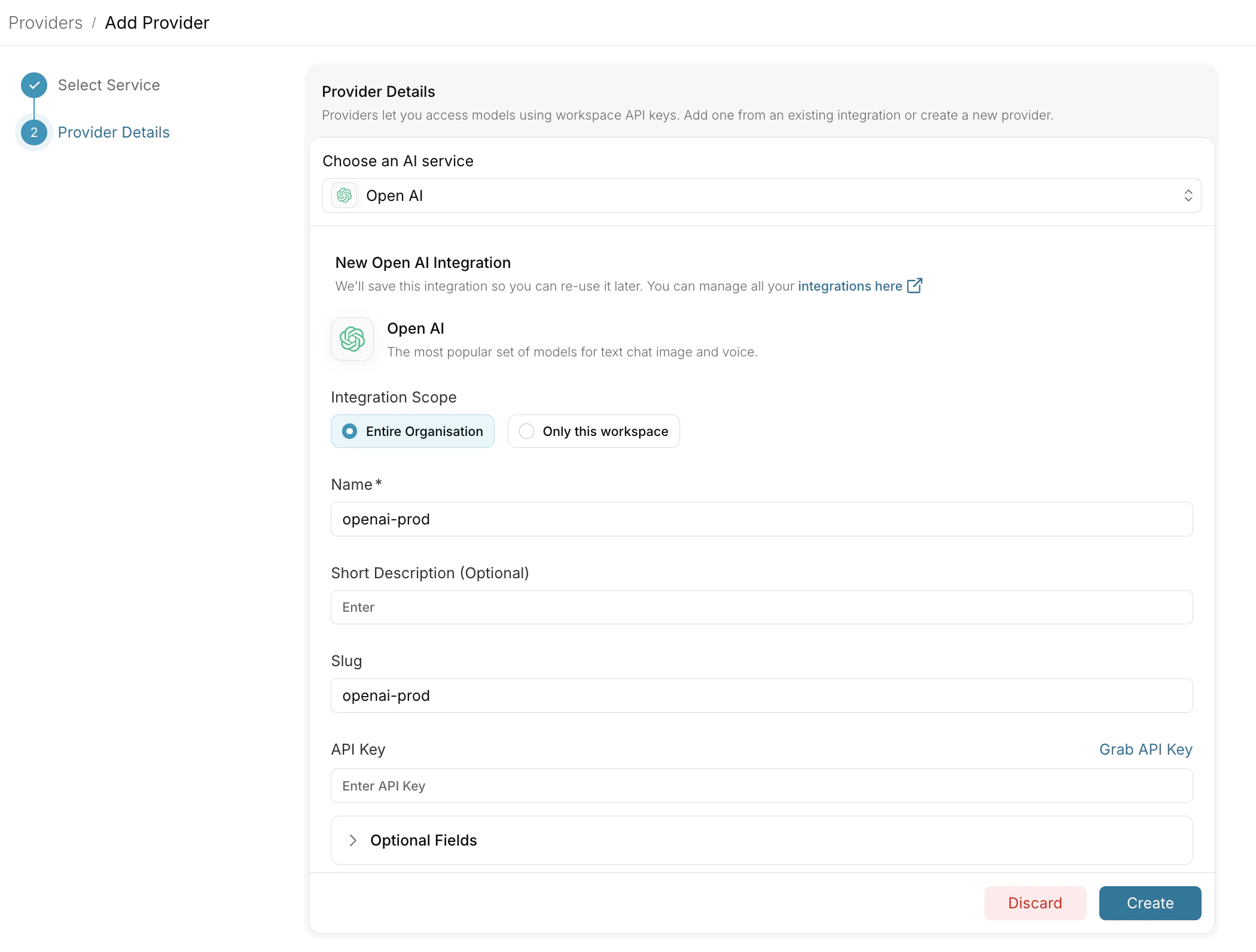
Go to [Model Catalog](https://app.portkey.ai/model-catalog) → **Add Provider**.
Select Anthropic, Bedrock, or Vertex AI as your provider and configure your credentials.
 Go to [API Keys](https://app.portkey.ai/api-keys) and generate your Portkey API key.
Set the following environment variables before running your agent:
```bash theme={"system"}
export ANTHROPIC_BASE_URL="https://api.portkey.ai"
export ANTHROPIC_AUTH_TOKEN="dummy"
export ANTHROPIC_CUSTOM_HEADERS="x-portkey-api-key: YOUR_PORTKEY_API_KEY
x-portkey-provider: @anthropic-prod"
```
Replace `@anthropic-prod` with your provider slug from the Model Catalog.
There are multiple ways to configure models, you can use the provider header, attach config directly to the API key, specify config header, etc.
## Basic Usage
### Simple Query
```python theme={"system"}
import os
import anyio
from claude_agent_sdk import query
# Set environment variables for Portkey
os.environ["ANTHROPIC_BASE_URL"] = "https://api.portkey.ai"
os.environ["ANTHROPIC_AUTH_TOKEN"] = "dummy"
os.environ["ANTHROPIC_CUSTOM_HEADERS"] = """x-portkey-api-key: YOUR_PORTKEY_API_KEY
x-portkey-provider: @anthropic-prod"""
async def main():
async for message in query(prompt="What is 2 + 2?"):
print(message)
anyio.run(main)
```
### Using ClaudeAgentOptions
```python theme={"system"}
import os
import anyio
from claude_agent_sdk import query, ClaudeAgentOptions
os.environ["ANTHROPIC_BASE_URL"] = "https://api.portkey.ai"
os.environ["ANTHROPIC_AUTH_TOKEN"] = "dummy"
os.environ["ANTHROPIC_CUSTOM_HEADERS"] = """x-portkey-api-key: YOUR_PORTKEY_API_KEY x-portkey-provider: @anthropic-prod"""
async def main():
options = ClaudeAgentOptions(
system_prompt="You are a helpful coding assistant",
max_turns=5
)
async for message in query(prompt="Write a Python function to sort a list", options=options):
print(message)
anyio.run(main)
```
### Interactive Client with Tools
```python theme={"system"}
import os
import anyio
from claude_agent_sdk import ClaudeAgentOptions, ClaudeSDKClient
os.environ["ANTHROPIC_BASE_URL"] = "https://api.portkey.ai"
os.environ["ANTHROPIC_AUTH_TOKEN"] = "dummy"
os.environ["ANTHROPIC_CUSTOM_HEADERS"] = """x-portkey-api-key: YOUR_PORTKEY_API_KEY
x-portkey-provider: @anthropic-prod"""
async def main():
options = ClaudeAgentOptions(
allowed_tools=["Read", "Write", "Bash"],
permission_mode='acceptEdits'
)
async with ClaudeSDKClient(options=options) as client:
await client.query("Create a hello.py file that prints 'Hello, World!'")
async for msg in client.receive_response():
print(msg)
anyio.run(main)
```
## Adding Observability
### Trace IDs for Request Tracking
Add trace IDs to group related requests in Portkey's dashboard:
```python theme={"system"}
os.environ["ANTHROPIC_CUSTOM_HEADERS"] = """x-portkey-api-key: YOUR_PORTKEY_API_KEY
x-portkey-provider: @anthropic-prod
x-portkey-trace-id: agent-session-123"""
```
### Custom Metadata
Add metadata for filtering and analytics:
```python theme={"system"}
import json
metadata = json.dumps({
"agent_type": "code_assistant",
"environment": "production",
"_user": "user_123"
})
os.environ["ANTHROPIC_CUSTOM_HEADERS"] = f"""x-portkey-api-key: YOUR_PORTKEY_API_KEY
x-portkey-provider: @anthropic-prod
x-portkey-metadata: {metadata}"""
```
## Using Portkey Configs
For advanced routing, fallbacks, and caching, create a [Portkey Config](/product/ai-gateway/configs) and reference it:
```python theme={"system"}
os.environ["ANTHROPIC_CUSTOM_HEADERS"] = """x-portkey-api-key: YOUR_PORTKEY_API_KEY
x-portkey-config: YOUR_CONFIG_ID"""
```
### Example: Fallback Configuration
Create a config in the [Portkey Dashboard](https://app.portkey.ai/configs) with fallback logic:
```json theme={"system"}
{
"strategy": {
"mode": "fallback"
},
"targets": [
{ "provider": "@anthropic-prod" },
{ "provider": "@bedrock-prod" }
]
}
```
This automatically switches to Bedrock if the primary Anthropic provider fails.
## Switch Providers
Change providers by updating the `x-portkey-provider` header:
| Provider | Header Value |
| ---------------- | ----------------- |
| Anthropic | `@anthropic-prod` |
| AWS Bedrock | `@bedrock-prod` |
| Google Vertex AI | `@vertex-prod` |
Replace with your actual provider slugs from the Model Catalog.
## Custom Tools with MCP Servers
Claude Agent SDK supports custom tools via MCP servers. All tool calls are tracked in Portkey:
```python theme={"system"}
import os
import anyio
from claude_agent_sdk import (
tool,
create_sdk_mcp_server,
ClaudeAgentOptions,
ClaudeSDKClient
)
os.environ["ANTHROPIC_BASE_URL"] = "https://api.portkey.ai"
os.environ["ANTHROPIC_AUTH_TOKEN"] = "dummy"
os.environ["ANTHROPIC_CUSTOM_HEADERS"] = """x-portkey-api-key: YOUR_PORTKEY_API_KEY
x-portkey-provider: @anthropic-prod
x-portkey-trace-id: mcp-tools-session"""
@tool("get_weather", "Get weather for a city", {"city": str})
async def get_weather(args):
return {
"content": [
{"type": "text", "text": f"Weather in {args['city']}: 72°F, Sunny"}
]
}
server = create_sdk_mcp_server(
name="weather-tools",
version="1.0.0",
tools=[get_weather]
)
async def main():
options = ClaudeAgentOptions(
mcp_servers={"weather": server},
allowed_tools=["mcp__weather__get_weather"]
)
async with ClaudeSDKClient(options=options) as client:
await client.query("What's the weather in San Francisco?")
async for msg in client.receive_response():
print(msg)
anyio.run(main)
```
Go to [API Keys](https://app.portkey.ai/api-keys) and generate your Portkey API key.
Set the following environment variables before running your agent:
```bash theme={"system"}
export ANTHROPIC_BASE_URL="https://api.portkey.ai"
export ANTHROPIC_AUTH_TOKEN="dummy"
export ANTHROPIC_CUSTOM_HEADERS="x-portkey-api-key: YOUR_PORTKEY_API_KEY
x-portkey-provider: @anthropic-prod"
```
Replace `@anthropic-prod` with your provider slug from the Model Catalog.
There are multiple ways to configure models, you can use the provider header, attach config directly to the API key, specify config header, etc.
## Basic Usage
### Simple Query
```python theme={"system"}
import os
import anyio
from claude_agent_sdk import query
# Set environment variables for Portkey
os.environ["ANTHROPIC_BASE_URL"] = "https://api.portkey.ai"
os.environ["ANTHROPIC_AUTH_TOKEN"] = "dummy"
os.environ["ANTHROPIC_CUSTOM_HEADERS"] = """x-portkey-api-key: YOUR_PORTKEY_API_KEY
x-portkey-provider: @anthropic-prod"""
async def main():
async for message in query(prompt="What is 2 + 2?"):
print(message)
anyio.run(main)
```
### Using ClaudeAgentOptions
```python theme={"system"}
import os
import anyio
from claude_agent_sdk import query, ClaudeAgentOptions
os.environ["ANTHROPIC_BASE_URL"] = "https://api.portkey.ai"
os.environ["ANTHROPIC_AUTH_TOKEN"] = "dummy"
os.environ["ANTHROPIC_CUSTOM_HEADERS"] = """x-portkey-api-key: YOUR_PORTKEY_API_KEY x-portkey-provider: @anthropic-prod"""
async def main():
options = ClaudeAgentOptions(
system_prompt="You are a helpful coding assistant",
max_turns=5
)
async for message in query(prompt="Write a Python function to sort a list", options=options):
print(message)
anyio.run(main)
```
### Interactive Client with Tools
```python theme={"system"}
import os
import anyio
from claude_agent_sdk import ClaudeAgentOptions, ClaudeSDKClient
os.environ["ANTHROPIC_BASE_URL"] = "https://api.portkey.ai"
os.environ["ANTHROPIC_AUTH_TOKEN"] = "dummy"
os.environ["ANTHROPIC_CUSTOM_HEADERS"] = """x-portkey-api-key: YOUR_PORTKEY_API_KEY
x-portkey-provider: @anthropic-prod"""
async def main():
options = ClaudeAgentOptions(
allowed_tools=["Read", "Write", "Bash"],
permission_mode='acceptEdits'
)
async with ClaudeSDKClient(options=options) as client:
await client.query("Create a hello.py file that prints 'Hello, World!'")
async for msg in client.receive_response():
print(msg)
anyio.run(main)
```
## Adding Observability
### Trace IDs for Request Tracking
Add trace IDs to group related requests in Portkey's dashboard:
```python theme={"system"}
os.environ["ANTHROPIC_CUSTOM_HEADERS"] = """x-portkey-api-key: YOUR_PORTKEY_API_KEY
x-portkey-provider: @anthropic-prod
x-portkey-trace-id: agent-session-123"""
```
### Custom Metadata
Add metadata for filtering and analytics:
```python theme={"system"}
import json
metadata = json.dumps({
"agent_type": "code_assistant",
"environment": "production",
"_user": "user_123"
})
os.environ["ANTHROPIC_CUSTOM_HEADERS"] = f"""x-portkey-api-key: YOUR_PORTKEY_API_KEY
x-portkey-provider: @anthropic-prod
x-portkey-metadata: {metadata}"""
```
## Using Portkey Configs
For advanced routing, fallbacks, and caching, create a [Portkey Config](/product/ai-gateway/configs) and reference it:
```python theme={"system"}
os.environ["ANTHROPIC_CUSTOM_HEADERS"] = """x-portkey-api-key: YOUR_PORTKEY_API_KEY
x-portkey-config: YOUR_CONFIG_ID"""
```
### Example: Fallback Configuration
Create a config in the [Portkey Dashboard](https://app.portkey.ai/configs) with fallback logic:
```json theme={"system"}
{
"strategy": {
"mode": "fallback"
},
"targets": [
{ "provider": "@anthropic-prod" },
{ "provider": "@bedrock-prod" }
]
}
```
This automatically switches to Bedrock if the primary Anthropic provider fails.
## Switch Providers
Change providers by updating the `x-portkey-provider` header:
| Provider | Header Value |
| ---------------- | ----------------- |
| Anthropic | `@anthropic-prod` |
| AWS Bedrock | `@bedrock-prod` |
| Google Vertex AI | `@vertex-prod` |
Replace with your actual provider slugs from the Model Catalog.
## Custom Tools with MCP Servers
Claude Agent SDK supports custom tools via MCP servers. All tool calls are tracked in Portkey:
```python theme={"system"}
import os
import anyio
from claude_agent_sdk import (
tool,
create_sdk_mcp_server,
ClaudeAgentOptions,
ClaudeSDKClient
)
os.environ["ANTHROPIC_BASE_URL"] = "https://api.portkey.ai"
os.environ["ANTHROPIC_AUTH_TOKEN"] = "dummy"
os.environ["ANTHROPIC_CUSTOM_HEADERS"] = """x-portkey-api-key: YOUR_PORTKEY_API_KEY
x-portkey-provider: @anthropic-prod
x-portkey-trace-id: mcp-tools-session"""
@tool("get_weather", "Get weather for a city", {"city": str})
async def get_weather(args):
return {
"content": [
{"type": "text", "text": f"Weather in {args['city']}: 72°F, Sunny"}
]
}
server = create_sdk_mcp_server(
name="weather-tools",
version="1.0.0",
tools=[get_weather]
)
async def main():
options = ClaudeAgentOptions(
mcp_servers={"weather": server},
allowed_tools=["mcp__weather__get_weather"]
)
async with ClaudeSDKClient(options=options) as client:
await client.query("What's the weather in San Francisco?")
async for msg in client.receive_response():
print(msg)
anyio.run(main)
```