> ## Documentation Index
> Fetch the complete documentation index at: https://docs.portkey.ai/docs/llms.txt
> Use this file to discover all available pages before exploring further.
# Langchain (Python)
> Add Portkey's enterprise features to any Langchain app—observability, reliability, caching, and cost control.
This guide covers Langchain **Python**. For JS, see [Langchain JS](/integrations/libraries/langchain-js).
Langchain provides a unified interface for building LLM applications. Add Portkey to get production-grade features: full observability, automatic fallbacks, semantic caching, and cost controls—all without changing your Langchain code.
## Quick Start
Add Portkey to any Langchain app with 3 parameters:
```python theme={"system"}
from langchain_openai import ChatOpenAI
model = ChatOpenAI(
model="@openai-prod/gpt-4o", # Provider slug from Model Catalog
base_url="https://api.portkey.ai/v1",
api_key="PORTKEY_API_KEY" # Your Portkey API key
)
response = model.invoke("Tell me a joke")
print(response.content)
```
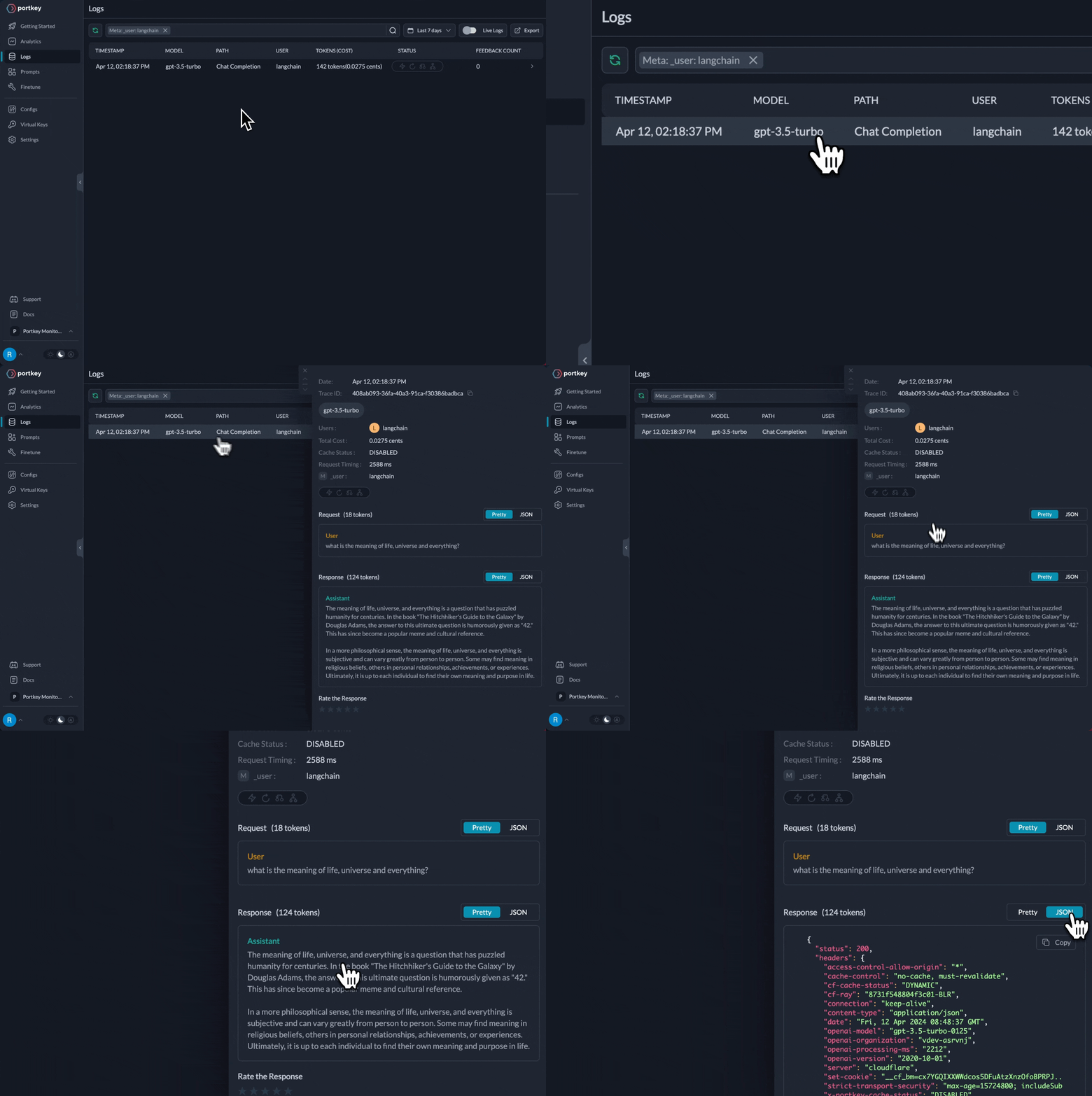 That's it! You now get:
* ✅ Full observability (costs, latency, logs)
* ✅ Dynamic model selection per request
* ✅ Automatic fallbacks and retries (via configs)
* ✅ Budget controls per team/project
## Why Add Portkey to Langchain?
Langchain handles application orchestration. Portkey adds production features:
Every request logged with costs, latency, tokens. Team-level analytics and debugging.
Switch models per request. Route simple queries to cheap models, complex to advanced—automatically tracked.
Automatic fallbacks, smart retries, load balancing—configured once, works everywhere.
Budget limits per team/project. Rate limiting. Centralized credential management.
## Setup
### 1. Install Packages
```bash theme={"system"}
pip install langchain-openai portkey-ai
```
### 2. Add Provider in Model Catalog
1. Go to [**Model Catalog → Add Provider**](https://app.portkey.ai/model-catalog/providers)
2. Select your provider (OpenAI, Anthropic, Google, etc.)
3. Choose existing credentials or create new by entering your API keys
4. Name your provider (e.g., `openai-prod`)
Your provider slug will be **`@openai-prod`** (or whatever you named it).
Set up budgets, rate limits, and manage credentials
### 3. Get Portkey API Key
Create your Portkey API key at [app.portkey.ai/api-keys](https://app.portkey.ai/api-keys)
### 4. Use in Your Code
Replace your existing `ChatOpenAI` initialization:
```python theme={"system"}
# Before (direct to OpenAI)
model = ChatOpenAI(
model="gpt-4o",
api_key="OPENAI_API_KEY"
)
# After (via Portkey)
model = ChatOpenAI(
model="@openai-prod/gpt-4o",
base_url="https://api.portkey.ai/v1",
api_key="PORTKEY_API_KEY"
)
```
**That's the only change needed!** All your existing Langchain code (agents, chains, LCEL, etc.) works exactly the same.
## Switching Between Providers
Just change the model string—everything else stays the same:
```python theme={"system"}
# OpenAI
model = ChatOpenAI(
model="@openai-prod/gpt-4o",
base_url="https://api.portkey.ai/v1",
api_key="PORTKEY_API_KEY"
)
# Anthropic
model = ChatOpenAI(
model="@anthropic-prod/claude-sonnet-4",
base_url="https://api.portkey.ai/v1",
api_key="PORTKEY_API_KEY"
)
# Google Gemini
model = ChatOpenAI(
model="@google-prod/gemini-2.0-flash",
base_url="https://api.portkey.ai/v1",
api_key="PORTKEY_API_KEY"
)
```
Portkey implements OpenAI-compatible APIs for all providers, so you always use `ChatOpenAI` regardless of which model you're calling.
## Using with Langchain Agents
Langchain agents are the primary use case. Portkey works seamlessly with `create_agent`:
```python theme={"system"}
from langchain.agents import create_agent
from langchain.tools import tool
from langchain_openai import ChatOpenAI
@tool
def search(query: str) -> str:
"""Search for information."""
return f"Results for: {query}"
@tool
def get_weather(location: str) -> str:
"""Get weather for a location."""
return f"Weather in {location}: Sunny, 72°F"
model = ChatOpenAI(
model="@openai-prod/gpt-4o",
base_url="https://api.portkey.ai/v1",
api_key="PORTKEY_API_KEY"
)
agent = create_agent(model, tools=[search, get_weather])
result = agent.invoke({
"messages": [{"role": "user", "content": "What's the weather in NYC and search for AI news"}]
})
```
Every agent step is logged in Portkey:
* Model calls with prompts and responses
* Tool executions with inputs and outputs
* Full trace of the agent's reasoning
* Costs and latency for each step
## Works With All Langchain Features
✅ **Agents** - Full compatibility with `create_agent`\
✅ **LCEL** - LangChain Expression Language\
✅ **Chains** - All chain types supported\
✅ **Streaming** - Token-by-token streaming\
✅ **Tool Calling** - Function/tool calling\
✅ **LangGraph** - Complex workflows
### Streaming
```python theme={"system"}
model = ChatOpenAI(
model="@openai-prod/gpt-4o",
base_url="https://api.portkey.ai/v1",
api_key="PORTKEY_API_KEY",
streaming=True
)
for chunk in model.stream("Write a short story"):
print(chunk.content, end="", flush=True)
```
### Tool Calling
```python theme={"system"}
from pydantic import BaseModel, Field
class GetWeather(BaseModel):
'''Get current weather in a location'''
location: str = Field(..., description="City and state, e.g. San Francisco, CA")
model = ChatOpenAI(
model="@openai-prod/gpt-4o",
base_url="https://api.portkey.ai/v1",
api_key="PORTKEY_API_KEY"
)
model_with_tools = model.bind_tools([GetWeather])
response = model_with_tools.invoke("What's the weather in NYC?")
print(response.tool_calls)
```
## Dynamic Model Selection
For dynamic model routing based on query complexity or task type, use **Portkey Configs** with conditional routing:
```python theme={"system"}
from langchain_openai import ChatOpenAI
from portkey_ai import createHeaders
# Define routing config (created in Portkey dashboard)
config = {
"strategy": {
"mode": "conditional",
"conditions": [
{
"query": {"metadata.complexity": {"$eq": "simple"}},
"then": "cheap-model"
},
{
"query": {"metadata.complexity": {"$eq": "complex"}},
"then": "advanced-model"
}
],
"default": "cheap-model"
},
"targets": [
{
"name": "cheap-model",
"override_params": {"model": "@openai-prod/gpt-4o-mini"}
},
{
"name": "advanced-model",
"override_params": {"model": "@openai-prod/o1"}
}
]
}
model = ChatOpenAI(
model="gpt-4o", # Default model
base_url="https://api.portkey.ai/v1",
api_key="PORTKEY_API_KEY",
default_headers=createHeaders(config=config)
)
# Route to cheap model
response1 = model.invoke(
"What is 2+2?",
config={"metadata": {"complexity": "simple"}}
)
# Route to advanced model
response2 = model.invoke(
"Solve this differential equation...",
config={"metadata": {"complexity": "complex"}}
)
```
### Use Cases
**1. Cost Optimization**
Route by query complexity automatically:
```python theme={"system"}
def smart_invoke(prompt, complexity="simple"):
return model.invoke(
prompt,
config={"metadata": {"complexity": complexity}}
)
# Automatic routing
answer1 = smart_invoke("What is 2+2?", complexity="simple")
answer2 = smart_invoke("Explain quantum mechanics", complexity="complex")
```
**2. Model Specialization by Task**
Route different task types to specialized models:
```python theme={"system"}
config = {
"strategy": {
"mode": "conditional",
"conditions": [
{"query": {"metadata.task": {"$eq": "code"}}, "then": "coding-model"},
{"query": {"metadata.task": {"$eq": "creative"}}, "then": "creative-model"}
],
"default": "coding-model"
},
"targets": [
{
"name": "coding-model",
"override_params": {"model": "@openai-prod/gpt-4o"}
},
{
"name": "creative-model",
"override_params": {"model": "@anthropic-prod/claude-sonnet-4"}
}
]
}
def route_by_task(prompt, task_type):
return model.invoke(
prompt,
config={"metadata": {"task": task_type}}
)
code = route_by_task("Write a sorting algorithm", task_type="code")
story = route_by_task("Write a sci-fi story", task_type="creative")
```
**3. Dynamic Agent Model Selection**
Use different models for different agent steps:
```python theme={"system"}
from langchain.agents import create_agent
from langchain.tools import tool
@tool
def complex_calculation(query: str) -> str:
"""Perform complex calculations."""
return "42"
model = ChatOpenAI(
model="gpt-4o",
base_url="https://api.portkey.ai/v1",
api_key="PORTKEY_API_KEY",
default_headers=createHeaders(config=config)
)
agent = create_agent(model, tools=[complex_calculation])
# Agent routes based on task complexity
result = agent.invoke({
"messages": [{"role": "user", "content": "Calculate quantum probabilities"}],
"metadata": {"complexity": "complex"}
})
```
All routing decisions are tracked in Portkey with full observability—see which models were used, costs per model, and performance comparisons.
Learn more about conditional routing and advanced patterns
### When to Use Dynamic Routing
**Use conditional routing** when you need:
* ✅ Cost optimization based on query complexity
* ✅ Model specialization by task type
* ✅ Automatic failover and fallbacks
* ✅ A/B testing with traffic distribution
**Use fixed models** when you need:
* ✅ Simple, predictable behavior
* ✅ Consistent model across all requests
* ✅ Easier debugging
## Advanced Features via Configs
For production features like fallbacks, caching, and load balancing, use Portkey Configs:
```python theme={"system"}
from portkey_ai import createHeaders
model = ChatOpenAI(
model="@openai-prod/gpt-4o",
base_url="https://api.portkey.ai/v1",
api_key="PORTKEY_API_KEY",
default_headers=createHeaders(
config="pc_your_config_id" # Created in Portkey dashboard
)
)
```
Set up fallbacks, retries, caching, load balancing, and more
## Langchain Embeddings
Create embeddings via Portkey:
```python theme={"system"}
from langchain_openai import OpenAIEmbeddings
embeddings = OpenAIEmbeddings(
model="text-embedding-3-small",
base_url="https://api.portkey.ai/v1",
api_key="PORTKEY_API_KEY",
default_headers={"x-portkey-provider": "@openai-prod"}
)
vectors = embeddings.embed_documents(["Hello world", "Goodbye world"])
```
Portkey supports OpenAI embeddings via `OpenAIEmbeddings`. For other providers (Cohere, Voyage), use the **Portkey SDK directly** ([docs](/api-reference/inference-api/embeddings)).
## Prompt Management
Use prompts from Portkey's Prompt Library:
```python theme={"system"}
import os
from langchain_openai import ChatOpenAI
from langchain_core.messages import SystemMessage, HumanMessage
from portkey_ai import Portkey
PORTKEY_API_KEY = os.environ.get("PORTKEY_API_KEY")
client = Portkey(api_key=PORTKEY_API_KEY)
# Render prompt from Portkey
rendered_prompt = client.prompts.render(
prompt_id="pp-story-generator",
variables={"character": "brave knight", "object": "magic sword"}
).data
# Convert to Langchain messages
langchain_messages = []
if rendered_prompt and rendered_prompt.prompt:
for msg in rendered_prompt.prompt:
if msg.get("role") == "user":
langchain_messages.append(HumanMessage(content=msg.get("content")))
elif msg.get("role") == "system":
langchain_messages.append(SystemMessage(content=msg.get("content")))
# Use with Langchain model
model = ChatOpenAI(
model="@openai-prod/gpt-4o",
base_url="https://api.portkey.ai/v1",
api_key="PORTKEY_API_KEY"
)
response = model.invoke(langchain_messages)
```
Manage, version, and test prompts in Portkey
## Migration from Direct OpenAI
Already using Langchain with OpenAI? Just update 3 parameters:
```python theme={"system"}
# Before
from langchain_openai import ChatOpenAI
import os
model = ChatOpenAI(
model="gpt-4o",
api_key=os.getenv("OPENAI_API_KEY"),
temperature=0.7
)
# After (add 2 parameters, change 1)
model = ChatOpenAI(
model="@openai-prod/gpt-4o", # Add provider slug
base_url="https://api.portkey.ai/v1", # Add this
api_key="PORTKEY_API_KEY", # Change to Portkey key
temperature=0.7 # Keep existing params
)
```
**Benefits:**
* Zero code changes to your existing Langchain logic
* Instant observability for all requests
* Production-grade reliability features
* Cost controls and budgets
## Next Steps
Set up providers, budgets, and access control
Configure fallbacks, caching, and routing
Track costs, performance, and usage
Add PII detection and content filtering
For complete SDK documentation:
Complete Portkey SDK documentation
That's it! You now get:
* ✅ Full observability (costs, latency, logs)
* ✅ Dynamic model selection per request
* ✅ Automatic fallbacks and retries (via configs)
* ✅ Budget controls per team/project
## Why Add Portkey to Langchain?
Langchain handles application orchestration. Portkey adds production features:
Every request logged with costs, latency, tokens. Team-level analytics and debugging.
Switch models per request. Route simple queries to cheap models, complex to advanced—automatically tracked.
Automatic fallbacks, smart retries, load balancing—configured once, works everywhere.
Budget limits per team/project. Rate limiting. Centralized credential management.
## Setup
### 1. Install Packages
```bash theme={"system"}
pip install langchain-openai portkey-ai
```
### 2. Add Provider in Model Catalog
1. Go to [**Model Catalog → Add Provider**](https://app.portkey.ai/model-catalog/providers)
2. Select your provider (OpenAI, Anthropic, Google, etc.)
3. Choose existing credentials or create new by entering your API keys
4. Name your provider (e.g., `openai-prod`)
Your provider slug will be **`@openai-prod`** (or whatever you named it).
Set up budgets, rate limits, and manage credentials
### 3. Get Portkey API Key
Create your Portkey API key at [app.portkey.ai/api-keys](https://app.portkey.ai/api-keys)
### 4. Use in Your Code
Replace your existing `ChatOpenAI` initialization:
```python theme={"system"}
# Before (direct to OpenAI)
model = ChatOpenAI(
model="gpt-4o",
api_key="OPENAI_API_KEY"
)
# After (via Portkey)
model = ChatOpenAI(
model="@openai-prod/gpt-4o",
base_url="https://api.portkey.ai/v1",
api_key="PORTKEY_API_KEY"
)
```
**That's the only change needed!** All your existing Langchain code (agents, chains, LCEL, etc.) works exactly the same.
## Switching Between Providers
Just change the model string—everything else stays the same:
```python theme={"system"}
# OpenAI
model = ChatOpenAI(
model="@openai-prod/gpt-4o",
base_url="https://api.portkey.ai/v1",
api_key="PORTKEY_API_KEY"
)
# Anthropic
model = ChatOpenAI(
model="@anthropic-prod/claude-sonnet-4",
base_url="https://api.portkey.ai/v1",
api_key="PORTKEY_API_KEY"
)
# Google Gemini
model = ChatOpenAI(
model="@google-prod/gemini-2.0-flash",
base_url="https://api.portkey.ai/v1",
api_key="PORTKEY_API_KEY"
)
```
Portkey implements OpenAI-compatible APIs for all providers, so you always use `ChatOpenAI` regardless of which model you're calling.
## Using with Langchain Agents
Langchain agents are the primary use case. Portkey works seamlessly with `create_agent`:
```python theme={"system"}
from langchain.agents import create_agent
from langchain.tools import tool
from langchain_openai import ChatOpenAI
@tool
def search(query: str) -> str:
"""Search for information."""
return f"Results for: {query}"
@tool
def get_weather(location: str) -> str:
"""Get weather for a location."""
return f"Weather in {location}: Sunny, 72°F"
model = ChatOpenAI(
model="@openai-prod/gpt-4o",
base_url="https://api.portkey.ai/v1",
api_key="PORTKEY_API_KEY"
)
agent = create_agent(model, tools=[search, get_weather])
result = agent.invoke({
"messages": [{"role": "user", "content": "What's the weather in NYC and search for AI news"}]
})
```
Every agent step is logged in Portkey:
* Model calls with prompts and responses
* Tool executions with inputs and outputs
* Full trace of the agent's reasoning
* Costs and latency for each step
## Works With All Langchain Features
✅ **Agents** - Full compatibility with `create_agent`\
✅ **LCEL** - LangChain Expression Language\
✅ **Chains** - All chain types supported\
✅ **Streaming** - Token-by-token streaming\
✅ **Tool Calling** - Function/tool calling\
✅ **LangGraph** - Complex workflows
### Streaming
```python theme={"system"}
model = ChatOpenAI(
model="@openai-prod/gpt-4o",
base_url="https://api.portkey.ai/v1",
api_key="PORTKEY_API_KEY",
streaming=True
)
for chunk in model.stream("Write a short story"):
print(chunk.content, end="", flush=True)
```
### Tool Calling
```python theme={"system"}
from pydantic import BaseModel, Field
class GetWeather(BaseModel):
'''Get current weather in a location'''
location: str = Field(..., description="City and state, e.g. San Francisco, CA")
model = ChatOpenAI(
model="@openai-prod/gpt-4o",
base_url="https://api.portkey.ai/v1",
api_key="PORTKEY_API_KEY"
)
model_with_tools = model.bind_tools([GetWeather])
response = model_with_tools.invoke("What's the weather in NYC?")
print(response.tool_calls)
```
## Dynamic Model Selection
For dynamic model routing based on query complexity or task type, use **Portkey Configs** with conditional routing:
```python theme={"system"}
from langchain_openai import ChatOpenAI
from portkey_ai import createHeaders
# Define routing config (created in Portkey dashboard)
config = {
"strategy": {
"mode": "conditional",
"conditions": [
{
"query": {"metadata.complexity": {"$eq": "simple"}},
"then": "cheap-model"
},
{
"query": {"metadata.complexity": {"$eq": "complex"}},
"then": "advanced-model"
}
],
"default": "cheap-model"
},
"targets": [
{
"name": "cheap-model",
"override_params": {"model": "@openai-prod/gpt-4o-mini"}
},
{
"name": "advanced-model",
"override_params": {"model": "@openai-prod/o1"}
}
]
}
model = ChatOpenAI(
model="gpt-4o", # Default model
base_url="https://api.portkey.ai/v1",
api_key="PORTKEY_API_KEY",
default_headers=createHeaders(config=config)
)
# Route to cheap model
response1 = model.invoke(
"What is 2+2?",
config={"metadata": {"complexity": "simple"}}
)
# Route to advanced model
response2 = model.invoke(
"Solve this differential equation...",
config={"metadata": {"complexity": "complex"}}
)
```
### Use Cases
**1. Cost Optimization**
Route by query complexity automatically:
```python theme={"system"}
def smart_invoke(prompt, complexity="simple"):
return model.invoke(
prompt,
config={"metadata": {"complexity": complexity}}
)
# Automatic routing
answer1 = smart_invoke("What is 2+2?", complexity="simple")
answer2 = smart_invoke("Explain quantum mechanics", complexity="complex")
```
**2. Model Specialization by Task**
Route different task types to specialized models:
```python theme={"system"}
config = {
"strategy": {
"mode": "conditional",
"conditions": [
{"query": {"metadata.task": {"$eq": "code"}}, "then": "coding-model"},
{"query": {"metadata.task": {"$eq": "creative"}}, "then": "creative-model"}
],
"default": "coding-model"
},
"targets": [
{
"name": "coding-model",
"override_params": {"model": "@openai-prod/gpt-4o"}
},
{
"name": "creative-model",
"override_params": {"model": "@anthropic-prod/claude-sonnet-4"}
}
]
}
def route_by_task(prompt, task_type):
return model.invoke(
prompt,
config={"metadata": {"task": task_type}}
)
code = route_by_task("Write a sorting algorithm", task_type="code")
story = route_by_task("Write a sci-fi story", task_type="creative")
```
**3. Dynamic Agent Model Selection**
Use different models for different agent steps:
```python theme={"system"}
from langchain.agents import create_agent
from langchain.tools import tool
@tool
def complex_calculation(query: str) -> str:
"""Perform complex calculations."""
return "42"
model = ChatOpenAI(
model="gpt-4o",
base_url="https://api.portkey.ai/v1",
api_key="PORTKEY_API_KEY",
default_headers=createHeaders(config=config)
)
agent = create_agent(model, tools=[complex_calculation])
# Agent routes based on task complexity
result = agent.invoke({
"messages": [{"role": "user", "content": "Calculate quantum probabilities"}],
"metadata": {"complexity": "complex"}
})
```
All routing decisions are tracked in Portkey with full observability—see which models were used, costs per model, and performance comparisons.
Learn more about conditional routing and advanced patterns
### When to Use Dynamic Routing
**Use conditional routing** when you need:
* ✅ Cost optimization based on query complexity
* ✅ Model specialization by task type
* ✅ Automatic failover and fallbacks
* ✅ A/B testing with traffic distribution
**Use fixed models** when you need:
* ✅ Simple, predictable behavior
* ✅ Consistent model across all requests
* ✅ Easier debugging
## Advanced Features via Configs
For production features like fallbacks, caching, and load balancing, use Portkey Configs:
```python theme={"system"}
from portkey_ai import createHeaders
model = ChatOpenAI(
model="@openai-prod/gpt-4o",
base_url="https://api.portkey.ai/v1",
api_key="PORTKEY_API_KEY",
default_headers=createHeaders(
config="pc_your_config_id" # Created in Portkey dashboard
)
)
```
Set up fallbacks, retries, caching, load balancing, and more
## Langchain Embeddings
Create embeddings via Portkey:
```python theme={"system"}
from langchain_openai import OpenAIEmbeddings
embeddings = OpenAIEmbeddings(
model="text-embedding-3-small",
base_url="https://api.portkey.ai/v1",
api_key="PORTKEY_API_KEY",
default_headers={"x-portkey-provider": "@openai-prod"}
)
vectors = embeddings.embed_documents(["Hello world", "Goodbye world"])
```
Portkey supports OpenAI embeddings via `OpenAIEmbeddings`. For other providers (Cohere, Voyage), use the **Portkey SDK directly** ([docs](/api-reference/inference-api/embeddings)).
## Prompt Management
Use prompts from Portkey's Prompt Library:
```python theme={"system"}
import os
from langchain_openai import ChatOpenAI
from langchain_core.messages import SystemMessage, HumanMessage
from portkey_ai import Portkey
PORTKEY_API_KEY = os.environ.get("PORTKEY_API_KEY")
client = Portkey(api_key=PORTKEY_API_KEY)
# Render prompt from Portkey
rendered_prompt = client.prompts.render(
prompt_id="pp-story-generator",
variables={"character": "brave knight", "object": "magic sword"}
).data
# Convert to Langchain messages
langchain_messages = []
if rendered_prompt and rendered_prompt.prompt:
for msg in rendered_prompt.prompt:
if msg.get("role") == "user":
langchain_messages.append(HumanMessage(content=msg.get("content")))
elif msg.get("role") == "system":
langchain_messages.append(SystemMessage(content=msg.get("content")))
# Use with Langchain model
model = ChatOpenAI(
model="@openai-prod/gpt-4o",
base_url="https://api.portkey.ai/v1",
api_key="PORTKEY_API_KEY"
)
response = model.invoke(langchain_messages)
```
Manage, version, and test prompts in Portkey
## Migration from Direct OpenAI
Already using Langchain with OpenAI? Just update 3 parameters:
```python theme={"system"}
# Before
from langchain_openai import ChatOpenAI
import os
model = ChatOpenAI(
model="gpt-4o",
api_key=os.getenv("OPENAI_API_KEY"),
temperature=0.7
)
# After (add 2 parameters, change 1)
model = ChatOpenAI(
model="@openai-prod/gpt-4o", # Add provider slug
base_url="https://api.portkey.ai/v1", # Add this
api_key="PORTKEY_API_KEY", # Change to Portkey key
temperature=0.7 # Keep existing params
)
```
**Benefits:**
* Zero code changes to your existing Langchain logic
* Instant observability for all requests
* Production-grade reliability features
* Cost controls and budgets
## Next Steps
Set up providers, budgets, and access control
Configure fallbacks, caching, and routing
Track costs, performance, and usage
Add PII detection and content filtering
For complete SDK documentation:
Complete Portkey SDK documentation