> ## Documentation Index
> Fetch the complete documentation index at: https://docs.portkey.ai/docs/llms.txt
> Use this file to discover all available pages before exploring further.
# Prompt Caching
Prompt caching on Anthropic lets you cache individual messages in your request for repeat use. With caching, you can free up your tokens to include more context in your prompt, and also deliver responses significantly faster and cheaper.
You can use this feature on our OpenAI-compliant universal API as well as with our prompt templates.
## API Support
Just set the `cache_control` param in your respective message body:
```javascript NodeJS theme={"system"}
import Portkey from 'portkey-ai'
const portkey = new Portkey({
apiKey: "PORTKEY_API_KEY", // defaults to process.env["PORTKEY_API_KEY"]
provider:"@PROVIDER"
})
const chatCompletion = await portkey.chat.completions.create({
messages: [
{ "role": 'system', "content": [
{
"type":"text","text":"You are a helpful assistant"
},
{
"type":"text","text":"",
"cache_control": {"type": "ephemeral"}
}
]},
{ "role": 'user', "content": 'Summarize the above story for me in 20 words' }
],
model: 'claude-3-5-sonnet-20240620',
max_tokens: 250 // Required field for Anthropic
});
console.log(chatCompletion.choices[0].message.content);
```
```python Python theme={"system"}
from portkey_ai import Portkey
portkey = Portkey(
api_key="PORTKEY_API_KEY",
provider="@ANTHROPIC_PROVIDER",
)
chat_completion = portkey.chat.completions.create(
messages= [
{ "role": 'system', "content": [
{
"type":"text","text":"You are a helpful assistant"
},
{
"type":"text","text":"",
"cache_control": {"type": "ephemeral"}
}
]},
{ "role": 'user', "content": 'Summarize the above story in 20 words' }
],
model= 'claude-3-5-sonnet-20240620',
max_tokens=250
)
print(chat_completion.choices[0].message.content)
```
```javascript OpenAI NodeJS theme={"system"}
import OpenAI from "openai";
import { PORTKEY_GATEWAY_URL, createHeaders } from "portkey-ai";
const portkey = new OpenAI({
apiKey: "ANTHROPIC_API_KEY",
baseURL: PORTKEY_GATEWAY_URL,
defaultHeaders: createHeaders({
provider: "anthropic",
apiKey: "PORTKEY_API_KEY",
}),
});
const chatCompletion = await portkey.chat.completions.create({
messages: [
{ "role": 'system', "content": [
{
"type":"text","text":"You are a helpful assistant"
},
{
"type":"text","text":"",
"cache_control": {"type": "ephemeral"}
}
]},
{ "role": 'user', "content": 'Summarize the above story for me in 20 words' }
],
model: 'claude-3-5-sonnet-20240620',
max_tokens: 250
});
console.log(chatCompletion.choices[0].message.content);
```
```python OpenAI Python theme={"system"}
from openai import OpenAI
from portkey_ai import PORTKEY_GATEWAY_URL, createHeaders
client = OpenAI(
api_key="ANTHROPIC_API_KEY",
base_url=PORTKEY_GATEWAY_URL,
default_headers=createHeaders(
api_key="PORTKEY_API_KEY",
provider="anthropic",
)
)
chat_completion = portkey.chat.completions.create(
messages= [
{ "role": 'system', "content": [
{
"type":"text","text":"You are a helpful assistant"
},
{
"type":"text","text":"",
"cache_control": {"type": "ephemeral"}
}
]},
{ "role": 'user', "content": 'Summarize the above story in 20 words' }
],
model= 'claude-3-5-sonnet-20240620',
max_tokens=250
)
print(chat_completion.choices[0].message.content)
```
```sh REST API theme={"system"}
curl https://api.portkey.ai/v1/chat/completions \
-H "Content-Type: application/json" \
-H "Authorization: Bearer $ANTHROPIC_API_KEY" \
-H "x-portkey-api-key: $PORTKEY_API_KEY" \
-H "x-portkey-provider: anthropic" \
-d '{
"model": "claude-3-5-sonnet-20240620",
"max_tokens": 1024,
"messages": [
{ "role": "system", "content": [
{
"type":"text","text":"You are a helpful assistant"
},
{
"type":"text","text":"",
"cache_control": {"type": "ephemeral"}
}
]},
{ "role": "user", "content": "Summarize the above story for me in 20 words" }
]
}'
```
## Prompt Templates Support
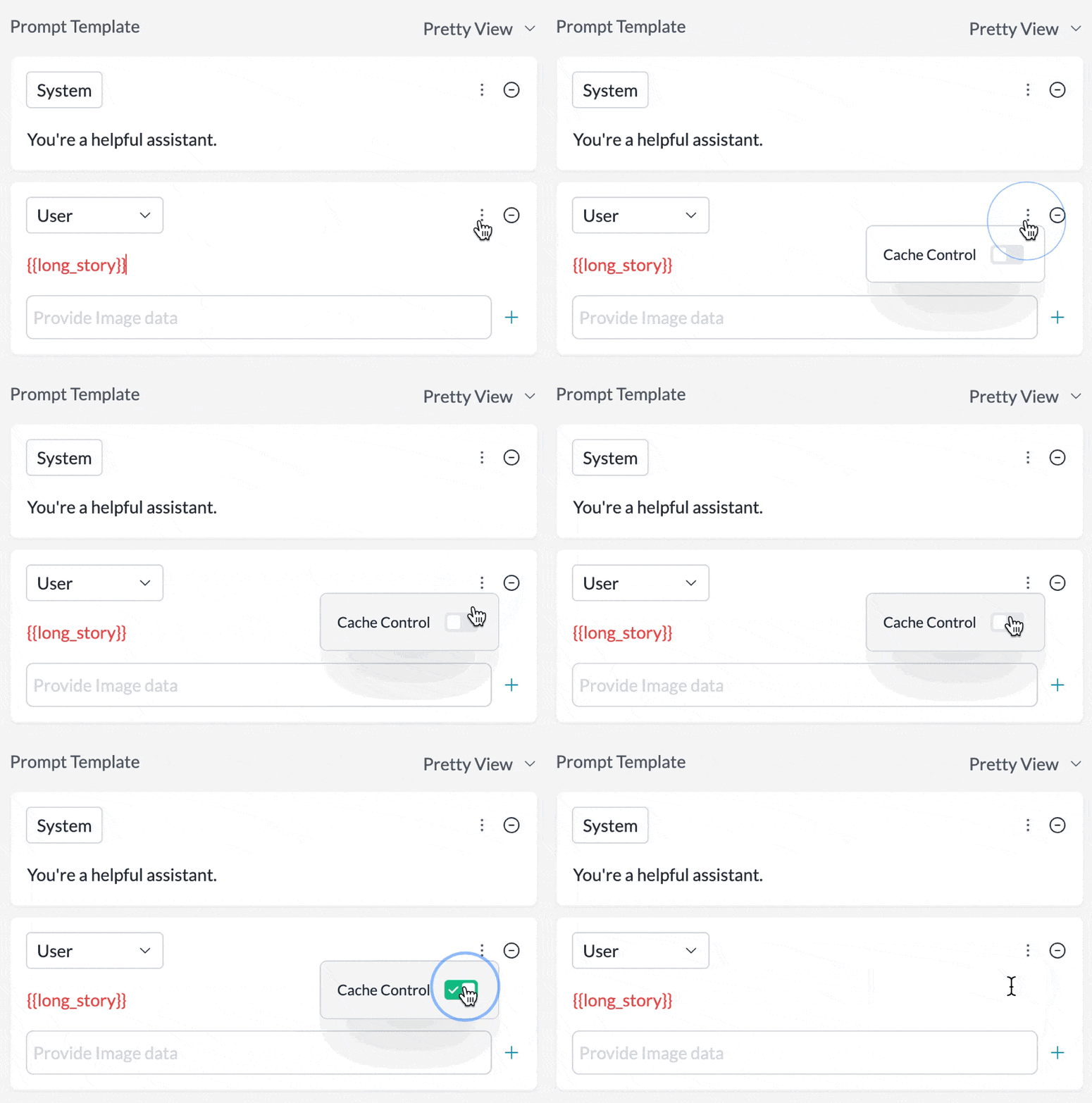
Set any message in your prompt template to be cached by just toggling the `Cache Control` setting in the UI:
 ## Cache TTL Options
By default, the cache has a **5-minute** lifetime that refreshes each time cached content is used. You can optionally specify a **1-hour** TTL by adding the `ttl` field to `cache_control`:
```json theme={"system"}
{
"cache_control": { "type": "ephemeral", "ttl": "1h" }
}
```
| TTL | Write Cost | Best For |
| -------------- | ---------------------- | --------------------------------------------------------------------------- |
| `5m` (default) | 1.25x base input price | Prompts used more frequently than every 5 minutes |
| `1h` | 2x base input price | Agentic workflows, long conversations where follow-ups may exceed 5 minutes |
Cache reads cost 0.1x the base input token price regardless of TTL.
* The message you are caching needs to cross minimum length to enable this feature (1024 tokens for Claude 3.5 Sonnet and Claude 3 Opus, 2048 tokens for Claude 3 Haiku)
* You can mix both TTLs in the same request, but 1-hour entries must appear before 5-minute entries
* Up to 4 cache breakpoints per request
For more, refer to Anthropic's prompt caching documentation [here](https://docs.anthropic.com/en/docs/build-with-claude/prompt-caching).
## Seeing Cache Results in Portkey
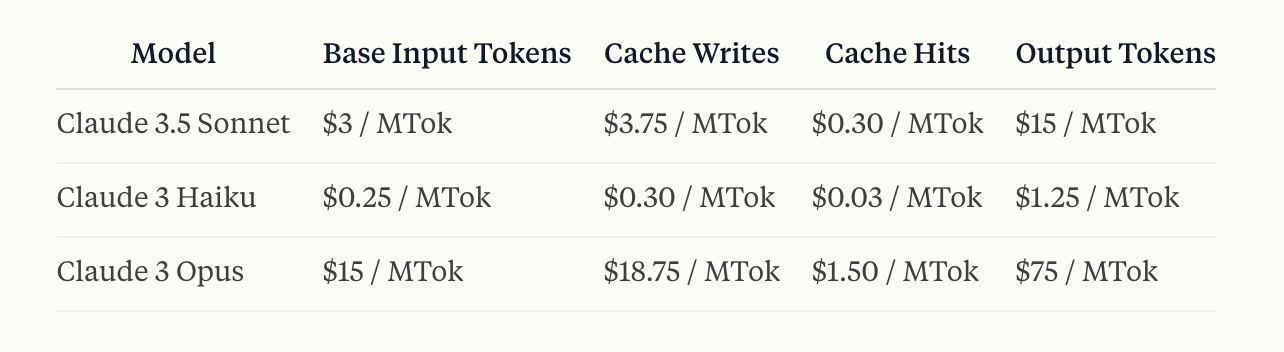
Portkey automatically calculates the correct pricing for your prompt caching requests & responses based on Anthropic's calculations here:
## Cache TTL Options
By default, the cache has a **5-minute** lifetime that refreshes each time cached content is used. You can optionally specify a **1-hour** TTL by adding the `ttl` field to `cache_control`:
```json theme={"system"}
{
"cache_control": { "type": "ephemeral", "ttl": "1h" }
}
```
| TTL | Write Cost | Best For |
| -------------- | ---------------------- | --------------------------------------------------------------------------- |
| `5m` (default) | 1.25x base input price | Prompts used more frequently than every 5 minutes |
| `1h` | 2x base input price | Agentic workflows, long conversations where follow-ups may exceed 5 minutes |
Cache reads cost 0.1x the base input token price regardless of TTL.
* The message you are caching needs to cross minimum length to enable this feature (1024 tokens for Claude 3.5 Sonnet and Claude 3 Opus, 2048 tokens for Claude 3 Haiku)
* You can mix both TTLs in the same request, but 1-hour entries must appear before 5-minute entries
* Up to 4 cache breakpoints per request
For more, refer to Anthropic's prompt caching documentation [here](https://docs.anthropic.com/en/docs/build-with-claude/prompt-caching).
## Seeing Cache Results in Portkey
Portkey automatically calculates the correct pricing for your prompt caching requests & responses based on Anthropic's calculations here:
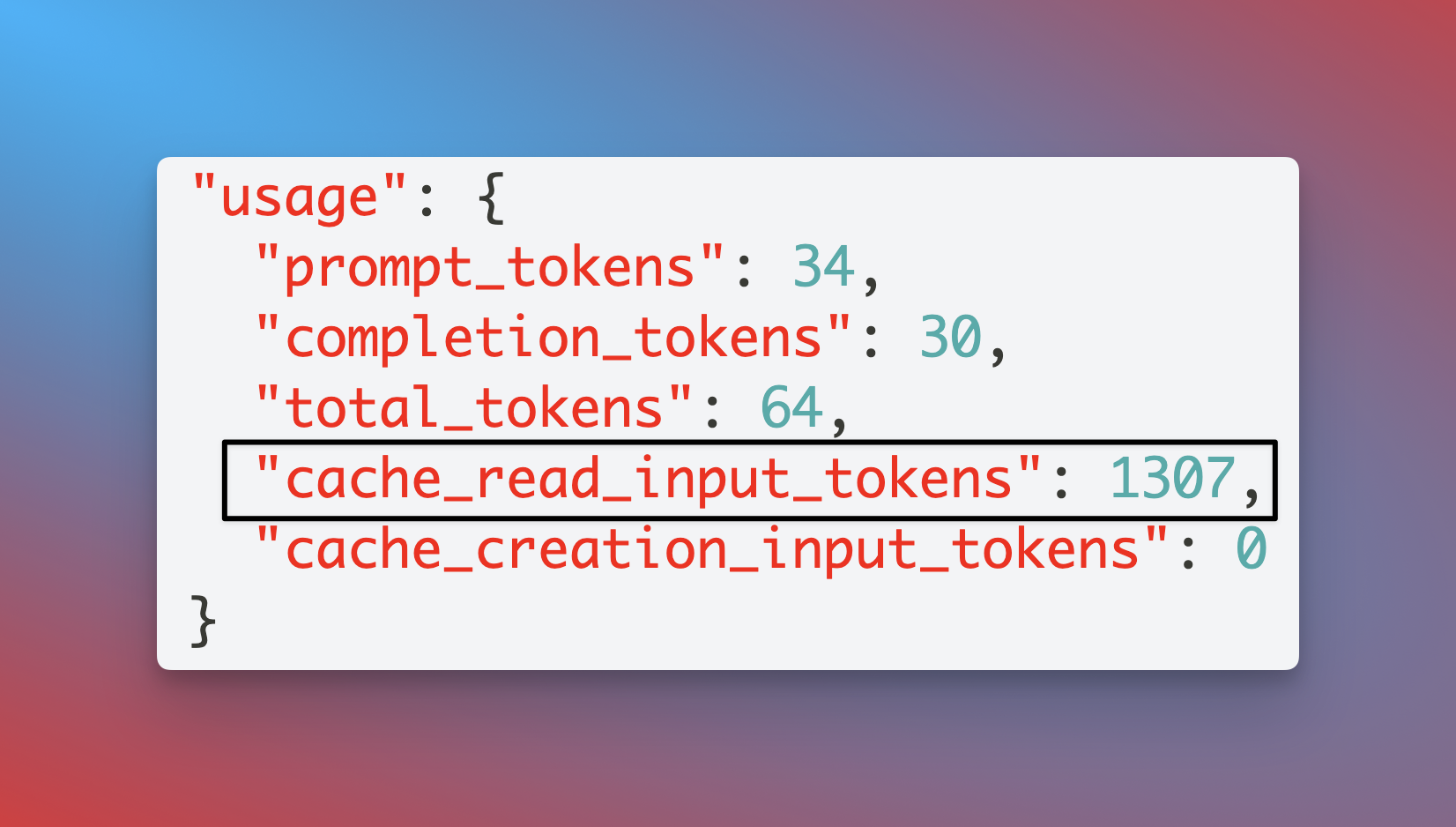
 In the individual log for any request, you can also see the exact status of your request and verify if it was cached, or delivered from cache with two `usage` parameters:
* `cache_creation_input_tokens`: Number of tokens written to the cache when creating a new entry.
* `cache_read_input_tokens`: Number of tokens retrieved from the cache for this request.
In the individual log for any request, you can also see the exact status of your request and verify if it was cached, or delivered from cache with two `usage` parameters:
* `cache_creation_input_tokens`: Number of tokens written to the cache when creating a new entry.
* `cache_read_input_tokens`: Number of tokens retrieved from the cache for this request.
 **Understanding Token Counts with Caching**
Portkey normalizes Anthropic's response to the OpenAI format. In this format, `prompt_tokens` **includes** the cached tokens:
```
prompt_tokens = inputTokens + cache_read_input_tokens + cache_creation_input_tokens
```
This differs from Anthropic's native format where `inputTokens` excludes cached tokens. Portkey's pricing calculation accounts for this by:
1. Subtracting cached tokens from `prompt_tokens` to get the base input token count
2. Applying the standard input token rate to base tokens
3. Applying the discounted cache read rate to `cache_read_input_tokens`
4. Applying the cache write rate to `cache_creation_input_tokens`
This ensures accurate cost calculation even though the token format is normalized.
**Understanding Token Counts with Caching**
Portkey normalizes Anthropic's response to the OpenAI format. In this format, `prompt_tokens` **includes** the cached tokens:
```
prompt_tokens = inputTokens + cache_read_input_tokens + cache_creation_input_tokens
```
This differs from Anthropic's native format where `inputTokens` excludes cached tokens. Portkey's pricing calculation accounts for this by:
1. Subtracting cached tokens from `prompt_tokens` to get the base input token count
2. Applying the standard input token rate to base tokens
3. Applying the discounted cache read rate to `cache_read_input_tokens`
4. Applying the cache write rate to `cache_creation_input_tokens`
This ensures accurate cost calculation even though the token format is normalized.