> ## Documentation Index
> Fetch the complete documentation index at: https://docs.portkey.ai/docs/llms.txt
> Use this file to discover all available pages before exploring further.
# OpenAI
> Integrate OpenAI with Portkey to get production metrics for your requests and make chat completions, audio, image generation, structured outputs, function calling, fine-tuning, batch, and more requests.
Provider Slug: `openai`
## Overview
Portkey integrates with [OpenAI](https://platform.openai.com/docs/api-reference/introduction)'s APIs to help you create production-grade AI sppd with enhanced reliability, observability, and governance features.
## Getting Started
Visit the [OpenAI dashboard](https://platform.openai.com/account/api-keys) to generate your API key.
Add your OpenAI API key to [Model Catalog](https://app.portkey.ai/model-catalog) to create an AI Provider. This gives you centralized key management with [budget limits](/docs/product/model-catalog/budget-limits) and rate limits per provider.
Now that you have your AI Provider, set up the Portkey client:
### Portkey Hosted App
Use your Portkey API key and AI Provider slug to initialize the client.
```python Python theme={"system"}
from portkey_ai import Portkey
portkey = Portkey(
api_key="PORTKEY_API_KEY", # Replace with your Portkey API key
provider="@openai-prod" # Your AI Provider slug from Model Catalog
)
```
```javascript Node.js theme={"system"}
import Portkey from 'portkey-ai'
const portkey = new Portkey({
apiKey: "PORTKEY_API_KEY", // defaults to process.env["PORTKEY_API_KEY"]
provider:"@openai-prod" // Your AI Provider slug from Model Catalog
})
```
### Open Source Use
Alternatively, use Portkey's Open Source AI Gateway to enhance your app's reliability with minimal code:
```python Python theme={"system"}
from portkey_ai import Portkey, PORTKEY_GATEWAY_URL
portkey = Portkey(
api_key="dummy", # Replace with your Portkey API key
base_url=PORTKEY_GATEWAY_URL,
Authorization="OPENAI_API_KEY", # Replace with your OpenAI API Key
provider="openai"
)
```
```javascript Node.js theme={"system"}
import Portkey, { PORTKEY_GATEWAY_URL } from 'portkey-ai'
const portkey = new Portkey({
apiKey: "dummy", // Replace with your Portkey API key
baseUrl: PORTKEY_GATEWAY_URL,
Authorization: "OPENAI_API_KEY", // Replace with your OpenAI API Key
provider: "openai"
})
```
🔥 That's it! You've integrated Portkey into your application with just a few lines of code. Now let's explore making requests using the Portkey client.
## Supported Models
* GPT-4o
* GPT-4o mini
* o1-preview
* o1-mini
* GPT-4 Turbo
* GPT-4
* GPT-3.5 Turbo
* DALL·E
* TTS (Text-to-Speech)
* Whisper
* Embeddings
* Moderation
* GPT base
## OpenAI Supported Features
### Chat Completions
Generate chat completions using OpenAI models through Portkey:
```python Python theme={"system"}
completion = portkey.chat.completions.create(
messages=[{"role": "user", "content": "Say this is a test"}],
model="gpt-4o"
)
print(completion.choices[0].message.content)
```
```javascript Node.js theme={"system"}
const chatCompletion = await portkey.chat.completions.create({
messages: [{ role: 'user', content: 'Say this is a test' }],
model: 'gpt-4o',
});
console.log(chatCompletion.choices[0].message.content);
```
```curl REST theme={"system"}
curl -X POST "https://api.portkey.ai/v1/chat/completions" \
-H "Content-Type: application/json" \
-H "Authorization: Bearer YOUR_PORTKEY_API_KEY" \
-d '{
"messages": [{"role": "user", "content": "Say this is a test"}],
"model": "gpt-4o"
}'
```
### Streaming
Stream responses for real-time output in your applications:
```python Python theme={"system"}
chat_complete = portkey.chat.completions.create(
model="gpt-4o",
messages=[{"role": "user", "content": "Say this is a test"}],
stream=True
)
for chunk in chat_complete:
print(chunk.choices[0].delta.content or "", end="", flush=True)
```
```javascript Node.js theme={"system"}
const stream = await portkey.chat.completions.create({
model: 'gpt-4',
messages: [{ role: 'user', content: 'Say this is a test' }],
stream: true,
});
for await (const chunk of stream) {
process.stdout.write(chunk.choices[0]?.delta?.content || '');
}
```
```curl REST theme={"system"}
curl -X POST "https://api.portkey.ai/v1/chat/completions" \
-H "Content-Type: application/json" \
-H "Authorization: Bearer YOUR_PORTKEY_API_KEY" \
-d '{
"model": "gpt-4o",
"messages": [{"role": "user", "content": "Say this is a test"}],
"stream": true
}'
```
### Function Calling
Leverage OpenAI's function calling capabilities through Portkey:
```javascript Node.js theme={"system"}
let tools = [{
type: "function",
function: {
name: "getWeather",
description: "Get the current weather",
parameters: {
type: "object",
properties: {
location: { type: "string", description: "City and state" },
unit: { type: "string", enum: ["celsius", "fahrenheit"] }
},
required: ["location"]
}
}
}];
let response = await portkey.chat.completions.create({
model: "gpt-4o",
messages: [
{ role: "system", content: "You are a helpful assistant." },
{ role: "user", content: "What's the weather like in Delhi - respond in JSON" }
],
tools,
tool_choice: "auto",
});
console.log(response.choices[0].finish_reason);
```
```python Python theme={"system"}
tools = [{
"type": "function",
"function": {
"name": "getWeather",
"description": "Get the current weather",
"parameters": {
"type": "object",
"properties": {
"location": {"type": "string", "description": "City and state"},
"unit": {"type": "string", "enum": ["celsius", "fahrenheit"]}
},
"required": ["location"]
}
}
}]
response = portkey.chat.completions.create(
model="gpt-4o",
messages=[
{"role": "system", "content": "You are a helpful assistant."},
{"role": "user", "content": "What's the weather like in Delhi - respond in JSON"}
],
tools=tools,
tool_choice="auto"
)
print(response.choices[0].finish_reason)
```
```curl REST theme={"system"}
curl -X POST "https://api.portkey.ai/v1/chat/completions" \
-H "Content-Type: application/json" \
-H "Authorization: Bearer YOUR_PORTKEY_API_KEY" \
-d '{
"model": "gpt-4o",
"messages": [
{"role": "system", "content": "You are a helpful assistant."},
{"role": "user", "content": "What'\''s the weather like in Delhi - respond in JSON"}
],
"tools": [{
"type": "function",
"function": {
"name": "getWeather",
"description": "Get the current weather",
"parameters": {
"type": "object",
"properties": {
"location": {"type": "string", "description": "City and state"},
"unit": {"type": "string", "enum": ["celsius", "fahrenheit"]}
},
"required": ["location"]
}
}
}],
"tool_choice": "auto"
}'
```
### Vision
Process images alongside text using OpenAI's vision capabilities:
```python Python theme={"system"}
response = portkey.chat.completions.create(
model="gpt-4-vision-preview",
messages=[
{
"role": "user",
"content": [
{"type": "text", "text": "What's in this image?"},
{
"type": "image_url",
"image_url": "https://upload.wikimedia.org/wikipedia/commons/thumb/d/dd/Gfp-wisconsin-madison-the-nature-boardwalk.jpg/2560px-Gfp-wisconsin-madison-the-nature-boardwalk.jpg",
},
],
}
],
max_tokens=300,
)
print(response)
```
```javascript Node.js theme={"system"}
const response = await portkey.chat.completions.create({
model: "gpt-4-vision-preview",
messages: [
{
role: "user",
content: [
{ type: "text", text: "What's in this image?" },
{
type: "image_url",
image_url: "https://upload.wikimedia.org/wikipedia/commons/thumb/d/dd/Gfp-wisconsin-madison-the-nature-boardwalk.jpg/2560px-Gfp-wisconsin-madison-the-nature-boardwalk.jpg",
},
],
},
],
max_tokens: 300,
});
console.log(response);
```
```curl REST theme={"system"}
curl -X POST "https://api.portkey.ai/v1/chat/completions" \
-H "Content-Type: application/json" \
-H "Authorization: Bearer YOUR_PORTKEY_API_KEY" \
-d '{
"model": "gpt-4-vision-preview",
"messages": [
{
"role": "user",
"content": [
{"type": "text", "text": "What'\''s in this image?"},
{
"type": "image_url",
"image_url": "https://upload.wikimedia.org/wikipedia/commons/thumb/d/dd/Gfp-wisconsin-madison-the-nature-boardwalk.jpg/2560px-Gfp-wisconsin-madison-the-nature-boardwalk.jpg"
}
]
}
],
"max_tokens": 300
}'
```
### Embeddings
Generate embeddings for text using OpenAI's embedding models:
```python Python theme={"system"}
response = portkey.embeddings.create(
input="Your text string goes here",
model="text-embedding-3-small"
)
print(response.data[0].embedding)
```
```javascript Node.js theme={"system"}
const response = await portkey.embeddings.create({
input: "Your text string goes here",
model: "text-embedding-3-small"
});
console.log(response.data[0].embedding);
```
```curl REST theme={"system"}
curl -X POST "https://api.portkey.ai/v1/embeddings" \
-H "Content-Type: application/json" \
-H "Authorization: Bearer YOUR_PORTKEY_API_KEY" \
-d '{
"input": "Your text string goes here",
"model": "text-embedding-3-small"
}'
```
### Transcription and Translation
Portkey supports both `Transcription` and `Translation` methods for STT models:
```python Python theme={"system"}
audio_file= open("/path/to/file.mp3", "rb")
# Transcription
transcription = portkey.audio.transcriptions.create(
model="whisper-1",
file=audio_file
)
print(transcription.text)
# Translation
translation = portkey.audio.translations.create(
model="whisper-1",
file=audio_file
)
print(translation.text)
```
```javascript Node.js theme={"system"}
import fs from "fs";
// Transcription
async function transcribe() {
const transcription = await portkey.audio.transcriptions.create({
file: fs.createReadStream("/path/to/file.mp3"),
model: "whisper-1",
});
console.log(transcription.text);
}
transcribe();
// Translation
async function translate() {
const translation = await portkey.audio.translations.create({
file: fs.createReadStream("/path/to/file.mp3"),
model: "whisper-1",
});
console.log(translation.text);
}
translate();
```
```curl REST theme={"system"}
# Transcription
curl -X POST "https://api.portkey.ai/v1/audio/transcriptions" \
-H "Authorization: Bearer YOUR_PORTKEY_API_KEY" \
-H "Content-Type: multipart/form-data" \
-F "file=@/path/to/file.mp3" \
-F "model=whisper-1"
# Translation
curl -X POST "https://api.portkey.ai/v1/audio/translations" \
-H "Authorization: Bearer YOUR_PORTKEY_API_KEY" \
-H "Content-Type: multipart/form-data" \
-F "file=@/path/to/file.mp3" \
-F "model=whisper-1"
```
### Text to Speech
Convert text to speech using OpenAI's TTS models:
```python Python theme={"system"}
from pathlib import Path
speech_file_path = Path(__file__).parent / "speech.mp3"
response = portkey.audio.speech.create(
model="tts-1",
voice="alloy",
input="Today is a wonderful day to build something people love!"
)
with open(speech_file_path, "wb") as f:
f.write(response.content)
```
````javascript Node.js theme={"system"}
import path from 'path';
import fs from 'fs';
const speechFile = path.resolve("./speech.mp3");
async function main() {
const mp3 = await portkey.audio.speech.createCertainly! I'll continue with the Text to Speech section and then move on to the additional features and sections:
```javascript Node.js
({
model: "tts-1",
voice: "alloy",
input: "Today is a wonderful day to build something people love!",
});
const buffer = Buffer.from(await mp3.arrayBuffer());
await fs.promises.writeFile(speechFile, buffer);
}
main();
````
```curl REST theme={"system"}
curl -X POST "https://api.portkey.ai/v1/audio/speech" \
-H "Authorization: Bearer YOUR_PORTKEY_API_KEY" \
-H "Content-Type: application/json" \
-d '{
"model": "tts-1",
"voice": "alloy",
"input": "Today is a wonderful day to build something people love!"
}' \
--output speech.mp3
```
### Prompt Caching
Implement prompt caching to improve performance and reduce costs:
Learn how to implement prompt caching for OpenAI models with Portkey.
### Structured Output
Use structured outputs for more consistent and parseable responses:
Discover how to use structured outputs with OpenAI models in Portkey.
## Supported Endpoints and Parameters
| Endpoint | Supported Parameters |
| --------------------- | ------------------------------------------------------------------------------------------------------------------------------------------------------------------------------------------------------------------------------------------------------------------------------------------------------------- |
| `complete` | model, prompt, max\_tokens, temperature, top\_p, n, stream, logprobs, echo, stop, presence\_penalty, frequency\_penalty, best\_of, logit\_bias, user, seed, suffix |
| `embed` | model, input, encoding\_format, dimensions, user |
| `chatComplete` | model, messages, functions, function\_call, max\_tokens, temperature, top\_p, n, stream, stop, presence\_penalty, frequency\_penalty, logit\_bias, user, seed, tools, tool\_choice, response\_format, logprobs, top\_logprobs, stream\_options, service\_tier, parallel\_tool\_calls, max\_completion\_tokens |
| `imageGenerate` | prompt, model, n, quality, response\_format, size, style, user |
| `createSpeech` | model, input, voice, response\_format, speed |
| `createTranscription` | All parameters supported |
| `createTranslation` | All parameters supported |
***
# Portkey's Advanced Features
## Track End-User IDs
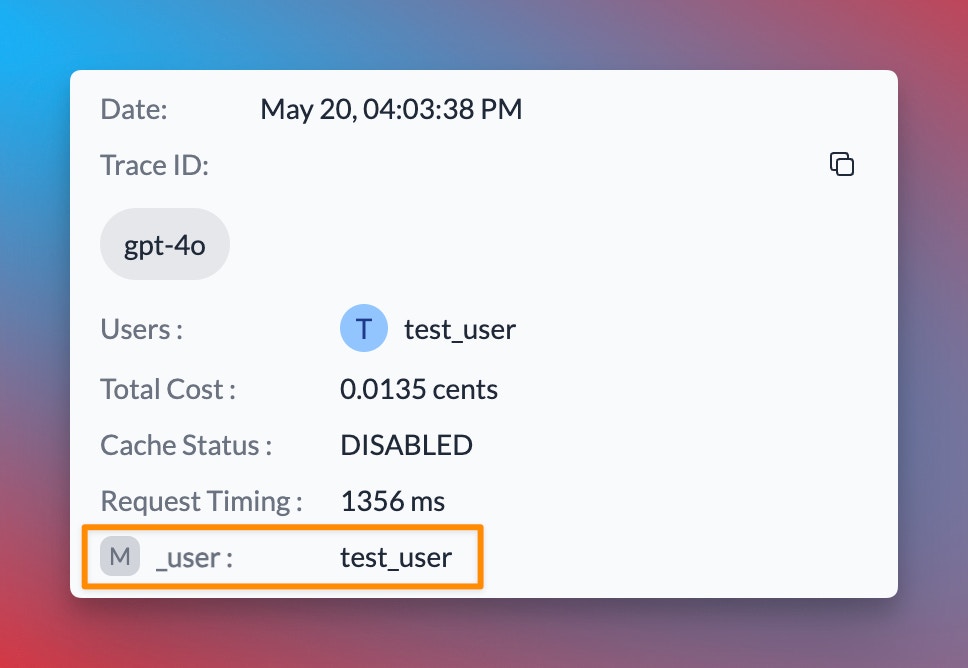
Portkey allows you to track user IDs passed with the user parameter in OpenAI requests, enabling you to monitor user-level costs, requests, and more:
```python Python theme={"system"}
response = portkey.chat.completions.create(
model="gpt-4o",
messages=[{"role": "user", "content": "Say this is a test"}],
user="user_123456"
)
```
```javascript Node.js theme={"system"}
const chatCompletion = await portkey.chat.completions.create({
messages: [{ role: "user", content: "Say this is a test" }],
model: "gpt-4o",
user: "user_12345",
});
```
```curl REST theme={"system"}
curl -X POST "https://api.portkey.ai/v1/chat/completions" \
-H "Content-Type: application/json" \
-H "Authorization: Bearer YOUR_PORTKEY_API_KEY" \
-d '{
"model": "gpt-4o",
"messages": [{"role": "user", "content": "Say this is a test"}],
"user": "user_123456"
}'
```
When you include the user parameter in your requests, Portkey logs will display the associated user ID, as shown in the image below:
 In addition to the `user` parameter, Portkey allows you to send arbitrary custom metadata with your requests. This powerful feature enables you to associate additional context or information with each request, which can be useful for analysis, debugging, or other custom use cases.
Explore how to use custom metadata to enhance your request tracking and analysis.
## Using The Gateway Config
Here's a simplified version of how to use Portkey's Gateway Configuration:
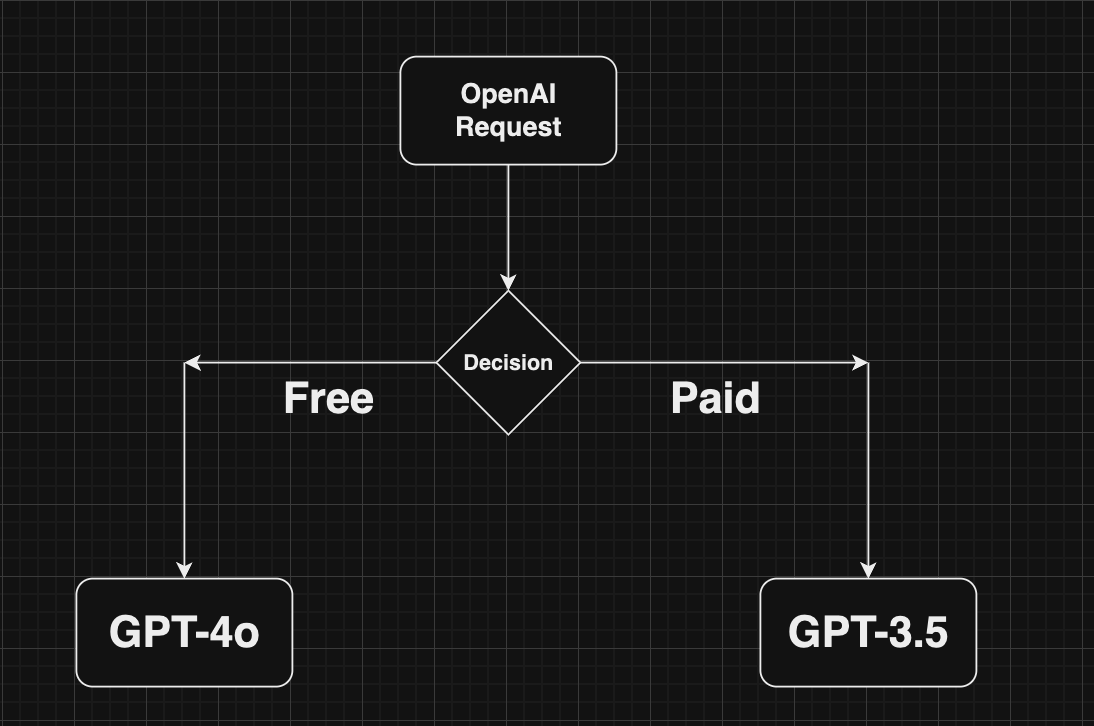
You can create a Gateway configuration using the Portkey Config Dashboard or by writing a JSON configuration in your code. In this example, requests are routed based on the user's subscription plan (paid or free).
```json theme={"system"}
config = {
"strategy": {
"mode": "conditional",
"conditions": [
{
"query": { "metadata.user_plan": { "$eq": "paid" } },
"then": "gpt4o"
},
{
"query": { "metadata.user_plan": { "$eq": "free" } },
"then": "gpt-3.5"
}
],
"default": "base-gpt4"
},
"targets": [
{
"name": "gpt4o",
"provider":"@xx"
},
{
"name": "gpt-3.5",
"provider":"@yy"
}
]
}
```
When a user makes a request, it will pass through Portkey's AI Gateway. Based on the configuration, the Gateway routes the request according to the user's metadata.
In addition to the `user` parameter, Portkey allows you to send arbitrary custom metadata with your requests. This powerful feature enables you to associate additional context or information with each request, which can be useful for analysis, debugging, or other custom use cases.
Explore how to use custom metadata to enhance your request tracking and analysis.
## Using The Gateway Config
Here's a simplified version of how to use Portkey's Gateway Configuration:
You can create a Gateway configuration using the Portkey Config Dashboard or by writing a JSON configuration in your code. In this example, requests are routed based on the user's subscription plan (paid or free).
```json theme={"system"}
config = {
"strategy": {
"mode": "conditional",
"conditions": [
{
"query": { "metadata.user_plan": { "$eq": "paid" } },
"then": "gpt4o"
},
{
"query": { "metadata.user_plan": { "$eq": "free" } },
"then": "gpt-3.5"
}
],
"default": "base-gpt4"
},
"targets": [
{
"name": "gpt4o",
"provider":"@xx"
},
{
"name": "gpt-3.5",
"provider":"@yy"
}
]
}
```
When a user makes a request, it will pass through Portkey's AI Gateway. Based on the configuration, the Gateway routes the request according to the user's metadata.
 Pass the Gateway configuration to your Portkey client. You can either use the config object or the Config ID from Portkey's hosted version.
```python Python theme={"system"}
from portkey_ai import Portkey
portkey = Portkey(
api_key="PORTKEY_API_KEY",
provider="@PROVIDER",
config=portkey_config
)
```
```javascript Node.js theme={"system"}
import Portkey from 'portkey-ai'
const portkey = new Portkey({
apiKey: "PORTKEY_API_KEY",
provider:"@PROVIDER",
config: portkeyConfig
})
```
That's it! Portkey seamlessly allows you to make your AI app more robust using built-in gateway features. Learn more about advanced gateway features:
Distribute requests across multiple targets based on defined weights.
Automatically switch to backup targets if the primary target fails.
Route requests to different targets based on specified conditions.
Enable caching of responses to improve performance and reduce costs.
## Guardrails
Portkey's AI gateway enables you to enforce input/output checks on requests by applying custom hooks before and after processing. Protect your user's/company's data by using PII guardrails and many more available on Portkey Guardrails:
```json theme={"system"}
{
"provider:"@openai-xxx",
"before_request_hooks": [{
"id": "input-guardrail-id-xx"
}],
"after_request_hooks": [{
"id": "output-guardrail-id-xx"
}]
}
```
Explore Portkey's guardrail features to enhance the security and reliability of your AI applications.
## Next Steps
The complete list of features supported in the SDK are available in our comprehensive documentation:
Explore the full capabilities of the Portkey SDK and how to leverage them in your projects.
***
## Limitations
Portkey does not support the following OpenAI features:
* Streaming for audio endpoints
* Chat completions feedback API
* File management endpoints
For the most up-to-date information on supported features and endpoints, please refer to our [API Reference](/docs/api-reference/inference-api/introduction).
***
Contact Us
Pass the Gateway configuration to your Portkey client. You can either use the config object or the Config ID from Portkey's hosted version.
```python Python theme={"system"}
from portkey_ai import Portkey
portkey = Portkey(
api_key="PORTKEY_API_KEY",
provider="@PROVIDER",
config=portkey_config
)
```
```javascript Node.js theme={"system"}
import Portkey from 'portkey-ai'
const portkey = new Portkey({
apiKey: "PORTKEY_API_KEY",
provider:"@PROVIDER",
config: portkeyConfig
})
```
That's it! Portkey seamlessly allows you to make your AI app more robust using built-in gateway features. Learn more about advanced gateway features:
Distribute requests across multiple targets based on defined weights.
Automatically switch to backup targets if the primary target fails.
Route requests to different targets based on specified conditions.
Enable caching of responses to improve performance and reduce costs.
## Guardrails
Portkey's AI gateway enables you to enforce input/output checks on requests by applying custom hooks before and after processing. Protect your user's/company's data by using PII guardrails and many more available on Portkey Guardrails:
```json theme={"system"}
{
"provider:"@openai-xxx",
"before_request_hooks": [{
"id": "input-guardrail-id-xx"
}],
"after_request_hooks": [{
"id": "output-guardrail-id-xx"
}]
}
```
Explore Portkey's guardrail features to enhance the security and reliability of your AI applications.
## Next Steps
The complete list of features supported in the SDK are available in our comprehensive documentation:
Explore the full capabilities of the Portkey SDK and how to leverage them in your projects.
***
## Limitations
Portkey does not support the following OpenAI features:
* Streaming for audio endpoints
* Chat completions feedback API
* File management endpoints
For the most up-to-date information on supported features and endpoints, please refer to our [API Reference](/docs/api-reference/inference-api/introduction).
***
Contact Us