> ## Documentation Index
> Fetch the complete documentation index at: https://docs.portkey.ai/docs/llms.txt
> Use this file to discover all available pages before exploring further.
# Make Your First Request
> Integrate Portkey and analyze your first LLM call in 2 minutes!
## 1. Get your Portkey API Key
[Create](https://app.portkey.ai/signup) or [log in](https://app.portkey.ai/login) to your Portkey account. Grab your account's API key from the "Settings" page.
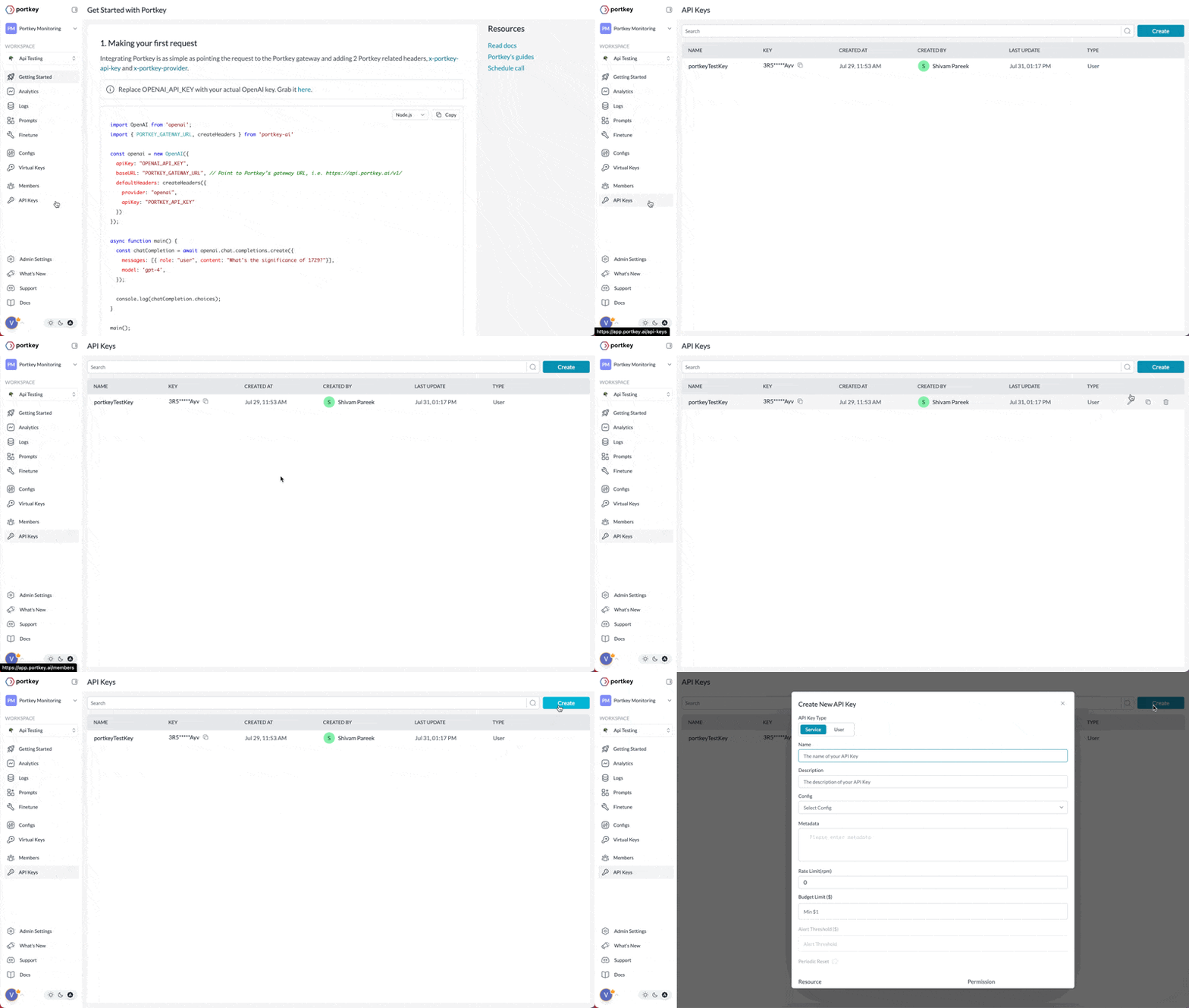 Based on your access level, you might see the relevant permissions on the API key modal - tick the ones you'd like, name your API key, and save it.
## 2. Integrate Portkey
Portkey offers a variety of integration options, including SDKs, REST APIs, and native connections with platforms like OpenAI, Langchain, and LlamaIndex, among others.
### Through the OpenAI SDK
If you're using the **OpenAI SDK**, import the Portkey SDK and configure it within your OpenAI client object:
### Portkey SDK
You can also use the **Portkey SDK / REST APIs** directly to make the chat completion calls. This is a more versatile way to make LLM calls across any provider:
Once, the integration is ready, you can view the requests reflect on your Portkey dashboard.
### Other Integration Guides
## 3. Next Steps
Now that you're up and running with Portkey, you can dive into the various Portkey features to learn about all of the supported functionalities:
While you're here, why not [give us a star](https://git.new/ai-gateway-docs)? It helps us a lot!
Based on your access level, you might see the relevant permissions on the API key modal - tick the ones you'd like, name your API key, and save it.
## 2. Integrate Portkey
Portkey offers a variety of integration options, including SDKs, REST APIs, and native connections with platforms like OpenAI, Langchain, and LlamaIndex, among others.
### Through the OpenAI SDK
If you're using the **OpenAI SDK**, import the Portkey SDK and configure it within your OpenAI client object:
### Portkey SDK
You can also use the **Portkey SDK / REST APIs** directly to make the chat completion calls. This is a more versatile way to make LLM calls across any provider:
Once, the integration is ready, you can view the requests reflect on your Portkey dashboard.
### Other Integration Guides
## 3. Next Steps
Now that you're up and running with Portkey, you can dive into the various Portkey features to learn about all of the supported functionalities:
While you're here, why not [give us a star](https://git.new/ai-gateway-docs)? It helps us a lot!