> ## Documentation Index
> Fetch the complete documentation index at: https://docs.portkey.ai/docs/llms.txt
> Use this file to discover all available pages before exploring further.
# Handling Anthropic's Silent 'Overloaded' Errors
> A step-by-step guide to detecting Anthropic’s streamed `overloaded_error` and building a resilient, automatic fallback to another model using Portkey.
As a developer, one of the most frustrating issues to debug is a silent failure. Your application appears to be working, your status codes are green, but your users are getting a broken experience. This is exactly what can happen with Anthropic's API during peak load.
This cookbook provides a production-ready recipe to handle these silent errors gracefully, ensuring your application remains resilient and your users stay happy.
## The Challenge: Anthropic's "Successful" Failure
When Anthropic's models are overloaded, they can send an `overloaded_error` message. For streaming responses, this error comes in the first chunk of the stream, but the HTTP response code is still `200 OK`.
```text Anthropic overloaded_error response theme={"system"}
HTTP 200 OK
{"type":"error","error":{"type":"overloaded_error","message":"Overloaded"}}
```
Because the status code is `200`, standard fallback logic (like Portkey's `on_status_codes`) won't trigger. Your application might interpret this as a successful but empty response, leading to a poor user experience.
## The Strategy: Content-Aware Fallbacks
We'll use Portkey's **Output Guardrails** to inspect the *content* of the response stream. This allows us to create a rule that looks for the specific `overloaded_error` message and triggers a fallback, even when the status code is `200`.
**Important limitation:** Output guardrails on streaming requests are informational only — no fallback or retry actions are triggered. For this solution to work with automatic fallback, use non-streaming (synchronous) requests. If you're using streaming, the output guardrail results will be available in `hook_results` but won't trigger the fallback automatically.
Here's the plan:
1. **Create an Output Guardrail** to detect the `"type":"overloaded_error"` string in the response.
2. **Build a Fallback Config** that uses this guardrail to trigger a fallback to a different model (like GPT-4o).
3. **Implement and Verify** the solution in your code.
***
## The Recipe: A Step-by-Step Guide
### Step 1: Create the Output Guardrail
First, we'll create a simple guardrail on Portkey that scans the response for the specific error string.
1. Navigate to the **Guardrails** page in your Portkey dashboard.
2. Click **Create Guardrail** and configure it with the following settings:
* **Guardrail Type:** `Contains`
* **Check:** `NONE`
* **Words or Phrases:** `"type":"overloaded_error"`
**Why use `NONE` instead of `ANY`?** The operator determines when the guardrail passes or fails:
* With `ANY`: The guardrail passes when the phrase IS found and fails when it's NOT found. Since normal responses don't contain `"type":"overloaded_error"`, it would fail on every request and trigger a fallback unnecessarily.
* With `NONE`: The guardrail passes when the phrase is NOT found and fails when it IS found. Normal responses pass through, while responses containing the overloaded error trigger the fallback as intended.
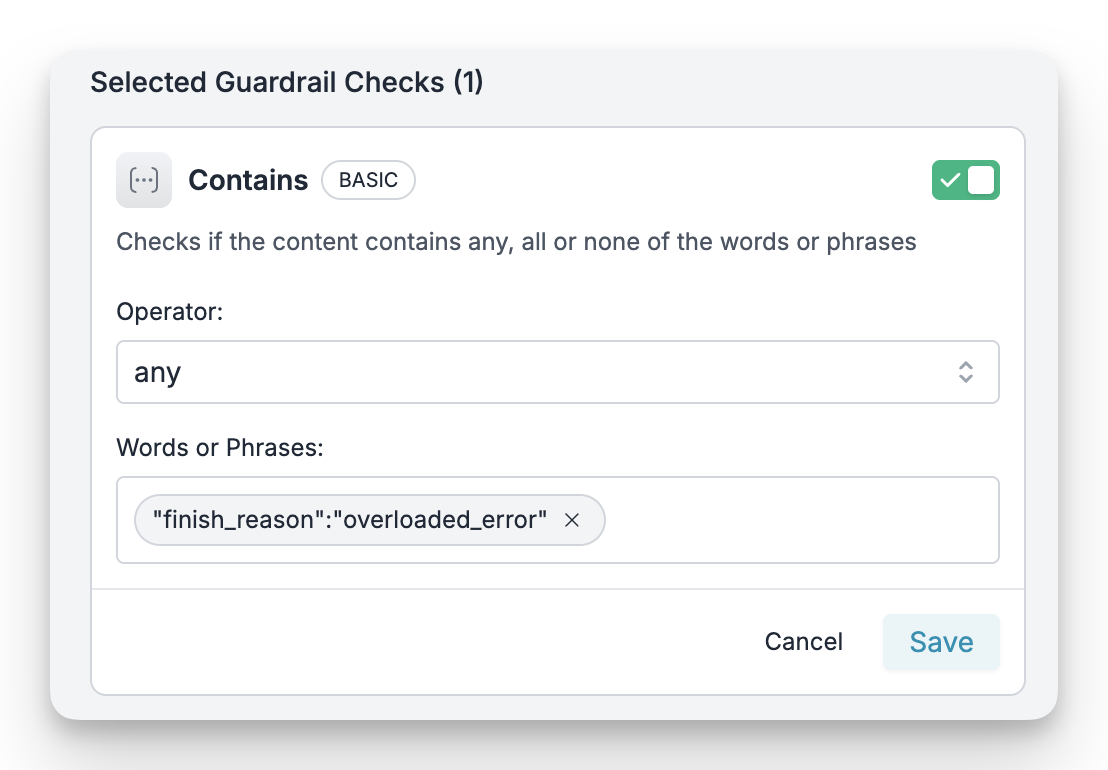 Give your guardrail a memorable name (like `anthropic-overload-detector`) and save it. Note down its **ID** (e.g., `grl_...`), as you'll need it in the next step.
### Step 2: Create the Fallback Config
Now, let's define the fallback behavior. We'll create a Portkey Config that links our new guardrail to a fallback strategy.
1. Navigate to the **Configs** page and click **Create Config**.
2. Paste the following JSON configuration:
```json Fallback Config theme={"system"}
{
"strategy": {
"mode": "fallback",
"on_status_codes": [446,246]
},
"targets": [
{
"override_params":{"model":"@anthropic/claude-sonnet-4"}
},
{
"override_params":{"model":"@openai/gpt-4o"}
}
]
}
```
**What this config does:**
* `output_guardrails`: Attaches our detector guardrail to this config.
* `strategy`: Defines a `fallback` mode.
* `on_status_codes: [246,446]`: This is the key part. When our Output Guardrail detects the error string in a **stream**, Portkey internally assigns it status `446` or `246` based on your settings. This rule tells Portkey to trigger the fallback when that happens.
* `targets`: Defines the sequence of models to try. It will first attempt the primary Anthropic model and fall back to the OpenAI model if the guardrail is triggered.
Save the config and note its **ID** (e.g., `cfg_...`).
### Step 3: Implement in Your Code
Finally, let's use this config in our application. Simply pass the Config ID when making your Portkey request.
```python theme={"system"}
from portkey_ai import Portkey
portkey = Portkey(
api_key="YOUR_PORTKEY_KEY",
config="cfg_..." # 👈 Replace with your Config ID
)
response = portkey.chat.completions.create(
messages=[{"role": "user", "content": "Tell me a story about a brave robot."}],
stream=False # Output guardrails only work with non-streaming requests
)
print("Response from model:")
print(response.choices[0].message.content)
```
With this setup, if Anthropic returns an `overloaded_error`, the guardrail will catch it, and Portkey will automatically retry the request with your fallback model (OpenAI's GPT-4o), ensuring your application remains operational.
Remember that this approach only works with non-streaming requests. For streaming use cases, consider implementing client-side error detection or using alternative resilience strategies.
***
## Verifying the Fallback
You can confirm the fallback is working by checking your Portkey logs.
1. Go to the **Logs** page in your Portkey dashboard.
2. You should see two requests for a single incoming call:
* The first request to Anthropic will have a status of `output_guardrail_triggered` (Status Code `446`).
* The second request to your fallback provider (OpenAI) will have a status of `success`.
This provides a clear audit trail of the automatic failover, giving you full visibility into your application's resilience.
## Summary
By combining Portkey's **Output Guardrails** with a **Fallback Config**, you can build a robust system that intelligently handles content-level errors that are normally invisible to traditional, status-code-based monitoring. This ensures your AI features remain reliable, even when upstream providers are experiencing issues.
### Further Reading
* [Guardrails Reference](https://portkey.ai/docs/product/guardrails-intro)
* [Fallback Configs](https://portkey.ai/docs/product/ai-gateway/fallbacks)
* [Virtual Keys](https://portkey.ai/docs/product/ai-gateway/virtual-keys)
Give your guardrail a memorable name (like `anthropic-overload-detector`) and save it. Note down its **ID** (e.g., `grl_...`), as you'll need it in the next step.
### Step 2: Create the Fallback Config
Now, let's define the fallback behavior. We'll create a Portkey Config that links our new guardrail to a fallback strategy.
1. Navigate to the **Configs** page and click **Create Config**.
2. Paste the following JSON configuration:
```json Fallback Config theme={"system"}
{
"strategy": {
"mode": "fallback",
"on_status_codes": [446,246]
},
"targets": [
{
"override_params":{"model":"@anthropic/claude-sonnet-4"}
},
{
"override_params":{"model":"@openai/gpt-4o"}
}
]
}
```
**What this config does:**
* `output_guardrails`: Attaches our detector guardrail to this config.
* `strategy`: Defines a `fallback` mode.
* `on_status_codes: [246,446]`: This is the key part. When our Output Guardrail detects the error string in a **stream**, Portkey internally assigns it status `446` or `246` based on your settings. This rule tells Portkey to trigger the fallback when that happens.
* `targets`: Defines the sequence of models to try. It will first attempt the primary Anthropic model and fall back to the OpenAI model if the guardrail is triggered.
Save the config and note its **ID** (e.g., `cfg_...`).
### Step 3: Implement in Your Code
Finally, let's use this config in our application. Simply pass the Config ID when making your Portkey request.
```python theme={"system"}
from portkey_ai import Portkey
portkey = Portkey(
api_key="YOUR_PORTKEY_KEY",
config="cfg_..." # 👈 Replace with your Config ID
)
response = portkey.chat.completions.create(
messages=[{"role": "user", "content": "Tell me a story about a brave robot."}],
stream=False # Output guardrails only work with non-streaming requests
)
print("Response from model:")
print(response.choices[0].message.content)
```
With this setup, if Anthropic returns an `overloaded_error`, the guardrail will catch it, and Portkey will automatically retry the request with your fallback model (OpenAI's GPT-4o), ensuring your application remains operational.
Remember that this approach only works with non-streaming requests. For streaming use cases, consider implementing client-side error detection or using alternative resilience strategies.
***
## Verifying the Fallback
You can confirm the fallback is working by checking your Portkey logs.
1. Go to the **Logs** page in your Portkey dashboard.
2. You should see two requests for a single incoming call:
* The first request to Anthropic will have a status of `output_guardrail_triggered` (Status Code `446`).
* The second request to your fallback provider (OpenAI) will have a status of `success`.
This provides a clear audit trail of the automatic failover, giving you full visibility into your application's resilience.
## Summary
By combining Portkey's **Output Guardrails** with a **Fallback Config**, you can build a robust system that intelligently handles content-level errors that are normally invisible to traditional, status-code-based monitoring. This ensures your AI features remain reliable, even when upstream providers are experiencing issues.
### Further Reading
* [Guardrails Reference](https://portkey.ai/docs/product/guardrails-intro)
* [Fallback Configs](https://portkey.ai/docs/product/ai-gateway/fallbacks)
* [Virtual Keys](https://portkey.ai/docs/product/ai-gateway/virtual-keys)