> ## Documentation Index
> Fetch the complete documentation index at: https://docs.portkey.ai/docs/llms.txt
> Use this file to discover all available pages before exploring further.
# Configure Provider Access Permissions
This is a Portkey Enterprise plan feature.
## Overview
Provider Management in Portkey allows Organization administrators to define who can view and manage providers within workspaces. This feature provides granular control over access to providers, which are critical for managing connections to external AI services.
## Accessing Provider Management Permissions
1. Navigate to **Admin Settings** in the Portkey dashboard
2. Select the **Security** tab from the left sidebar
3. Locate the **Provider Management** section
## Permission Settings
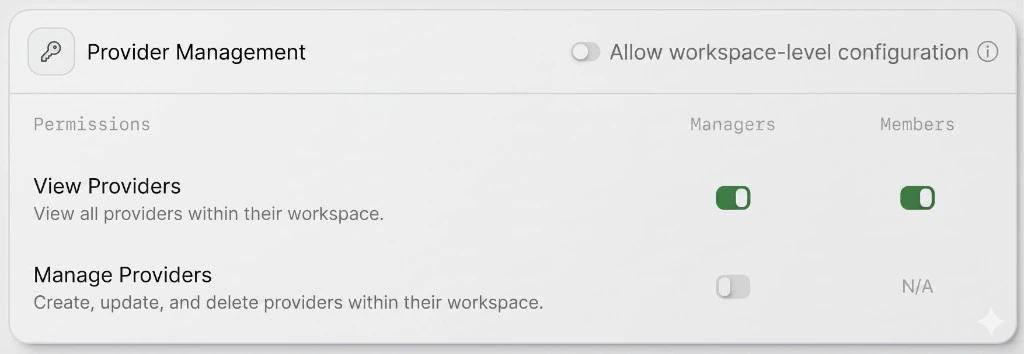
The Provider Management section includes a toggle for **Allow workspace-level configuration** and provides granular permission controls for different user roles:
| Permission | Description | Managers | Members |
| -------------------- | ------------------------------------------------------------ | -------- | ------- |
| **View Providers** | View all providers within their workspace. | Yes | Yes |
| **Manage Providers** | Create, update, and delete providers within their workspace. | Yes | N/A |
Members cannot create, modify, or delete providers by default. Only Managers have access to manage providers.
 ## Understanding Providers in Model Catalog
Providers in Portkey's [Model Catalog](/product/model-catalog) securely store your API credentials and enable:
* Centralized management of AI provider credentials
* Abstraction of actual API keys from end users
* Definition of routing rules, fallbacks, and other advanced features
* Application of usage limits and tracking across providers
By controlling who can view and manage providers, organizations can maintain security while enabling appropriate access for different team roles.
## Related Features
Learn about Portkey's access control features including user roles and organization hierarchy
Understand how to add and manage providers in the Model Catalog
Learn how to set budget limits on providers to control spending
## Understanding Providers in Model Catalog
Providers in Portkey's [Model Catalog](/product/model-catalog) securely store your API credentials and enable:
* Centralized management of AI provider credentials
* Abstraction of actual API keys from end users
* Definition of routing rules, fallbacks, and other advanced features
* Application of usage limits and tracking across providers
By controlling who can view and manage providers, organizations can maintain security while enabling appropriate access for different team roles.
## Related Features
Learn about Portkey's access control features including user roles and organization hierarchy
Understand how to add and manage providers in the Model Catalog
Learn how to set budget limits on providers to control spending