> ## Documentation Index
> Fetch the complete documentation index at: https://docs.portkey.ai/docs/llms.txt
> Use this file to discover all available pages before exploring further.
# Fallbacks
> Automatically switch to backup LLMs when the primary fails.
Available on all Portkey [plans](https://portkey.ai/pricing).
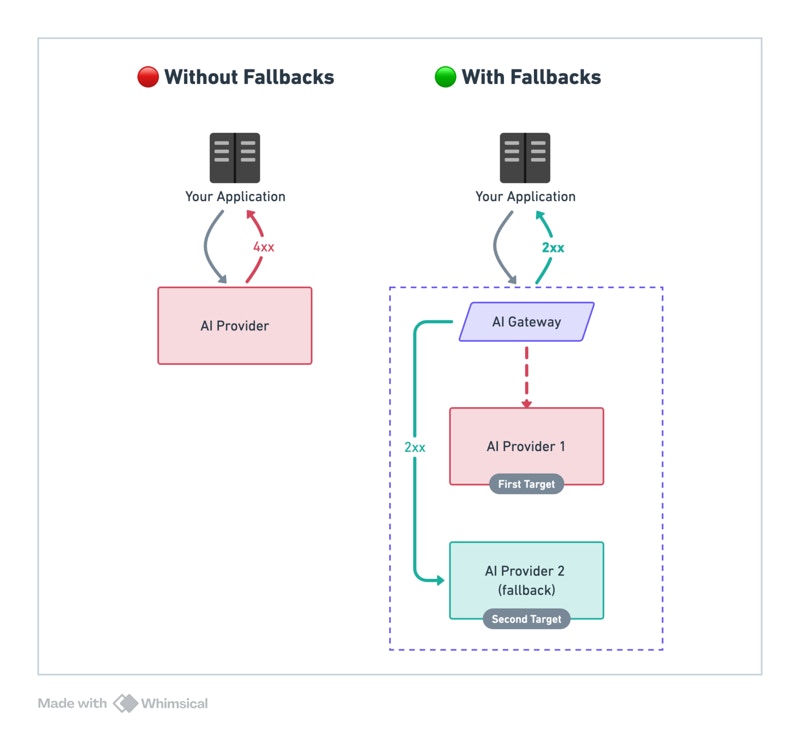
Specify a prioritized list of providers/models. If the primary LLM fails, Portkey automatically falls back to the next in line.
 ## Examples
```json Between Models theme={"system"}
{
"strategy": { "mode": "fallback" },
"targets": [
{ "override_params": { "model": "@openai-prod/gpt-4o" } },
{ "override_params": { "model": "@anthropic-prod/claude-3-5-sonnet-20241022" } }
]
}
```
```json Between Providers (model from request) theme={"system"}
{
"strategy": { "mode": "fallback" },
"targets": [
{ "provider": "@openai-prod" },
{ "provider": "@azure-prod" }
]
}
```
```json On Rate Limit Only (429) theme={"system"}
{
"strategy": { "mode": "fallback", "on_status_codes": [429] },
"targets": [
{ "provider": "@openai-prod" },
{ "provider": "@azure-prod" }
]
}
```
```json Multi-tier Fallback theme={"system"}
{
"strategy": { "mode": "fallback" },
"targets": [
{ "override_params": { "model": "@openai-prod/gpt-4o" } },
{ "override_params": { "model": "@anthropic-prod/claude-3-5-sonnet-20241022" } },
{ "override_params": { "model": "@google-prod/gemini-1.5-pro" } }
]
}
```
The `@provider-slug/model-name` format automatically routes to the correct provider. Set up providers in [Model Catalog](https://app.portkey.ai/model-catalog).
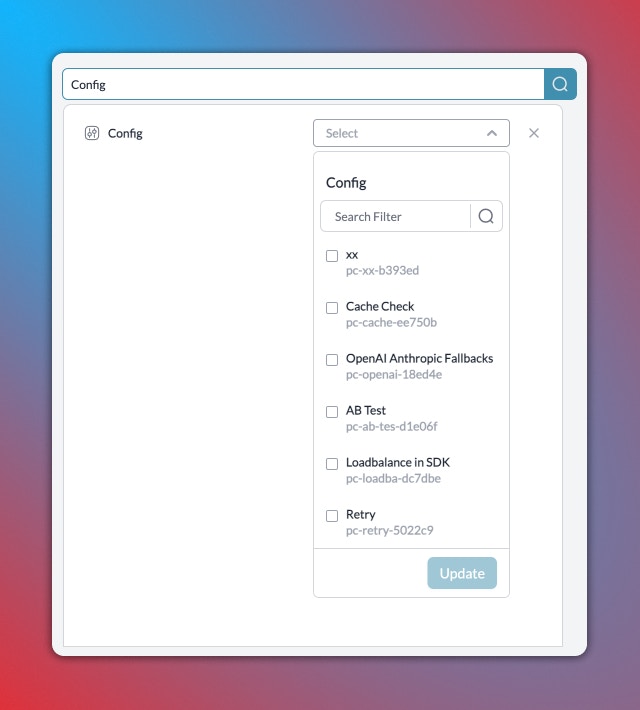
[Create](/product/ai-gateway/configs#creating-configs) and [use](/product/ai-gateway/configs#using-configs) configs in your requests.
## Trigger on Specific Status Codes
By default, fallback triggers on any **non-2xx** status code.
Customize with `on_status_codes`:
```json theme={"system"}
{
"strategy": { "mode": "fallback", "on_status_codes": [429, 503] },
"targets": [
{ "provider": "@openai-prod" },
{ "provider": "@azure-prod" }
]
}
```
## Tracing Fallback Requests
Portkey logs all requests in a fallback chain. To trace:
1. Filter logs by `Config ID` to see all requests using that config
2. Filter by `Trace ID` to see all attempts for a single request
## Examples
```json Between Models theme={"system"}
{
"strategy": { "mode": "fallback" },
"targets": [
{ "override_params": { "model": "@openai-prod/gpt-4o" } },
{ "override_params": { "model": "@anthropic-prod/claude-3-5-sonnet-20241022" } }
]
}
```
```json Between Providers (model from request) theme={"system"}
{
"strategy": { "mode": "fallback" },
"targets": [
{ "provider": "@openai-prod" },
{ "provider": "@azure-prod" }
]
}
```
```json On Rate Limit Only (429) theme={"system"}
{
"strategy": { "mode": "fallback", "on_status_codes": [429] },
"targets": [
{ "provider": "@openai-prod" },
{ "provider": "@azure-prod" }
]
}
```
```json Multi-tier Fallback theme={"system"}
{
"strategy": { "mode": "fallback" },
"targets": [
{ "override_params": { "model": "@openai-prod/gpt-4o" } },
{ "override_params": { "model": "@anthropic-prod/claude-3-5-sonnet-20241022" } },
{ "override_params": { "model": "@google-prod/gemini-1.5-pro" } }
]
}
```
The `@provider-slug/model-name` format automatically routes to the correct provider. Set up providers in [Model Catalog](https://app.portkey.ai/model-catalog).
[Create](/product/ai-gateway/configs#creating-configs) and [use](/product/ai-gateway/configs#using-configs) configs in your requests.
## Trigger on Specific Status Codes
By default, fallback triggers on any **non-2xx** status code.
Customize with `on_status_codes`:
```json theme={"system"}
{
"strategy": { "mode": "fallback", "on_status_codes": [429, 503] },
"targets": [
{ "provider": "@openai-prod" },
{ "provider": "@azure-prod" }
]
}
```
## Tracing Fallback Requests
Portkey logs all requests in a fallback chain. To trace:
1. Filter logs by `Config ID` to see all requests using that config
2. Filter by `Trace ID` to see all attempts for a single request
 ## Combine with Other Strategies
Fallback targets are fully composable — each target can be a load balancer, a conditional router, or another fallback. Any strategy can nest inside any other.
The primary target is a load balancer cluster. Individual endpoint failures stay within the cluster — only a full provider outage triggers the cross-model backup.
When the primary fails, a conditional router picks the best backup based on request context — keeping EU users on EU infrastructure even during outages.
Give each load-balanced slot its own independent fallback chain. One model family failing doesn't trigger another family's backup.
See a complete config combining conditional routing, load balancing, and fallbacks across four model families.
## Considerations
* Ensure fallback LLMs are compatible with your use case
* A single request may invoke multiple LLMs
* Each LLM has different latency and pricing
## Combine with Other Strategies
Fallback targets are fully composable — each target can be a load balancer, a conditional router, or another fallback. Any strategy can nest inside any other.
The primary target is a load balancer cluster. Individual endpoint failures stay within the cluster — only a full provider outage triggers the cross-model backup.
When the primary fails, a conditional router picks the best backup based on request context — keeping EU users on EU infrastructure even during outages.
Give each load-balanced slot its own independent fallback chain. One model family failing doesn't trigger another family's backup.
See a complete config combining conditional routing, load balancing, and fallbacks across four model families.
## Considerations
* Ensure fallback LLMs are compatible with your use case
* A single request may invoke multiple LLMs
* Each LLM has different latency and pricing