> ## Documentation Index
> Fetch the complete documentation index at: https://docs.portkey.ai/docs/llms.txt
> Use this file to discover all available pages before exploring further.
# Coding Agents
> The governance layer for Claude Code, Codex, and other AI coding agents — centralized credentials, cost controls, observability, and provider failover for platform teams.
When developers use Claude Code or Codex individually, it works fine. When 100 developers use it — raw API keys get scattered, costs spike overnight without attribution, and there's no fallback when a provider goes down.
Portkey is the gateway that sits between your team's coding agents and LLM providers. **Developers change nothing. You get full control.**
Centralize provider credentials. Issue scoped API keys per team. Rotate or revoke access without touching developer configs.
Set hard budget and rate limits per developer, team, or workspace. Block requests when limits are hit.
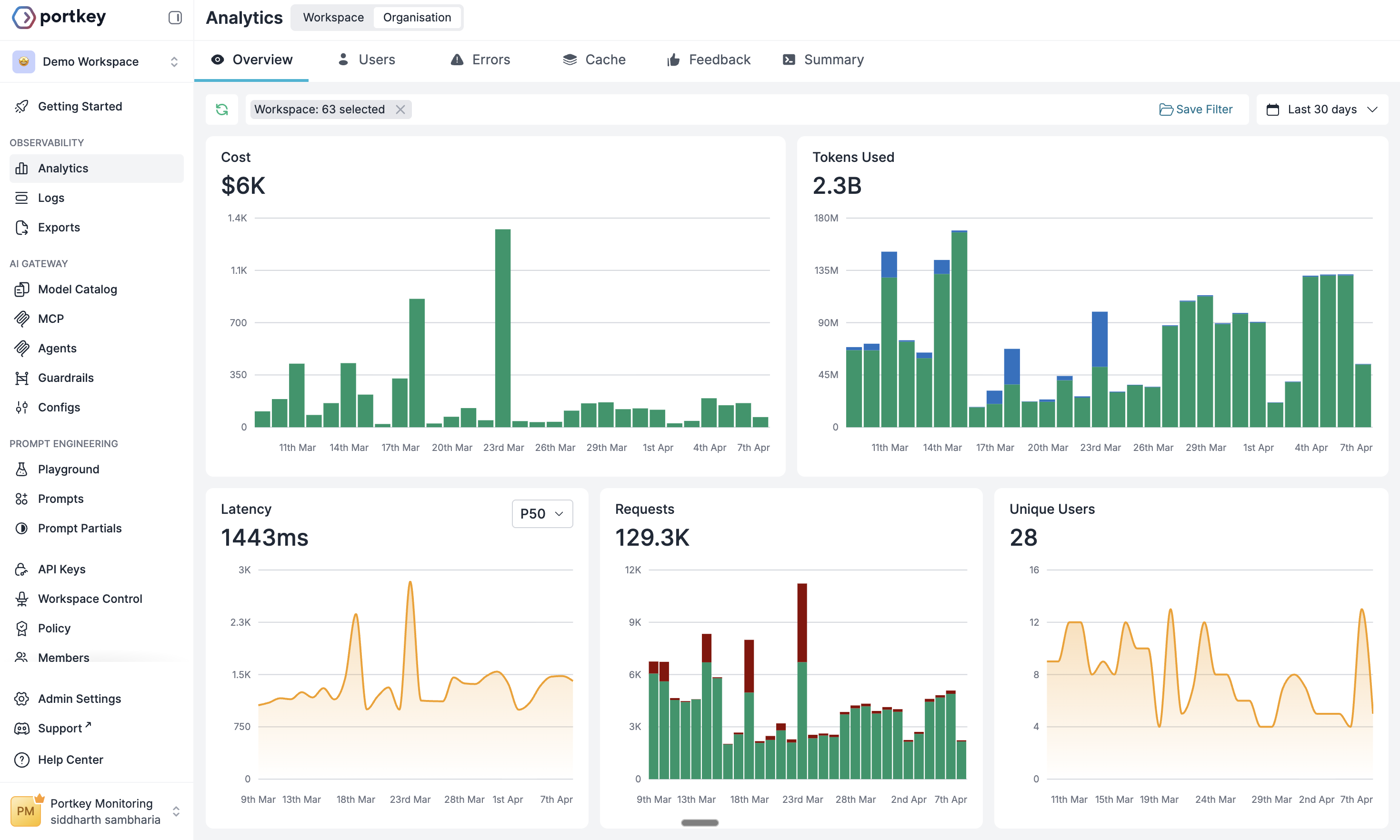
Log every request — cost, tokens, latency, model, and who made it. Attribute spend by team or project.
***
## Supported agents
The most widely deployed AI coding agent. Supports Anthropic direct, Bedrock, and Vertex AI through a single Portkey endpoint.
OpenAI's terminal coding agent. Configure via `config.toml` with full provider flexibility.
Route Cursor's AI requests through Portkey for observability and cost controls.
Set Portkey as Cline's custom OpenAI base URL.
Drop-in Portkey integration via base URL override.
Minimal extensible terminal coding agent. Route through Portkey via custom provider config.
Any OpenAI-compatible coding agent works with Portkey.
***
## What platform teams get
### Access control
Developers never see provider credentials. Every request is authenticated through a scoped Portkey key.
| Goal | What to use | Description |
| ------------------------- | -------------------------------------------------------------------------------- | ----------------------------------------------------------------------------------------------------------------------------------- |
| Centralize credentials | [Model Catalog](/product/model-catalog) | Store Anthropic, Bedrock, and Vertex keys once. Issue scoped Portkey keys to teams — no raw key distribution. |
| Isolate teams | [Workspaces](/product/enterprise-offering/org-management/workspaces) | Each team gets its own workspace with separate budgets, rate limits, and provider access. One team's usage never affects another's. |
| Manage team access | [API Keys](/product/enterprise-offering/org-management/api-keys-authn-and-authz) | One key per developer or team. Rotate or revoke from one place without touching developer configs. |
| Provision access at scale | [SSO / SCIM](/product/enterprise-offering/org-management/sso) | Connect your identity provider. Onboard and offboard developers automatically. |
### Cost management
Agentic loops are expensive. One uncapped session can rack up hundreds of dollars overnight.
| Goal | What to use | Description |
| -------------------------- | --------------------------------------------------------------- | ---------------------------------------------------------------------------------------------------------- |
| Cap team spending | [Budget Policies](/product/enterprise-offering/budget-policies) | Hard spend limits per developer, team, or workspace. Requests block when the limit is hit. |
| Prevent traffic starvation | [Rate Limits](/product/model-catalog/rate-limits) | Stop any single user from consuming shared provider capacity. |
| Attribute costs by team | [Logs + Metadata](/product/observability/metadata) | Every request logged with team, project, model, tokens, and exact cost. Answer spend questions in seconds. |
 ### Reliability
Coding agents fail silently when providers go down. Portkey routes around outages automatically.
| Goal | What to use | Description |
| ------------------------ | ---------------------------------------------------- | ----------------------------------------------------------------------------------- |
| Survive provider outages | [Fallbacks](/product/ai-gateway/fallbacks) | Auto-retry on Bedrock or Vertex if Anthropic goes down — no developer intervention. |
| Handle team-scale volume | [Load Balancing](/product/ai-gateway/load-balancing) | Distribute traffic across providers and API keys. |
### Governance
Coding agents operate with terminal-level access. Portkey adds the control layer.
| Goal | What to use | Description |
| --------------------------- | ----------------------------------------------------- | ------------------------------------------------------------------------------------------------ |
| Protect sensitive codebases | [Guardrails](/product/guardrails) | PII detection, prompt injection protection, and content filtering before requests hit the model. |
| Govern MCP tool access | [MCP Gateway](/product/mcp-gateway) | Centralized auth and full call logs for every MCP tool your agents use. |
| Maintain a compliance trail | [Audit Logs](/product/enterprise-offering/audit-logs) | Immutable record of every access, config change, and policy action across the org. |
| Share coding standards | [Agent Skills](/guides/coding-agents/skills) | Version prompt instructions and sync them to every developer's agent with one command. |
***
## Setting up Claude Code and Codex
For Claude Code and Codex, the [Portkey CLI](/guides/coding-agents/agent-cli) sets up gateway routing, MCP servers, and team skills in one command:
```bash theme={"system"}
npx portkey
```
Anthropic direct, Bedrock, and Vertex AI
Full `config.toml` reference and provider options
***
## Next steps
Hard spend limits per team or developer
Centralized provider credentials and access controls
Fallbacks, load balancing, and routing strategies
Govern MCP tool access across your agent fleet
Logs, traces, and cost breakdowns for every session
Sync team coding standards to every developer's agent
### Reliability
Coding agents fail silently when providers go down. Portkey routes around outages automatically.
| Goal | What to use | Description |
| ------------------------ | ---------------------------------------------------- | ----------------------------------------------------------------------------------- |
| Survive provider outages | [Fallbacks](/product/ai-gateway/fallbacks) | Auto-retry on Bedrock or Vertex if Anthropic goes down — no developer intervention. |
| Handle team-scale volume | [Load Balancing](/product/ai-gateway/load-balancing) | Distribute traffic across providers and API keys. |
### Governance
Coding agents operate with terminal-level access. Portkey adds the control layer.
| Goal | What to use | Description |
| --------------------------- | ----------------------------------------------------- | ------------------------------------------------------------------------------------------------ |
| Protect sensitive codebases | [Guardrails](/product/guardrails) | PII detection, prompt injection protection, and content filtering before requests hit the model. |
| Govern MCP tool access | [MCP Gateway](/product/mcp-gateway) | Centralized auth and full call logs for every MCP tool your agents use. |
| Maintain a compliance trail | [Audit Logs](/product/enterprise-offering/audit-logs) | Immutable record of every access, config change, and policy action across the org. |
| Share coding standards | [Agent Skills](/guides/coding-agents/skills) | Version prompt instructions and sync them to every developer's agent with one command. |
***
## Setting up Claude Code and Codex
For Claude Code and Codex, the [Portkey CLI](/guides/coding-agents/agent-cli) sets up gateway routing, MCP servers, and team skills in one command:
```bash theme={"system"}
npx portkey
```
Anthropic direct, Bedrock, and Vertex AI
Full `config.toml` reference and provider options
***
## Next steps
Hard spend limits per team or developer
Centralized provider credentials and access controls
Fallbacks, load balancing, and routing strategies
Govern MCP tool access across your agent fleet
Logs, traces, and cost breakdowns for every session
Sync team coding standards to every developer's agent