> ## Documentation Index
> Fetch the complete documentation index at: https://docs.portkey.ai/docs/llms.txt
> Use this file to discover all available pages before exploring further.
# Guardrails
> Ship to production confidently with Portkey Guardrails on your requests & responses
This feature is available on all plans.
* **Developer**: Access to `BASIC` Guardrails
* **Production**: Access to `BASIC`, `PARTNER`, `PRO` Guardrails.
* **Enterprise**: Access to **all** Guardrails plus `custom` Guardrails.
LLMs are brittle - not just in API uptimes or their inexplicable `400`/`500` errors, but also in their core behavior. You can get a response with a `200` status code that completely errors out for your app's pipeline due to mismatched output. With Portkey's Guardrails, we now help you enforce LLM behavior in real-time with our *Guardrails on the Gateway* pattern.
Use Portkey's Guardrails to verify your LLM inputs AND outputs, adhering to your specifed checks. Since Guardrails are built on top of our [Gateway](https://github.com/portkey-ai/gateway), you can orchestrate your request - with actions ranging from *denying the request*, *logging the guardrail result*, *creating an evals dataset*, *falling back to another LLM or prompt*, *retrying the request*, and more.
#### Examples of Guardrails Portkey offers:
* **Regex match** - Check if the request or response text matches a regex pattern
* **JSON Schema** - Check if the response JSON matches a JSON schema
* **Contains Code** - Checks if the content contains code of format SQL, Python, TypeScript, etc.
* **Custom guardrail** - If you are running a custom guardrail currently, you can also integrate it with Portkey
* ...and many more.
Portkey currently offers 20+ deterministic guardrails like the ones described above as well as LLM-based guardrails like `Detect Gibberish`, `Scan for prompt injection`, and more. These guardrails serve as protective barriers that help mitigate risks associated with Gen AI, ensuring its responsible and ethical deployment within organizations.
Portkey also integrates with your favourite Guardrail platforms like [Aporia](https://www.aporia.com/), [SydeLabs](https://sydelabs.ai/), [Pillar Security](https://www.pillar.security/) and more. Just add their API keys to Portkey and you can enable their guardrails policies on your Portkey calls! [More details on Guardrail Partners here.](/product/guardrails/list-of-guardrail-checks)
***
## Using Guardrails
Putting Portkey Guardrails in production is just a 4-step process:
1. Create Guardrail Checks
2. Create Guardrail Actions
3. Enable Guardrail through Configs
4. Attach the Config to a Request
This flowchart shows how Portkey processes a Guardrails request:
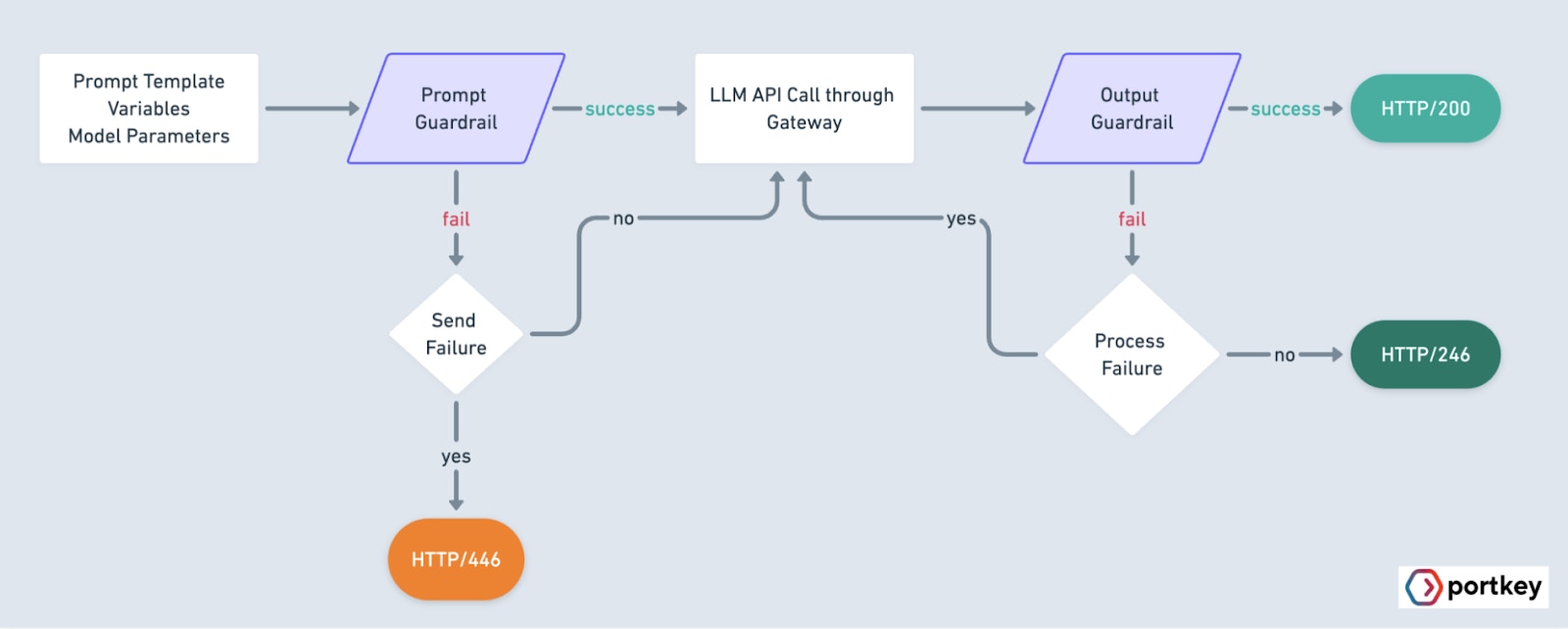 Portkey only evaluates the last message in the request body when running guardrails checks.
***
## 1. Create a New Guardrail & Add Checks
On the `Guardrails` page, click on `Create` and add your preferred Guardrail checks from the right sidebar.
On Portkey, you can configure Guardrails to be run on either the `INPUT` (i.e. `PROMPT`) or the `OUTPUT`. Hence, for the Guardrail you create, make sure your Guardrail is only validating **ONLY ONE OF** the **Input** or the **Output**.
Portkey only evaluates the last message in the request body when running guardrails checks.
***
## 1. Create a New Guardrail & Add Checks
On the `Guardrails` page, click on `Create` and add your preferred Guardrail checks from the right sidebar.
On Portkey, you can configure Guardrails to be run on either the `INPUT` (i.e. `PROMPT`) or the `OUTPUT`. Hence, for the Guardrail you create, make sure your Guardrail is only validating **ONLY ONE OF** the **Input** or the **Output**.
 Each Guardrail Check has a custom input field based on its usecase — just add the relevant details to the form and save your check.
* You can add as many checks as you want to a single Guardrail.
* A check ONLY returns a boolean (`Yes`/`No`) verdict.
***
## 2. Add Guardrail Actions
Define a basic orchestration logic for your Guardrail here.
Guardrail is created to validate **ONLY ONE OF** the `Input` or the `Output`. The Actions set here will also apply only to either the `request` or the `response`.
Each Guardrail Check has a custom input field based on its usecase — just add the relevant details to the form and save your check.
* You can add as many checks as you want to a single Guardrail.
* A check ONLY returns a boolean (`Yes`/`No`) verdict.
***
## 2. Add Guardrail Actions
Define a basic orchestration logic for your Guardrail here.
Guardrail is created to validate **ONLY ONE OF** the `Input` or the `Output`. The Actions set here will also apply only to either the `request` or the `response`.
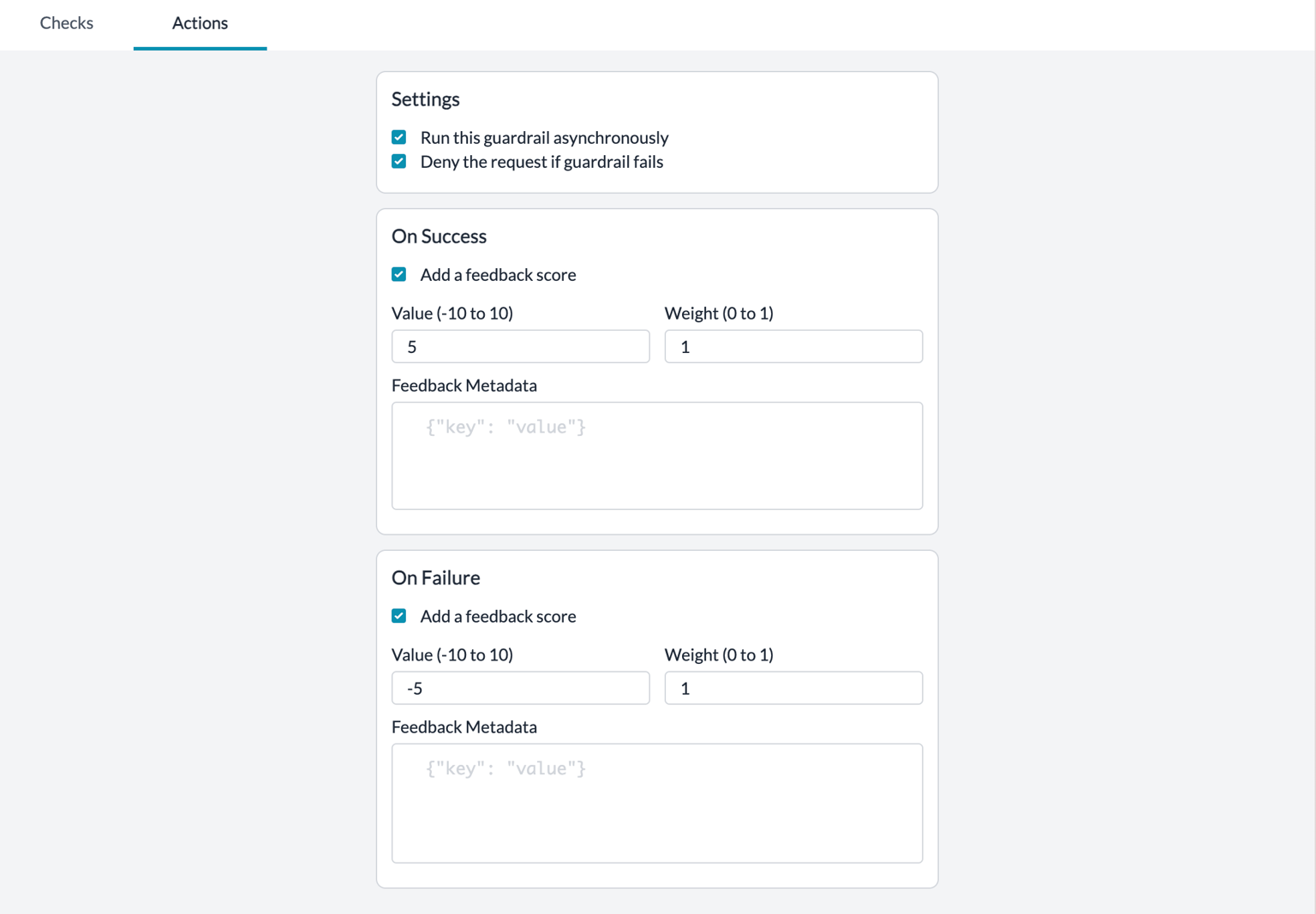 ### There are 7 Types of Guardrail Actions
| Action | State | Description | Impact |
| :------------- | :-------------------------------------- | :--------------------------------------------------------------------------------------------------------------------------------------------------------------------------------------------------------------------------------------------------- | ------------------------------------------------------------------------------------------------------------------------------------------------------------------------------------------- |
| **Async** | **TRUE** This is the **default** state | Run the Guardrail checks **asynchronously** along with the LLM request. | Will add no latency to your requestUseful when you only want to log guardrail checks without affecting the request |
| **Async** | **FALSE** | **On Request** Run the Guardrail check **BEFORE** sending the request to the **LLM** **On Response** Run the Guardrail check **BEFORE** sending the response to the **user** | Will add latency to the requestUseful when your Guardrail critical and you want more orchestration over your request based on the Guardrail result |
| **Deny** | **TRUE** | **On Request & Response** If any of the Guardrail checks **FAIL**, the request will be killed with a **446** status code. If all of the Guardrail checks **SUCCEED**, the request/response will be sent further with a **200** status code. | This is useful when your Guardrails are critical and upon them failing, you can not run the requestWe would advice running this action on a subset of your requests to first see the impact |
| **Deny** | **FALSE** This is the **default** state | **On Request & Response** If any of the Guardrail checks **FAIL**, the request will STILL be sent, but with a **246** status code. If all of the Guardrail checks **SUCCEED**, the request/response will be sent further with a **200** status code. | This is useful when you want to log the Guardrail result but do not want it to affect your result |
| **Sequential** | **TRUE** | Run the Guardrail checks **sequentially** one after another. The next check only runs after the previous one completes. | Useful when checks have dependencies or when you want predictable ordering. Adds latency as checks run one at a time. |
| **Sequential** | **FALSE** This is the **default** state | Run the Guardrail checks **in parallel**. All checks execute simultaneously. | Faster execution when checks are independent of each other. |
| **On Success** | **Send Feedback** | If **all of the** Guardrail checks **PASS**, append your custom defined feedback to the request | We recommend setting up this actionThis will help you build an "Evals dataset" of Guardrail results on your requests over time |
| **On Failure** | **Send Feedback** | If **any of the** Guardrail checks **FAIL**, append your custom feedback to the request | We recommend setting up this actionThis will help you build an "Evals dataset" of Guardrail results on your requests over time |
Set the relevant actions you want with your checks, name your Guardrail and save it! When you save the Guardrail, you will get an associated `$Guardrail_ID` that you can then add to your request.
***
## 3. "Enable" the Guardrails through Configs
This is where Portkey's magic comes into play. The Guardrail you created above is yet not an `Active` guardrail because it is not attached to any request.
Configs is one of Portkey's most powerful features and is used to define all kinds of request orchestration - everything from caching, retries, fallbacks, timeouts, to load balancing.
Now, you can use Configs to add **Guardrail checks** & **actions** to your request.
### Option 1: Direct Guardrail Configuration (Recommended)
Portkey now offers a more intuitive way to add guardrails to your configurations:
| Config Key | Value | Description |
| :--------------------- | :------------------------------------------- | :------------------------------------------------------------ |
| **input\_guardrails** | `["guardrails-id-xxx", "guardrails-id-yyy"]` | Apply these guardrails to the **INPUT** before sending to LLM |
| **output\_guardrails** | `["guardrails-id-xxx", "guardrails-id-yyy"]` | Apply these guardrails to the **OUTPUT** from the LLM |
```json theme={"system"}
{
"retry": {
"attempts": 3
},
"cache": {
"mode": "simple"
},
"provider":"@openai-xxx",
"input_guardrails": ["guardrails-id-xxx", "guardrails-id-yyy"],
"output_guardrails": ["guardrails-id-xxx", "guardrails-id-yyy"]
}
```
### Option 2: Hook-Based Configuration (For Creating [Raw Guardrails](/product/guardrails/creating-raw-guardrails-in-json))
You can also continue to use the original hook-based approach:
| Type | Config Key | Value | Description |
| :------------------ | :------------------------- | :------------------------- | :------------------------------------------------------------- |
| Before Request Hook | **before\_request\_hooks** | `[{"id":"$guardrail_id"}]` | These hooks run on the **INPUT** before sending to the LLM |
| After Request Hook | **after\_request\_hooks** | `[{"id":"$guardrail_id"}]` | These hooks run on the **OUTPUT** after receiving from the LLM |
```json theme={"system"}
{
"retry": {
"attempts": 3
},
"cache": {
"mode": "simple"
},
"provider":"@openai-xxx",
"before_request_hooks": [{
"id": "input-guardrail-id-xx"
}],
"after_request_hooks": [{
"id": "output-guardrail-id-xx"
}]
}
```
Both configuration approaches work identically - choose whichever is more intuitive for your team. The simplified `input_guardrails` and `output_guardrails` fields are recommended for better readability.
### Guardrail Behaviour on the Gateway
For **asynchronous** guardrails (`async= TRUE`), Portkey returns the standard, default status codes from the LLM providers — this is because the Guardrails verdict is not affecting how you orchestrate your requests. Portkey will only log the Guardrail result for you.
But for **synchronous** requests (`async= FALSE`), Portkey can orchestrate your requests based on the Guardrail verdict. The behaviour is dependent on the following:
* Guardrail Check Verdict (`PASS` or `FAIL`) AND
* Guardrail Action — DENY Setting (`TRUE` or `FALSE`)
Portkey sends different `request status codes` corresponding to your set Guardrail behaviour.
For requests where `async= FALSE`:
| Guardrail Verdict | DENY Setting | Returned Status Code | Description |
| :---------------- | :----------- | :------------------- | :------------------------------------------------------------------------------------------------------------------------------------------- |
| **PASS** | **FALSE** | **200** | Guardrails have **passed**, request will be processed regardless |
| **PASS** | **TRUE** | **200** | Guardrails have **passed**, request will be processed regardless |
| **FAIL** | **FALSE** | **246** | Guardrails have **failed**, but the request should still \*\*be processed.\*\*Portkey introduces a new Status code to indicate this state. |
| **FAIL** | **TRUE** | **446** | Guardrails have **failed**, and the request should **not** \*\*be processed.\*\*Portkey introduces a new Status code to indicate this state. |
### Example Config Using the New `246` & `446` Status Codes
```json theme={"system"}
{
"strategy": {
"mode": "fallback",
"on_status_codes": [246, 446]
},
"targets": [
{"provider":"@openai-key-xxx"},
{"provider":"@anthropic-key-xxx"}
],
"input_guardrails": ["guardrails-id-xxx"]
}
```
```json theme={"system"}
{
"retry": {
"on_status_codes": [246],
"attempts": 5
},
"output_guardrails": ["guardrails-id-xxx"]
}
```
Create these Configs in Portkey UI, save them, and get an associated Config ID to attach to your requests. [More here](/product/ai-gateway/configs).
## 4. Final Step - Attach Config to Request
Now, while instantiating your Portkey client or while sending headers, just pass the Config ID.
```js Node theme={"system"}
const portkey = new Portkey({
apiKey: "PORTKEY_API_KEY",
config: "pc-***" // Supports a string config id or a config object
});
```
```py Python theme={"system"}
portkey = Portkey(
api_key="PORTKEY_API_KEY",
config="pc-***" # Supports a string config id or a config object
)
```
```js OpenAI Node theme={"system"}
const openai = new OpenAI({
apiKey: 'OPENAI_API_KEY',
baseURL: PORTKEY_GATEWAY_URL,
defaultHeaders: createHeaders({
apiKey: "PORTKEY_API_KEY",
config: "CONFIG_ID"
})
});
```
```py OpenAI Python theme={"system"}
client = OpenAI(
api_key="OPENAI_API_KEY", # defaults to os.environ.get("OPENAI_API_KEY")
base_url=PORTKEY_GATEWAY_URL,
default_headers=createHeaders(
provider="openai",
api_key="PORTKEY_API_KEY", # defaults to os.environ.get("PORTKEY_API_KEY")
config="CONFIG_ID"
)
)
```
```sh cURL theme={"system"}
curl https://api.portkey.ai/v1/chat/completions \
-H "Content-Type: application/json" \
-H "Authorization: Bearer $OPENAI_API_KEY" \
-H "x-portkey-api-key: $PORTKEY_API_KEY" \
-H "x-portkey-config: $CONFIG_ID" \
-d '{
"model": "gpt-3.5-turbo",
"messages": [{
"role": "user",
"content": "Hello!"
}]
}'
```
For more, refer to the [Config documentation](/product/ai-gateway/configs).
***
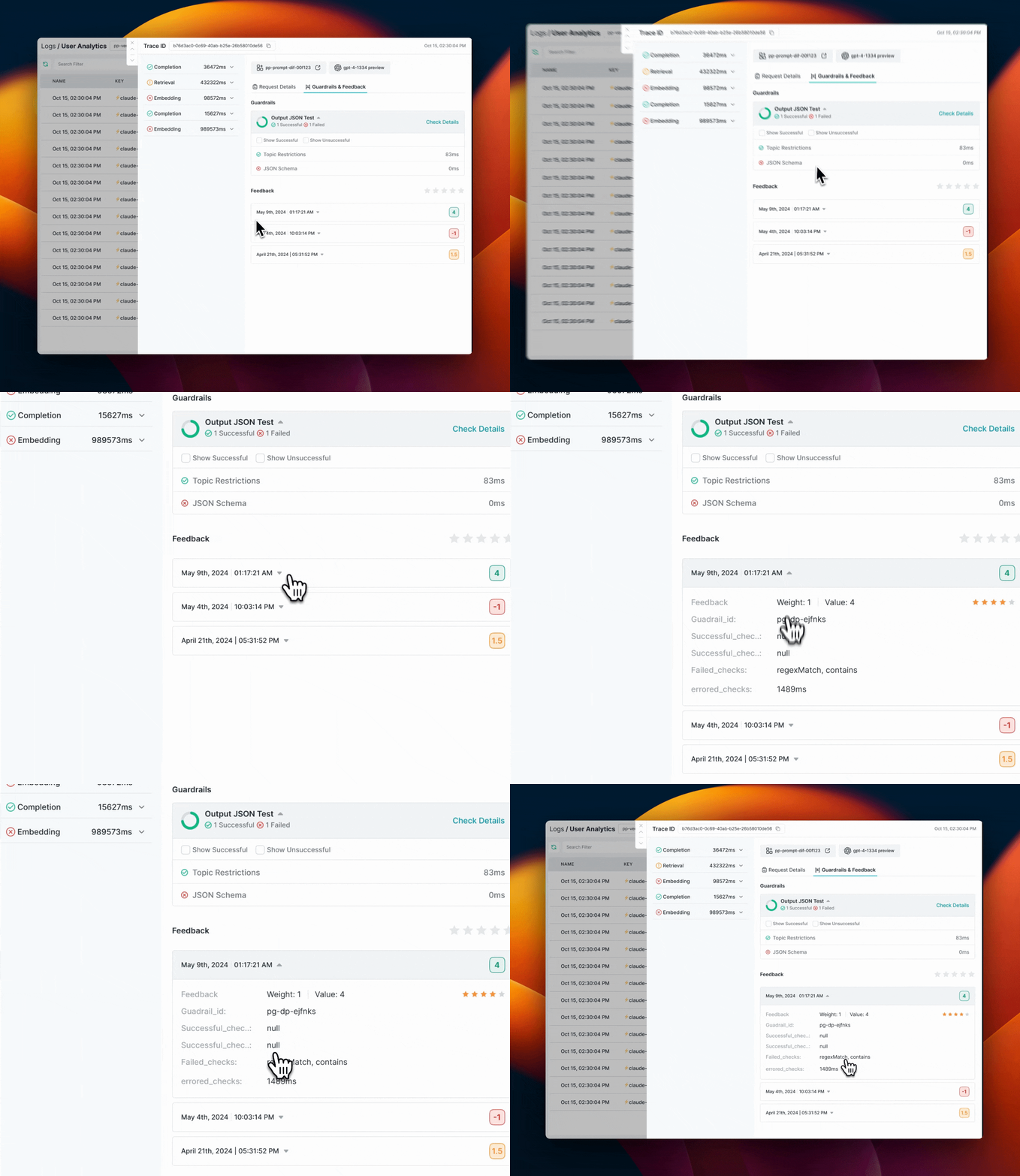
## Viewing Guardrail Results in Portkey Logs
Portkey Logs will show you detailed information about Guardrail results for each request.
### On the `Feedback & Guardrails` tab on the log drawer, you can see
#### Guardrail Details
* **Overview**: How many checks `passed` and how many `failed`
* **Verdict**: Guardrail verdict for each of the checks in your Guardrail
* **Latency**: Round trip time for each check in your Guardrail
#### Feedback Details
Portkey will also show the feedback object logged for each request
* `Value`:\*\* The numerical feedback value you passed
* `Weight`: The numerical feedback weight
* `Metadata Key & Value`:\*\* Any custom metadata sent with the feedback
* `successfulChecks`: Which checks associated with this request `passed`
* `failedChecks`: Which checks associated with this request `failed`
* `erroredChecks`: If there were any checks that errored out along the way
### There are 7 Types of Guardrail Actions
| Action | State | Description | Impact |
| :------------- | :-------------------------------------- | :--------------------------------------------------------------------------------------------------------------------------------------------------------------------------------------------------------------------------------------------------- | ------------------------------------------------------------------------------------------------------------------------------------------------------------------------------------------- |
| **Async** | **TRUE** This is the **default** state | Run the Guardrail checks **asynchronously** along with the LLM request. | Will add no latency to your requestUseful when you only want to log guardrail checks without affecting the request |
| **Async** | **FALSE** | **On Request** Run the Guardrail check **BEFORE** sending the request to the **LLM** **On Response** Run the Guardrail check **BEFORE** sending the response to the **user** | Will add latency to the requestUseful when your Guardrail critical and you want more orchestration over your request based on the Guardrail result |
| **Deny** | **TRUE** | **On Request & Response** If any of the Guardrail checks **FAIL**, the request will be killed with a **446** status code. If all of the Guardrail checks **SUCCEED**, the request/response will be sent further with a **200** status code. | This is useful when your Guardrails are critical and upon them failing, you can not run the requestWe would advice running this action on a subset of your requests to first see the impact |
| **Deny** | **FALSE** This is the **default** state | **On Request & Response** If any of the Guardrail checks **FAIL**, the request will STILL be sent, but with a **246** status code. If all of the Guardrail checks **SUCCEED**, the request/response will be sent further with a **200** status code. | This is useful when you want to log the Guardrail result but do not want it to affect your result |
| **Sequential** | **TRUE** | Run the Guardrail checks **sequentially** one after another. The next check only runs after the previous one completes. | Useful when checks have dependencies or when you want predictable ordering. Adds latency as checks run one at a time. |
| **Sequential** | **FALSE** This is the **default** state | Run the Guardrail checks **in parallel**. All checks execute simultaneously. | Faster execution when checks are independent of each other. |
| **On Success** | **Send Feedback** | If **all of the** Guardrail checks **PASS**, append your custom defined feedback to the request | We recommend setting up this actionThis will help you build an "Evals dataset" of Guardrail results on your requests over time |
| **On Failure** | **Send Feedback** | If **any of the** Guardrail checks **FAIL**, append your custom feedback to the request | We recommend setting up this actionThis will help you build an "Evals dataset" of Guardrail results on your requests over time |
Set the relevant actions you want with your checks, name your Guardrail and save it! When you save the Guardrail, you will get an associated `$Guardrail_ID` that you can then add to your request.
***
## 3. "Enable" the Guardrails through Configs
This is where Portkey's magic comes into play. The Guardrail you created above is yet not an `Active` guardrail because it is not attached to any request.
Configs is one of Portkey's most powerful features and is used to define all kinds of request orchestration - everything from caching, retries, fallbacks, timeouts, to load balancing.
Now, you can use Configs to add **Guardrail checks** & **actions** to your request.
### Option 1: Direct Guardrail Configuration (Recommended)
Portkey now offers a more intuitive way to add guardrails to your configurations:
| Config Key | Value | Description |
| :--------------------- | :------------------------------------------- | :------------------------------------------------------------ |
| **input\_guardrails** | `["guardrails-id-xxx", "guardrails-id-yyy"]` | Apply these guardrails to the **INPUT** before sending to LLM |
| **output\_guardrails** | `["guardrails-id-xxx", "guardrails-id-yyy"]` | Apply these guardrails to the **OUTPUT** from the LLM |
```json theme={"system"}
{
"retry": {
"attempts": 3
},
"cache": {
"mode": "simple"
},
"provider":"@openai-xxx",
"input_guardrails": ["guardrails-id-xxx", "guardrails-id-yyy"],
"output_guardrails": ["guardrails-id-xxx", "guardrails-id-yyy"]
}
```
### Option 2: Hook-Based Configuration (For Creating [Raw Guardrails](/product/guardrails/creating-raw-guardrails-in-json))
You can also continue to use the original hook-based approach:
| Type | Config Key | Value | Description |
| :------------------ | :------------------------- | :------------------------- | :------------------------------------------------------------- |
| Before Request Hook | **before\_request\_hooks** | `[{"id":"$guardrail_id"}]` | These hooks run on the **INPUT** before sending to the LLM |
| After Request Hook | **after\_request\_hooks** | `[{"id":"$guardrail_id"}]` | These hooks run on the **OUTPUT** after receiving from the LLM |
```json theme={"system"}
{
"retry": {
"attempts": 3
},
"cache": {
"mode": "simple"
},
"provider":"@openai-xxx",
"before_request_hooks": [{
"id": "input-guardrail-id-xx"
}],
"after_request_hooks": [{
"id": "output-guardrail-id-xx"
}]
}
```
Both configuration approaches work identically - choose whichever is more intuitive for your team. The simplified `input_guardrails` and `output_guardrails` fields are recommended for better readability.
### Guardrail Behaviour on the Gateway
For **asynchronous** guardrails (`async= TRUE`), Portkey returns the standard, default status codes from the LLM providers — this is because the Guardrails verdict is not affecting how you orchestrate your requests. Portkey will only log the Guardrail result for you.
But for **synchronous** requests (`async= FALSE`), Portkey can orchestrate your requests based on the Guardrail verdict. The behaviour is dependent on the following:
* Guardrail Check Verdict (`PASS` or `FAIL`) AND
* Guardrail Action — DENY Setting (`TRUE` or `FALSE`)
Portkey sends different `request status codes` corresponding to your set Guardrail behaviour.
For requests where `async= FALSE`:
| Guardrail Verdict | DENY Setting | Returned Status Code | Description |
| :---------------- | :----------- | :------------------- | :------------------------------------------------------------------------------------------------------------------------------------------- |
| **PASS** | **FALSE** | **200** | Guardrails have **passed**, request will be processed regardless |
| **PASS** | **TRUE** | **200** | Guardrails have **passed**, request will be processed regardless |
| **FAIL** | **FALSE** | **246** | Guardrails have **failed**, but the request should still \*\*be processed.\*\*Portkey introduces a new Status code to indicate this state. |
| **FAIL** | **TRUE** | **446** | Guardrails have **failed**, and the request should **not** \*\*be processed.\*\*Portkey introduces a new Status code to indicate this state. |
### Example Config Using the New `246` & `446` Status Codes
```json theme={"system"}
{
"strategy": {
"mode": "fallback",
"on_status_codes": [246, 446]
},
"targets": [
{"provider":"@openai-key-xxx"},
{"provider":"@anthropic-key-xxx"}
],
"input_guardrails": ["guardrails-id-xxx"]
}
```
```json theme={"system"}
{
"retry": {
"on_status_codes": [246],
"attempts": 5
},
"output_guardrails": ["guardrails-id-xxx"]
}
```
Create these Configs in Portkey UI, save them, and get an associated Config ID to attach to your requests. [More here](/product/ai-gateway/configs).
## 4. Final Step - Attach Config to Request
Now, while instantiating your Portkey client or while sending headers, just pass the Config ID.
```js Node theme={"system"}
const portkey = new Portkey({
apiKey: "PORTKEY_API_KEY",
config: "pc-***" // Supports a string config id or a config object
});
```
```py Python theme={"system"}
portkey = Portkey(
api_key="PORTKEY_API_KEY",
config="pc-***" # Supports a string config id or a config object
)
```
```js OpenAI Node theme={"system"}
const openai = new OpenAI({
apiKey: 'OPENAI_API_KEY',
baseURL: PORTKEY_GATEWAY_URL,
defaultHeaders: createHeaders({
apiKey: "PORTKEY_API_KEY",
config: "CONFIG_ID"
})
});
```
```py OpenAI Python theme={"system"}
client = OpenAI(
api_key="OPENAI_API_KEY", # defaults to os.environ.get("OPENAI_API_KEY")
base_url=PORTKEY_GATEWAY_URL,
default_headers=createHeaders(
provider="openai",
api_key="PORTKEY_API_KEY", # defaults to os.environ.get("PORTKEY_API_KEY")
config="CONFIG_ID"
)
)
```
```sh cURL theme={"system"}
curl https://api.portkey.ai/v1/chat/completions \
-H "Content-Type: application/json" \
-H "Authorization: Bearer $OPENAI_API_KEY" \
-H "x-portkey-api-key: $PORTKEY_API_KEY" \
-H "x-portkey-config: $CONFIG_ID" \
-d '{
"model": "gpt-3.5-turbo",
"messages": [{
"role": "user",
"content": "Hello!"
}]
}'
```
For more, refer to the [Config documentation](/product/ai-gateway/configs).
***
## Viewing Guardrail Results in Portkey Logs
Portkey Logs will show you detailed information about Guardrail results for each request.
### On the `Feedback & Guardrails` tab on the log drawer, you can see
#### Guardrail Details
* **Overview**: How many checks `passed` and how many `failed`
* **Verdict**: Guardrail verdict for each of the checks in your Guardrail
* **Latency**: Round trip time for each check in your Guardrail
#### Feedback Details
Portkey will also show the feedback object logged for each request
* `Value`:\*\* The numerical feedback value you passed
* `Weight`: The numerical feedback weight
* `Metadata Key & Value`:\*\* Any custom metadata sent with the feedback
* `successfulChecks`: Which checks associated with this request `passed`
* `failedChecks`: Which checks associated with this request `failed`
* `erroredChecks`: If there were any checks that errored out along the way
 ***
## Understanding Guardrail Response Structure
When Guardrails are enabled and configured to run synchronously (`async=false`), Portkey adds a `hook_results` object to your API responses. This object provides detailed information about the guardrail checks that were performed and their outcomes.
### Hook Results Structure
The `hook_results` object contains two main sections:
```json theme={"system"}
"hook_results": {
"before_request_hooks": [...], // Guardrails applied to the input
"after_request_hooks": [...] // Guardrails applied to the output
}
```
Each section contains an array of guardrail execution results, structured as follows:
Overall verdict of this guardrail (true = passed, false = failed). Only true if all checks within this guardrail passed.
The ID of the guardrail that was executed (e.g., "pg-check-cfa540")
Indicates if the guardrail modified the request or response (e.g., PII redaction)
An array of individual check results within this guardrail
Check-specific data that varies based on the guardrail type (e.g., for wordCount it includes counts and thresholds)
Result of this specific check (true = passed, false = failed)
Identifier of the specific check (e.g., "default.sentenceCount", "default.wordCount")
Time taken to execute this check in milliseconds
Whether this check modified the content
Timestamp when the check was executed
Additional logging information (if available)
Error message or object if the guardrail encountered an error
Feedback information configured in the guardrail
The numerical feedback value
The weight assigned to this feedback
Additional metadata including which checks succeeded or failed
Comma-separated list of checks that passed
Comma-separated list of checks that failed
Comma-separated list of checks that encountered errors
Total execution time for the guardrail in milliseconds
Whether the guardrail was run asynchronously
Always "guardrail" for guardrail hooks
Timestamp when the guardrail was executed
Whether failed checks should deny the request/response
### Example Hook Results
#### Non-Streaming Responses
Here's a simplified example of what the `hook_results` might look like in a non-streaming response:
```json [expandable] theme={"system"}
"hook_results": {
"before_request_hooks": [
{
"verdict": true,
"id": "sentence_and_word_check_guardrail",
"transformed": false,
"checks": [
{
"data": {
"sentenceCount": 1,
"minCount": 1,
"maxCount": 99999,
"not": false,
"verdict": true,
"explanation": "The sentence count (1) is within the specified range of 1 to 99999.",
"textExcerpt": "when does the flight from new york to bengaluru land tomorrow, what time, what is its flight number,..."
},
"verdict": true,
"id": "default.sentenceCount",
"execution_time": 0,
"transformed": false,
"created_at": "2025-05-20T08:00:59.492Z",
"log": null
},
{
"data": {
"wordCount": 24,
"minWords": 1,
"maxWords": 99999,
"not": false,
"verdict": true,
"explanation": "The text contains 24 words, which is within the specified range of 1-99999 words.",
"textExcerpt": "when does the flight from new york to bengaluru land tomorrow, what time, what is its flight number,..."
},
"verdict": true,
"id": "default.wordCount",
"execution_time": 0,
"transformed": false,
"created_at": "2025-05-20T08:00:59.492Z",
"log": null
}
],
"feedback": {
"value": 5,
"weight": 1,
"metadata": {
"successfulChecks": "default.sentenceCount, default.wordCount",
"failedChecks": "",
"erroredChecks": ""
}
},
"execution_time": 0,
"async": false,
"type": "guardrail",
"created_at": "2025-05-20T08:00:59.492Z",
"deny": false
},
{
"verdict": true,
"id": "character_check_guardrai",
"transformed": false,
"checks": [
{
"data": {
"characterCount": 130,
"minCharacters": 1,
"maxCharacters": 9999999,
"not": false,
"verdict": true,
"explanation": "The text contains 130 characters, which is within the specified range of 1-9999999 characters.",
"textExcerpt": "when does the flight from new york to bengaluru land tomorrow, what time, what is its flight number,..."
},
"verdict": true,
"id": "default.characterCount",
"execution_time": 0,
"transformed": false,
"created_at": "2025-05-20T08:00:59.492Z",
"log": null
}
],
"feedback": {
"value": 5,
"weight": 1,
"metadata": {
"successfulChecks": "default.characterCount",
"failedChecks": "",
"erroredChecks": ""
}
},
"execution_time": 0,
"async": false,
"type": "guardrail",
"created_at": "2025-05-20T08:00:59.492Z",
"deny": false
}
],
"after_request_hooks": [
{
"verdict": true,
"id": "sentence_and_word_check_guardrail",
"transformed": false,
"checks": [
{
"data": {
"sentenceCount": 2,
"minCount": 1,
"maxCount": 99999,
"not": false,
"verdict": true,
"explanation": "The sentence count (2) is within the specified range of 1 to 99999.",
"textExcerpt": "I'm unable to provide real-time flight information, such as specific flight times, numbers, or bagga..."
},
"verdict": true,
"id": "default.sentenceCount",
"execution_time": 0,
"transformed": false,
"created_at": "2025-05-20T08:01:02.229Z",
"log": null
},
{
"data": {
"wordCount": 46,
"minWords": 1,
"maxWords": 99999,
"not": false,
"verdict": true,
"explanation": "The text contains 46 words, which is within the specified range of 1-99999 words.",
"textExcerpt": "I'm unable to provide real-time flight information, such as specific flight times, numbers, or bagga..."
},
"verdict": true,
"id": "default.wordCount",
"execution_time": 0,
"transformed": false,
"created_at": "2025-05-20T08:01:02.229Z",
"log": null
}
],
"feedback": {
"value": 5,
"weight": 1,
"metadata": {
"successfulChecks": "default.sentenceCount, default.wordCount",
"failedChecks": "",
"erroredChecks": ""
}
},
"execution_time": 0,
"async": false,
"type": "guardrail",
"created_at": "2025-05-20T08:01:02.229Z",
"deny": false
}
]
}
}
```
This example corresponds to a `config` like:
```json theme={"system"}
{
"input_guardrails": [
"sentence_and_word_check_guardrail", // Contains sentenceCount and wordCount checks
"characer_check_guardrail" // Contains characterCount check
],
"output_guardrails": [
"sentence_and_word_check_guardrail" // The same guardrail can be used for both input and output
]
}
```
#### Streaming Responses
Portkey supports hook results in streaming responses for `/chat/completions`, `/completions`, `/embeddings`, and `/messages` endpoints. Both **input guardrails** (before request hooks) and **output guardrails** (after request hooks) are supported for streaming responses.
* **Input guardrails** (`input_guardrails` / before request hooks) are evaluated before the stream starts.
* **Output guardrails** (`output_guardrails` / after request hooks) are evaluated on the full assembled response after the stream completes. After the final `[DONE]` chunk, the `hook_results` for output guardrails are sent as an additional chunk. Note that **no action is taken** for output guardrails on streaming — fallback and retry are not triggered; results are informational only.
To receive `hook_results` inside streaming chunks, set the `x-portkey-strict-open-ai-compliance` header to `false`. By default this header is `true`, and `hook_results` chunks will not be visible.
**How output guardrails work with streaming:** Portkey accumulates all stream chunks, then parses the complete response and runs the output guardrails after the stream ends. The guardrail results are sent as an additional SSE chunk at the end of the stream.
```bash cURL - /chat/completions theme={"system"}
curl --location 'https://api.portkey.ai/v1/chat/completions' \
--header 'Content-Type: application/json' \
--header 'x-portkey-api-key: PORTKEY_API_KEY' \
--header 'x-portkey-config: {"beforeRequestHooks":[{"type":"guardrail","id":"my_solid_guardrail","checks":[{"id":"default.regexMatch","parameters":{"rule": "*asd"}}]}],"retry": {"attempts": 1}}' \
--header 'x-portkey-strict-open-ai-compliance: false' \
--data '{
"model": "@my-openai/gpt-3.5-turbo",
"max_tokens": 100,
"stream": true,
"messages": [
{
"role": "system",
"content": "You are a helpful assistant"
},
{
"role": "user",
"content": "hello sir how are you?"
}
]
}'
```
```python Python theme={"system"}
from portkey_ai import AsyncPortkey
import asyncio
portkey = AsyncPortkey(
api_key="PORTKEY_API_KEY",
provider="openai",
config={
"beforeRequestHooks": [
{
"type": "guardrail",
"id": "my_solid_guardrail",
"checks": [{"id": "default.regexMatch", "parameters": {"rule": "*"}}],
}
],
"cache": {"mode": "simple"},
},
)
async def main():
hook_results = None
try:
response = await portkey.chat.completions.create(
model="@my-openai/gpt-3.5-turbo",
messages=[
{"role": "system", "content": "You are a helpful assistant."},
{"role": "user", "content": "Hello!"},
],
stream=True,
)
async for chunk in response:
if chunk.model_extra and chunk.model_extra.get("hook_results"):
hook_results = chunk.model_extra.get("hook_results")
if len(hook_results.get("before_request_hooks", [])) > 0:
# Input guardrails — sent before the stream starts
pass
if len(hook_results.get("after_request_hooks", [])) > 0:
# Output guardrail - sent after the stream ends (informational only, no fallback/retry)
pass
print(chunk.choices, end="", flush=True)
print("\n")
except Exception as e:
print(e)
if __name__ == "__main__":
asyncio.run(main())
```
```javascript Node theme={"system"}
import Portkey from 'portkey-ai';
const portkey = new Portkey({
apiKey: "PORTKEY_API_KEY",
provider: "openai",
config: {
beforeRequestHooks: [
{
type: "guardrail",
id: "my_solid_guardrail",
checks: [{ id: "default.regexMatch", parameters: { rule: "*" } }],
}
],
cache: { mode: "simple" },
},
});
async function main() {
let hookResults = null;
try {
const response = await portkey.chat.completions.create({
model: "@my-openai/gpt-3.5-turbo",
messages: [
{ role: "system", content: "You are a helpful assistant." },
{ role: "user", content: "Hello!" },
],
stream: true,
});
for await (const chunk of response) {
if (chunk.model_extra && chunk.model_extra.hook_results) {
hookResults = chunk.model_extra.hook_results;
if (hookResults.before_request_hooks?.length > 0) {
// Input guardrails — sent before the stream starts
}
if (hookResults.after_request_hooks?.length > 0) {
// Output guardrails — sent after the stream ends (informational only, no fallback/retry)
}
}
process.stdout.write(JSON.stringify(chunk.choices));
process.stdout.write("\n");
}
} catch (error) {
console.error(error);
}
}
main();
```
```python OpenAI Python theme={"system"}
from openai import AsyncOpenAI
import asyncio
client = AsyncOpenAI(
api_key="OPENAI_API_KEY",
base_url="https://api.portkey.ai/v1",
default_headers={
"x-portkey-api-key": "PORTKEY_API_KEY",
"x-portkey-config": '{"beforeRequestHooks":[{"type":"guardrail","id":"my_solid_guardrail","checks":[{"id":"default.regexMatch","parameters":{"rule":"*"}}]}]}',
"x-portkey-strict-open-ai-compliance": "false"
}
)
async def main():
hook_results = None
try:
response = await client.chat.completions.create(
model="gpt-3.5-turbo",
messages=[
{"role": "system", "content": "You are a helpful assistant."},
{"role": "user", "content": "Hello!"},
],
stream=True,
)
async for chunk in response:
if chunk.model_extra and chunk.model_extra.get("hook_results"):
hook_results = chunk.model_extra.get("hook_results")
if len(hook_results.get("before_request_hooks", [])) > 0:
# Input guardrails — sent before the stream starts
pass
if len(hook_results.get("after_request_hooks", [])) > 0:
# Output guardrails — sent after the stream ends (informational only, no fallback/retry)
pass
print(chunk.choices, end="", flush=True)
print("\n")
except Exception as e:
print(e)
if __name__ == "__main__":
asyncio.run(main())
```
```javascript OpenAI Node theme={"system"}
import OpenAI from 'openai';
const client = new OpenAI({
apiKey: process.env.OPENAI_API_KEY,
baseURL: "https://api.portkey.ai/v1",
defaultHeaders: {
"x-portkey-api-key": process.env.PORTKEY_API_KEY,
"x-portkey-config": JSON.stringify({
beforeRequestHooks: [
{
type: "guardrail",
id: "my_solid_guardrail",
checks: [{ id: "default.regexMatch", parameters: { rule: "*" } }],
}
]
}),
"x-portkey-strict-open-ai-compliance": "false"
}
});
async function main() {
let hookResults = null;
try {
const response = await client.chat.completions.create({
model: "gpt-3.5-turbo",
messages: [
{ role: "system", content: "You are a helpful assistant." },
{ role: "user", content: "Hello!" },
],
stream: true,
});
for await (const chunk of response) {
if (chunk.model_extra && chunk.model_extra.hook_results) {
hookResults = chunk.model_extra.hook_results;
if (hookResults.before_request_hooks?.length > 0) {
// Input guardrails — sent before the stream starts
}
if (hookResults.after_request_hooks?.length > 0) {
// Output guardrails — sent after the stream ends (informational only, no fallback/retry)
}
}
process.stdout.write(JSON.stringify(chunk.choices));
process.stdout.write("\n");
}
} catch (error) {
console.error(error);
}
}
main();
```
```bash cURL - /messages (Anthropic) theme={"system"}
curl --location 'https://api.portkey.ai/v1/messages' \
--header 'Content-Type: application/json' \
--header 'x-portkey-api-key: YOUR_PORTKEY_API_KEY' \
--header 'x-portkey-config: {"beforeRequestHooks":[{"type":"guardrail","id":"my_solid_guardrail","checks":[{"id":"default.regexMatch","parameters":{"rule": "*asd"}}]}],"retry": {"attempts": 1}}' \
--header 'x-portkey-strict-open-ai-compliance: false' \
--data '{
"model": "@dev-anthropic/claude-haiku-4-5",
"max_tokens": 100,
"stream": true,
"messages": [
{
"role": "user",
"content": "tell me a story?"
}
]
}'
```
**Input guardrail response chunk for /chat/completions** (sent before the stream):
```json theme={"system"}
data: {"hook_results":{"before_request_hooks":[{"verdict":true,"id":"my_solid_guardrail","transformed":false,"checks":[{"data":{"explanation":"An error occurred while processing the regex: Invalid regular expression: /*/: Nothing to repeat","regexPattern":"*","not":false,"textExcerpt":"hello sir how are you?"},"verdict":false,"id":"default.regexMatch","error":{"name":"SyntaxError","message":"Invalid regular expression: /*/: Nothing to repeat"},"execution_time":0,"created_at":"2025-11-14T08:14:04.772Z","transformed":false,"fail_on_error":false}],"feedback":null,"execution_time":0,"async":false,"type":"guardrail","created_at":"2025-11-14T08:14:04.772Z","deny":false}]}}
```
**Output guardrail response chunk for /chat/completions** (sent after the stream ends):
```json theme={"system"}
data: {"hook_results":{"after_request_hooks":[{"verdict":true,"id":"my_output_guardrail","transformed":false,"checks":[...],"feedback":null,"execution_time":12,"async":false,"type":"guardrail","created_at":"2025-11-14T08:14:06.772Z","deny":false}]}}
```
**Input guardrail response chunk for /messages** (sent before the stream):
```
event: hook_results
data: {"hook_results":{"before_request_hooks":[{"verdict":true,"id":"my_solid_guardrail","transformed":false,"checks":[{"data":{"explanation":"An error occurred while processing the regex: Invalid regular expression: /*asd/: Nothing to repeat","regexPattern":"*asd","not":false,"textExcerpt":"tell me a story?"},"verdict":false,"id":"default.regexMatch","error":{"name":"SyntaxError","message":"Invalid regular expression: /*asd/: Nothing to repeat"},"execution_time":0,"transformed":false,"created_at":"2025-11-14T09:23:12.457Z","log":null,"fail_on_error":false}],"feedback":null,"execution_time":0,"async":false,"type":"guardrail","created_at":"2025-11-14T09:23:12.457Z","deny":false}]}}
```
**Output guardrail response chunk for /messages** (sent after the stream ends):
```
event: hook_results
data: {"hook_results":{"after_request_hooks":[{"verdict":true,"id":"my_output_guardrail","transformed":false,"checks":[...],"feedback":null,"execution_time":12,"async":false,"type":"guardrail","created_at":"2025-11-14T09:23:15.457Z","deny":false}]}}
```
For the `/messages` endpoint (Anthropic), it is not possible to access hook results through the Anthropic SDK because the SDK only parses Anthropic-specific events. Use cURL or raw HTTP requests to access hook results for this endpoint.
**Accessing Hook Results in SDKs**
When using Portkey or OpenAI SDKs with streaming enabled (`stream=True`), the hook results are available in the `.model_extra.hook_results` parameter of the response chunks. Input guardrail results (`before_request_hooks`) appear in the first chunk before the stream, while output guardrail results (`after_request_hooks`) appear in the final chunk after the stream ends. This applies to:
* `.chat.completions.create()` with `stream=True`
* `.completions.create()` with `stream=True`
* `.embeddings.create()` with `stream=True`
For input guardrails, `hook_results` appear in the first chunk (before any content). For output guardrails, `hook_results` are sent as an additional chunk after the `[DONE]` chunk — these contain the `after_request_hooks` array with the guardrail verdicts.
### Important Notes
* If a guardrail is configured to run asynchronously (`async=true`), the `hook_results` will not appear in the API response. The results will only be available in the Portkey logs.
* Output guardrails on streaming requests are **informational only** — no fallback or retry actions are triggered based on the results.
* The `data` field varies based on the type of guardrail check being performed. Each guardrail type returns different information relevant to its function.
* The overall `verdict` for a guardrail is `true` only if all individual checks pass. If any check fails, the verdict will be `false`.
* When `transformed` is `true`, it indicates that the guardrail has modified the content (such as redacting PII).
* If `deny` is `true` and the verdict is `false`, the request will be denied with a 446 status code.
### Special Fields
* **Check-specific data**: Each guardrail type provides different data in the `data` field. For example, a sentence count check provides information about the number of sentences, while a PII check might provide information about detected PII entities.
* **Feedback metadata**: The `metadata` object within `feedback` keeps track of which checks were successful, failed, or encountered errors.
## Defining Guardrails Directly in JSON
On Portkey, you can also create the Guardrails in code and add them to your Configs. Read more about this here:
***
## Bring Your Own Guardrails
If you already have a custom guardrail pipeline where you send your inputs/outputs for evaluation, you can integrate it with Portkey using a modular, custom webhook! Read more here:
***
## Examples of When to Deny Requests with Guardrails
1. **Prompt Injection Checks**: Preventing inputs that could alter the behavior of the AI model or manipulate its responses.
2. **Moderation Checks**: Ensuring responses do not contain offensive, harmful, or inappropriate content.
3. **Compliance Checks**: Verifying that inputs and outputs comply with regulatory requirements or organizational policies.
4. **Security Checks**: Blocking requests that contain potentially harmful content, such as SQL injection attempts or cross-site scripting (XSS) payloads.
By appropriately configuring Guardrail Actions, you can maintain the integrity and reliability of your AI app, ensuring that only safe and compliant requests are processed.
To enable Guardrails for your org, ping us on the [Portkey Discord](https://portkey.ai/community)
***
***
## Understanding Guardrail Response Structure
When Guardrails are enabled and configured to run synchronously (`async=false`), Portkey adds a `hook_results` object to your API responses. This object provides detailed information about the guardrail checks that were performed and their outcomes.
### Hook Results Structure
The `hook_results` object contains two main sections:
```json theme={"system"}
"hook_results": {
"before_request_hooks": [...], // Guardrails applied to the input
"after_request_hooks": [...] // Guardrails applied to the output
}
```
Each section contains an array of guardrail execution results, structured as follows:
Overall verdict of this guardrail (true = passed, false = failed). Only true if all checks within this guardrail passed.
The ID of the guardrail that was executed (e.g., "pg-check-cfa540")
Indicates if the guardrail modified the request or response (e.g., PII redaction)
An array of individual check results within this guardrail
Check-specific data that varies based on the guardrail type (e.g., for wordCount it includes counts and thresholds)
Result of this specific check (true = passed, false = failed)
Identifier of the specific check (e.g., "default.sentenceCount", "default.wordCount")
Time taken to execute this check in milliseconds
Whether this check modified the content
Timestamp when the check was executed
Additional logging information (if available)
Error message or object if the guardrail encountered an error
Feedback information configured in the guardrail
The numerical feedback value
The weight assigned to this feedback
Additional metadata including which checks succeeded or failed
Comma-separated list of checks that passed
Comma-separated list of checks that failed
Comma-separated list of checks that encountered errors
Total execution time for the guardrail in milliseconds
Whether the guardrail was run asynchronously
Always "guardrail" for guardrail hooks
Timestamp when the guardrail was executed
Whether failed checks should deny the request/response
### Example Hook Results
#### Non-Streaming Responses
Here's a simplified example of what the `hook_results` might look like in a non-streaming response:
```json [expandable] theme={"system"}
"hook_results": {
"before_request_hooks": [
{
"verdict": true,
"id": "sentence_and_word_check_guardrail",
"transformed": false,
"checks": [
{
"data": {
"sentenceCount": 1,
"minCount": 1,
"maxCount": 99999,
"not": false,
"verdict": true,
"explanation": "The sentence count (1) is within the specified range of 1 to 99999.",
"textExcerpt": "when does the flight from new york to bengaluru land tomorrow, what time, what is its flight number,..."
},
"verdict": true,
"id": "default.sentenceCount",
"execution_time": 0,
"transformed": false,
"created_at": "2025-05-20T08:00:59.492Z",
"log": null
},
{
"data": {
"wordCount": 24,
"minWords": 1,
"maxWords": 99999,
"not": false,
"verdict": true,
"explanation": "The text contains 24 words, which is within the specified range of 1-99999 words.",
"textExcerpt": "when does the flight from new york to bengaluru land tomorrow, what time, what is its flight number,..."
},
"verdict": true,
"id": "default.wordCount",
"execution_time": 0,
"transformed": false,
"created_at": "2025-05-20T08:00:59.492Z",
"log": null
}
],
"feedback": {
"value": 5,
"weight": 1,
"metadata": {
"successfulChecks": "default.sentenceCount, default.wordCount",
"failedChecks": "",
"erroredChecks": ""
}
},
"execution_time": 0,
"async": false,
"type": "guardrail",
"created_at": "2025-05-20T08:00:59.492Z",
"deny": false
},
{
"verdict": true,
"id": "character_check_guardrai",
"transformed": false,
"checks": [
{
"data": {
"characterCount": 130,
"minCharacters": 1,
"maxCharacters": 9999999,
"not": false,
"verdict": true,
"explanation": "The text contains 130 characters, which is within the specified range of 1-9999999 characters.",
"textExcerpt": "when does the flight from new york to bengaluru land tomorrow, what time, what is its flight number,..."
},
"verdict": true,
"id": "default.characterCount",
"execution_time": 0,
"transformed": false,
"created_at": "2025-05-20T08:00:59.492Z",
"log": null
}
],
"feedback": {
"value": 5,
"weight": 1,
"metadata": {
"successfulChecks": "default.characterCount",
"failedChecks": "",
"erroredChecks": ""
}
},
"execution_time": 0,
"async": false,
"type": "guardrail",
"created_at": "2025-05-20T08:00:59.492Z",
"deny": false
}
],
"after_request_hooks": [
{
"verdict": true,
"id": "sentence_and_word_check_guardrail",
"transformed": false,
"checks": [
{
"data": {
"sentenceCount": 2,
"minCount": 1,
"maxCount": 99999,
"not": false,
"verdict": true,
"explanation": "The sentence count (2) is within the specified range of 1 to 99999.",
"textExcerpt": "I'm unable to provide real-time flight information, such as specific flight times, numbers, or bagga..."
},
"verdict": true,
"id": "default.sentenceCount",
"execution_time": 0,
"transformed": false,
"created_at": "2025-05-20T08:01:02.229Z",
"log": null
},
{
"data": {
"wordCount": 46,
"minWords": 1,
"maxWords": 99999,
"not": false,
"verdict": true,
"explanation": "The text contains 46 words, which is within the specified range of 1-99999 words.",
"textExcerpt": "I'm unable to provide real-time flight information, such as specific flight times, numbers, or bagga..."
},
"verdict": true,
"id": "default.wordCount",
"execution_time": 0,
"transformed": false,
"created_at": "2025-05-20T08:01:02.229Z",
"log": null
}
],
"feedback": {
"value": 5,
"weight": 1,
"metadata": {
"successfulChecks": "default.sentenceCount, default.wordCount",
"failedChecks": "",
"erroredChecks": ""
}
},
"execution_time": 0,
"async": false,
"type": "guardrail",
"created_at": "2025-05-20T08:01:02.229Z",
"deny": false
}
]
}
}
```
This example corresponds to a `config` like:
```json theme={"system"}
{
"input_guardrails": [
"sentence_and_word_check_guardrail", // Contains sentenceCount and wordCount checks
"characer_check_guardrail" // Contains characterCount check
],
"output_guardrails": [
"sentence_and_word_check_guardrail" // The same guardrail can be used for both input and output
]
}
```
#### Streaming Responses
Portkey supports hook results in streaming responses for `/chat/completions`, `/completions`, `/embeddings`, and `/messages` endpoints. Both **input guardrails** (before request hooks) and **output guardrails** (after request hooks) are supported for streaming responses.
* **Input guardrails** (`input_guardrails` / before request hooks) are evaluated before the stream starts.
* **Output guardrails** (`output_guardrails` / after request hooks) are evaluated on the full assembled response after the stream completes. After the final `[DONE]` chunk, the `hook_results` for output guardrails are sent as an additional chunk. Note that **no action is taken** for output guardrails on streaming — fallback and retry are not triggered; results are informational only.
To receive `hook_results` inside streaming chunks, set the `x-portkey-strict-open-ai-compliance` header to `false`. By default this header is `true`, and `hook_results` chunks will not be visible.
**How output guardrails work with streaming:** Portkey accumulates all stream chunks, then parses the complete response and runs the output guardrails after the stream ends. The guardrail results are sent as an additional SSE chunk at the end of the stream.
```bash cURL - /chat/completions theme={"system"}
curl --location 'https://api.portkey.ai/v1/chat/completions' \
--header 'Content-Type: application/json' \
--header 'x-portkey-api-key: PORTKEY_API_KEY' \
--header 'x-portkey-config: {"beforeRequestHooks":[{"type":"guardrail","id":"my_solid_guardrail","checks":[{"id":"default.regexMatch","parameters":{"rule": "*asd"}}]}],"retry": {"attempts": 1}}' \
--header 'x-portkey-strict-open-ai-compliance: false' \
--data '{
"model": "@my-openai/gpt-3.5-turbo",
"max_tokens": 100,
"stream": true,
"messages": [
{
"role": "system",
"content": "You are a helpful assistant"
},
{
"role": "user",
"content": "hello sir how are you?"
}
]
}'
```
```python Python theme={"system"}
from portkey_ai import AsyncPortkey
import asyncio
portkey = AsyncPortkey(
api_key="PORTKEY_API_KEY",
provider="openai",
config={
"beforeRequestHooks": [
{
"type": "guardrail",
"id": "my_solid_guardrail",
"checks": [{"id": "default.regexMatch", "parameters": {"rule": "*"}}],
}
],
"cache": {"mode": "simple"},
},
)
async def main():
hook_results = None
try:
response = await portkey.chat.completions.create(
model="@my-openai/gpt-3.5-turbo",
messages=[
{"role": "system", "content": "You are a helpful assistant."},
{"role": "user", "content": "Hello!"},
],
stream=True,
)
async for chunk in response:
if chunk.model_extra and chunk.model_extra.get("hook_results"):
hook_results = chunk.model_extra.get("hook_results")
if len(hook_results.get("before_request_hooks", [])) > 0:
# Input guardrails — sent before the stream starts
pass
if len(hook_results.get("after_request_hooks", [])) > 0:
# Output guardrail - sent after the stream ends (informational only, no fallback/retry)
pass
print(chunk.choices, end="", flush=True)
print("\n")
except Exception as e:
print(e)
if __name__ == "__main__":
asyncio.run(main())
```
```javascript Node theme={"system"}
import Portkey from 'portkey-ai';
const portkey = new Portkey({
apiKey: "PORTKEY_API_KEY",
provider: "openai",
config: {
beforeRequestHooks: [
{
type: "guardrail",
id: "my_solid_guardrail",
checks: [{ id: "default.regexMatch", parameters: { rule: "*" } }],
}
],
cache: { mode: "simple" },
},
});
async function main() {
let hookResults = null;
try {
const response = await portkey.chat.completions.create({
model: "@my-openai/gpt-3.5-turbo",
messages: [
{ role: "system", content: "You are a helpful assistant." },
{ role: "user", content: "Hello!" },
],
stream: true,
});
for await (const chunk of response) {
if (chunk.model_extra && chunk.model_extra.hook_results) {
hookResults = chunk.model_extra.hook_results;
if (hookResults.before_request_hooks?.length > 0) {
// Input guardrails — sent before the stream starts
}
if (hookResults.after_request_hooks?.length > 0) {
// Output guardrails — sent after the stream ends (informational only, no fallback/retry)
}
}
process.stdout.write(JSON.stringify(chunk.choices));
process.stdout.write("\n");
}
} catch (error) {
console.error(error);
}
}
main();
```
```python OpenAI Python theme={"system"}
from openai import AsyncOpenAI
import asyncio
client = AsyncOpenAI(
api_key="OPENAI_API_KEY",
base_url="https://api.portkey.ai/v1",
default_headers={
"x-portkey-api-key": "PORTKEY_API_KEY",
"x-portkey-config": '{"beforeRequestHooks":[{"type":"guardrail","id":"my_solid_guardrail","checks":[{"id":"default.regexMatch","parameters":{"rule":"*"}}]}]}',
"x-portkey-strict-open-ai-compliance": "false"
}
)
async def main():
hook_results = None
try:
response = await client.chat.completions.create(
model="gpt-3.5-turbo",
messages=[
{"role": "system", "content": "You are a helpful assistant."},
{"role": "user", "content": "Hello!"},
],
stream=True,
)
async for chunk in response:
if chunk.model_extra and chunk.model_extra.get("hook_results"):
hook_results = chunk.model_extra.get("hook_results")
if len(hook_results.get("before_request_hooks", [])) > 0:
# Input guardrails — sent before the stream starts
pass
if len(hook_results.get("after_request_hooks", [])) > 0:
# Output guardrails — sent after the stream ends (informational only, no fallback/retry)
pass
print(chunk.choices, end="", flush=True)
print("\n")
except Exception as e:
print(e)
if __name__ == "__main__":
asyncio.run(main())
```
```javascript OpenAI Node theme={"system"}
import OpenAI from 'openai';
const client = new OpenAI({
apiKey: process.env.OPENAI_API_KEY,
baseURL: "https://api.portkey.ai/v1",
defaultHeaders: {
"x-portkey-api-key": process.env.PORTKEY_API_KEY,
"x-portkey-config": JSON.stringify({
beforeRequestHooks: [
{
type: "guardrail",
id: "my_solid_guardrail",
checks: [{ id: "default.regexMatch", parameters: { rule: "*" } }],
}
]
}),
"x-portkey-strict-open-ai-compliance": "false"
}
});
async function main() {
let hookResults = null;
try {
const response = await client.chat.completions.create({
model: "gpt-3.5-turbo",
messages: [
{ role: "system", content: "You are a helpful assistant." },
{ role: "user", content: "Hello!" },
],
stream: true,
});
for await (const chunk of response) {
if (chunk.model_extra && chunk.model_extra.hook_results) {
hookResults = chunk.model_extra.hook_results;
if (hookResults.before_request_hooks?.length > 0) {
// Input guardrails — sent before the stream starts
}
if (hookResults.after_request_hooks?.length > 0) {
// Output guardrails — sent after the stream ends (informational only, no fallback/retry)
}
}
process.stdout.write(JSON.stringify(chunk.choices));
process.stdout.write("\n");
}
} catch (error) {
console.error(error);
}
}
main();
```
```bash cURL - /messages (Anthropic) theme={"system"}
curl --location 'https://api.portkey.ai/v1/messages' \
--header 'Content-Type: application/json' \
--header 'x-portkey-api-key: YOUR_PORTKEY_API_KEY' \
--header 'x-portkey-config: {"beforeRequestHooks":[{"type":"guardrail","id":"my_solid_guardrail","checks":[{"id":"default.regexMatch","parameters":{"rule": "*asd"}}]}],"retry": {"attempts": 1}}' \
--header 'x-portkey-strict-open-ai-compliance: false' \
--data '{
"model": "@dev-anthropic/claude-haiku-4-5",
"max_tokens": 100,
"stream": true,
"messages": [
{
"role": "user",
"content": "tell me a story?"
}
]
}'
```
**Input guardrail response chunk for /chat/completions** (sent before the stream):
```json theme={"system"}
data: {"hook_results":{"before_request_hooks":[{"verdict":true,"id":"my_solid_guardrail","transformed":false,"checks":[{"data":{"explanation":"An error occurred while processing the regex: Invalid regular expression: /*/: Nothing to repeat","regexPattern":"*","not":false,"textExcerpt":"hello sir how are you?"},"verdict":false,"id":"default.regexMatch","error":{"name":"SyntaxError","message":"Invalid regular expression: /*/: Nothing to repeat"},"execution_time":0,"created_at":"2025-11-14T08:14:04.772Z","transformed":false,"fail_on_error":false}],"feedback":null,"execution_time":0,"async":false,"type":"guardrail","created_at":"2025-11-14T08:14:04.772Z","deny":false}]}}
```
**Output guardrail response chunk for /chat/completions** (sent after the stream ends):
```json theme={"system"}
data: {"hook_results":{"after_request_hooks":[{"verdict":true,"id":"my_output_guardrail","transformed":false,"checks":[...],"feedback":null,"execution_time":12,"async":false,"type":"guardrail","created_at":"2025-11-14T08:14:06.772Z","deny":false}]}}
```
**Input guardrail response chunk for /messages** (sent before the stream):
```
event: hook_results
data: {"hook_results":{"before_request_hooks":[{"verdict":true,"id":"my_solid_guardrail","transformed":false,"checks":[{"data":{"explanation":"An error occurred while processing the regex: Invalid regular expression: /*asd/: Nothing to repeat","regexPattern":"*asd","not":false,"textExcerpt":"tell me a story?"},"verdict":false,"id":"default.regexMatch","error":{"name":"SyntaxError","message":"Invalid regular expression: /*asd/: Nothing to repeat"},"execution_time":0,"transformed":false,"created_at":"2025-11-14T09:23:12.457Z","log":null,"fail_on_error":false}],"feedback":null,"execution_time":0,"async":false,"type":"guardrail","created_at":"2025-11-14T09:23:12.457Z","deny":false}]}}
```
**Output guardrail response chunk for /messages** (sent after the stream ends):
```
event: hook_results
data: {"hook_results":{"after_request_hooks":[{"verdict":true,"id":"my_output_guardrail","transformed":false,"checks":[...],"feedback":null,"execution_time":12,"async":false,"type":"guardrail","created_at":"2025-11-14T09:23:15.457Z","deny":false}]}}
```
For the `/messages` endpoint (Anthropic), it is not possible to access hook results through the Anthropic SDK because the SDK only parses Anthropic-specific events. Use cURL or raw HTTP requests to access hook results for this endpoint.
**Accessing Hook Results in SDKs**
When using Portkey or OpenAI SDKs with streaming enabled (`stream=True`), the hook results are available in the `.model_extra.hook_results` parameter of the response chunks. Input guardrail results (`before_request_hooks`) appear in the first chunk before the stream, while output guardrail results (`after_request_hooks`) appear in the final chunk after the stream ends. This applies to:
* `.chat.completions.create()` with `stream=True`
* `.completions.create()` with `stream=True`
* `.embeddings.create()` with `stream=True`
For input guardrails, `hook_results` appear in the first chunk (before any content). For output guardrails, `hook_results` are sent as an additional chunk after the `[DONE]` chunk — these contain the `after_request_hooks` array with the guardrail verdicts.
### Important Notes
* If a guardrail is configured to run asynchronously (`async=true`), the `hook_results` will not appear in the API response. The results will only be available in the Portkey logs.
* Output guardrails on streaming requests are **informational only** — no fallback or retry actions are triggered based on the results.
* The `data` field varies based on the type of guardrail check being performed. Each guardrail type returns different information relevant to its function.
* The overall `verdict` for a guardrail is `true` only if all individual checks pass. If any check fails, the verdict will be `false`.
* When `transformed` is `true`, it indicates that the guardrail has modified the content (such as redacting PII).
* If `deny` is `true` and the verdict is `false`, the request will be denied with a 446 status code.
### Special Fields
* **Check-specific data**: Each guardrail type provides different data in the `data` field. For example, a sentence count check provides information about the number of sentences, while a PII check might provide information about detected PII entities.
* **Feedback metadata**: The `metadata` object within `feedback` keeps track of which checks were successful, failed, or encountered errors.
## Defining Guardrails Directly in JSON
On Portkey, you can also create the Guardrails in code and add them to your Configs. Read more about this here:
***
## Bring Your Own Guardrails
If you already have a custom guardrail pipeline where you send your inputs/outputs for evaluation, you can integrate it with Portkey using a modular, custom webhook! Read more here:
***
## Examples of When to Deny Requests with Guardrails
1. **Prompt Injection Checks**: Preventing inputs that could alter the behavior of the AI model or manipulate its responses.
2. **Moderation Checks**: Ensuring responses do not contain offensive, harmful, or inappropriate content.
3. **Compliance Checks**: Verifying that inputs and outputs comply with regulatory requirements or organizational policies.
4. **Security Checks**: Blocking requests that contain potentially harmful content, such as SQL injection attempts or cross-site scripting (XSS) payloads.
By appropriately configuring Guardrail Actions, you can maintain the integrity and reliability of your AI app, ensuring that only safe and compliant requests are processed.
To enable Guardrails for your org, ping us on the [Portkey Discord](https://portkey.ai/community)
***