> ## Documentation Index
> Fetch the complete documentation index at: https://docs.portkey.ai/docs/llms.txt
> Use this file to discover all available pages before exploring further.
# PII Redaction
> Replace any sensitive data in requests with standard identifiers
Advanced PII Redaction feature automatically detects and redacts sensitive information from requests before they reach the LLM. This feature works seamlessly with our entire guardrails ecosystem, providing an additional layer of security for your AI interactions.
## Enabling PII Redaction
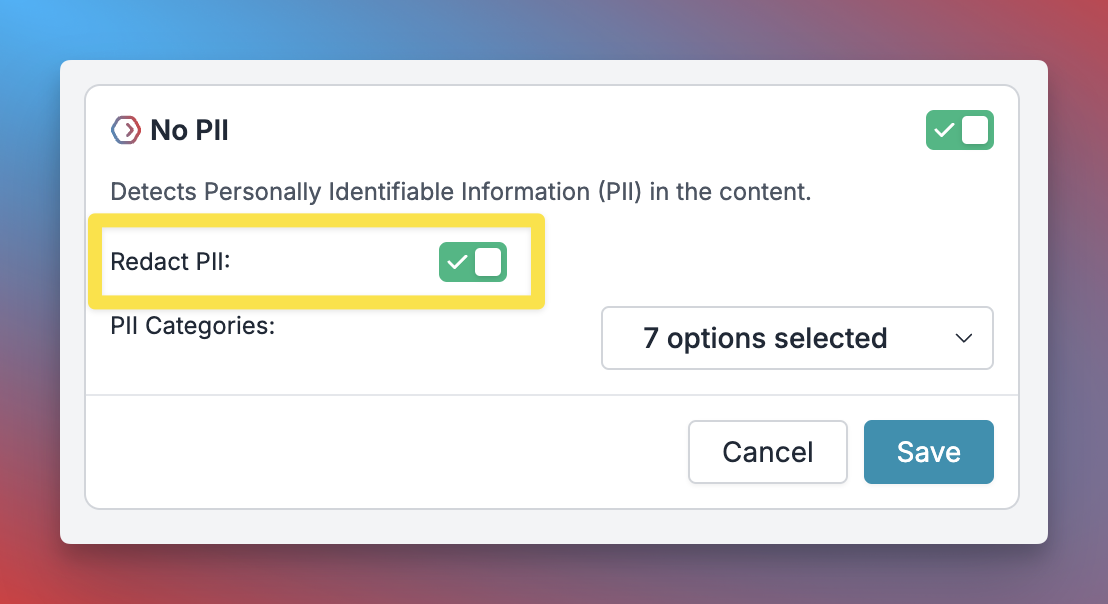
On the Guardrail creation page, for select PII guardrails, you will see a **Redact PII** toggle. Just enable it to start redacting PII in your requests.
 ## Guardrails Support
PII redaction is supported across 5 guardrail providers:
Redact `Phone number`, `Email addresses`, `Location information`, `IP addresses`, `Social Security Numbers (SSN)`, `Names`, `Credit card information` from requests
Based on Patronus's EnterprisePII dataset, this guardrail can detect and redact confidential information typically found in business documents like meeting notes, commercial contracts, marketing emails, performance reviews, and more
Pangea's redact feature can redact PII like geographic locations, payment card industry (PCI) data, and many other types of sensitive information, with support for rule customization
You can select from a list of predefined PII or define a custom sensitive-information type using regular expressions (RegEx) and redact PII.
Promptfoo helps detect multiple PII exposures - in session data, via social engineering, or a direct exposure.
## Custom PII Redaction with Regex
For more granular control over PII redaction, you can create custom patterns using Portkey's **Regex Match** guardrail with redaction capabilities. This allows you to define specific patterns for sensitive information unique to your use case.
### Setting Up Custom PII Patterns
## Guardrails Support
PII redaction is supported across 5 guardrail providers:
Redact `Phone number`, `Email addresses`, `Location information`, `IP addresses`, `Social Security Numbers (SSN)`, `Names`, `Credit card information` from requests
Based on Patronus's EnterprisePII dataset, this guardrail can detect and redact confidential information typically found in business documents like meeting notes, commercial contracts, marketing emails, performance reviews, and more
Pangea's redact feature can redact PII like geographic locations, payment card industry (PCI) data, and many other types of sensitive information, with support for rule customization
You can select from a list of predefined PII or define a custom sensitive-information type using regular expressions (RegEx) and redact PII.
Promptfoo helps detect multiple PII exposures - in session data, via social engineering, or a direct exposure.
## Custom PII Redaction with Regex
For more granular control over PII redaction, you can create custom patterns using Portkey's **Regex Match** guardrail with redaction capabilities. This allows you to define specific patterns for sensitive information unique to your use case.
### Setting Up Custom PII Patterns
 1. **Navigate to Guardrails**: Go to the `Guardrails` page and click `Create`
2. **Select Regex Match**: Choose the "Regex Match" guardrail from the BASIC category
3. **Configure the Pattern**:
* **Regex Rule**: Enter your regex pattern to match specific PII (e.g., `\b\d{3}-\d{2}-\d{4}\b` for SSN patterns)
* **Replacement Text**: Define what to replace matches with (e.g., `[REDACTED]`, `*****`, `[SSN_HIDDEN]`)
* **Enable Redact**: Toggle the "Redact" option to `ON`
* **Inverse**: Keep this `OFF` unless you want to redact everything except the pattern
4. **Save the Guardrail**: Name your guardrail and save it to get the associated Guardrail ID
### Common Regex Patterns for PII
```
| PII Type | Regex Pattern | Replacement Example |
|----------|---------------|-------------------|
| Credit Card | `\b\d{4}[- ]?\d{4}[- ]?\d{4}[- ]?\d{4}\b` | `[CREDIT_CARD]` |
| Social Security Number | `\b\d{3}-\d{2}-\d{4}\b` | `[SSN_REDACTED]` |
| Phone Numbers | `\b\d{3}[-.]\d{3}[-.]\d{4}\b` | `[PHONE_HIDDEN]` |
| Email Addresses | `\b[A-Za-z0-9._%+-]+@[A-Za-z0-9.-]+\.[A-Z|a-z]{2,}\b` | `[EMAIL_REDACTED]` |
| Custom Employee IDs | `EMP-\d{6}` | `[EMPLOYEE_ID]` |
```
### Adding to Your Config
Once you've created your custom PII regex guardrail, add it to your Portkey config:
```json theme={"system"}
{
"before_request_hooks": [
{"id": "your-custom-pii-guardrail-id"}
],
"after_request_hooks": [
{"id": "your-custom-pii-guardrail-id"}
]
}
```
You can add the same guardrail to both `before_request_hooks` (input guardrails) and `after_request_hooks` (output guardrails) to scan and redact PII in both user inputs and LLM responses.
### Example Implementation
```js theme={"system"}
const portkey = new Portkey({
apiKey: "PORTKEY_API_KEY",
config: "pc-***" // Config with custom PII redaction
});
const response = await portkey.chat.completions.create({
model: "@your-model-slug",
messages: [
{
role: "user",
content: "My SSN is 123-45-6789 and credit card is 4532-1234-5678-9012"
}
]
});
```
```py theme={"system"}
portkey = Portkey(
api_key="PORTKEY_API_KEY",
config="pc-***" # Config with custom PII redaction
)
response = portkey.chat.completions.create(
model="@your-model-slug",
messages=[
{
"role": "user",
"content": "My SSN is 123-45-6789 and credit card is 4532-1234-5678-9012"
}
]
)
```
With the custom regex guardrail configured, the input would be automatically transformed to:
```
"My SSN is [SSN_REDACTED] and credit card is [CREDIT_CARD]"
```
## How It Works
1. **Detection**: When enabled, the system scans incoming or outgoing requests for PII using the configured guardrail provider.
2. **Redaction**: Detected PII is automatically replaced with standardized identifiers:
* Email addresses → `{{EMAIL_ADDRESS_1}}`, `{{EMAIL_ADDRESS_2}}`, etc.
* Phone numbers → `{{PHONE_NUMBER_1}}`, `{{PHONE_NUMBER_2}}`, etc.
* And similar patterns for other PII types
3. **Processing**: The redacted request is then forwarded to the LLM, ensuring sensitive data never reaches the model.
Example:
```
Original Request:
"Hi, you can reach me at john@example.com or 555-0123"
Redacted Request:
"Hi, you can reach me at {{EMAIL_ADDRESS_1}} or {{PHONE_NUMBER_1}}"
```
## Monitoring PII Redaction
You can track request transformations through two key indicators in the request/response body:
1. `transformed` boolean flag: Indicates whether any redaction occurred
2. `check_results` object: Contains detailed information about specific transformations
## Best Practices
1. **Gradual Implementation**:
* Start by enabling the feature for a subset of requests
* Monitor the logs and transformation results
* Gradually expand coverage after validation
2. **Regular Monitoring**:
* Review transformation logs periodically
* Validate that sensitive information is being caught appropriately
3. **Documentation**:
* Maintain records of what types of PII you're scanning for
* Document any specific compliance requirements being addressed
## Security Considerations
* Redaction is irreversible by design
* Original PII storage and handling varies by guardrail provider
* The feature can be applied to both input and output content
* Custom regex patterns should be carefully designed to avoid false positives
**Compliance Implications**
This feature can help organizations meet various compliance requirements by:
* Preventing accidental exposure of sensitive data to LLMs
* Providing audit trails of PII handling
* Supporting data minimization principles
* Enabling systematic PII management across AI operations
## Limitations
* Redaction patterns are not customizable for pre-built guardrails (but can be customized using regex)
* Transformation is one-way (non-reversible)
* Performance may vary based on chosen guardrail provider
* Complex regex patterns may impact processing latency
## Troubleshooting
If you experience issues:
1. Verify the feature is enabled in your guardrails configuration
2. Check the `transformed` flag and `check_results` for specific transformation details
3. Review logs for any error messages or unexpected behavior
4. For custom regex patterns, validate the regex syntax and test with sample data
5. [Contact us here](https://portkey.wiki/community) for additional assistance
## FAQs
Currently, redaction patterns are standardized and not customizable.
Each instance receives a numbered identifier (e.g., `{{EMAIL_ADDRESS_1}}`, `{{EMAIL_ADDRESS_2}}`, etc.).
Impact varies by guardrail provider and request complexity. Custom regex patterns with complex expressions may add minimal latency.
Yes, the feature works with any LLM supported by Portkey.
Yes, you can configure the guardrail to scan both requests and responses.
Yes, you can use multiple guardrails in the same config to combine pre-built PII detection with custom regex patterns.
1. **Navigate to Guardrails**: Go to the `Guardrails` page and click `Create`
2. **Select Regex Match**: Choose the "Regex Match" guardrail from the BASIC category
3. **Configure the Pattern**:
* **Regex Rule**: Enter your regex pattern to match specific PII (e.g., `\b\d{3}-\d{2}-\d{4}\b` for SSN patterns)
* **Replacement Text**: Define what to replace matches with (e.g., `[REDACTED]`, `*****`, `[SSN_HIDDEN]`)
* **Enable Redact**: Toggle the "Redact" option to `ON`
* **Inverse**: Keep this `OFF` unless you want to redact everything except the pattern
4. **Save the Guardrail**: Name your guardrail and save it to get the associated Guardrail ID
### Common Regex Patterns for PII
```
| PII Type | Regex Pattern | Replacement Example |
|----------|---------------|-------------------|
| Credit Card | `\b\d{4}[- ]?\d{4}[- ]?\d{4}[- ]?\d{4}\b` | `[CREDIT_CARD]` |
| Social Security Number | `\b\d{3}-\d{2}-\d{4}\b` | `[SSN_REDACTED]` |
| Phone Numbers | `\b\d{3}[-.]\d{3}[-.]\d{4}\b` | `[PHONE_HIDDEN]` |
| Email Addresses | `\b[A-Za-z0-9._%+-]+@[A-Za-z0-9.-]+\.[A-Z|a-z]{2,}\b` | `[EMAIL_REDACTED]` |
| Custom Employee IDs | `EMP-\d{6}` | `[EMPLOYEE_ID]` |
```
### Adding to Your Config
Once you've created your custom PII regex guardrail, add it to your Portkey config:
```json theme={"system"}
{
"before_request_hooks": [
{"id": "your-custom-pii-guardrail-id"}
],
"after_request_hooks": [
{"id": "your-custom-pii-guardrail-id"}
]
}
```
You can add the same guardrail to both `before_request_hooks` (input guardrails) and `after_request_hooks` (output guardrails) to scan and redact PII in both user inputs and LLM responses.
### Example Implementation
```js theme={"system"}
const portkey = new Portkey({
apiKey: "PORTKEY_API_KEY",
config: "pc-***" // Config with custom PII redaction
});
const response = await portkey.chat.completions.create({
model: "@your-model-slug",
messages: [
{
role: "user",
content: "My SSN is 123-45-6789 and credit card is 4532-1234-5678-9012"
}
]
});
```
```py theme={"system"}
portkey = Portkey(
api_key="PORTKEY_API_KEY",
config="pc-***" # Config with custom PII redaction
)
response = portkey.chat.completions.create(
model="@your-model-slug",
messages=[
{
"role": "user",
"content": "My SSN is 123-45-6789 and credit card is 4532-1234-5678-9012"
}
]
)
```
With the custom regex guardrail configured, the input would be automatically transformed to:
```
"My SSN is [SSN_REDACTED] and credit card is [CREDIT_CARD]"
```
## How It Works
1. **Detection**: When enabled, the system scans incoming or outgoing requests for PII using the configured guardrail provider.
2. **Redaction**: Detected PII is automatically replaced with standardized identifiers:
* Email addresses → `{{EMAIL_ADDRESS_1}}`, `{{EMAIL_ADDRESS_2}}`, etc.
* Phone numbers → `{{PHONE_NUMBER_1}}`, `{{PHONE_NUMBER_2}}`, etc.
* And similar patterns for other PII types
3. **Processing**: The redacted request is then forwarded to the LLM, ensuring sensitive data never reaches the model.
Example:
```
Original Request:
"Hi, you can reach me at john@example.com or 555-0123"
Redacted Request:
"Hi, you can reach me at {{EMAIL_ADDRESS_1}} or {{PHONE_NUMBER_1}}"
```
## Monitoring PII Redaction
You can track request transformations through two key indicators in the request/response body:
1. `transformed` boolean flag: Indicates whether any redaction occurred
2. `check_results` object: Contains detailed information about specific transformations
## Best Practices
1. **Gradual Implementation**:
* Start by enabling the feature for a subset of requests
* Monitor the logs and transformation results
* Gradually expand coverage after validation
2. **Regular Monitoring**:
* Review transformation logs periodically
* Validate that sensitive information is being caught appropriately
3. **Documentation**:
* Maintain records of what types of PII you're scanning for
* Document any specific compliance requirements being addressed
## Security Considerations
* Redaction is irreversible by design
* Original PII storage and handling varies by guardrail provider
* The feature can be applied to both input and output content
* Custom regex patterns should be carefully designed to avoid false positives
**Compliance Implications**
This feature can help organizations meet various compliance requirements by:
* Preventing accidental exposure of sensitive data to LLMs
* Providing audit trails of PII handling
* Supporting data minimization principles
* Enabling systematic PII management across AI operations
## Limitations
* Redaction patterns are not customizable for pre-built guardrails (but can be customized using regex)
* Transformation is one-way (non-reversible)
* Performance may vary based on chosen guardrail provider
* Complex regex patterns may impact processing latency
## Troubleshooting
If you experience issues:
1. Verify the feature is enabled in your guardrails configuration
2. Check the `transformed` flag and `check_results` for specific transformation details
3. Review logs for any error messages or unexpected behavior
4. For custom regex patterns, validate the regex syntax and test with sample data
5. [Contact us here](https://portkey.wiki/community) for additional assistance
## FAQs
Currently, redaction patterns are standardized and not customizable.
Each instance receives a numbered identifier (e.g., `{{EMAIL_ADDRESS_1}}`, `{{EMAIL_ADDRESS_2}}`, etc.).
Impact varies by guardrail provider and request complexity. Custom regex patterns with complex expressions may add minimal latency.
Yes, the feature works with any LLM supported by Portkey.
Yes, you can configure the guardrail to scan both requests and responses.
Yes, you can use multiple guardrails in the same config to combine pre-built PII detection with custom regex patterns.