> ## Documentation Index
> Fetch the complete documentation index at: https://docs.portkey.ai/docs/llms.txt
> Use this file to discover all available pages before exploring further.
# OpenTelemetry for LLM Observability
> Leverage OpenTelemetry with Portkey for comprehensive LLM application observability, combining gateway insights with full-stack telemetry.
[OpenTelemetry (OTel)](https://opentelemetry.io/) is a Cloud Native Computing Foundation (CNCF) open-source framework. It provides a standardized way to collect, process, and export telemetry data (traces, metrics, and logs) from your applications. This is vital for monitoring performance, debugging issues, and understanding complex system behavior.
Many popular AI development tools and SDKs, like the Vercel AI SDK, LlamaIndex, OpenLLMetry, and Logfire, utilize OpenTelemetry for observability. Portkey now embraces OTel, allowing you to send telemetry data from any OTel-compatible source directly into Portkey's observability platform.
## The Portkey Advantage: Gateway Intelligence Meets Full-Stack Observability
Portkey's strength lies in its unique combination of an intelligent **LLM Gateway** and a powerful **Observability** backend.
* **Enriched Data from the Gateway:** Your LLM calls routed through the Portkey Gateway are automatically enriched with deep contextual information—provider configuration, caching status, retry attempts, prompt versions, and more. This data flows seamlessly into Portkey Observability.
* **Holistic View with OpenTelemetry:** By adding an OTel endpoint, Portkey now ingests traces and logs from your *entire* application stack, not just the LLM calls. Instrument your frontend, backend services, databases, and any other component with OTel, and send that data to Portkey.
This combination provides an unparalleled, end-to-end view of your LLM application's performance, cost, and behavior. You can correlate application-level events with specific LLM interactions managed by the Portkey Gateway.
## How OpenTelemetry Data Flows to Portkey
The following diagram illustrates how telemetry data from your instrumented applications and the Portkey Gateway itself is consolidated within Portkey Observability:
```mermaid theme={"system"}
graph LR
subgraph Your Application Stack
A[Application Code]
LIB[OTel Libraries e.g. Logfire]
A -- Instruments with --> LIB
end
PG[Portkey Gateway]
PK_OTEL[Portkey OTel Endpoint api.portkey.ai/v1/otel]
PK_OBS[Portkey Observability Backend]
LIB -- Direct Export --> PK_OTEL
A -- LLM Calls via --> PG
PG -- Rich Telemetry & Logs --> PK_OBS
PK_OTEL -- Ingests Data --> PK_OBS
```
**Explanation:**
1. Your **Application Code** is instrumented using **OTel Instrumentation Libraries**.
2. This telemetry data (traces, logs) can be sent to the **Portkey OTel Backend Endpoint**.
3. Simultaneously, LLM calls made via the **Portkey Gateway** generate their own rich, structured telemetry.
4. All this data is consolidated in the **Portkey Observability Stack**, giving you a unified view.
## Setting Up Portkey as an OpenTelemetry Backend
To send your OpenTelemetry data to Portkey, configure your OTel exporter to point to Portkey's OTLP endpoint and provide your Portkey API Key for authentication.
**Key Environment Variables:**
```bash theme={"system"}
# Portkey's OTLP HTTP Endpoint for traces and logs
OTEL_EXPORTER_OTLP_ENDPOINT="https://api.portkey.ai/v1/otel"
# Your Portkey API Key (ensure it's a Server Key)
OTEL_EXPORTER_OTLP_HEADERS="x-portkey-api-key=YOUR_PORTKEY_API_KEY"
```
Replace `YOUR_PORTKEY_API_KEY` with your actual Portkey API Key found in your Portkey Dashboard.
**Signal-Specific Endpoints:**
If your OTel collector or SDK strictly requires signal-specific endpoints:
**For Traces:**
`OTEL_EXPORTER_OTLP_TRACES_ENDPOINT="https://api.portkey.ai/v1/otel/v1/traces"`
**For Logs:**
`OTEL_EXPORTER_OTLP_LOGS_ENDPOINT="https://api.portkey.ai/v1/otel/v1/logs"`
Remember to include the `OTEL_EXPORTER_OTLP_HEADERS` with your API key for these as well.
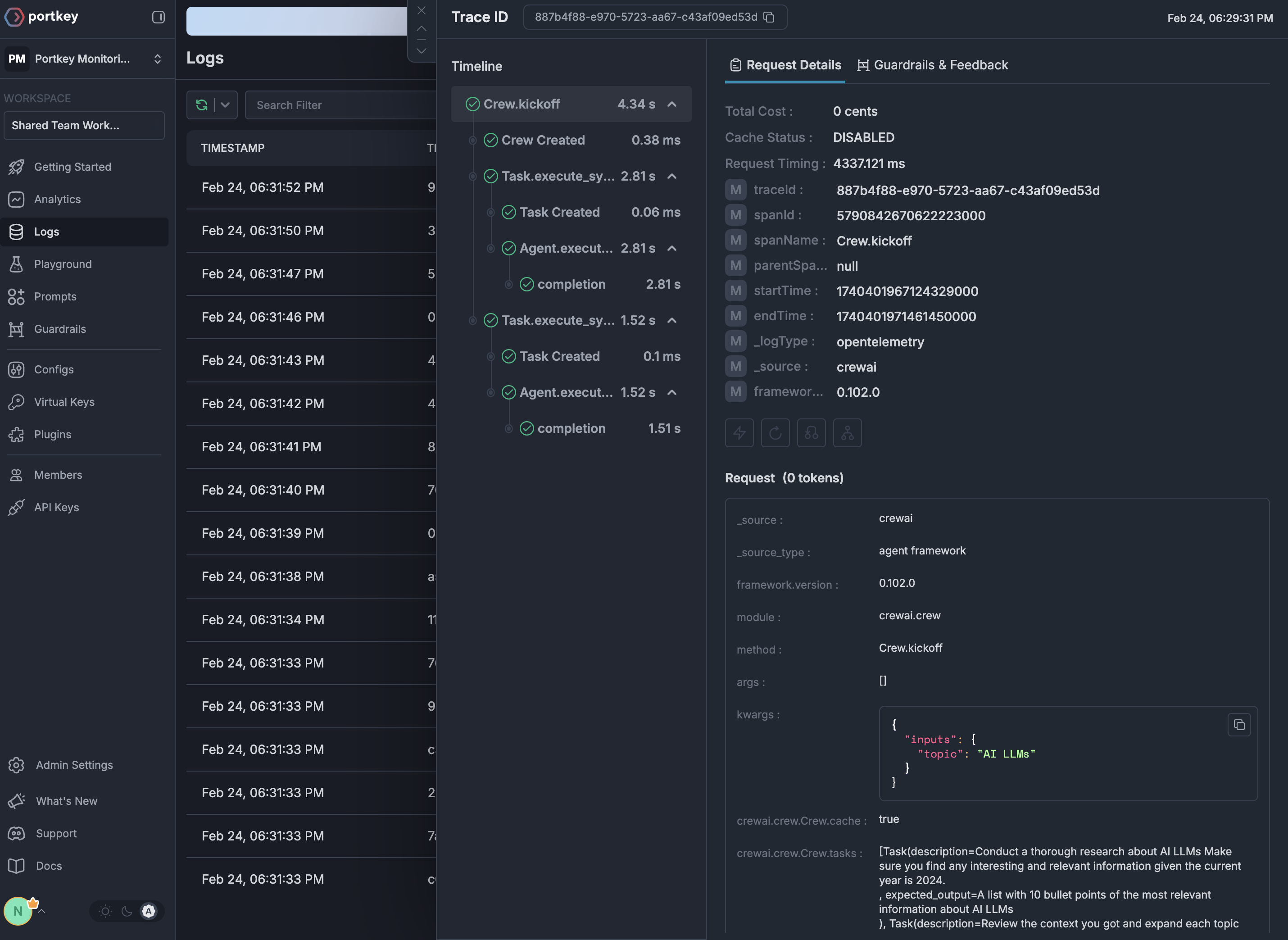
## Viewing Traces
Once configured, your OpenTelemetry traces appear in the Portkey dashboard with full visibility for your AI application:
 ## GenAI Semantic Conventions Support
Portkey automatically enriches OpenTelemetry traces with cost and token metrics following the [GenAI Semantic Conventions](https://opentelemetry.io/docs/specs/semconv/gen-ai/). When you send traces with GenAI attributes, Portkey automatically:
* **Extracts Token Counts**: Reads `gen_ai.usage.input_tokens` and `gen_ai.usage.output_tokens` from trace attributes
* **Calculates Costs**: Automatically computes costs based on token usage and model pricing
* **Identifies Models & Providers**: Extracts model information from `gen_ai.request.model` or `gen_ai.response.model` and provider from `gen_ai.system`
* **Enriches Analytics**: Makes all trace data available for cost attribution and usage analysis
This means traces sent from OpenTelemetry-instrumented applications automatically get the same cost tracking and analytics as requests made directly through the Portkey Gateway.
This feature is particularly powerful for applications using frameworks like LangChain, LlamaIndex, or other tools with built-in OpenTelemetry instrumentation that follow GenAI semantic conventions.
## W3C Trace Context Headers
When making requests to the Portkey Gateway, you can use standard W3C trace context headers (`traceparent` and `baggage`) instead of Portkey-specific headers. This enables seamless integration with existing OpenTelemetry-instrumented applications.
* **`traceparent`**: The trace ID and span ID are automatically extracted and used for Portkey's tracing
* **`baggage`**: Key-value pairs are parsed and merged into the request metadata
For detailed usage examples and header specifications, see the [W3C Trace Context Support section in the Tracing documentation](/product/observability/traces#w3c-trace-context-support).
## Why Use OpenTelemetry with Portkey?
Portkey's OTel backend is compatible with any OTel-compliant library. Here are a few popular ones for GenAI and general application observability:
Works with any programming language that supports OpenTelemetry - Python, JavaScript, Java, Go, and more
Compatible with all major LLM frameworks through their OTel instrumentation
Many libraries offer auto-instrumentation that requires no changes to your application code
Built on industry-standard protocols ensuring long-term compatibility
Navigate to the [Logs page](https://app.portkey.ai/logs) to view your traces, filter by various attributes, and drill down into specific requests.
## Getting Started
Sign up for [Portkey](https://app.portkey.ai) and grab your API key from the settings page
Pick from our [supported integrations](#supported-integrations) based on your stack
Point your OTel exporter to `https://api.portkey.ai/v1/logs/otel` with your API key
Run your application and view traces in the Portkey dashboard
## Next Steps
Browse all available OpenTelemetry integrations
Learn how to analyze traces in Portkey
Discover Portkey's native auto-instrumentation features
Join our Discord community for support
## Experimental Features
### Push Logs to an OpenTelemetry compatible endpoint `[Enterprise/Self-Hosted]`
[OpenTelemetry conventions on GenAI Traces](https://opentelemetry.io/docs/specs/semconv/gen-ai/gen-ai-spans/) are still under development and have not been widely adapted, hence the feature is still experimental.
When enabled, Portkey Gateway pushes logs to an OpenTelemetry-compatible endpoint following the [semconv 1.40.0](https://opentelemetry.io/docs/specs/semconv/) semantic conventions for GenAI. This includes rich attributes such as:
* Operation and provider: `gen_ai.operation.name`, `gen_ai.provider.name`
* Request attributes: `gen_ai.request.model`, `gen_ai.request.max_tokens`, `gen_ai.request.temperature`, `gen_ai.request.top_k`, etc.
* Response attributes: `gen_ai.response.id`, `gen_ai.response.model`, `gen_ai.response.finish_reasons`
* Token usage: `gen_ai.usage.input_tokens`, `gen_ai.usage.output_tokens`, `gen_ai.usage.cache_creation.input_tokens`, `gen_ai.usage.cache_read.input_tokens`
* Structured messages: `gen_ai.input.messages`, `gen_ai.output.messages`, `gen_ai.system_instructions`
* Tool definitions: `gen_ai.tool.definitions`
* Embeddings support: `gen_ai.request.encoding_formats`, `gen_ai.embeddings.dimension.count`
To push logs to an OpenTelemetry compatible endpoint, you can set the following environment variables in your deployment configuration:
This is an example configuration for LangSmith, but all OpenTelemetry compatible endpoints are supported.
```yaml theme={"system"}
EXPERIMENTAL_GEN_AI_OTEL_TRACES_ENABLED: "true"
EXPERIMENTAL_GEN_AI_OTEL_EXPORTER_OTLP_ENDPOINT: https://api.smith.langchain.com/otel
EXPERIMENTAL_GEN_AI_OTEL_EXPORTER_OTLP_HEADERS: x-api-key=langsmith-api-key
EXPERIMENTAL_GEN_AI_OTEL_RESOURCE_ATTRIBUTES: deployment.environment=production,service.version=1.0
```
**Environment Variables:**
* `EXPERIMENTAL_GEN_AI_OTEL_TRACES_ENABLED`: Set to `"true"` to enable pushing logs to an OpenTelemetry endpoint
* `EXPERIMENTAL_GEN_AI_OTEL_EXPORTER_OTLP_ENDPOINT`: The OpenTelemetry OTLP endpoint URL (e.g., `https://api.smith.langchain.com/otel`)
* `EXPERIMENTAL_GEN_AI_OTEL_EXPORTER_OTLP_HEADERS`: Comma-separated list of headers in the format `key=value` (e.g., `x-api-key=langsmith-api-key`)
* `EXPERIMENTAL_GEN_AI_OTEL_RESOURCE_ATTRIBUTES`: Comma-separated `key=value` pairs added as OTLP resource attributes (e.g., `deployment.environment=production`)
The logs are pushed to the endpoint specified in `EXPERIMENTAL_GEN_AI_OTEL_EXPORTER_OTLP_ENDPOINT` at the `/v1/traces` path.
View comprehensive documentation including attribute mapping, span structure, and integration guides.
## GenAI Semantic Conventions Support
Portkey automatically enriches OpenTelemetry traces with cost and token metrics following the [GenAI Semantic Conventions](https://opentelemetry.io/docs/specs/semconv/gen-ai/). When you send traces with GenAI attributes, Portkey automatically:
* **Extracts Token Counts**: Reads `gen_ai.usage.input_tokens` and `gen_ai.usage.output_tokens` from trace attributes
* **Calculates Costs**: Automatically computes costs based on token usage and model pricing
* **Identifies Models & Providers**: Extracts model information from `gen_ai.request.model` or `gen_ai.response.model` and provider from `gen_ai.system`
* **Enriches Analytics**: Makes all trace data available for cost attribution and usage analysis
This means traces sent from OpenTelemetry-instrumented applications automatically get the same cost tracking and analytics as requests made directly through the Portkey Gateway.
This feature is particularly powerful for applications using frameworks like LangChain, LlamaIndex, or other tools with built-in OpenTelemetry instrumentation that follow GenAI semantic conventions.
## W3C Trace Context Headers
When making requests to the Portkey Gateway, you can use standard W3C trace context headers (`traceparent` and `baggage`) instead of Portkey-specific headers. This enables seamless integration with existing OpenTelemetry-instrumented applications.
* **`traceparent`**: The trace ID and span ID are automatically extracted and used for Portkey's tracing
* **`baggage`**: Key-value pairs are parsed and merged into the request metadata
For detailed usage examples and header specifications, see the [W3C Trace Context Support section in the Tracing documentation](/product/observability/traces#w3c-trace-context-support).
## Why Use OpenTelemetry with Portkey?
Portkey's OTel backend is compatible with any OTel-compliant library. Here are a few popular ones for GenAI and general application observability:
Works with any programming language that supports OpenTelemetry - Python, JavaScript, Java, Go, and more
Compatible with all major LLM frameworks through their OTel instrumentation
Many libraries offer auto-instrumentation that requires no changes to your application code
Built on industry-standard protocols ensuring long-term compatibility
Navigate to the [Logs page](https://app.portkey.ai/logs) to view your traces, filter by various attributes, and drill down into specific requests.
## Getting Started
Sign up for [Portkey](https://app.portkey.ai) and grab your API key from the settings page
Pick from our [supported integrations](#supported-integrations) based on your stack
Point your OTel exporter to `https://api.portkey.ai/v1/logs/otel` with your API key
Run your application and view traces in the Portkey dashboard
## Next Steps
Browse all available OpenTelemetry integrations
Learn how to analyze traces in Portkey
Discover Portkey's native auto-instrumentation features
Join our Discord community for support
## Experimental Features
### Push Logs to an OpenTelemetry compatible endpoint `[Enterprise/Self-Hosted]`
[OpenTelemetry conventions on GenAI Traces](https://opentelemetry.io/docs/specs/semconv/gen-ai/gen-ai-spans/) are still under development and have not been widely adapted, hence the feature is still experimental.
When enabled, Portkey Gateway pushes logs to an OpenTelemetry-compatible endpoint following the [semconv 1.40.0](https://opentelemetry.io/docs/specs/semconv/) semantic conventions for GenAI. This includes rich attributes such as:
* Operation and provider: `gen_ai.operation.name`, `gen_ai.provider.name`
* Request attributes: `gen_ai.request.model`, `gen_ai.request.max_tokens`, `gen_ai.request.temperature`, `gen_ai.request.top_k`, etc.
* Response attributes: `gen_ai.response.id`, `gen_ai.response.model`, `gen_ai.response.finish_reasons`
* Token usage: `gen_ai.usage.input_tokens`, `gen_ai.usage.output_tokens`, `gen_ai.usage.cache_creation.input_tokens`, `gen_ai.usage.cache_read.input_tokens`
* Structured messages: `gen_ai.input.messages`, `gen_ai.output.messages`, `gen_ai.system_instructions`
* Tool definitions: `gen_ai.tool.definitions`
* Embeddings support: `gen_ai.request.encoding_formats`, `gen_ai.embeddings.dimension.count`
To push logs to an OpenTelemetry compatible endpoint, you can set the following environment variables in your deployment configuration:
This is an example configuration for LangSmith, but all OpenTelemetry compatible endpoints are supported.
```yaml theme={"system"}
EXPERIMENTAL_GEN_AI_OTEL_TRACES_ENABLED: "true"
EXPERIMENTAL_GEN_AI_OTEL_EXPORTER_OTLP_ENDPOINT: https://api.smith.langchain.com/otel
EXPERIMENTAL_GEN_AI_OTEL_EXPORTER_OTLP_HEADERS: x-api-key=langsmith-api-key
EXPERIMENTAL_GEN_AI_OTEL_RESOURCE_ATTRIBUTES: deployment.environment=production,service.version=1.0
```
**Environment Variables:**
* `EXPERIMENTAL_GEN_AI_OTEL_TRACES_ENABLED`: Set to `"true"` to enable pushing logs to an OpenTelemetry endpoint
* `EXPERIMENTAL_GEN_AI_OTEL_EXPORTER_OTLP_ENDPOINT`: The OpenTelemetry OTLP endpoint URL (e.g., `https://api.smith.langchain.com/otel`)
* `EXPERIMENTAL_GEN_AI_OTEL_EXPORTER_OTLP_HEADERS`: Comma-separated list of headers in the format `key=value` (e.g., `x-api-key=langsmith-api-key`)
* `EXPERIMENTAL_GEN_AI_OTEL_RESOURCE_ATTRIBUTES`: Comma-separated `key=value` pairs added as OTLP resource attributes (e.g., `deployment.environment=production`)
The logs are pushed to the endpoint specified in `EXPERIMENTAL_GEN_AI_OTEL_EXPORTER_OTLP_ENDPOINT` at the `/v1/traces` path.
View comprehensive documentation including attribute mapping, span structure, and integration guides.