> ## Documentation Index
> Fetch the complete documentation index at: https://docs.portkey.ai/docs/llms.txt
> Use this file to discover all available pages before exploring further.
# Bring Your Own Guardrails
> Integrate your custom guardrails with Portkey using webhooks
Portkey's webhook guardrails allow you to integrate your existing guardrail infrastructure with our AI Gateway. This is perfect for teams that have already built custom guardrail pipelines (like PII redaction, sensitive content filtering, or data validation) and want to:
* Enforce guardrails directly within the AI request flow
* Make existing guardrail systems production-ready
* Modify AI requests and responses in real-time
## How It Works
1. You add a Webhook as a Guardrail Check in Portkey
2. When a request passes through Portkey's Gateway:
* Portkey sends relevant data to your webhook endpoint
* Your webhook evaluates the request/response and returns a verdict
* Based on your webhook's response, Portkey either allows the request to proceed, modifies it if required, or applies your configured guardrail actions
## Setting Up a Webhook Guardrail
### Configure Your Webhook in Portkey App
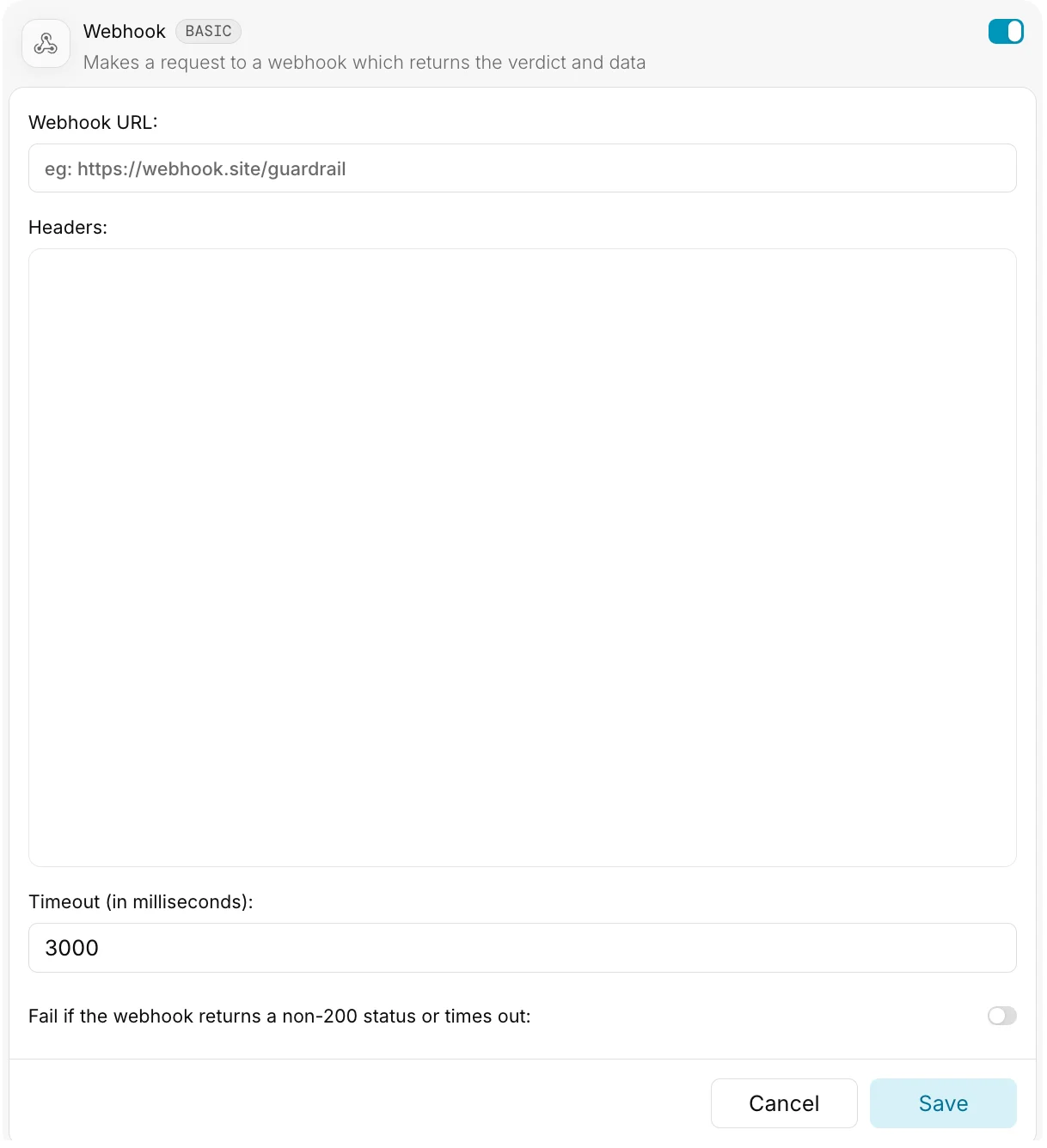 In the Guardrail configuration UI, you'll need to provide:
| Field | Description | Type |
| :-------------- | :--------------------------------------- | :------------ |
| **Webhook URL** | Your webhook's endpoint URL | `string` |
| **Headers** | Headers to include with webhook requests | `JSON` |
| **Timeout** | Maximum wait time for webhook response | `number` (ms) |
#### Webhook URL
This should be a publicly accessible URL where your webhook is hosted.
**Enterprise Feature**: Portkey Enterprise customers can configure secure access to webhooks within private networks.
#### Headers
Specify headers as a JSON object:
```json theme={"system"}
{
"Authorization": "Bearer YOUR_API_KEY",
"Content-Type": "application/json"
}
```
#### Timeout
The maximum time Portkey will wait for your webhook to respond before proceeding with a default `verdict: true`.
* Default: `3000ms` (3 seconds)
* If your webhook processing is time-intensive, consider increasing this value
### Webhook Request Structure
Your webhook should accept `POST` requests with the following structure:
#### Request Headers
| Header | Description |
| :------------- | :------------------------------------------- |
| `Content-Type` | Always set to `application/json` |
| Custom Headers | Any headers you configured in the Portkey UI |
#### Request Body
Portkey sends comprehensive information about the AI request to your webhook:
Information about the user's request to the LLM
OpenAI compliant request body json.
Last message/prompt content from the overall request body.
Whether the request uses streaming
Information about the LLM's response (empty for beforeRequestHook)
OpenAI compliant response body json.
Last message/prompt content from the overall response body.
HTTP status code from LLM provider
Portkey provider slug. Example: `openai`, `azure-openai`, etc.
Type of request: `chatComplete`, `complete`, or `embed`
Custom metadata passed with the request. Can come from: 1) the `x-portkey-metadata` header, 2) default API key settings, or 3) workspace defaults.
When the hook is triggered: `beforeRequestHook` or `afterRequestHook`
#### Event Types
Your webhook can be triggered at two points:
* **beforeRequestHook**: Before the request is sent to the LLM provider
* **afterRequestHook**: After receiving a response from the LLM provider
```JSON beforeRequestHook Example [expandable] theme={"system"}
{
"request": {
"json": {
"stream": false,
"messages": [
{
"role": "system",
"content": "You are a helpful assistant"
},
{
"role": "user",
"content": "Say Hi"
}
],
"max_tokens": 20,
"n": 1,
"model": "gpt-4o-mini"
},
"text": "Say Hi",
"isStreamingRequest": false,
"isTransformed": false
},
"response": {
"json": {},
"text": "",
"statusCode": null,
"isTransformed": false
},
"provider": "openai",
"requestType": "chatComplete",
"metadata": {
"_user": "visarg123"
},
"eventType": "beforeRequestHook"
}
```
```JSON afterRequestHook Example [expandable] theme={"system"}
{
"request": {
"json": {
"stream": false,
"messages": [
{
"role": "system",
"content": "You are a helpful assistant"
},
{
"role": "user",
"content": "Say Hi"
}
],
"max_tokens": 20,
"n": 1,
"model": "gpt-4o-mini"
},
"text": "Say Hi",
"isStreamingRequest": false,
"isTransformed": false
},
"response": {
"json": {
"id": "chatcmpl-B9SAAj7zd4mq12omkeEImYvYnjbOr",
"object": "chat.completion",
"created": 1741592910,
"model": "gpt-4o-mini-2024-07-18",
"choices": [
{
"index": 0,
"message": {
"role": "assistant",
"content": "Hi! How can I assist you today?",
"refusal": null
},
"logprobs": null,
"finish_reason": "stop"
}
],
"usage": {
"prompt_tokens": 18,
"completion_tokens": 10,
"total_tokens": 28,
"prompt_tokens_details": {
"cached_tokens": 0,
"audio_tokens": 0
},
"completion_tokens_details": {
"reasoning_tokens": 0,
"audio_tokens": 0,
"accepted_prediction_tokens": 0,
"rejected_prediction_tokens": 0
}
},
"service_tier": "default",
"system_fingerprint": "fp_06737a9306"
},
"text": "Hi! How can I assist you today?",
"statusCode": 200,
"isTransformed": false
},
"provider": "openai",
"requestType": "chatComplete",
"metadata": {
"_user": "visarg123"
},
"eventType": "afterRequestHook"
}
```
### Webhook Response Structure
Your webhook must return a response that follows this structure:
#### Response Body
Whether the request/response passes your guardrail check:
* `true`: No violations detected
* `false`: Violations detected
Optional field to modify the request or response
Modified request data (only for beforeRequestHook)
If this field is found in the Webhook response, Portkey will fully override the existing request body with the returned data.
Modified response data (only for afterRequestHook)
If this field is found in the Webhook response, Portkey will fully override the existing response body with the returned data.
## Webhook Capabilities
Your webhook can perform three main actions:
### Simple Validation
Return a verdict without modifying the request/response:
```json theme={"system"}
{
"verdict": true // or false if the request violates your guardrails
}
```
### Request Transformation
Modify the user's request before it reaches the LLM provider:
```json theme={"system"}
{
"verdict": true,
"transformedData": {
"request": {
"json": {
"messages": [
{
"role": "system",
"content": "You are a helpful assistant. Do not provide harmful content."
},
{
"role": "user",
"content": "Original user message"
}
],
"max_tokens": 100,
"model": "gpt-4o"
}
}
}
}
```
```json theme={"system"}
{
"verdict": true,
"transformedData": {
"request": {
"json": {
"messages": [
{
"role": "system",
"content": "You are a helpful assistant"
},
{
"role": "user",
"content": "My name is [REDACTED] and my email is [REDACTED]"
}
],
"max_tokens": 100,
"model": "gpt-4o"
}
}
}
}
```
### Response Transformation
Modify the LLM's response before it reaches the user:
```json theme={"system"}
{
"verdict": true,
"transformedData": {
"response": {
"json": {
"id": "chatcmpl-123",
"object": "chat.completion",
"created": 1741592832,
"model": "gpt-4o-mini",
"choices": [
{
"index": 0,
"message": {
"role": "assistant",
"content": "I've filtered this response to comply with our content policies."
},
"finish_reason": "stop"
}
],
"usage": {
"prompt_tokens": 23,
"completion_tokens": 12,
"total_tokens": 35
}
},
"text": "I've filtered this response to comply with our content policies."
}
}
}
```
```json theme={"system"}
{
"verdict": true,
"transformedData": {
"response": {
"json": {
"id": "chatcmpl-123",
"object": "chat.completion",
"created": 1741592832,
"model": "gpt-4o-mini",
"choices": [
{
"index": 0,
"message": {
"role": "assistant",
"content": "Original response with additional disclaimer: This response is provided for informational purposes only."
},
"finish_reason": "stop"
}
],
"usage": {
"prompt_tokens": 23,
"completion_tokens": 20,
"total_tokens": 43
}
},
"text": "Original response with additional disclaimer: This response is provided for informational purposes only."
}
}
}
```
## Passing Metadata to Your Webhook
You can include additional context with each request using Portkey's metadata feature:
```json theme={"system"}
// In your API request to Portkey
"x-portkey-metadata": {"user": "john", "context": "customer_support"}
```
This metadata will be forwarded to your webhook in the `metadata` field. [Learn more about metadata](/product/observability/metadata).
## Important Implementation Notes
1. **Complete Transformations**: When using `transformedData`, include all fields in your transformed object, not just the changed portions.
2. **Independent Verdict and Transformation**: The `verdict` and any transformations are independent. You can return `verdict: false` while still returning transformations.
3. **Default Behavior**: If your webhook fails to respond within the timeout period, Portkey will default to `verdict: true`.
4. **Event Type Awareness**: When implementing transformations, ensure your webhook checks the `eventType` field to determine whether it's being called before or after the LLM request.
## Example Implementation
Check out our Guardrail Webhook implementation on GitHub:
## Get Help
Building custom webhooks? Join the [Portkey Discord community](https://portkey.ai/community) for support and to share your implementation experiences!
In the Guardrail configuration UI, you'll need to provide:
| Field | Description | Type |
| :-------------- | :--------------------------------------- | :------------ |
| **Webhook URL** | Your webhook's endpoint URL | `string` |
| **Headers** | Headers to include with webhook requests | `JSON` |
| **Timeout** | Maximum wait time for webhook response | `number` (ms) |
#### Webhook URL
This should be a publicly accessible URL where your webhook is hosted.
**Enterprise Feature**: Portkey Enterprise customers can configure secure access to webhooks within private networks.
#### Headers
Specify headers as a JSON object:
```json theme={"system"}
{
"Authorization": "Bearer YOUR_API_KEY",
"Content-Type": "application/json"
}
```
#### Timeout
The maximum time Portkey will wait for your webhook to respond before proceeding with a default `verdict: true`.
* Default: `3000ms` (3 seconds)
* If your webhook processing is time-intensive, consider increasing this value
### Webhook Request Structure
Your webhook should accept `POST` requests with the following structure:
#### Request Headers
| Header | Description |
| :------------- | :------------------------------------------- |
| `Content-Type` | Always set to `application/json` |
| Custom Headers | Any headers you configured in the Portkey UI |
#### Request Body
Portkey sends comprehensive information about the AI request to your webhook:
Information about the user's request to the LLM
OpenAI compliant request body json.
Last message/prompt content from the overall request body.
Whether the request uses streaming
Information about the LLM's response (empty for beforeRequestHook)
OpenAI compliant response body json.
Last message/prompt content from the overall response body.
HTTP status code from LLM provider
Portkey provider slug. Example: `openai`, `azure-openai`, etc.
Type of request: `chatComplete`, `complete`, or `embed`
Custom metadata passed with the request. Can come from: 1) the `x-portkey-metadata` header, 2) default API key settings, or 3) workspace defaults.
When the hook is triggered: `beforeRequestHook` or `afterRequestHook`
#### Event Types
Your webhook can be triggered at two points:
* **beforeRequestHook**: Before the request is sent to the LLM provider
* **afterRequestHook**: After receiving a response from the LLM provider
```JSON beforeRequestHook Example [expandable] theme={"system"}
{
"request": {
"json": {
"stream": false,
"messages": [
{
"role": "system",
"content": "You are a helpful assistant"
},
{
"role": "user",
"content": "Say Hi"
}
],
"max_tokens": 20,
"n": 1,
"model": "gpt-4o-mini"
},
"text": "Say Hi",
"isStreamingRequest": false,
"isTransformed": false
},
"response": {
"json": {},
"text": "",
"statusCode": null,
"isTransformed": false
},
"provider": "openai",
"requestType": "chatComplete",
"metadata": {
"_user": "visarg123"
},
"eventType": "beforeRequestHook"
}
```
```JSON afterRequestHook Example [expandable] theme={"system"}
{
"request": {
"json": {
"stream": false,
"messages": [
{
"role": "system",
"content": "You are a helpful assistant"
},
{
"role": "user",
"content": "Say Hi"
}
],
"max_tokens": 20,
"n": 1,
"model": "gpt-4o-mini"
},
"text": "Say Hi",
"isStreamingRequest": false,
"isTransformed": false
},
"response": {
"json": {
"id": "chatcmpl-B9SAAj7zd4mq12omkeEImYvYnjbOr",
"object": "chat.completion",
"created": 1741592910,
"model": "gpt-4o-mini-2024-07-18",
"choices": [
{
"index": 0,
"message": {
"role": "assistant",
"content": "Hi! How can I assist you today?",
"refusal": null
},
"logprobs": null,
"finish_reason": "stop"
}
],
"usage": {
"prompt_tokens": 18,
"completion_tokens": 10,
"total_tokens": 28,
"prompt_tokens_details": {
"cached_tokens": 0,
"audio_tokens": 0
},
"completion_tokens_details": {
"reasoning_tokens": 0,
"audio_tokens": 0,
"accepted_prediction_tokens": 0,
"rejected_prediction_tokens": 0
}
},
"service_tier": "default",
"system_fingerprint": "fp_06737a9306"
},
"text": "Hi! How can I assist you today?",
"statusCode": 200,
"isTransformed": false
},
"provider": "openai",
"requestType": "chatComplete",
"metadata": {
"_user": "visarg123"
},
"eventType": "afterRequestHook"
}
```
### Webhook Response Structure
Your webhook must return a response that follows this structure:
#### Response Body
Whether the request/response passes your guardrail check:
* `true`: No violations detected
* `false`: Violations detected
Optional field to modify the request or response
Modified request data (only for beforeRequestHook)
If this field is found in the Webhook response, Portkey will fully override the existing request body with the returned data.
Modified response data (only for afterRequestHook)
If this field is found in the Webhook response, Portkey will fully override the existing response body with the returned data.
## Webhook Capabilities
Your webhook can perform three main actions:
### Simple Validation
Return a verdict without modifying the request/response:
```json theme={"system"}
{
"verdict": true // or false if the request violates your guardrails
}
```
### Request Transformation
Modify the user's request before it reaches the LLM provider:
```json theme={"system"}
{
"verdict": true,
"transformedData": {
"request": {
"json": {
"messages": [
{
"role": "system",
"content": "You are a helpful assistant. Do not provide harmful content."
},
{
"role": "user",
"content": "Original user message"
}
],
"max_tokens": 100,
"model": "gpt-4o"
}
}
}
}
```
```json theme={"system"}
{
"verdict": true,
"transformedData": {
"request": {
"json": {
"messages": [
{
"role": "system",
"content": "You are a helpful assistant"
},
{
"role": "user",
"content": "My name is [REDACTED] and my email is [REDACTED]"
}
],
"max_tokens": 100,
"model": "gpt-4o"
}
}
}
}
```
### Response Transformation
Modify the LLM's response before it reaches the user:
```json theme={"system"}
{
"verdict": true,
"transformedData": {
"response": {
"json": {
"id": "chatcmpl-123",
"object": "chat.completion",
"created": 1741592832,
"model": "gpt-4o-mini",
"choices": [
{
"index": 0,
"message": {
"role": "assistant",
"content": "I've filtered this response to comply with our content policies."
},
"finish_reason": "stop"
}
],
"usage": {
"prompt_tokens": 23,
"completion_tokens": 12,
"total_tokens": 35
}
},
"text": "I've filtered this response to comply with our content policies."
}
}
}
```
```json theme={"system"}
{
"verdict": true,
"transformedData": {
"response": {
"json": {
"id": "chatcmpl-123",
"object": "chat.completion",
"created": 1741592832,
"model": "gpt-4o-mini",
"choices": [
{
"index": 0,
"message": {
"role": "assistant",
"content": "Original response with additional disclaimer: This response is provided for informational purposes only."
},
"finish_reason": "stop"
}
],
"usage": {
"prompt_tokens": 23,
"completion_tokens": 20,
"total_tokens": 43
}
},
"text": "Original response with additional disclaimer: This response is provided for informational purposes only."
}
}
}
```
## Passing Metadata to Your Webhook
You can include additional context with each request using Portkey's metadata feature:
```json theme={"system"}
// In your API request to Portkey
"x-portkey-metadata": {"user": "john", "context": "customer_support"}
```
This metadata will be forwarded to your webhook in the `metadata` field. [Learn more about metadata](/product/observability/metadata).
## Important Implementation Notes
1. **Complete Transformations**: When using `transformedData`, include all fields in your transformed object, not just the changed portions.
2. **Independent Verdict and Transformation**: The `verdict` and any transformations are independent. You can return `verdict: false` while still returning transformations.
3. **Default Behavior**: If your webhook fails to respond within the timeout period, Portkey will default to `verdict: true`.
4. **Event Type Awareness**: When implementing transformations, ensure your webhook checks the `eventType` field to determine whether it's being called before or after the LLM request.
## Example Implementation
Check out our Guardrail Webhook implementation on GitHub:
## Get Help
Building custom webhooks? Join the [Portkey Discord community](https://portkey.ai/community) for support and to share your implementation experiences!