> ## Documentation Index
> Fetch the complete documentation index at: https://docs.portkey.ai/docs/llms.txt
> Use this file to discover all available pages before exploring further.

# Langchain (Python)

> Supercharge Langchain apps with Portkey: Multi-LLM, observability, caching, reliability, and prompt management.

<Info>
  This guide covers Langchain **Python**. For JS, see [Langchain JS](/integrations/libraries/langchain-js).
</Info>

Portkey extends Langchain's `ChatOpenAI` to effortlessly work with **1600+ LLMs** (Anthropic, Gemini, Mistral, etc.) without needing different SDKs. Portkey enhances your Langchain apps with interoperability, reliability, speed, cost-efficiency, and deep observability.

## Getting Started

Integrate Portkey into Langchain easily.

### 1. Install Packages

```sh theme={"system"}
pip install -U langchain-openai portkey-ai
```

<Info>
  `langchain-openai` includes `langchain-core`. Install `langchain` or other specific packages if you need more components.
</Info>

### 2. Basic Setup: `ChatOpenAI` with Portkey

Configure `ChatOpenAI` to route requests via Portkey using your Portkey API Key and `createHeaders` method.

```python theme={"system"}
from langchain_openai import ChatOpenAI
from portkey_ai import PORTKEY_GATEWAY_URL, createHeaders
import os

# Use environment variables for API keys
PORTKEY_API_KEY = os.environ.get("PORTKEY_API_KEY")
PROVIDER_API_KEY = os.environ.get("OPENAI_API_KEY") # Example: OpenAI API Key

# Configure Portkey headers
portkey_headers = createHeaders(
    api_key=PORTKEY_API_KEY,
    provider="openai" # Specify target LLM provider
)

llm = ChatOpenAI(
    api_key=PROVIDER_API_KEY,       # Provider's API key
    base_url=PORTKEY_GATEWAY_URL, # Route via Portkey
    default_headers=portkey_headers, # Portkey specific headers
    model="gpt-4o"               # Specify provider model
)

# response = llm.invoke("Tell me a joke about AI.")
# print(response.content)
```

**Key `ChatOpenAI` Parameters:**

* `api_key`: The underlying provider's API key.
* `base_url`: Set to `PORTKEY_GATEWAY_URL` to route via Portkey.
* `default_headers`: Uses `createHeaders` for your `PORTKEY_API_KEY`. Can also include a `virtual_key` (for provider credentials) or a `config` ID (for advanced routing).

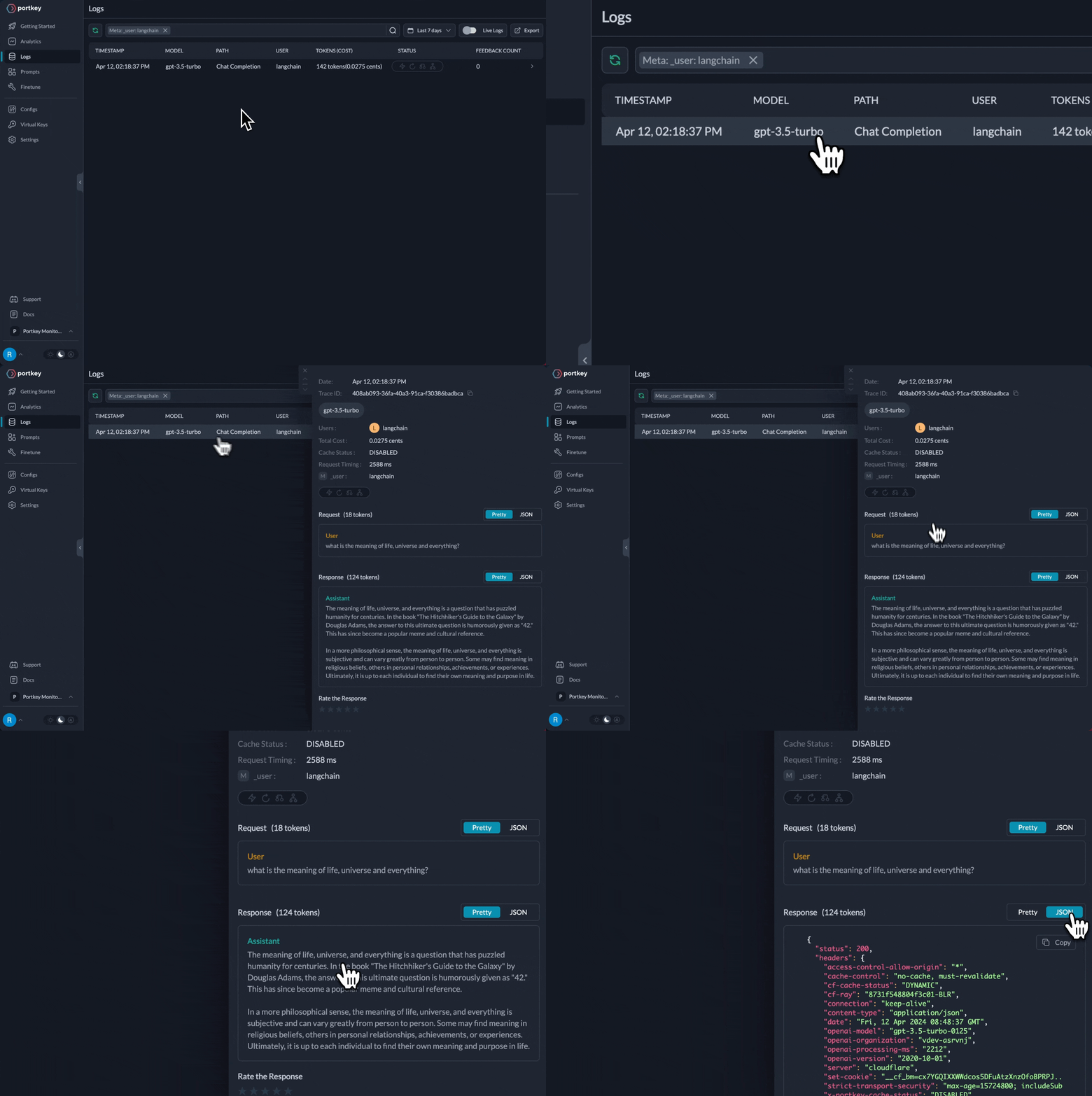
All LLM calls via this `llm` instance now use Portkey, starting with observability.

<Frame caption="Langchain requests now appear in Portkey Logs">
  <img src="https://mintcdn.com/portkey-docs/T0lFtdapIPX8YtCI/images/libraries/langchain-logs.gif?s=83f80a28ac2103950e5683f90faa16b2" width="1612" height="1080" data-path="images/libraries/langchain-logs.gif" />
</Frame>

This setup enables Portkey's advanced features for Langchain.

## Key Portkey Features for Langchain

Routing Langchain requests via Portkey's `ChatOpenAI` interface unlocks powerful capabilities:

<CardGroup cols={2}>
  <Card title="Multi-LLM Integration" href="#1-multi-llm-integration">
    <p>Use `ChatOpenAI` for OpenAI, Anthropic, Gemini, Mistral, and more. Switch providers easily with Virtual Keys or Configs.</p>
  </Card>

  <Card title="Advanced Caching" href="#2-advanced-caching">
    <p>Reduce latency and costs with Portkey's Simple, Semantic, or Hybrid caching, enabled via Configs.</p>
  </Card>

  <Card title="Enhanced Reliability" href="#3-enhanced-reliability">
    <p>Build robust apps with retries, timeouts, fallbacks, and load balancing, configured in Portkey.</p>
  </Card>

  <Card title="Full Observability" href="#4-full-observability">
    <p>Get deep insights: LLM usage, costs, latency, and errors are automatically logged in Portkey.</p>
  </Card>

  <Card title="Prompt Management" href="#5-prompt-management">
    <p>Manage, version, and use prompts from Portkey's Prompt Library within Langchain.</p>
  </Card>

  <Card title="Secure Virtual Keys" href="#6-secure-virtual-keys">
    <p>Securely manage LLM provider API keys using Portkey Virtual Keys in your Langchain setup.</p>
  </Card>
</CardGroup>

***

## 1. Multi-LLM Integration

Portkey simplifies using different LLM providers. `ChatOpenAI` becomes your universal client for numerous models.

**Mechanism: Portkey Headers with Virtual Keys**

Switch LLMs by changing the `virtual_key` in `createHeaders` and the `model` in `ChatOpenAI`. Portkey manages provider specifics.

### Example: Anthropic (Claude)

1. **Create Anthropic Virtual Key:** In Portkey, add your Anthropic API key and get the Virtual Key ID.

2. **Update Langchain code:**

```python theme={"system"}
from langchain_openai import ChatOpenAI
from portkey_ai import PORTKEY_GATEWAY_URL, createHeaders
import os

PORTKEY_API_KEY = os.environ.get("PORTKEY_API_KEY")
ANTHROPIC_VIRTUAL_KEY = os.environ.get("ANTHROPIC_VIRTUAL_KEY")

portkey_anthropic_headers = createHeaders(
    api_key=PORTKEY_API_KEY,
    virtual_key=ANTHROPIC_VIRTUAL_KEY
)

llm_claude = ChatOpenAI(
    api_key="placeholder_anthropic_key", # Placeholder; Portkey uses Virtual Key
    base_url=PORTKEY_GATEWAY_URL,
    default_headers=portkey_anthropic_headers,
    model="claude-3-5-sonnet-latest" # Anthropic model
)

# response_claude = llm_claude.invoke("Haiku principles?")
# print(response_claude.content)
```

### Example: Vertex (Gemini)

1. **Create Google Virtual Key:** In Portkey, add your [Vertex AI credentials](/integrations/llms/vertex-ai#how-to-find-your-google-vertex-project-details) and get the Virtual Key ID.

2. **Update Langchain code:**

```python theme={"system"}
from langchain_openai import ChatOpenAI
from portkey_ai import PORTKEY_GATEWAY_URL, createHeaders
import os

PORTKEY_API_KEY = os.environ.get("PORTKEY_API_KEY")
GOOGLE_VIRTUAL_KEY = os.environ.get("GOOGLE_VIRTUAL_KEY")

portkey_gemini_headers = createHeaders(
    api_key=PORTKEY_API_KEY,
    virtual_key=GOOGLE_VIRTUAL_KEY
)

llm_gemini = ChatOpenAI(
    api_key="placeholder_google_key", # Placeholder; Portkey uses Virtual Key
    base_url=PORTKEY_GATEWAY_URL,
    default_headers=portkey_gemini_headers,
    model="gemini-2.5-pro-preview" # Gemini model
)

# response_gemini = llm_gemini.invoke("Zero-knowledge proofs?")
# print(response_gemini.content)
```

Core `ChatOpenAI` structure remains. Only `virtual_key` and `model` change. Portkey maps responses to the OpenAI format Langchain expects. This extends to Mistral, Cohere, Azure, Bedrock via their Virtual Keys.

***

## 2. Advanced Caching

Portkey's caching reduces latency and LLM costs. Enable it via a Portkey [Config object](/api-reference/config-object) or a saved Config ID in `createHeaders`.

A Portkey Config can specify `mode` (`simple`, `semantic`, `hybrid`) and `max_age` (cache duration).

### Example: Semantic Caching

1. **Define/Save Portkey Config:** Create a Config in Portkey (e.g., `langchain-semantic-cache`) specifying caching strategy.

   ```json theme={"system"}
   // Example Portkey Config JSON for semantic cache
   {
     "cache": { "mode": "semantic", "max_age": "2h" },
     "virtual_key": "your_openai_virtual_key_id",
     "override_params": { "model": "gpt-4o" }
   }
   ```

   Assume saved Config ID is `cfg_semantic_cache_123`.

2. **Use Config ID in `createHeaders`:**

```python theme={"system"}
from langchain_openai import ChatOpenAI
from portkey_ai import PORTKEY_GATEWAY_URL, createHeaders
import os

PORTKEY_API_KEY = os.environ.get("PORTKEY_API_KEY")
PORTKEY_CONFIG_ID = "cfg_semantic_cache_123"

portkey_cached_headers = createHeaders(
    api_key=PORTKEY_API_KEY,
    config=PORTKEY_CONFIG_ID
)

llm_cached = ChatOpenAI(
    api_key="placeholder_key", # Config can handle auth via virtual_key
    base_url=PORTKEY_GATEWAY_URL,
    default_headers=portkey_cached_headers
)

# response1 = llm_cached.invoke("Capital of France?")
# response2 = llm_cached.invoke("Tell me France's capital.")
```

Similar requests can now hit the cache. Monitor cache performance in your Portkey dashboard.

***

## 3. Enhanced Reliability

Portkey improves Langchain app resilience via Configs:

* **Retries:** Auto-retry failed LLM requests.
* **Fallbacks:** Define backup LLMs if a primary fails.
* **Load Balancing:** Distribute requests across keys or models.
* **Timeouts:** Set max request durations.

### Example: Fallbacks with Retries

1. **Define/Save Portkey Config:** Create a Config for retries and fallbacks (e.g., `gpt-4o` then `claude-3-sonnet`).

   ```json theme={"system"}
   // Example Portkey Config for reliability
   {
     "strategy": { "mode": "fallback" },
     "targets": [
       { "override_params": {"model": "gpt-4o"}, "virtual_key": "vk_openai", "retry": {"count": 2} },
       { "override_params": {"model": "claude-3-sonnet-20240229"}, "virtual_key": "vk_anthropic" }
     ]
   }
   ```

   Assume saved Config ID is `cfg_reliable_123`.

2. **Use Config ID in `createHeaders`:**

```python theme={"system"}
from langchain_openai import ChatOpenAI
from portkey_ai import PORTKEY_GATEWAY_URL, createHeaders
import os

PORTKEY_API_KEY = os.environ.get("PORTKEY_API_KEY")
PORTKEY_RELIABLE_CONFIG_ID = "cfg_reliable_123"

portkey_reliable_headers = createHeaders(
    api_key=PORTKEY_API_KEY,
    config=PORTKEY_RELIABLE_CONFIG_ID
)

llm_reliable = ChatOpenAI(
    api_key="placeholder_key",
    base_url=PORTKEY_GATEWAY_URL,
    default_headers=portkey_reliable_headers
)

# response = llm_reliable.invoke("Poem on resilient AI.")
```

Offload complex logic to Portkey Configs, keeping Langchain code clean.

***

## 4. Full Observability

Routing Langchain `ChatOpenAI` via Portkey provides instant, comprehensive observability:

* **Logged Requests:** Detailed logs of requests, responses, latencies, costs.
* **Tracing:** Understand call lifecycles.
* **Performance Analytics:** Monitor metrics, track usage.
* **Debugging:** Pinpoint errors quickly.

This is crucial for monitoring and optimizing production Langchain apps.

<Frame caption="Langchain requests are automatically logged in Portkey">
  <img src="https://mintcdn.com/portkey-docs/T0lFtdapIPX8YtCI/images/libraries/langchain-logs.gif?s=83f80a28ac2103950e5683f90faa16b2" width="1612" height="1080" data-path="images/libraries/langchain-logs.gif" />
</Frame>

***

## 5. Prompt Management

Portkey's Prompt Library helps manage prompts effectively:

* **Version Control:** Store and track prompt changes.
* **Parameterized Prompts:** Use variables with [mustache templating](/product/prompt-library/prompt-templates#templating-engine).
* **Sandbox:** Test prompts with different LLMs in Portkey.

### Using Portkey Prompts in Langchain

1. Create prompt in Portkey, get `Prompt ID`.
2. Use Portkey SDK to render prompt with variables.
3. Transform rendered prompt to Langchain message format.
4. Pass messages to Portkey-configured `ChatOpenAI`.

```python theme={"system"}
import os
from langchain_openai import ChatOpenAI
from langchain_core.messages import SystemMessage, HumanMessage
from portkey_ai import PORTKEY_GATEWAY_URL, createHeaders, Portkey

PORTKEY_API_KEY = os.environ.get("PORTKEY_API_KEY")
client = Portkey(api_key=PORTKEY_API_KEY)

PROMPT_ID = "pp-story-generator" # Your Portkey Prompt ID

rendered_prompt = client.prompts.render(
    prompt_id=PROMPT_ID,
    variables={"character": "brave knight", "object": "magic sword"}
).data

langchain_messages = []
if rendered_prompt and rendered_prompt.prompt:
    for msg in rendered_prompt.prompt:
        if msg.get("role") == "user": langchain_messages.append(HumanMessage(content=msg.get("content")))
        elif msg.get("role") == "system": langchain_messages.append(SystemMessage(content=msg.get("content")))

OPENAI_VIRTUAL_KEY = os.environ.get("OPENAI_VIRTUAL_KEY")
portkey_headers = createHeaders(api_key=PORTKEY_API_KEY, virtual_key=OPENAI_VIRTUAL_KEY)

llm_portkey_prompt = ChatOpenAI(
    api_key="placeholder_key",
    base_url=PORTKEY_GATEWAY_URL,
    default_headers=portkey_headers,
    model=rendered_prompt.model if rendered_prompt and rendered_prompt.model else "gpt-4o"
)

# if langchain_messages: response = llm_portkey_prompt.invoke(langchain_messages)
```

Manage prompts centrally in Portkey for versioning and collaboration.

***

## 6. Secure Virtual Keys

Portkey's [Virtual Keys](/product/ai-gateway/virtual-keys) are vital for secure, flexible LLM ops with Langchain.

**Benefits:**

* **Secure Credentials:** Store provider API keys in Portkey's vault. Code uses Virtual Key IDs.
* **Easy Configuration:** Switch providers/keys by changing `virtual_key` in `createHeaders`.
* **Access Control:** Manage Virtual Key permissions in Portkey.
* **Auditability:** Track usage via Portkey logs.

Using Virtual Keys boosts security and simplifies config management.

***

## Langchain Embeddings

Create embeddings with `OpenAIEmbeddings` via Portkey.

```python theme={"system"}
from langchain_openai import OpenAIEmbeddings
from portkey_ai import PORTKEY_GATEWAY_URL, createHeaders
import os

PORTKEY_API_KEY = os.environ.get("PORTKEY_API_KEY")
OPENAI_EMBEDDINGS_VIRTUAL_KEY = os.environ.get("OPENAI_EMBEDDINGS_VIRTUAL_KEY")

portkey_headers = createHeaders(api_key=PORTKEY_API_KEY, virtual_key=OPENAI_EMBEDDINGS_VIRTUAL_KEY)

embeddings_model = OpenAIEmbeddings(
    api_key="placeholder_key",
    base_url=PORTKEY_GATEWAY_URL,
    default_headers=portkey_headers,
    model="text-embedding-3-small"
)

# embeddings = embeddings_model.embed_documents(["Hello world!", "Test."])
```

<Info>
  Portkey supports OpenAI embeddings via Langchain's `OpenAIEmbeddings`. For other providers (Cohere, Gemini), use the **Portkey SDK directly** ([docs](/api-reference/inference-api/embeddings)).
</Info>

***

## Langchain Chains & Prompts

Standard Langchain `Chains` and `PromptTemplates` work seamlessly with Portkey-configured `ChatOpenAI` instances. Portkey features (logging, caching) apply automatically.

```python theme={"system"}
from langchain_openai import ChatOpenAI
from langchain_core.prompts import ChatPromptTemplate
from portkey_ai import PORTKEY_GATEWAY_URL, createHeaders
import os

PORTKEY_API_KEY = os.environ.get("PORTKEY_API_KEY")
OPENAI_VIRTUAL_KEY = os.environ.get("OPENAI_VIRTUAL_KEY")

portkey_headers = createHeaders(api_key=PORTKEY_API_KEY, virtual_key=OPENAI_VIRTUAL_KEY)

chat_llm = ChatOpenAI(
    api_key="placeholder_key",
    base_url=PORTKEY_GATEWAY_URL,
    default_headers=portkey_headers,
    model="gpt-4o"
)

prompt = ChatPromptTemplate.from_messages([
    ("system", "You are a world-class technical writer."),
    ("user", "{input}")
])

chain = prompt | chat_llm

# response = chain.invoke({"input": "Explain API gateways simply."})
```

All chain requests via `chat_llm` are processed by Portkey.

This concludes the main features. Redundant examples have been removed for clarity.
