> ## Documentation Index
> Fetch the complete documentation index at: https://docs.portkey.ai/docs/llms.txt
> Use this file to discover all available pages before exploring further.
# Open WebUI
> Cost tracking, observability, and more for Open WebUI
This guide will help you implement enterprise-grade security, observability, and governance for OpenWebUI using Portkey. While OpenWebUI supports various provider plugins, Portkey provides a unified interface for all your LLM providers, offering comprehensive features for model management, cost tracking, observability, and metadata logging.
For IT administrators deploying centralized instances of OpenWebUI, Portkey enables essential enterprise features including usage tracking, access controls, and budget management. Let's walk through implementing these features step by step.
# Understanding the Implementation
When implementing Portkey with OpenWebUI in your organization, we'll follow these key steps:
1. Basic OpenWebUI integration with Portkey
2. Setting up organizational governance using Virtual Keys and Configs
3. Managing user access and permissions
If you're an individual user just looking to use Portkey with OpenWebUI, you only need to complete Steps 1 and 2 to get started.
## Official Portkey Manifold Pipe
We now ship an officially supported OpenWebUI pipe that encapsulates Portkey best practices out of the box. Copy it directly from the expandable snippet below or grab the raw file with one click.
* **Download:** [portkey\_manifold\_pipe.py](https://raw.githubusercontent.com/Portkey-AI/docs-core/refs/heads/main/integrations/libraries/openwebui-portkey-pipe.py)
* **Location:** Place the file inside your OpenWebUI `pipes/` directory.
```python title="portkey_manifold_pipe.py" theme={"system"}
"""
title: Portkey Manifold Pipe
author: Portkey
version: 0.6.0
license: MIT
documentation: https://portkey.ai/docs/integrations/libraries/openwebui
"""
from pydantic import BaseModel, Field
from typing import Union, Generator, Iterator, List, Dict, Any
import json
import requests
from requests.adapters import HTTPAdapter
from urllib3.util.retry import Retry
class Pipe:
class Valves(BaseModel):
# Auth & endpoint
PORTKEY_API_KEY: str = Field(
default="",
description="Your Portkey API key (required). Will be used as Bearer token."
)
PORTKEY_API_BASE_URL: str = Field(
default="https://api.portkey.ai/v1",
description="Base URL for the Portkey API (change only for self-hosted)."
)
# Models
AUTO_DISCOVER_MODELS: bool = Field(
default=True,
description="If true, fetches models from GET {BASE}/models to fill dropdown."
)
PORTKEY_MODELS: str = Field(
default="@openai-slug/gpt-4o, @anthropic-slug/claude-sonnet-latest",
description="Comma-separated model IDs (used when auto-discovery is disabled or to augment)."
)
# Streaming format
STREAM_FORMAT: str = Field(
default="auto",
description="How to return streamed lines: 'auto' | 'jsonl' | 'sse'. "
"'jsonl' strips 'data:' and yields pure JSON per line; "
"'sse' passes lines as-is; 'auto' tries to normalize sensibly."
)
# Headers / metadata
FORWARD_USER_INFO_HEADERS: bool = Field(
default=False,
description="If true, forwards X-OpenWebUI-* user headers to Portkey."
)
SEND_METADATA_HEADER: bool = Field(
default=True,
description="If true, sends x-portkey-metadata with user info as JSON."
)
# Networking
REQUEST_TIMEOUT_SECS: int = Field(
default=600,
description="HTTP timeout (seconds). Increase for long streams."
)
RETRIES_NON_STREAM: int = Field(
default=3,
description="Retry count for non-streaming requests (backoff included)."
)
RETRY_BACKOFF_FACTOR: float = Field(
default=0.5,
description="Seconds factor for exponential backoff (non-stream only)."
)
def __init__(self):
self.type = "manifold"
self.valves = self.Valves()
self.name = "PORTKEY"
self._session = None # lazy init
# ---------- utilities ----------
def _clean_model_id(self, full_model_id: str) -> str:
# OpenWebUI may prefix the pipe filename; strip it.
# "portkey_manifold_pipe.@foo/bar" -> "@foo/bar"
return full_model_id.split(".", 1)[-1] if "." in full_model_id else full_model_id
def _user_to_metadata(self, __user__: Dict[str, Any]) -> Dict[str, Any]:
# Harvest user info commonly available from OpenWebUI
__user__ = __user__ or {}
meta = {}
# canonical set
if "name" in __user__: meta["name"] = __user__["name"]
if "id" in __user__: meta["id"] = __user__["id"]
if "email" in __user__: meta["email"] = __user__["email"]
if "role" in __user__: meta["role"] = __user__["role"]
if "chat_id" in __user__: meta["chat_id"] = __user__["chat_id"]
return meta
def _build_headers(self, __user__: Dict[str, Any]) -> Dict[str, str]:
if not self.valves.PORTKEY_API_KEY:
raise Exception("PORTKEY_API_KEY is required. Paste your Portkey API key.")
headers = {
"Authorization": f"Bearer {self.valves.PORTKEY_API_KEY}",
"Content-Type": "application/json",
"User-Agent": "openwebui-portkey-pipe/0.6.0",
}
# Optional: forward OpenWebUI X- headers (mirrors ENABLE_FORWARD_USER_INFO_HEADERS behavior)
if self.valves.FORWARD_USER_INFO_HEADERS and __user__:
if "name" in __user__: headers["X-OpenWebUI-User-Name"] = str(__user__["name"])
if "id" in __user__: headers["X-OpenWebUI-User-Id"] = str(__user__["id"])
if "email" in __user__: headers["X-OpenWebUI-User-Email"] = str(__user__["email"])
if "role" in __user__: headers["X-OpenWebUI-User-Role"] = str(__user__["role"])
if "chat_id" in __user__:headers["X-OpenWebUI-Chat-Id"] = str(__user__["chat_id"])
# Optional: structured metadata payload for Portkey observability
if self.valves.SEND_METADATA_HEADER:
meta = self._user_to_metadata(__user__)
if meta:
headers["x-portkey-metadata"] = json.dumps(meta)
return headers
def _session_non_stream(self) -> requests.Session:
# Session with retries for non-stream requests
if self._session is None:
s = requests.Session()
retry = Retry(
total=self.valves.RETRIES_NON_STREAM,
read=self.valves.RETRIES_NON_STREAM,
connect=self.valves.RETRIES_NON_STREAM,
backoff_factor=self.valves.RETRY_BACKOFF_FACTOR,
status_forcelist=(429, 500, 502, 503, 504),
allowed_methods=False, # allow POST retries
raise_on_status=False,
)
adapter = HTTPAdapter(max_retries=retry)
s.mount("https://", adapter)
s.mount("http://", adapter)
self._session = s
return self._session
# ---------- models list for UI ----------
def _models_from_auto_discovery(self) -> List[str]:
url = f"{self.valves.PORTKEY_API_BASE_URL}/models"
try:
r = self._session_non_stream().get(url, timeout=30)
r.raise_for_status()
payload = r.json()
# Robust extraction: prefer OpenAI-ish shape {"data":[{"id":...}]}
data = payload.get("data") if isinstance(payload, dict) else None
if isinstance(data, list):
ids = [item.get("id") for item in data if isinstance(item, dict) and item.get("id")]
return [i for i in ids if isinstance(i, str)]
# Fallbacks
if isinstance(payload, list):
# maybe it's already a list of ids or objects
maybe_ids = []
for item in payload:
if isinstance(item, str):
maybe_ids.append(item)
elif isinstance(item, dict) and "id" in item and isinstance(item["id"], str):
maybe_ids.append(item["id"])
return maybe_ids
return []
except Exception:
return []
def pipes(self) -> list:
model_ids = []
if self.valves.AUTO_DISCOVER_MODELS:
model_ids.extend(self._models_from_auto_discovery())
if self.valves.PORTKEY_MODELS:
manual = [m.strip() for m in self.valves.PORTKEY_MODELS.split(",") if m.strip()]
model_ids.extend(manual)
# De-dup preserve order
seen = set()
uniq = []
for m in model_ids:
if m not in seen:
seen.add(m)
uniq.append(m)
return [{"id": model_id, "name": model_id} for model_id in uniq]
# ---------- streaming helpers ----------
def _normalize_stream_line(self, line: str) -> str:
"""
Return a single line based on STREAM_FORMAT:
- 'jsonl': strip leading 'data:' if present; return the JSON payload only.
- 'sse': return as-is.
- 'auto': if startswith 'data:', drop the prefix; yield JSON if decodes, else original.
Lines equal to '[DONE]' are skipped.
"""
if not line or line.strip() == "[DONE]":
return ""
fmt = (self.valves.STREAM_FORMAT or "auto").lower()
if fmt == "sse":
return line
# jsonl or auto
if line.startswith("data:"):
line = line[len("data:"):].lstrip()
if fmt == "jsonl" or fmt == "auto":
# try to confirm it is JSON; if yes, return compact JSON string
try:
obj = json.loads(line)
return json.dumps(obj, separators=(",", ":"))
except Exception:
# not JSON, return as-is in 'auto'; in 'jsonl' still return raw line
return line
return line
def _iter_stream(self, response: requests.Response) -> Iterator[str]:
for raw in response.iter_lines(decode_unicode=True):
if raw is None:
continue
line = raw.strip()
if not line:
continue # skip keep-alives
out = self._normalize_stream_line(line)
if out:
yield out
# ---------- main entry ----------
def pipe(self, body: dict, __user__: dict) -> Union[str, Generator, Iterator]:
# validate & normalize model id
full_model_id = body.get("model", "")
if not full_model_id:
raise Exception("A 'model' must be provided.")
payload = {**body, "model": self._clean_model_id(full_model_id)}
headers = self._build_headers(__user__)
url = f"{self.valves.PORTKEY_API_BASE_URL}/chat/completions"
stream = bool(body.get("stream", True))
try:
if stream:
# streaming: do NOT use retrying session to avoid duplicate tokens
r = requests.post(
url=url,
json=payload,
headers=headers,
stream=True,
timeout=self.valves.REQUEST_TIMEOUT_SECS,
)
else:
r = self._session_non_stream().post(
url=url,
json=payload,
headers=headers,
stream=False,
timeout=self.valves.REQUEST_TIMEOUT_SECS,
)
r.raise_for_status()
if stream:
return self._iter_stream(r)
else:
return r.json()
except requests.HTTPError as http_err:
status = getattr(http_err.response, "status_code", "unknown")
details = None
try:
details = http_err.response.json()
except Exception:
try:
details = {"raw": http_err.response.text}
except Exception:
details = None
msg = f"Portkey HTTP {status}"
if isinstance(details, dict):
err = details.get("error")
if isinstance(err, dict):
parts = []
if "message" in err: parts.append(err["message"])
if "type" in err: parts.append(f"type={err['type']}")
if "request_id" in err: parts.append(f"request_id={err['request_id']}")
if parts: msg += " — " + " | ".join(parts)
else:
# keep it concise, but helpful
snippet = json.dumps(details)[:800]
msg += f" — {snippet}"
raise Exception(msg) from http_err
except requests.RequestException as req_err:
raise Exception(f"Network error talking to Portkey: {req_err}") from req_err
except Exception as e:
raise Exception(f"Unexpected error: {e}") from e
```
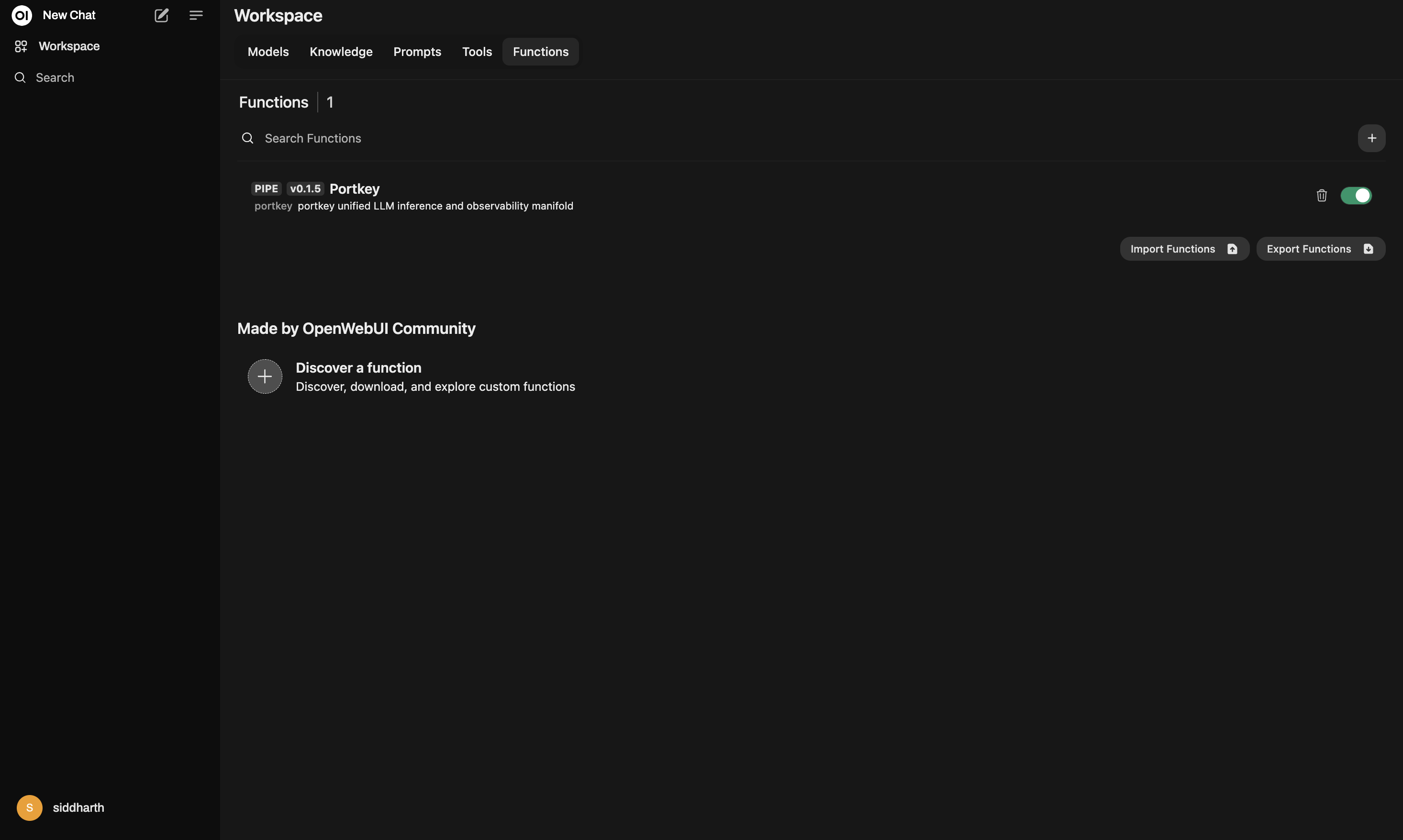
## 1. Install the Portkey Manifold Pipe
Set up the official pipe once and OpenWebUI will immediately surface Portkey as a selectable provider.
1. Download `portkey_manifold_pipe.py` or copy it from the accordion above.
2. Drop the file into your OpenWebUI `pipes/` directory (for Docker installs this is typically `/app/backend/data/pipes/`).
3. Restart OpenWebUI so the new pipe is registered.
4. In the OpenWebUI interface, open the `Pipe` dropdown and choose `PORTKEY`.
 ## 2. Configure Your Pipe Valves
Open the `Valves` panel for the `PORTKEY` pipe to align it with your Portkey workspace.
### Portkey API Key
* **PORTKEY\_API\_KEY** (required): Generate an API key from the [Portkey dashboard](https://app.portkey.ai/api-keys) and paste it here. The pipe uses it as a Bearer token for every request.
* **PORTKEY\_API\_BASE\_URL** (optional): Leave the default `https://api.portkey.ai/v1` unless you are routing through a self-hosted or region-specific Portkey deployment.
### Model Discovery & Curation
* **AUTO\_DISCOVER\_MODELS**: When enabled, the pipe calls `GET {BASE_URL}/models` and auto-populates the OpenWebUI dropdown with every model your workspace can access.
* **PORTKEY\_MODELS**: Provide a comma-separated list such as `@openai/gpt-4o-mini, @anthropic/claude-3-5-sonnet` to spotlight specific models or supplement the auto-discovered list.
### Metadata & Compliance Controls
* **FORWARD\_USER\_INFO\_HEADERS**: Forward the standard `X-OpenWebUI-User-*` headers to Portkey for downstream audit trails.
* **SEND\_METADATA\_HEADER**: Keep this enabled to emit structured `x-portkey-metadata` headers containing `name`, `id`, `email`, `role`, and `chat_id` whenever OpenWebUI shares that context.
### Streaming & Networking
* **STREAM\_FORMAT**: Choose how you want streamed responses returned to OpenWebUI. `auto` intelligently normalizes SSE payloads, `jsonl` emits plain JSON per line, and `sse` forwards raw `data:` lines unchanged.
* **REQUEST\_TIMEOUT\_SECS**, **RETRIES\_NON\_STREAM**, **RETRY\_BACKOFF\_FACTOR**: Increase these for long-running, non-streaming requests or stricter resiliency policies. Retries only apply to non-streamed calls.
### Bring Your Portkey Governance
* **Virtual Keys**: Create dedicated keys in the [Virtual Keys](https://app.portkey.ai/virtual-keys) dashboard to enforce budget limits, rate limits, and provider-level segmentation. Pair each department or environment with its own key.
* **Configs** (optional): Reference reusable configs that bundle advanced routing, fallbacks, and retry logic. Here is a simple template that adds five retry attempts on server errors:
```json theme={"system"}
{
"retry": {
"attempts": 5
},
"virtual_key": "virtual-key-xxx"
}
```
Store configs in Portkey's Config Library and reference them inside valve metadata or the request payload to unlock advanced orchestration. Explore more patterns in the [Configs documentation](https://docs.portkey.ai/configs).
## 3. How the Pipe Works
* **Model IDs**: OpenWebUI prefixes model IDs with the pipe filename. The pipe automatically cleans this up before sending requests to Portkey.
* **Routing**: Every chat request is proxied to `POST {PORTKEY_API_BASE_URL}/chat/completions` with streaming enabled by default. Add `"stream": false` to fall back to buffered responses (the pipe will honour retry policies for non-streaming calls).
* **User Context**: When enabled, OpenWebUI user attributes flow through as headers and structured metadata so you can filter logs, attribute spend, and enforce policy in Portkey.
* **Resilience**: Non-stream requests reuse a retry-enabled session with exponential backoff for status codes such as `429`, `500`, or `503`.
### Example Workflow
1. Paste your Portkey API key into the valve panel and toggle any metadata headers you need.
2. Let the pipe auto-discover models or manually curate the dropdown with `PORTKEY_MODELS`.
3. Select a model, start chatting, and monitor the live traffic inside Portkey's dashboards.
For deeper usage patterns—including multi-tenant governance—continue with the sections below.
# 4. Set Up Enterprise Governance for OpenWebUI
**Why Enterprise Governance?**
If you are using OpenWeb UI inside your orgnaization, you need to consider several governance aspects:
* **Cost Management**: Controlling and tracking AI spending across teams
* **Access Control**: Managing which teams can use specific models
* **Usage Analytics**: Understanding how AI is being used across the organization
* **Security & Compliance**: Maintaining enterprise security standards
* **Reliability**: Ensuring consistent service across all users
Portkey adds a comprehensive governance layer to address these enterprise needs. Let's implement these controls step by step.
**Enterprise Implementation Guide**
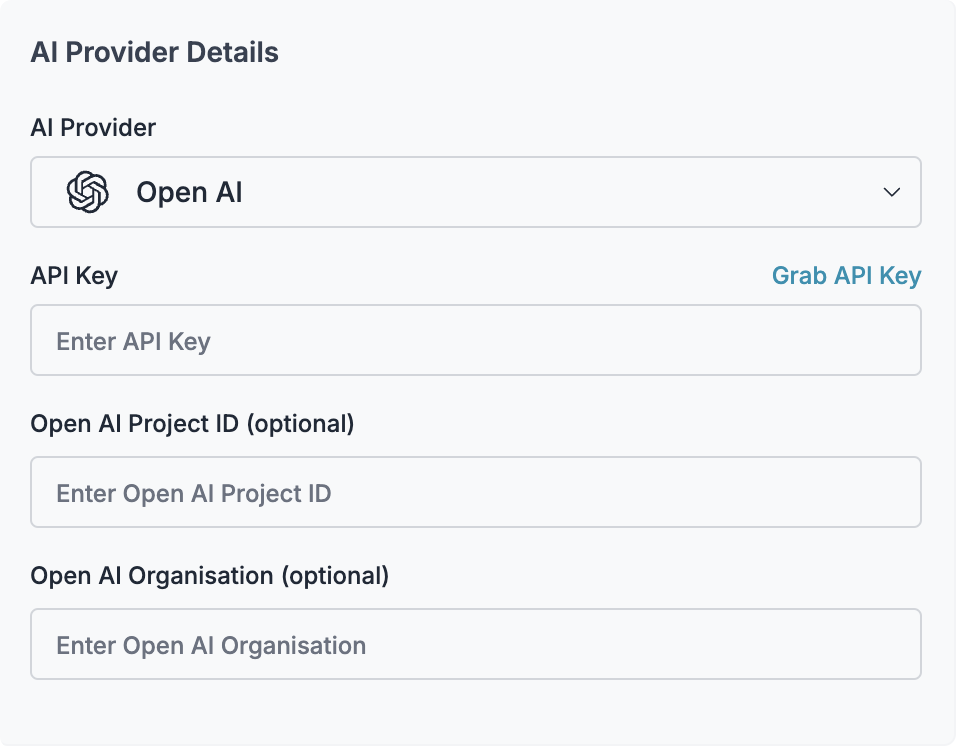
### Step 1: Implement Budget Controls & Rate Limits
Virtual Keys enable granular control over LLM access at the team/department level. This helps you:
* Set up [budget limits](/product/ai-gateway/virtual-keys/budget-limits)
* Prevent unexpected usage spikes using Rate limits
* Track departmental spending
#### Setting Up Department-Specific Controls:
1. Navigate to [Virtual Keys](https://app.portkey.ai/virtual-keys) in Portkey dashboard
2. Create new Virtual Key for each department with budget limits and rate limits
3. Configure department-specific limits
## 2. Configure Your Pipe Valves
Open the `Valves` panel for the `PORTKEY` pipe to align it with your Portkey workspace.
### Portkey API Key
* **PORTKEY\_API\_KEY** (required): Generate an API key from the [Portkey dashboard](https://app.portkey.ai/api-keys) and paste it here. The pipe uses it as a Bearer token for every request.
* **PORTKEY\_API\_BASE\_URL** (optional): Leave the default `https://api.portkey.ai/v1` unless you are routing through a self-hosted or region-specific Portkey deployment.
### Model Discovery & Curation
* **AUTO\_DISCOVER\_MODELS**: When enabled, the pipe calls `GET {BASE_URL}/models` and auto-populates the OpenWebUI dropdown with every model your workspace can access.
* **PORTKEY\_MODELS**: Provide a comma-separated list such as `@openai/gpt-4o-mini, @anthropic/claude-3-5-sonnet` to spotlight specific models or supplement the auto-discovered list.
### Metadata & Compliance Controls
* **FORWARD\_USER\_INFO\_HEADERS**: Forward the standard `X-OpenWebUI-User-*` headers to Portkey for downstream audit trails.
* **SEND\_METADATA\_HEADER**: Keep this enabled to emit structured `x-portkey-metadata` headers containing `name`, `id`, `email`, `role`, and `chat_id` whenever OpenWebUI shares that context.
### Streaming & Networking
* **STREAM\_FORMAT**: Choose how you want streamed responses returned to OpenWebUI. `auto` intelligently normalizes SSE payloads, `jsonl` emits plain JSON per line, and `sse` forwards raw `data:` lines unchanged.
* **REQUEST\_TIMEOUT\_SECS**, **RETRIES\_NON\_STREAM**, **RETRY\_BACKOFF\_FACTOR**: Increase these for long-running, non-streaming requests or stricter resiliency policies. Retries only apply to non-streamed calls.
### Bring Your Portkey Governance
* **Virtual Keys**: Create dedicated keys in the [Virtual Keys](https://app.portkey.ai/virtual-keys) dashboard to enforce budget limits, rate limits, and provider-level segmentation. Pair each department or environment with its own key.
* **Configs** (optional): Reference reusable configs that bundle advanced routing, fallbacks, and retry logic. Here is a simple template that adds five retry attempts on server errors:
```json theme={"system"}
{
"retry": {
"attempts": 5
},
"virtual_key": "virtual-key-xxx"
}
```
Store configs in Portkey's Config Library and reference them inside valve metadata or the request payload to unlock advanced orchestration. Explore more patterns in the [Configs documentation](https://docs.portkey.ai/configs).
## 3. How the Pipe Works
* **Model IDs**: OpenWebUI prefixes model IDs with the pipe filename. The pipe automatically cleans this up before sending requests to Portkey.
* **Routing**: Every chat request is proxied to `POST {PORTKEY_API_BASE_URL}/chat/completions` with streaming enabled by default. Add `"stream": false` to fall back to buffered responses (the pipe will honour retry policies for non-streaming calls).
* **User Context**: When enabled, OpenWebUI user attributes flow through as headers and structured metadata so you can filter logs, attribute spend, and enforce policy in Portkey.
* **Resilience**: Non-stream requests reuse a retry-enabled session with exponential backoff for status codes such as `429`, `500`, or `503`.
### Example Workflow
1. Paste your Portkey API key into the valve panel and toggle any metadata headers you need.
2. Let the pipe auto-discover models or manually curate the dropdown with `PORTKEY_MODELS`.
3. Select a model, start chatting, and monitor the live traffic inside Portkey's dashboards.
For deeper usage patterns—including multi-tenant governance—continue with the sections below.
# 4. Set Up Enterprise Governance for OpenWebUI
**Why Enterprise Governance?**
If you are using OpenWeb UI inside your orgnaization, you need to consider several governance aspects:
* **Cost Management**: Controlling and tracking AI spending across teams
* **Access Control**: Managing which teams can use specific models
* **Usage Analytics**: Understanding how AI is being used across the organization
* **Security & Compliance**: Maintaining enterprise security standards
* **Reliability**: Ensuring consistent service across all users
Portkey adds a comprehensive governance layer to address these enterprise needs. Let's implement these controls step by step.
**Enterprise Implementation Guide**
### Step 1: Implement Budget Controls & Rate Limits
Virtual Keys enable granular control over LLM access at the team/department level. This helps you:
* Set up [budget limits](/product/ai-gateway/virtual-keys/budget-limits)
* Prevent unexpected usage spikes using Rate limits
* Track departmental spending
#### Setting Up Department-Specific Controls:
1. Navigate to [Virtual Keys](https://app.portkey.ai/virtual-keys) in Portkey dashboard
2. Create new Virtual Key for each department with budget limits and rate limits
3. Configure department-specific limits
 ### Step 2: Define Model Access Rules
As your AI usage scales, controlling which teams can access specific models becomes crucial. Portkey Configs provide this control layer with features like:
#### Access Control Features:
* **Model Restrictions**: Limit access to specific models
* **Data Protection**: Implement guardrails for sensitive data
* **Reliability Controls**: Add fallbacks and retry logic
#### Example Configuration:
Here's a basic configuration to route requests to OpenAI, specifically using GPT-4o:
```json theme={"system"}
{
"strategy": {
"mode": "single"
},
"targets": [
{
"virtual_key": "YOUR_OPENAI_VIRTUAL_KEY",
"override_params": {
"model": "gpt-4o"
}
}
]
}
```
Create your config on the [Configs page](https://app.portkey.ai/configs) in your Portkey dashboard. You'll need the config ID for connecting to OpenWeb UI's setup.
Configs can be updated anytime to adjust controls without affecting running applications.
### Step 3: Implement Access Controls
Create User-specific API keys that automatically:
* Track usage per user/team with the help of virtual keys
* Apply appropriate configs to route requests
* Collect relevant metadata to filter logs
* Enforce access permissions
Create API keys through:
* [Portkey App](https://app.portkey.ai/)
* [API Key Management API](/api-reference/admin-api/control-plane/api-keys/create-api-key)
Example using Python SDK:
```python theme={"system"}
from portkey_ai import Portkey
portkey = Portkey(api_key="YOUR_ADMIN_API_KEY")
api_key = portkey.api_keys.create(
name="engineering-team",
type="organisation",
workspace_id="YOUR_WORKSPACE_ID",
defaults={
"config_id": "your-config-id",
"metadata": {
"environment": "production",
"department": "engineering"
}
},
scopes=["logs.view", "configs.read"]
)
```
For detailed key management instructions, see our [API Keys documentation](/api-reference/admin-api/control-plane/api-keys/create-api-key).
### Step 4: Deploy & Monitor
After distributing API keys to your team members, your enterprise-ready OpenWeb UI setup is ready to go. Each team member can now use their designated API keys with appropriate access levels and budget controls.
Apply your governance setup using the integration steps from earlier sections
Monitor usage in Portkey dashboard:
* Cost tracking by department
* Model usage patterns
* Request volumes
* Error rates
### Enterprise Features Now Available
**OpenWeb UI now has:**
* Departmental budget controls
* Model access governance
* Usage tracking & attribution
* Security guardrails
* Reliability features
# Portkey Features
Now that you have enterprise-grade Zed setup, let's explore the comprehensive features Portkey provides to ensure secure, efficient, and cost-effective AI operations.
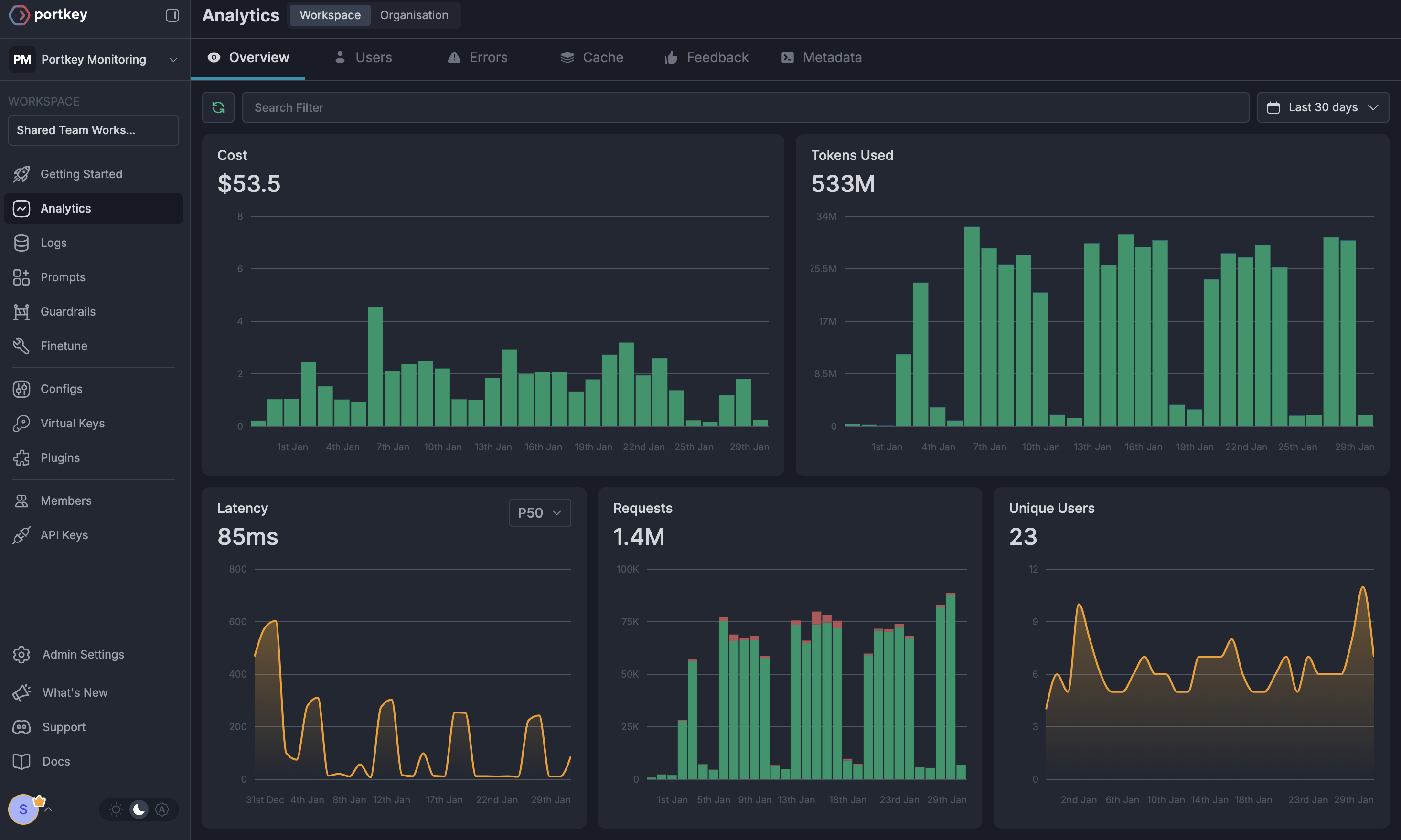
### 1. Comprehensive Metrics
Using Portkey you can track 40+ key metrics including cost, token usage, response time, and performance across all your LLM providers in real time. You can also filter these metrics based on custom metadata that you can set in your configs. Learn more about metadata here.
### Step 2: Define Model Access Rules
As your AI usage scales, controlling which teams can access specific models becomes crucial. Portkey Configs provide this control layer with features like:
#### Access Control Features:
* **Model Restrictions**: Limit access to specific models
* **Data Protection**: Implement guardrails for sensitive data
* **Reliability Controls**: Add fallbacks and retry logic
#### Example Configuration:
Here's a basic configuration to route requests to OpenAI, specifically using GPT-4o:
```json theme={"system"}
{
"strategy": {
"mode": "single"
},
"targets": [
{
"virtual_key": "YOUR_OPENAI_VIRTUAL_KEY",
"override_params": {
"model": "gpt-4o"
}
}
]
}
```
Create your config on the [Configs page](https://app.portkey.ai/configs) in your Portkey dashboard. You'll need the config ID for connecting to OpenWeb UI's setup.
Configs can be updated anytime to adjust controls without affecting running applications.
### Step 3: Implement Access Controls
Create User-specific API keys that automatically:
* Track usage per user/team with the help of virtual keys
* Apply appropriate configs to route requests
* Collect relevant metadata to filter logs
* Enforce access permissions
Create API keys through:
* [Portkey App](https://app.portkey.ai/)
* [API Key Management API](/api-reference/admin-api/control-plane/api-keys/create-api-key)
Example using Python SDK:
```python theme={"system"}
from portkey_ai import Portkey
portkey = Portkey(api_key="YOUR_ADMIN_API_KEY")
api_key = portkey.api_keys.create(
name="engineering-team",
type="organisation",
workspace_id="YOUR_WORKSPACE_ID",
defaults={
"config_id": "your-config-id",
"metadata": {
"environment": "production",
"department": "engineering"
}
},
scopes=["logs.view", "configs.read"]
)
```
For detailed key management instructions, see our [API Keys documentation](/api-reference/admin-api/control-plane/api-keys/create-api-key).
### Step 4: Deploy & Monitor
After distributing API keys to your team members, your enterprise-ready OpenWeb UI setup is ready to go. Each team member can now use their designated API keys with appropriate access levels and budget controls.
Apply your governance setup using the integration steps from earlier sections
Monitor usage in Portkey dashboard:
* Cost tracking by department
* Model usage patterns
* Request volumes
* Error rates
### Enterprise Features Now Available
**OpenWeb UI now has:**
* Departmental budget controls
* Model access governance
* Usage tracking & attribution
* Security guardrails
* Reliability features
# Portkey Features
Now that you have enterprise-grade Zed setup, let's explore the comprehensive features Portkey provides to ensure secure, efficient, and cost-effective AI operations.
### 1. Comprehensive Metrics
Using Portkey you can track 40+ key metrics including cost, token usage, response time, and performance across all your LLM providers in real time. You can also filter these metrics based on custom metadata that you can set in your configs. Learn more about metadata here.
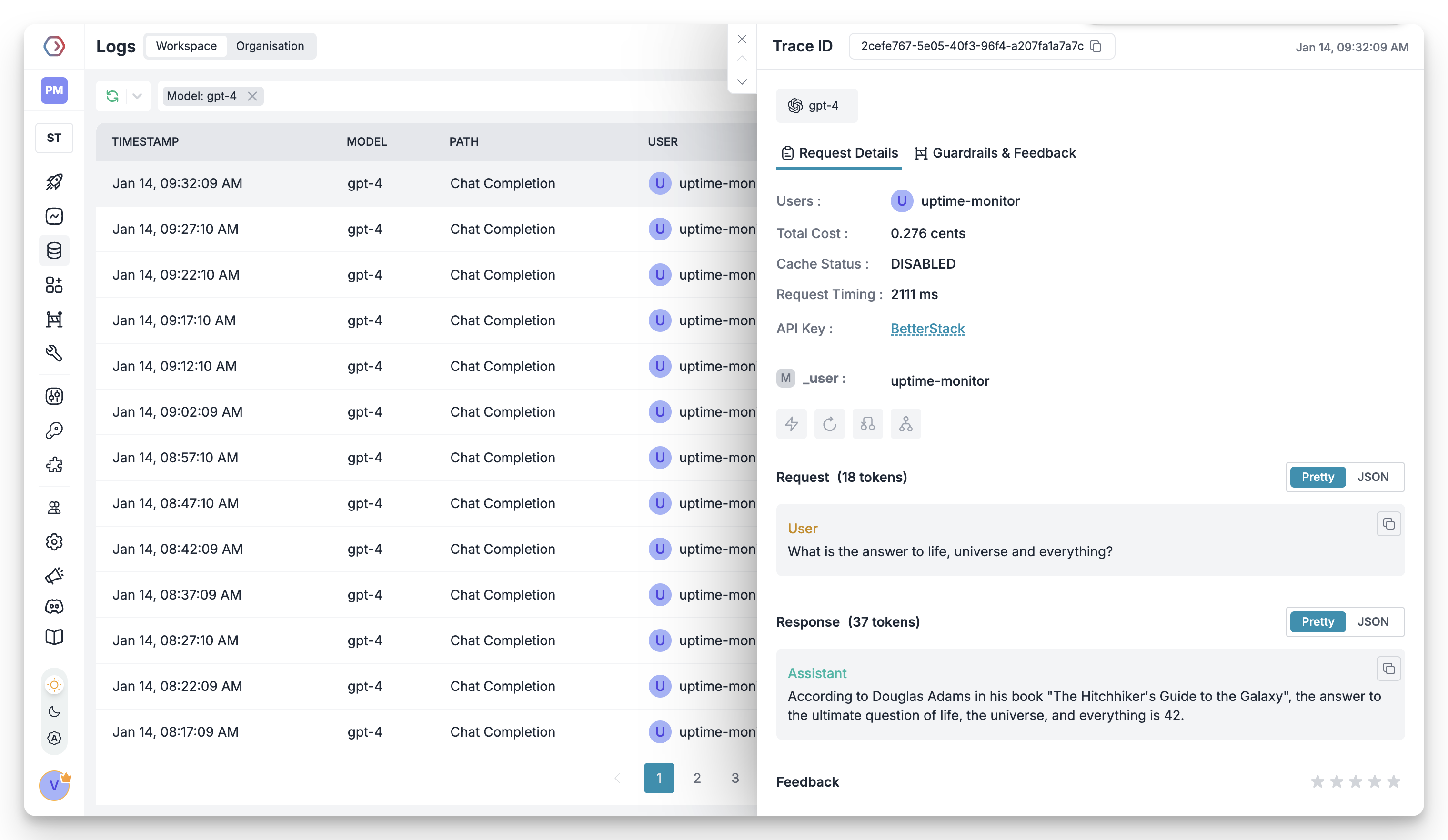
 ### 2. Advanced Logs
Portkey's logging dashboard provides detailed logs for every request made to your LLMs. These logs include:
* Complete request and response tracking
* Metadata tags for filtering
* Cost attribution and much more...
### 2. Advanced Logs
Portkey's logging dashboard provides detailed logs for every request made to your LLMs. These logs include:
* Complete request and response tracking
* Metadata tags for filtering
* Cost attribution and much more...
 ### 3. Unified Access to 1600+ LLMs
You can easily switch between 1600+ LLMs. Call various LLMs such as Anthropic, Gemini, Mistral, Azure OpenAI, Google Vertex AI, AWS Bedrock, and many more by simply changing the `virtual key` in your default `config` object.
### 4. Advanced Metadata Tracking
Using Portkey, you can add custom metadata to your LLM requests for detailed tracking and analytics. Use metadata tags to filter logs, track usage, and attribute costs across departments and teams.
### 5. Enterprise Access Management
Set and manage spending limits across teams and departments. Control costs with granular budget limits and usage tracking.
Enterprise-grade SSO integration with support for SAML 2.0, Okta, Azure AD, and custom providers for secure authentication.
Hierarchical organization structure with workspaces, teams, and role-based access control for enterprise-scale deployments.
Comprehensive access control rules and detailed audit logging for security compliance and usage tracking.
### 6. Reliability Features
Automatically switch to backup targets if the primary target fails.
Route requests to different targets based on specified conditions.
Distribute requests across multiple targets based on defined weights.
Enable caching of responses to improve performance and reduce costs.
Automatic retry handling with exponential backoff for failed requests
Set and manage budget limits across teams and departments. Control costs with granular budget limits and usage tracking.
### 7. Advanced Guardrails
Protect your Project's data and enhance reliability with real-time checks on LLM inputs and outputs. Leverage guardrails to:
* Prevent sensitive data leaks
* Enforce compliance with organizational policies
* PII detection and masking
* Content filtering
* Custom security rules
* Data compliance checks
Implement real-time protection for your LLM interactions with automatic detection and filtering of sensitive content, PII, and custom security rules. Enable comprehensive data protection while maintaining compliance with organizational policies.
# FAQs
You can update your Virtual Key limits at any time from the Portkey dashboard:1. Go to Virtual Keys section2. Click on the Virtual Key you want to modify3. Update the budget or rate limits4. Save your changes
Yes! You can create multiple Virtual Keys (one for each provider) and attach them to a single config. This config can then be connected to your API key, allowing you to use multiple providers through a single API key.
Portkey provides several ways to track team costs:
* Create separate Virtual Keys for each team
* Use metadata tags in your configs
* Set up team-specific API keys
* Monitor usage in the analytics dashboard
When a team reaches their budget limit:
1. Further requests will be blocked
2. Team admins receive notifications
3. Usage statistics remain available in dashboard
4. Limits can be adjusted if needed
# Next Steps
**Join our Community**
* [Discord Community](https://portkey.sh/discord-report)
* [GitHub Repository](https://github.com/Portkey-AI)
For enterprise support and custom features, contact our [enterprise team](https://calendly.com/portkey-ai).
### 3. Unified Access to 1600+ LLMs
You can easily switch between 1600+ LLMs. Call various LLMs such as Anthropic, Gemini, Mistral, Azure OpenAI, Google Vertex AI, AWS Bedrock, and many more by simply changing the `virtual key` in your default `config` object.
### 4. Advanced Metadata Tracking
Using Portkey, you can add custom metadata to your LLM requests for detailed tracking and analytics. Use metadata tags to filter logs, track usage, and attribute costs across departments and teams.
### 5. Enterprise Access Management
Set and manage spending limits across teams and departments. Control costs with granular budget limits and usage tracking.
Enterprise-grade SSO integration with support for SAML 2.0, Okta, Azure AD, and custom providers for secure authentication.
Hierarchical organization structure with workspaces, teams, and role-based access control for enterprise-scale deployments.
Comprehensive access control rules and detailed audit logging for security compliance and usage tracking.
### 6. Reliability Features
Automatically switch to backup targets if the primary target fails.
Route requests to different targets based on specified conditions.
Distribute requests across multiple targets based on defined weights.
Enable caching of responses to improve performance and reduce costs.
Automatic retry handling with exponential backoff for failed requests
Set and manage budget limits across teams and departments. Control costs with granular budget limits and usage tracking.
### 7. Advanced Guardrails
Protect your Project's data and enhance reliability with real-time checks on LLM inputs and outputs. Leverage guardrails to:
* Prevent sensitive data leaks
* Enforce compliance with organizational policies
* PII detection and masking
* Content filtering
* Custom security rules
* Data compliance checks
Implement real-time protection for your LLM interactions with automatic detection and filtering of sensitive content, PII, and custom security rules. Enable comprehensive data protection while maintaining compliance with organizational policies.
# FAQs
You can update your Virtual Key limits at any time from the Portkey dashboard:1. Go to Virtual Keys section2. Click on the Virtual Key you want to modify3. Update the budget or rate limits4. Save your changes
Yes! You can create multiple Virtual Keys (one for each provider) and attach them to a single config. This config can then be connected to your API key, allowing you to use multiple providers through a single API key.
Portkey provides several ways to track team costs:
* Create separate Virtual Keys for each team
* Use metadata tags in your configs
* Set up team-specific API keys
* Monitor usage in the analytics dashboard
When a team reaches their budget limit:
1. Further requests will be blocked
2. Team admins receive notifications
3. Usage statistics remain available in dashboard
4. Limits can be adjusted if needed
# Next Steps
**Join our Community**
* [Discord Community](https://portkey.sh/discord-report)
* [GitHub Repository](https://github.com/Portkey-AI)
For enterprise support and custom features, contact our [enterprise team](https://calendly.com/portkey-ai).