> ## Documentation Index
> Fetch the complete documentation index at: https://docs.portkey.ai/docs/llms.txt
> Use this file to discover all available pages before exploring further.
# AWS Bedrock
Portkey provides a robust and secure gateway to facilitate the integration of various Large Language Models (LLMs) into your applications, including models hosted on AWS Bedrock.
With Portkey, you can take advantage of features like fast AI gateway access, observability, prompt management, and more, all while ensuring the secure management of your LLM API keys through a [virtual key](/product/ai-gateway/virtual-keys) system.
Provider Slug. `bedrock`
## Portkey SDK Integration with AWS Bedrock
Portkey provides a consistent API to interact with models from various providers. To integrate Bedrock with Portkey:
### 1. Install the Portkey SDK
Add the Portkey SDK to your application to interact with Anthropic's API through Portkey's gateway.
```sh theme={"system"}
npm install --save portkey-ai
```
```sh theme={"system"}
pip install portkey-ai
```
### 2. Initialize Portkey with the Virtual Key
There are two ways to integrate AWS Bedrock with Portkey:
Use your `AWS Secret Access Key`, `AWS Access Key Id`, and `AWS Region` to create your Virtual key.
[**Integration Guide**](/integrations/llms/aws-bedrock#how-to-find-your-aws-credentials)
Take your `AWS Assumed Role ARN` and `AWS Region` to create the virtaul key.
[**Integration Guide**](/product/ai-gateway/virtual-keys/bedrock-amazon-assumed-role)
```js theme={"system"}
import Portkey from 'portkey-ai'
const portkey = new Portkey({
apiKey: "PORTKEY_API_KEY", // defaults to process.env["PORTKEY_API_KEY"]
virtualKey: "VIRTUAL_KEY" // Your Bedrock Virtual Key
})
```
```python theme={"system"}
from portkey_ai import Portkey
portkey = Portkey(
api_key="PORTKEY_API_KEY", # Replace with your Portkey API key
virtual_key="VIRTUAL_KEY" # Replace with your virtual key for Bedrock
)
```
#### Using Virtual Key with AWS STS
If you're using [AWS Security Token Service](https://docs.aws.amazon.com/STS/latest/APIReference/welcome.html), you can pass your `aws_session_token` along with the Virtual key:
```js theme={"system"}
import Portkey from 'portkey-ai'
const portkey = new Portkey({
apiKey: "PORTKEY_API_KEY", // defaults to process.env["PORTKEY_API_KEY"]
virtualKey: "VIRTUAL_KEY" // Your Bedrock Virtual Key,
aws_session_token: ""
})
```
```python theme={"system"}
from portkey_ai import Portkey
portkey = Portkey(
api_key="PORTKEY_API_KEY", # Replace with your Portkey API key
virtual_key="VIRTUAL_KEY" # Replace with your virtual key for Bedrock,
aws_session_token=""
)
```
#### Not using Virtual Keys?
[Check out this example on how you can directly use your AWS details to make a Bedrock request through Portkey.](/integrations/llms/bedrock/aws-bedrock#making-requests-without-virtual-keys)
### **3. Invoke Chat Completions with AWS bedrock**
Use the Portkey instance to send requests to Anthropic. You can also override the virtual key directly in the API call if needed.
```js theme={"system"}
const chatCompletion = await portkey.chat.completions.create({
messages: [{ role: 'user', content: 'Say this is a test' }],
model: 'anthropic.claude-v2:1',
max_tokens: 250 // Required field for Anthropic
});
console.log(chatCompletion.choices);
```
```python theme={"system"}
completion = portkey.chat.completions.create(
messages= [{ "role": 'user', "content": 'Say this is a test' }],
model= 'anthropic.claude-v2:1',
max_tokens=250 # Required field for Anthropic
)
print(completion.choices)
```
## Using Vision Models
Portkey's multimodal Gateway fully supports Bedrock's vision models `anthropic.claude-3-sonnet`, `anthropic.claude-3-haiku`, and `anthropic.claude-3-opus`
For more info, check out this guide:
[Vision](/product/ai-gateway/multimodal-capabilities/vision)
## Extended Thinking (Reasoning Models) (Beta)
The assistants thinking response is returned in the `response_chunk.choices[0].delta.content_blocks` array, not the `response.choices[0].message.content` string.
Models like `us.anthropic.claude-3-7-sonnet-20250219-v1:0` support [extended thinking](https://aws.amazon.com/blogs/aws/anthropics-claude-3-7-sonnet-the-first-hybrid-reasoning-model-is-now-available-in-amazon-bedrock/).
This is similar to openai thinking, but you get the model's reasoning as it processes the request as well.
Note that you will have to set [`strict_open_ai_compliance=False`](/product/ai-gateway/strict-open-ai-compliance) in the headers to use this feature.
### Single turn conversation
```py Python theme={"system"}
from portkey_ai import Portkey
# Initialize the Portkey client
portkey = Portkey(
api_key="PORTKEY_API_KEY", # Replace with your Portkey API key
virtual_key="VIRTUAL_KEY", # Add your provider's virtual key
strict_openai_compliance=False
)
# Create the request
response = portkey.chat.completions.create(
model="us.anthropic.claude-3-7-sonnet-20250219-v1:0",
max_tokens=3000,
thinking={
"type": "enabled",
"budget_tokens": 2030
},
stream=True,
messages=[
{
"role": "user",
"content": [
{
"type": "text",
"text": "when does the flight from new york to bengaluru land tomorrow, what time, what is its flight number, and what is its baggage belt?"
}
]
}
]
)
print(response)
# in case of streaming responses you'd have to parse the response_chunk.choices[0].delta.content_blocks array
# response = portkey.chat.completions.create(
# ...same config as above but with stream: true
# )
# for chunk in response:
# if chunk.choices[0].delta:
# content_blocks = chunk.choices[0].delta.get("content_blocks")
# if content_blocks is not None:
# for content_block in content_blocks:
# print(content_block)
```
```ts NodeJS theme={"system"}
import Portkey from 'portkey-ai';
// Initialize the Portkey client
const portkey = new Portkey({
apiKey: "PORTKEY_API_KEY", // Replace with your Portkey API key
virtualKey: "VIRTUAL_KEY", // Add your bedrock's virtual key
strictOpenAICompliance: false
});
// Generate a chat completion
async function getChatCompletionFunctions() {
const response = await portkey.chat.completions.create({
model: "us.anthropic.claude-3-7-sonnet-20250219-v1:0",
max_tokens: 3000,
thinking: {
type: "enabled",
budget_tokens: 2030
},
stream: true,
messages: [
{
role: "user",
content: [
{
type: "text",
text: "when does the flight from new york to bengaluru land tomorrow, what time, what is its flight number, and what is its baggage belt?"
}
]
}
]
});
console.log(response);
// in case of streaming responses you'd have to parse the response_chunk.choices[0].delta.content_blocks array
// const response = await portkey.chat.completions.create({
// ...same config as above but with stream: true
// });
// for await (const chunk of response) {
// if (chunk.choices[0].delta?.content_blocks) {
// for (const contentBlock of chunk.choices[0].delta.content_blocks) {
// console.log(contentBlock);
// }
// }
// }
}
// Call the function
getChatCompletionFunctions();
```
```js OpenAI NodeJS theme={"system"}
import OpenAI from 'openai'; // We're using the v4 SDK
import { PORTKEY_GATEWAY_URL, createHeaders } from 'portkey-ai'
const openai = new OpenAI({
apiKey: 'BEDROCK_API_KEY', // defaults to process.env["OPENAI_API_KEY"],
baseURL: PORTKEY_GATEWAY_URL,
defaultHeaders: createHeaders({
provider: "bedrock",
apiKey: "PORTKEY_API_KEY", // defaults to process.env["PORTKEY_API_KEY"]
strictOpenAICompliance: false
})
});
// Generate a chat completion with streaming
async function getChatCompletionFunctions(){
const response = await openai.chat.completions.create({
model: "us.anthropic.claude-3-7-sonnet-20250219-v1:0",
max_tokens: 3000,
thinking: {
type: "enabled",
budget_tokens: 2030
},
stream: true,
messages: [
{
role: "user",
content: [
{
type: "text",
text: "when does the flight from new york to bengaluru land tomorrow, what time, what is its flight number, and what is its baggage belt?"
}
]
}
],
});
console.log(response)
// in case of streaming responses you'd have to parse the response_chunk.choices[0].delta.content_blocks array
// const response = await openai.chat.completions.create({
// ...same config as above but with stream: true
// });
// for await (const chunk of response) {
// if (chunk.choices[0].delta?.content_blocks) {
// for (const contentBlock of chunk.choices[0].delta.content_blocks) {
// console.log(contentBlock);
// }
// }
// }
}
await getChatCompletionFunctions();
```
```py OpenAI Python theme={"system"}
from openai import OpenAI
from portkey_ai import PORTKEY_GATEWAY_URL, createHeaders
openai = OpenAI(
api_key='BEDROCK_API_KEY',
base_url=PORTKEY_GATEWAY_URL,
default_headers=createHeaders(
provider="bedrock",
api_key="PORTKEY_API_KEY",
strict_openai_compliance=False
)
)
response = openai.chat.completions.create(
model="us.anthropic.claude-3-7-sonnet-20250219-v1:0",
max_tokens=3000,
thinking={
"type": "enabled",
"budget_tokens": 2030
},
stream=True,
messages=[
{
"role": "user",
"content": [
{
"type": "text",
"text": "when does the flight from new york to bengaluru land tomorrow, what time, what is its flight number, and what is its baggage belt?"
}
]
}
]
)
print(response)
```
```sh cURL theme={"system"}
curl "https://api.portkey.ai/v1/chat/completions" \
-H "Content-Type: application/json" \
-H "x-portkey-api-key: $PORTKEY_API_KEY" \
-H "x-portkey-provider: bedrock" \
-H "x-api-key: $BEDROCK_API_KEY" \
-H "x-portkey-strict-openai-compliance: false" \
-d '{
"model": "us.anthropic.claude-3-7-sonnet-20250219-v1:0",
"max_tokens": 3000,
"thinking": {
"type": "enabled",
"budget_tokens": 2030
},
"stream": true,
"messages": [
{
"role": "user",
"content": [
{
"type": "text",
"text": "when does the flight from new york to bengaluru land tomorrow, what time, what is its flight number, and what is its baggage belt?"
}
]
}
]
}'
```
### Multi turn conversation
```py Python theme={"system"}
from portkey_ai import Portkey
# Initialize the Portkey client
portkey = Portkey(
api_key="PORTKEY_API_KEY", # Replace with your Portkey API key
virtual_key="VIRTUAL_KEY", # Add your provider's virtual key
strict_openai_compliance=False
)
# Create the request
response = portkey.chat.completions.create(
model="us.anthropic.claude-3-7-sonnet-20250219-v1:0",
max_tokens=3000,
thinking={
"type": "enabled",
"budget_tokens": 2030
},
stream=True,
messages=[
{
"role": "user",
"content": [
{
"type": "text",
"text": "when does the flight from baroda to bangalore land tomorrow, what time, what is its flight number, and what is its baggage belt?"
}
]
},
{
"role": "assistant",
"content": [
{
"type": "thinking",
"thinking": "The user is asking several questions about a flight from Baroda (also known as Vadodara) to Bangalore:\n1. When does the flight land tomorrow\n2. What time does it land\n3. What is the flight number\n4. What is the baggage belt number at the arrival airport\n\nTo properly answer these questions, I would need access to airline flight schedules and airport information systems. However, I don't have:\n- Real-time or scheduled flight information\n- Access to airport baggage claim allocation systems\n- Information about specific flights between these cities\n- The ability to look up tomorrow's specific flight schedules\n\nThis question requires current, specific flight information that I don't have access to. Instead of guessing or providing potentially incorrect information, I should explain this limitation and suggest ways the user could find this information.",
"signature": "EqoBCkgIARABGAIiQBVA7FBNLRtWarDSy9TAjwtOpcTSYHJ+2GYEoaorq3V+d3eapde04bvEfykD/66xZXjJ5yyqogJ8DEkNMotspRsSDKzuUJ9FKhSNt/3PdxoMaFZuH+1z1aLF8OeQIjCrA1+T2lsErrbgrve6eDWeMvP+1sqVqv/JcIn1jOmuzrPi2tNz5M0oqkOO9txJf7QqEPPw6RG3JLO2h7nV1BMN6wE="
}
]
},
{
"role": "user",
"content": "thanks that's good to know, how about to chennai?"
}
]
)
print(response)
```
```ts NodeJS theme={"system"}
import Portkey from 'portkey-ai';
// Initialize the Portkey client
const portkey = new Portkey({
apiKey: "PORTKEY_API_KEY", // Replace with your Portkey API key
virtualKey: "VIRTUAL_KEY", // Add your bedrock's virtual key
strictOpenAICompliance: false
});
// Generate a chat completion
async function getChatCompletionFunctions() {
const response = await portkey.chat.completions.create({
model: "us.anthropic.claude-3-7-sonnet-20250219-v1:0",
max_tokens: 3000,
thinking: {
type: "enabled",
budget_tokens: 2030
},
stream: true,
messages: [
{
role: "user",
content: [
{
type: "text",
text: "when does the flight from baroda to bangalore land tomorrow, what time, what is its flight number, and what is its baggage belt?"
}
]
},
{
role: "assistant",
content: [
{
type: "thinking",
thinking: "The user is asking several questions about a flight from Baroda (also known as Vadodara) to Bangalore:\n1. When does the flight land tomorrow\n2. What time does it land\n3. What is the flight number\n4. What is the baggage belt number at the arrival airport\n\nTo properly answer these questions, I would need access to airline flight schedules and airport information systems. However, I don't have:\n- Real-time or scheduled flight information\n- Access to airport baggage claim allocation systems\n- Information about specific flights between these cities\n- The ability to look up tomorrow's specific flight schedules\n\nThis question requires current, specific flight information that I don't have access to. Instead of guessing or providing potentially incorrect information, I should explain this limitation and suggest ways the user could find this information.",
signature: "EqoBCkgIARABGAIiQBVA7FBNLRtWarDSy9TAjwtOpcTSYHJ+2GYEoaorq3V+d3eapde04bvEfykD/66xZXjJ5yyqogJ8DEkNMotspRsSDKzuUJ9FKhSNt/3PdxoMaFZuH+1z1aLF8OeQIjCrA1+T2lsErrbgrve6eDWeMvP+1sqVqv/JcIn1jOmuzrPi2tNz5M0oqkOO9txJf7QqEPPw6RG3JLO2h7nV1BMN6wE="
}
]
},
{
role: "user",
content: "thanks that's good to know, how about to chennai?"
}
]
});
console.log(response);
}
// Call the function
getChatCompletionFunctions();
```
```js OpenAI NodeJS theme={"system"}
import OpenAI from 'openai'; // We're using the v4 SDK
import { PORTKEY_GATEWAY_URL, createHeaders } from 'portkey-ai'
const openai = new OpenAI({
apiKey: 'BEDROCK_API_KEY', // defaults to process.env["OPENAI_API_KEY"],
baseURL: PORTKEY_GATEWAY_URL,
defaultHeaders: createHeaders({
provider: "bedrock",
apiKey: "PORTKEY_API_KEY", // defaults to process.env["PORTKEY_API_KEY"]
strictOpenAICompliance: false
})
});
// Generate a chat completion with streaming
async function getChatCompletionFunctions(){
const response = await openai.chat.completions.create({
model: "us.anthropic.claude-3-7-sonnet-20250219-v1:0",
max_tokens: 3000,
thinking: {
type: "enabled",
budget_tokens: 2030
},
stream: true,
messages: [
{
role: "user",
content: [
{
type: "text",
text: "when does the flight from baroda to bangalore land tomorrow, what time, what is its flight number, and what is its baggage belt?"
}
]
},
{
role: "assistant",
content: [
{
type: "thinking",
thinking: "The user is asking several questions about a flight from Baroda (also known as Vadodara) to Bangalore:\n1. When does the flight land tomorrow\n2. What time does it land\n3. What is the flight number\n4. What is the baggage belt number at the arrival airport\n\nTo properly answer these questions, I would need access to airline flight schedules and airport information systems. However, I don't have:\n- Real-time or scheduled flight information\n- Access to airport baggage claim allocation systems\n- Information about specific flights between these cities\n- The ability to look up tomorrow's specific flight schedules\n\nThis question requires current, specific flight information that I don't have access to. Instead of guessing or providing potentially incorrect information, I should explain this limitation and suggest ways the user could find this information.",
signature: "EqoBCkgIARABGAIiQBVA7FBNLRtWarDSy9TAjwtOpcTSYHJ+2GYEoaorq3V+d3eapde04bvEfykD/66xZXjJ5yyqogJ8DEkNMotspRsSDKzuUJ9FKhSNt/3PdxoMaFZuH+1z1aLF8OeQIjCrA1+T2lsErrbgrve6eDWeMvP+1sqVqv/JcIn1jOmuzrPi2tNz5M0oqkOO9txJf7QqEPPw6RG3JLO2h7nV1BMN6wE="
}
]
},
{
role: "user",
content: "thanks that's good to know, how about to chennai?"
}
],
});
console.log(response)
}
await getChatCompletionFunctions();
```
```py OpenAI Python theme={"system"}
from openai import OpenAI
from portkey_ai import PORTKEY_GATEWAY_URL, createHeaders
openai = OpenAI(
api_key='BEDROCK_API_KEY',
base_url=PORTKEY_GATEWAY_URL,
default_headers=createHeaders(
provider="bedrock",
api_key="PORTKEY_API_KEY",
strict_openai_compliance=False
)
)
response = openai.chat.completions.create(
model="us.anthropic.claude-3-7-sonnet-20250219-v1:0",
max_tokens=3000,
thinking={
"type": "enabled",
"budget_tokens": 2030
},
stream=True,
messages=[
{
"role": "user",
"content": [
{
"type": "text",
"text": "when does the flight from baroda to bangalore land tomorrow, what time, what is its flight number, and what is its baggage belt?"
}
]
},
{
"role": "assistant",
"content": [
{
"type": "thinking",
"thinking": "The user is asking several questions about a flight from Baroda (also known as Vadodara) to Bangalore:\n1. When does the flight land tomorrow\n2. What time does it land\n3. What is the flight number\n4. What is the baggage belt number at the arrival airport\n\nTo properly answer these questions, I would need access to airline flight schedules and airport information systems. However, I don't have:\n- Real-time or scheduled flight information\n- Access to airport baggage claim allocation systems\n- Information about specific flights between these cities\n- The ability to look up tomorrow's specific flight schedules\n\nThis question requires current, specific flight information that I don't have access to. Instead of guessing or providing potentially incorrect information, I should explain this limitation and suggest ways the user could find this information.",
signature: "EqoBCkgIARABGAIiQBVA7FBNLRtWarDSy9TAjwtOpcTSYHJ+2GYEoaorq3V+d3eapde04bvEfykD/66xZXjJ5yyqogJ8DEkNMotspRsSDKzuUJ9FKhSNt/3PdxoMaFZuH+1z1aLF8OeQIjCrA1+T2lsErrbgrve6eDWeMvP+1sqVqv/JcIn1jOmuzrPi2tNz5M0oqkOO9txJf7QqEPPw6RG3JLO2h7nV1BMN6wE="
}
]
},
{
"role": "user",
"content": "thanks that's good to know, how about to chennai?"
}
]
)
print(response)
```
```sh cURL theme={"system"}
curl "https://api.portkey.ai/v1/chat/completions" \
-H "Content-Type: application/json" \
-H "x-portkey-api-key: $PORTKEY_API_KEY" \
-H "x-portkey-provider: bedrock" \
-H "x-api-key: $BEDROCK_API_KEY" \
-H "x-portkey-strict-openai-compliance: false" \
-d '{
"model": "us.anthropic.claude-3-7-sonnet-20250219-v1:0",
"max_tokens": 3000,
"thinking": {
"type": "enabled",
"budget_tokens": 2030
},
"stream": true,
"messages": [
{
"role": "user",
"content": [
{
"type": "text",
"text": "when does the flight from baroda to bangalore land tomorrow, what time, what is its flight number, and what is its baggage belt?"
}
]
},
{
"role": "assistant",
"content": [
{
"type": "thinking",
"thinking": "The user is asking several questions about a flight from Baroda (also known as Vadodara) to Bangalore:\n1. When does the flight land tomorrow\n2. What time does it land\n3. What is the flight number\n4. What is the baggage belt number at the arrival airport\n\nTo properly answer these questions, I would need access to airline flight schedules and airport information systems. However, I don't have:\n- Real-time or scheduled flight information\n- Access to airport baggage claim allocation systems\n- Information about specific flights between these cities\n- The ability to look up tomorrow's specific flight schedules\n\nThis question requires current, specific flight information that I don't have access to. Instead of guessing or providing potentially incorrect information, I should explain this limitation and suggest ways the user could find this information.",
"signature": "EqoBCkgIARABGAIiQBVA7FBNLRtWarDSy9TAjwtOpcTSYHJ+2GYEoaorq3V+d3eapde04bvEfykD/66xZXjJ5yyqogJ8DEkNMotspRsSDKzuUJ9FKhSNt/3PdxoMaFZuH+1z1aLF8OeQIjCrA1+T2lsErrbgrve6eDWeMvP+1sqVqv/JcIn1jOmuzrPi2tNz5M0oqkOO9txJf7QqEPPw6RG3JLO2h7nV1BMN6wE="
}
]
},
{
"role": "user",
"content": "thanks that's good to know, how about to chennai?"
}
]
}'
```
## Inference Profiles
[Inference profiles](https://docs.aws.amazon.com/bedrock/latest/userguide/inference-profiles.html) are a resource in Amazon Bedrock that define a model and one or more Regions to which the inference profile can route model invocation requests.
To use inference profiles, your IAM role needs to additionally have the following permissions:
```json theme={"system"}
{
"Version": "2012-10-17",
"Statement": [
{
"Effect": "Allow",
"Action": [
"bedrock:GetInferenceProfile"
],
"Resource": [
"arn:aws:bedrock:*:*:inference-profile/*",
"arn:aws:bedrock:*:*:application-inference-profile/*"
]
}
]
}
```
This is a pre-requisite for using inference profiles, as the gateway needs to fetch the foundation model to process the request.
For reference, see the following documentation:
[https://docs.aws.amazon.com/bedrock/latest/userguide/inference-profiles-prereq.html](https://docs.aws.amazon.com/bedrock/latest/userguide/inference-profiles-prereq.html)
## Bedrock Converse API
Portkey uses the [AWS Converse API](https://docs.aws.amazon.com/bedrock/latest/APIReference/API_runtime_Converse.html) internally for making chat completions requests.
If you need to pass [additional input fields or parameters](https://docs.aws.amazon.com/bedrock/latest/APIReference/API_runtime_Converse.html#API_runtime_Converse_RequestSyntax) like `anthropic_beta`, `top_k`, `frequency_penalty` etc. that are specific to a model, you can pass it with this key:
```json theme={"system"}
"additionalModelRequestFields": {
"frequency_penalty": 0.4
}
```
If you require the model to [respond with certain fields](https://docs.aws.amazon.com/bedrock/latest/APIReference/API_runtime_Converse.html#API_runtime_Converse_RequestSyntax) that are specific to a model, you need to pass this key:
```json theme={"system"}
"additionalModelResponseFieldPaths": [ "/stop_sequence" ]
```
## Managing AWS Bedrock Prompts
You can manage all prompts to AWS bedrock in the [Prompt Library](/product/prompt-library). All the current models of Anthropic are supported and you can easily start testing different prompts.
Once you're ready with your prompt, you can use the `portkey.prompts.completions.create` interface to use the prompt in your application.
## Making Requests without Virtual Keys
If you do not want to add your AWS details to Portkey vault, you can also directly pass them while instantiating the Portkey client.
### Mapping the Bedrock Details
| Node SDK | Python SDK | REST Headers |
| ------------------ | ------------------------ | ------------------------------- |
| awsAccessKeyId | aws\_access\_key\_id | x-portkey-aws-access-key-id |
| awsSecretAccessKey | aws\_secret\_access\_key | x-portkey-aws-secret-access-key |
| awsRegion | aws\_region | x-portkey-aws-region |
| awsSessionToken | aws\_session\_token | x-portkey-aws-session-token |
### Example
```js theme={"system"}
import Portkey from 'portkey-ai'
const portkey = new Portkey({
apiKey: "PORTKEY_API_KEY",
provider: "bedrock",
awsAccessKeyId: "AWS_ACCESS_KEY_ID",
awsSecretAccessKey: "AWS_SECRET_ACCESS_KEY",
awsRegion: "us-east-1",
awsSessionToken: "AWS_SESSION_TOKEN"
})
```
```python theme={"system"}
from portkey_ai import Portkey
client = Portkey(
api_key="PORTKEY_API_KEY",
provider="bedrock",
aws_access_key_id="",
aws_secret_access_key="",
aws_region="us-east-1",
aws_session_token=""
)
```
```sh theme={"system"}
curl https://api.portkey.ai/v1/chat/completions \
-H "Content-Type: application/json" \
-H "x-portkey-api-key: $PORTKEY_API_KEY" \
-H "x-portkey-provider: bedrock" \
-H "x-portkey-aws-access-key-id: $AWS_ACCESS_KEY_ID" \
-H "x-portkey-aws-secret-access-key: $AWS_SECRET_ACCESS_KEY" \
-H "x-portkey-aws-region: $AWS_REGION" \
-H "x-portkey-aws-session-token: $AWS_TOKEN" \
-d '{
"model": "gpt-4o",
"messages": [{"role": "user","content": "Hello!"}]
}'
```
***
## Supported Models
***
## How to Find Your AWS Credentials
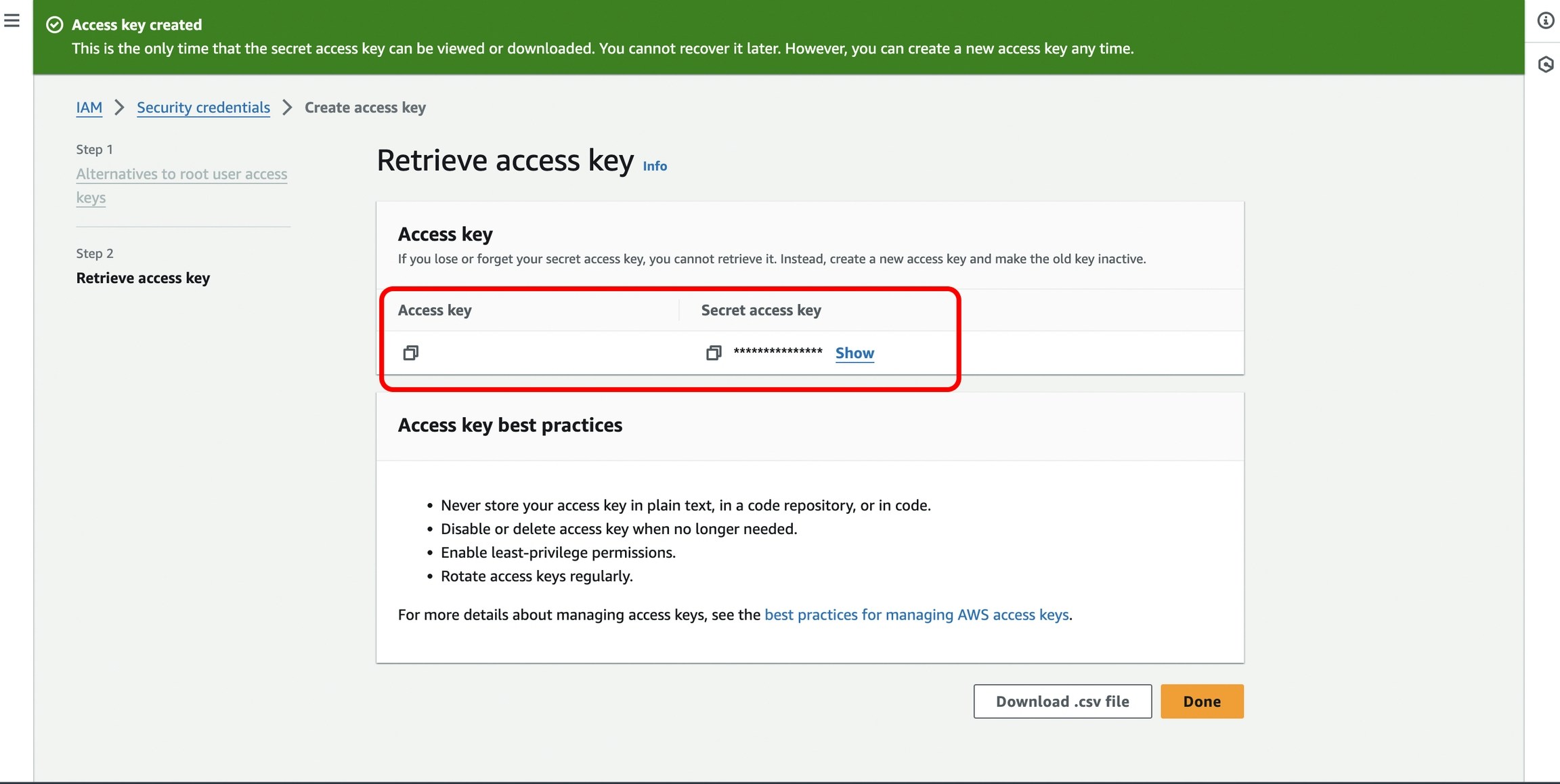
[Navigate here in the AWS Management Console](https://us-east-1.console.aws.amazon.com/iam/home#/security%5Fcredentials) to obtain your **AWS Access Key ID** and **AWS** **Secret Access Key.**
* In the console, you'll find the '**Access keys'** section. Click on '**Create access key**'.
* Copy the `Secret Access Key` once it is generated, and you can view the `Access Key ID` along with it.
 * On the same [page](https://us-east-1.console.aws.amazon.com/iam/home#/security%5Fcredentials) under the '**Access keys'** section, where you created your Secret Access key, you will also find your **Access Key ID.**
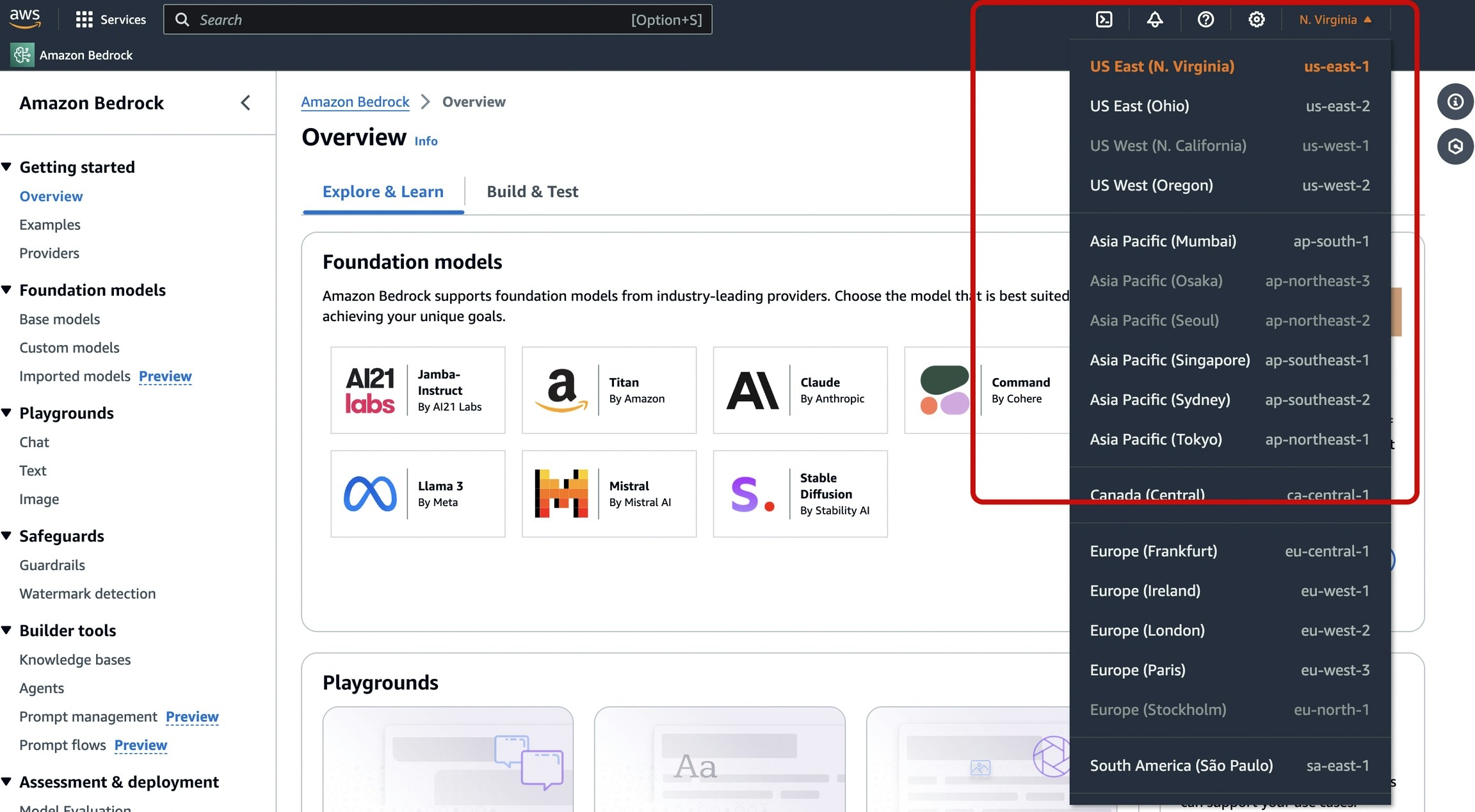
 * And lastly, get Your `AWS Region` from the Home Page of[ AWS Bedrock](https://us-east-1.console.aws.amazon.com/bedrock/home?region=us-east-1#/overview) as shown in the image below.
 ***
## Next Steps
The complete list of features supported in the SDK are available on the link below.
You'll find more information in the relevant sections:
1. [Add metadata to your requests](/product/observability/metadata)
2. [Add gateway configs to your Bedrock requests](/product/ai-gateway/configs)
3. [Tracing Bedrock requests](/product/observability/traces)
4. [Setup a fallback from OpenAI to Beckrock APIs](/product/ai-gateway/fallbacks)
***
## Next Steps
The complete list of features supported in the SDK are available on the link below.
You'll find more information in the relevant sections:
1. [Add metadata to your requests](/product/observability/metadata)
2. [Add gateway configs to your Bedrock requests](/product/ai-gateway/configs)
3. [Tracing Bedrock requests](/product/observability/traces)
4. [Setup a fallback from OpenAI to Beckrock APIs](/product/ai-gateway/fallbacks)