> ## Documentation Index
> Fetch the complete documentation index at: https://docs.portkey.ai/docs/llms.txt
> Use this file to discover all available pages before exploring further.
# Google Vertex AI
Portkey provides a robust and secure gateway to facilitate the integration of various Large Language Models (LLMs), and embedding models into your apps, including [Google Vertex AI](https://cloud.google.com/vertex-ai?hl=en).
With Portkey, you can take advantage of features like fast AI gateway access, observability, prompt management, and more, all while ensuring the secure management of your Vertex auth through a [virtual key](/product/ai-gateway/virtual-keys/) system
Provider Slug. `vertex-ai`
## Portkey SDK Integration with Google Vertex AI
Portkey provides a consistent API to interact with models from various providers. To integrate Google Vertex AI with Portkey:
### 1. Install the Portkey SDK
Add the Portkey SDK to your application to interact with Google Vertex AI API through Portkey's gateway.
```sh theme={"system"}
npm install --save portkey-ai
```
```sh theme={"system"}
pip install portkey-ai
```
### 2. Initialize Portkey with the Virtual Key
To integrate Vertex AI with Portkey, you'll need your `Vertex Project Id` Or `Service Account JSON` & `Vertex Region`, with which you can set up the Virtual key.
[Here's a guide on how to find your Vertex Project details](/integrations/llms/vertex-ai#how-to-find-your-google-vertex-project-details)
If you are integrating through Service Account File, [refer to this guide](/integrations/llms/vertex-ai#get-your-service-account-json).
```js theme={"system"}
import Portkey from 'portkey-ai'
const portkey = new Portkey({
apiKey: "PORTKEY_API_KEY", // defaults to process.env["PORTKEY_API_KEY"]
virtualKey: "VERTEX_VIRTUAL_KEY", // Your Vertex AI Virtual Key
})
```
```python theme={"system"}
from portkey_ai import Portkey
portkey = Portkey(
api_key="PORTKEY_API_KEY", # Replace with your Portkey API key
virtual_key="VERTEX_VIRTUAL_KEY" # Replace with your virtual key for Google
)
```
If you do not want to add your Vertex AI details to Portkey vault, you can directly pass them while instantiating the Portkey client. [More on that here](/integrations/llms/vertex-ai#making-requests-without-virtual-keys).
### **3. Invoke Chat Completions with** Vertex AI and Gemini
Use the Portkey instance to send requests to Gemini models hosted on Vertex AI. You can also override the virtual key directly in the API call if needed.
Vertex AI uses OAuth2 to authenticate its requests, so you need to send the **access token** additionally along with the request.
```js theme={"system"}
const chatCompletion = await portkey.chat.completions.create({
messages: [{ role: 'user', content: 'Say this is a test' }],
model: 'gemini-1.5-pro-latest',
}, {Authorization: "Bearer $YOUR_VERTEX_ACCESS_TOKEN"});
console.log(chatCompletion.choices);
```
```python theme={"system"}
completion = portkey.with_options(Authorization="Bearer $YOUR_VERTEX_ACCESS_TOKEN").chat.completions.create(
messages= [{ "role": 'user', "content": 'Say this is a test' }],
model= 'gemini-1.5-pro-latest'
)
print(completion)
```
To use Anthopic models on Vertex AI, prepend `anthropic.` to the model name.
Example: `anthropic.claude-3-5-sonnet@20240620`
Similarly, for Meta models, prepend `meta.` to the model name.
Example: `meta.llama-3-8b-8192`
## Using Self-Deployed Models on Vertex AI (Hugging Face, Custom Models)
Portkey supports connecting to self-deployed models on Vertex AI, including models from Hugging Face or any custom models you've deployed to a Vertex AI endpoint.
**Requirements for Self-Deployed Models**
To use self-deployed models on Vertex AI through Portkey:
1. **Model Naming Convention**: When making requests to your self-deployed model, you must prefix the model name with `endpoints.`
```
endpoints.my_endpoint_name
```
2. **Required Permissions**: The Google Cloud service account used in your Portkey virtual key must have the `aiplatform.endpoints.predict` permission.
```js theme={"system"}
const chatCompletion = await portkey.chat.completions.create({
messages: [{ role: 'user', content: 'Say this is a test' }],
model: 'endpoints.my_custom_llm', // Notice the 'endpoints.' prefix
}, {Authorization: "Bearer $YOUR_VERTEX_ACCESS_TOKEN"});
console.log(chatCompletion.choices);
```
```python theme={"system"}
completion = portkey.with_options(Authorization="Bearer $YOUR_VERTEX_ACCESS_TOKEN").chat.completions.create(
messages= [{ "role": 'user', "content": 'Say this is a test' }],
model= 'endpoints.my_huggingface_model' # Notice the 'endpoints.' prefix
)
print(completion)
```
**Why the prefix?** Vertex AI's product offering for self-deployed models is called "Endpoints." This naming convention indicates to Portkey that it should route requests to your custom endpoint rather than a standard Vertex AI model.
This approach works for all models you can self-deploy on Vertex AI Model Garden, including Hugging Face models and your own custom models.
## Document, Video, Audio Processing
Vertex AI supports attaching `webm`, `mp4`, `pdf`, `jpg`, `mp3`, `wav`, etc. file types to your Gemini messages.
Gemini Docs:
* [Document Processing](https://ai.google.dev/gemini-api/docs/document-processing?lang=python)
* [Video & Image Processing](https://ai.google.dev/gemini-api/docs/vision?lang=python)
* [Audio Processing](https://ai.google.dev/gemini-api/docs/audio?lang=python)
Using Portkey, here's how you can send these media files:
```javascript JavaScript theme={"system"}
const chatCompletion = await portkey.chat.completions.create({
messages: [
{ role: 'system', content: 'You are a helpful assistant' },
{ role: 'user', content: [
{
type: 'image_url',
image_url: {
url: 'gs://cloud-samples-data/generative-ai/image/scones.jpg'
}
},
{
type: 'text',
text: 'Describe the image'
}
]}
],
model: 'gemini-1.5-pro-001',
max_tokens: 200
});
```
```python Python theme={"system"}
completion = portkey.chat.completions.create(
messages=[
{
"role": "system",
"content": "You are a helpful assistant"
},
{
"role": "user",
"content": [
{
"type": "image_url",
"image_url": {
"url": "gs://cloud-samples-data/generative-ai/image/scones.jpg"
}
},
{
"type": "text",
"text": "Describe the image"
}
]
}
],
model='gemini-1.5-pro-001',
max_tokens=200
)
print(completion)
```
```sh cURL theme={"system"}
curl --location 'https://api.portkey.ai/v1/chat/completions' \
--header 'x-portkey-provider: vertex-ai' \
--header 'x-portkey-vertex-region: us-central1' \
--header 'Content-Type: application/json' \
--header 'x-portkey-api-key: PORTKEY_API_KEY' \
--header 'Authorization: GEMINI_API_KEY' \
--data '{
"model": "gemini-1.5-pro-001",
"max_tokens": 200,
"stream": false,
"messages": [
{
"role": "system",
"content": "You are a helpful assistant"
},
{
"role": "user",
"content": [
{
"type": "image_url",
"image_url": {
"url": "gs://cloud-samples-data/generative-ai/image/scones.jpg"
}
},
{
"type": "text",
"text": "describe this image"
}
]
}
]
}'
```
## Extended Thinking (Reasoning Models) (Beta)
The assistants thinking response is returned in the `response_chunk.choices[0].delta.content_blocks` array, not the `response.choices[0].message.content` string.
Gemini models do not support plugging back the reasoning into multi turn conversations, so you don't need to send the thinking message back to the model.
Models like `google.gemini-2.5-flash-preview-04-17` `anthropic.claude-3-7-sonnet@20250219` support [extended thinking](https://cloud.google.com/vertex-ai/generative-ai/docs/partner-models/use-claude#claude-3-7-sonnet).
This is similar to openai thinking, but you get the model's reasoning as it processes the request as well.
Note that you will have to set [`strict_open_ai_compliance=False`](/product/ai-gateway/strict-open-ai-compliance) in the headers to use this feature.
### Single turn conversation
```py Python theme={"system"}
from portkey_ai import Portkey
# Initialize the Portkey client
portkey = Portkey(
api_key="PORTKEY_API_KEY", # Replace with your Portkey API key
virtual_key="VIRTUAL_KEY", # Add your provider's virtual key
strict_open_ai_compliance=False
)
# Create the request
response = portkey.chat.completions.create(
model="anthropic.claude-3-7-sonnet@20250219",
max_tokens=3000,
thinking={
"type": "enabled",
"budget_tokens": 2030
},
stream=True,
messages=[
{
"role": "user",
"content": [
{
"type": "text",
"text": "when does the flight from new york to bengaluru land tomorrow, what time, what is its flight number, and what is its baggage belt?"
}
]
}
]
)
print(response)
# in case of streaming responses you'd have to parse the response_chunk.choices[0].delta.content_blocks array
# response = portkey.chat.completions.create(
# ...same config as above but with stream: true
# )
# for chunk in response:
# if chunk.choices[0].delta:
# content_blocks = chunk.choices[0].delta.get("content_blocks")
# if content_blocks is not None:
# for content_block in content_blocks:
# print(content_block)
```
```ts NodeJS theme={"system"}
import Portkey from 'portkey-ai';
// Initialize the Portkey client
const portkey = new Portkey({
apiKey: "PORTKEY_API_KEY", // Replace with your Portkey API key
virtualKey: "VIRTUAL_KEY", // your vertex-ai virtual key
strictOpenAiCompliance: false
});
// Generate a chat completion
async function getChatCompletionFunctions() {
const response = await portkey.chat.completions.create({
model: "anthropic.claude-3-7-sonnet@20250219",
max_tokens: 3000,
thinking: {
type: "enabled",
budget_tokens: 2030
},
stream: true,
messages: [
{
role: "user",
content: [
{
type: "text",
text: "when does the flight from new york to bengaluru land tomorrow, what time, what is its flight number, and what is its baggage belt?"
}
]
}
]
});
console.log(response);
// in case of streaming responses you'd have to parse the response_chunk.choices[0].delta.content_blocks array
// const response = await portkey.chat.completions.create({
// ...same config as above but with stream: true
// });
// for await (const chunk of response) {
// if (chunk.choices[0].delta?.content_blocks) {
// for (const contentBlock of chunk.choices[0].delta.content_blocks) {
// console.log(contentBlock);
// }
// }
// }
}
// Call the function
getChatCompletionFunctions();
```
```js OpenAI NodeJS theme={"system"}
import OpenAI from 'openai'; // We're using the v4 SDK
import { PORTKEY_GATEWAY_URL, createHeaders } from 'portkey-ai'
const openai = new OpenAI({
apiKey: 'VERTEX_API_KEY', // defaults to process.env["OPENAI_API_KEY"],
baseURL: PORTKEY_GATEWAY_URL,
defaultHeaders: createHeaders({
provider: "vertex-ai",
apiKey: "PORTKEY_API_KEY", // defaults to process.env["PORTKEY_API_KEY"]
strictOpenAiCompliance: false
})
});
// Generate a chat completion with streaming
async function getChatCompletionFunctions(){
const response = await openai.chat.completions.create({
model: "anthropic.claude-3-7-sonnet@20250219",
max_tokens: 3000,
thinking: {
type: "enabled",
budget_tokens: 2030
},
stream: true,
messages: [
{
role: "user",
content: [
{
type: "text",
text: "when does the flight from new york to bengaluru land tomorrow, what time, what is its flight number, and what is its baggage belt?"
}
]
}
],
});
console.log(response)
// in case of streaming responses you'd have to parse the response_chunk.choices[0].delta.content_blocks array
// const response = await openai.chat.completions.create({
// ...same config as above but with stream: true
// });
// for await (const chunk of response) {
// if (chunk.choices[0].delta?.content_blocks) {
// for (const contentBlock of chunk.choices[0].delta.content_blocks) {
// console.log(contentBlock);
// }
// }
// }
}
await getChatCompletionFunctions();
```
```py OpenAI Python theme={"system"}
from openai import OpenAI
from portkey_ai import PORTKEY_GATEWAY_URL, createHeaders
openai = OpenAI(
api_key='VERTEX_API_KEY',
base_url=PORTKEY_GATEWAY_URL,
default_headers=createHeaders(
provider="vertex-ai",
api_key="PORTKEY_API_KEY",
strict_open_ai_compliance=False
)
)
response = openai.chat.completions.create(
model="anthropic.claude-3-7-sonnet@20250219",
max_tokens=3000,
thinking={
"type": "enabled",
"budget_tokens": 2030
},
stream=True,
messages=[
{
"role": "user",
"content": [
{
"type": "text",
"text": "when does the flight from new york to bengaluru land tomorrow, what time, what is its flight number, and what is its baggage belt?"
}
]
}
]
)
print(response)
```
```sh cURL theme={"system"}
curl "https://api.portkey.ai/v1/chat/completions" \
-H "Content-Type: application/json" \
-H "x-portkey-api-key: $PORTKEY_API_KEY" \
-H "x-portkey-provider: vertex-ai" \
-H "x-api-key: $VERTEX_API_KEY" \
-H "x-portkey-strict-open-ai-compliance: false" \
-d '{
"model": "anthropic.claude-3-7-sonnet@20250219",
"max_tokens": 3000,
"thinking": {
"type": "enabled",
"budget_tokens": 2030
},
"stream": true,
"messages": [
{
"role": "user",
"content": [
{
"type": "text",
"text": "when does the flight from new york to bengaluru land tomorrow, what time, what is its flight number, and what is its baggage belt?"
}
]
}
]
}'
```
To disable thinking for gemini models like `google.gemini-2.5-flash-preview-04-17`, you are required to explicitly set `budget_tokens` to `0`.
```json theme={"system"}
"thinking": {
"type": "enabled",
"budget_tokens": 0
}
```
### Multi turn conversation
```py Python theme={"system"}
from portkey_ai import Portkey
# Initialize the Portkey client
portkey = Portkey(
api_key="PORTKEY_API_KEY", # Replace with your Portkey API key
virtual_key="VIRTUAL_KEY", # Add your provider's virtual key
strict_open_ai_compliance=False
)
# Create the request
response = portkey.chat.completions.create(
model="anthropic.claude-3-7-sonnet@20250219",
max_tokens=3000,
thinking={
"type": "enabled",
"budget_tokens": 2030
},
stream=True,
messages=[
{
"role": "user",
"content": [
{
"type": "text",
"text": "when does the flight from baroda to bangalore land tomorrow, what time, what is its flight number, and what is its baggage belt?"
}
]
},
{
"role": "assistant",
"content": [
{
"type": "thinking",
"thinking": "The user is asking several questions about a flight from Baroda (also known as Vadodara) to Bangalore:\n1. When does the flight land tomorrow\n2. What time does it land\n3. What is the flight number\n4. What is the baggage belt number at the arrival airport\n\nTo properly answer these questions, I would need access to airline flight schedules and airport information systems. However, I don't have:\n- Real-time or scheduled flight information\n- Access to airport baggage claim allocation systems\n- Information about specific flights between these cities\n- The ability to look up tomorrow's specific flight schedules\n\nThis question requires current, specific flight information that I don't have access to. Instead of guessing or providing potentially incorrect information, I should explain this limitation and suggest ways the user could find this information.",
"signature": "EqoBCkgIARABGAIiQBVA7FBNLRtWarDSy9TAjwtOpcTSYHJ+2GYEoaorq3V+d3eapde04bvEfykD/66xZXjJ5yyqogJ8DEkNMotspRsSDKzuUJ9FKhSNt/3PdxoMaFZuH+1z1aLF8OeQIjCrA1+T2lsErrbgrve6eDWeMvP+1sqVqv/JcIn1jOmuzrPi2tNz5M0oqkOO9txJf7QqEPPw6RG3JLO2h7nV1BMN6wE="
}
]
},
{
"role": "user",
"content": "thanks that's good to know, how about to chennai?"
}
]
)
print(response)
```
```ts NodeJS theme={"system"}
import Portkey from 'portkey-ai';
// Initialize the Portkey client
const portkey = new Portkey({
apiKey: "PORTKEY_API_KEY", // Replace with your Portkey API key
virtualKey: "VIRTUAL_KEY", // your vertex-ai virtual key
strictOpenAiCompliance: false
});
// Generate a chat completion
async function getChatCompletionFunctions() {
const response = await portkey.chat.completions.create({
model: "anthropic.claude-3-7-sonnet@20250219",
max_tokens: 3000,
thinking: {
type: "enabled",
budget_tokens: 2030
},
stream: true,
messages: [
{
role: "user",
content: [
{
type: "text",
text: "when does the flight from baroda to bangalore land tomorrow, what time, what is its flight number, and what is its baggage belt?"
}
]
},
{
role: "assistant",
content: [
{
type: "thinking",
thinking: "The user is asking several questions about a flight from Baroda (also known as Vadodara) to Bangalore:\n1. When does the flight land tomorrow\n2. What time does it land\n3. What is the flight number\n4. What is the baggage belt number at the arrival airport\n\nTo properly answer these questions, I would need access to airline flight schedules and airport information systems. However, I don't have:\n- Real-time or scheduled flight information\n- Access to airport baggage claim allocation systems\n- Information about specific flights between these cities\n- The ability to look up tomorrow's specific flight schedules\n\nThis question requires current, specific flight information that I don't have access to. Instead of guessing or providing potentially incorrect information, I should explain this limitation and suggest ways the user could find this information.",
signature: "EqoBCkgIARABGAIiQBVA7FBNLRtWarDSy9TAjwtOpcTSYHJ+2GYEoaorq3V+d3eapde04bvEfykD/66xZXjJ5yyqogJ8DEkNMotspRsSDKzuUJ9FKhSNt/3PdxoMaFZuH+1z1aLF8OeQIjCrA1+T2lsErrbgrve6eDWeMvP+1sqVqv/JcIn1jOmuzrPi2tNz5M0oqkOO9txJf7QqEPPw6RG3JLO2h7nV1BMN6wE="
}
]
},
{
role: "user",
content: "thanks that's good to know, how about to chennai?"
}
]
});
console.log(response);
}
// Call the function
getChatCompletionFunctions();
```
```js OpenAI NodeJS theme={"system"}
import OpenAI from 'openai'; // We're using the v4 SDK
import { PORTKEY_GATEWAY_URL, createHeaders } from 'portkey-ai'
const openai = new OpenAI({
apiKey: 'ANTHROPIC_API_KEY', // defaults to process.env["OPENAI_API_KEY"],
baseURL: PORTKEY_GATEWAY_URL,
defaultHeaders: createHeaders({
provider: "vertex-ai",
apiKey: "PORTKEY_API_KEY", // defaults to process.env["PORTKEY_API_KEY"]
strictOpenAiCompliance: false
})
});
// Generate a chat completion with streaming
async function getChatCompletionFunctions(){
const response = await openai.chat.completions.create({
model: "anthropic.claude-3-7-sonnet@20250219",
max_tokens: 3000,
thinking: {
type: "enabled",
budget_tokens: 2030
},
stream: true,
messages: [
{
role: "user",
content: [
{
type: "text",
text: "when does the flight from baroda to bangalore land tomorrow, what time, what is its flight number, and what is its baggage belt?"
}
]
},
{
role: "assistant",
content: [
{
type: "thinking",
thinking: "The user is asking several questions about a flight from Baroda (also known as Vadodara) to Bangalore:\n1. When does the flight land tomorrow\n2. What time does it land\n3. What is the flight number\n4. What is the baggage belt number at the arrival airport\n\nTo properly answer these questions, I would need access to airline flight schedules and airport information systems. However, I don't have:\n- Real-time or scheduled flight information\n- Access to airport baggage claim allocation systems\n- Information about specific flights between these cities\n- The ability to look up tomorrow's specific flight schedules\n\nThis question requires current, specific flight information that I don't have access to. Instead of guessing or providing potentially incorrect information, I should explain this limitation and suggest ways the user could find this information.",
signature: "EqoBCkgIARABGAIiQBVA7FBNLRtWarDSy9TAjwtOpcTSYHJ+2GYEoaorq3V+d3eapde04bvEfykD/66xZXjJ5yyqogJ8DEkNMotspRsSDKzuUJ9FKhSNt/3PdxoMaFZuH+1z1aLF8OeQIjCrA1+T2lsErrbgrve6eDWeMvP+1sqVqv/JcIn1jOmuzrPi2tNz5M0oqkOO9txJf7QqEPPw6RG3JLO2h7nV1BMN6wE="
}
]
},
{
role: "user",
content: "thanks that's good to know, how about to chennai?"
}
],
});
console.log(response)
}
await getChatCompletionFunctions();
```
```py OpenAI Python theme={"system"}
from openai import OpenAI
from portkey_ai import PORTKEY_GATEWAY_URL, createHeaders
openai = OpenAI(
api_key='Anthropic_API_KEY',
base_url=PORTKEY_GATEWAY_URL,
default_headers=createHeaders(
provider="vertex-ai",
api_key="PORTKEY_API_KEY",
strict_open_ai_compliance=False
)
)
response = openai.chat.completions.create(
model="anthropic.claude-3-7-sonnet@20250219",
max_tokens=3000,
thinking={
"type": "enabled",
"budget_tokens": 2030
},
stream=True,
messages=[
{
"role": "user",
"content": [
{
"type": "text",
"text": "when does the flight from baroda to bangalore land tomorrow, what time, what is its flight number, and what is its baggage belt?"
}
]
},
{
"role": "assistant",
"content": [
{
"type": "thinking",
"thinking": "The user is asking several questions about a flight from Baroda (also known as Vadodara) to Bangalore:\n1. When does the flight land tomorrow\n2. What time does it land\n3. What is the flight number\n4. What is the baggage belt number at the arrival airport\n\nTo properly answer these questions, I would need access to airline flight schedules and airport information systems. However, I don't have:\n- Real-time or scheduled flight information\n- Access to airport baggage claim allocation systems\n- Information about specific flights between these cities\n- The ability to look up tomorrow's specific flight schedules\n\nThis question requires current, specific flight information that I don't have access to. Instead of guessing or providing potentially incorrect information, I should explain this limitation and suggest ways the user could find this information.",
signature: "EqoBCkgIARABGAIiQBVA7FBNLRtWarDSy9TAjwtOpcTSYHJ+2GYEoaorq3V+d3eapde04bvEfykD/66xZXjJ5yyqogJ8DEkNMotspRsSDKzuUJ9FKhSNt/3PdxoMaFZuH+1z1aLF8OeQIjCrA1+T2lsErrbgrve6eDWeMvP+1sqVqv/JcIn1jOmuzrPi2tNz5M0oqkOO9txJf7QqEPPw6RG3JLO2h7nV1BMN6wE="
}
]
},
{
"role": "user",
"content": "thanks that's good to know, how about to chennai?"
}
]
)
print(response)
```
```sh cURL theme={"system"}
curl "https://api.portkey.ai/v1/chat/completions" \
-H "Content-Type: application/json" \
-H "x-portkey-api-key: $PORTKEY_API_KEY" \
-H "x-portkey-provider: vertex-ai" \
-H "x-api-key: $VERTEX_API_KEY" \
-H "x-portkey-strict-open-ai-compliance: false" \
-d '{
"model": "anthropic.claude-3-7-sonnet@20250219",
"max_tokens": 3000,
"thinking": {
"type": "enabled",
"budget_tokens": 2030
},
"stream": true,
"messages": [
{
"role": "user",
"content": [
{
"type": "text",
"text": "when does the flight from baroda to bangalore land tomorrow, what time, what is its flight number, and what is its baggage belt?"
}
]
},
{
"role": "assistant",
"content": [
{
"type": "thinking",
"thinking": "The user is asking several questions about a flight from Baroda (also known as Vadodara) to Bangalore:\n1. When does the flight land tomorrow\n2. What time does it land\n3. What is the flight number\n4. What is the baggage belt number at the arrival airport\n\nTo properly answer these questions, I would need access to airline flight schedules and airport information systems. However, I don't have:\n- Real-time or scheduled flight information\n- Access to airport baggage claim allocation systems\n- Information about specific flights between these cities\n- The ability to look up tomorrow's specific flight schedules\n\nThis question requires current, specific flight information that I don't have access to. Instead of guessing or providing potentially incorrect information, I should explain this limitation and suggest ways the user could find this information.",
"signature": "EqoBCkgIARABGAIiQBVA7FBNLRtWarDSy9TAjwtOpcTSYHJ+2GYEoaorq3V+d3eapde04bvEfykD/66xZXjJ5yyqogJ8DEkNMotspRsSDKzuUJ9FKhSNt/3PdxoMaFZuH+1z1aLF8OeQIjCrA1+T2lsErrbgrve6eDWeMvP+1sqVqv/JcIn1jOmuzrPi2tNz5M0oqkOO9txJf7QqEPPw6RG3JLO2h7nV1BMN6wE="
}
]
},
{
"role": "user",
"content": "thanks that's good to know, how about to chennai?"
}
]
}'
```
### Sending `base64` Image
Here, you can send the `base64` image data along with the `url` field too:
```json theme={"system"}
"url": "data:image/png;base64,UklGRkacAABXRUJQVlA4IDqcAAC....."
```
This same message format also works for all other media types — just send your media file in the `url` field, like `"url": "gs://cloud-samples-data/video/animals.mp4"` for google cloud urls and `"url":"https://download.samplelib.com/mp3/sample-3s.mp3"` for public urls
Your URL should have the file extension, this is used for inferring `MIME_TYPE` which is a required parameter for prompting Gemini models with files
## Text Embedding Models
You can use any of Vertex AI's `English` and `Multilingual` models through Portkey, in the familar OpenAI-schema.
The Gemini-specific parameter `task_type` is also supported on Portkey.
```javascript theme={"system"}
import Portkey from 'portkey-ai';
const portkey = new Portkey({
apiKey: "PORTKEY_API_KEY",
virtualKey: "VERTEX_VIRTUAL_KEY"
});
// Generate embeddings
async function getEmbeddings() {
const embeddings = await portkey.embeddings.create({
input: "embed this",
model: "text-multilingual-embedding-002",
// @ts-ignore (if using typescript)
task_type: "CLASSIFICATION", // Optional
}, {Authorization: "Bearer $YOUR_VERTEX_ACCESS_TOKEN"});
console.log(embeddings);
}
await getEmbeddings();
```
```python theme={"system"}
from portkey_ai import Portkey
# Initialize the Portkey client
portkey = Portkey(
api_key="PORTKEY_API_KEY", # Replace with your Portkey API key
virtual_key="VERTEX_VIRTUAL_KEY"
)
# Generate embeddings
def get_embeddings():
embeddings = portkey.with_options(Authorization="Bearer $YOUR_VERTEX_ACCESS_TOKEN").embeddings.create(
input='The vector representation for this text',
model='text-embedding-004',
task_type="CLASSIFICATION" # Optional
)
print(embeddings)
get_embeddings()
```
```sh theme={"system"}
curl 'https://api.portkey.ai/v1/embeddings' \
-H 'Content-Type: application/json' \
-H 'x-portkey-api-key: PORTKEY_API_KEY' \
-H 'x-portkey-provider: vertex-ai' \
-H 'Authorization: Bearer VERTEX_AI_ACCESS_TOKEN' \
-H 'x-portkey-virtual-key: $VERTEX_VIRTUAL_KEY' \
--data-raw '{
"model": "textembedding-004",
"input": "A HTTP 246 code is used to signify an AI response containing hallucinations or other inaccuracies",
"task_type": "CLASSIFICATION"
}'
```
## Function Calling
Portkey supports function calling mode on Google's Gemini Models. Explore this Cookbook for a deep dive and examples:
[Function Calling](/guides/getting-started/function-calling)
## Managing Vertex AI Prompts
You can manage all prompts to Google Gemini in the [Prompt Library](/product/prompt-library). All the models in the model garden are supported and you can easily start testing different prompts.
Once you're ready with your prompt, you can use the `portkey.prompts.completions.create` interface to use the prompt in your application.
## Image Generation Models
Portkey supports the `Imagen API` on Vertex AI for image generations, letting you easily make requests in the familar OpenAI-compliant schema.
```sh cURL theme={"system"}
curl https://api.portkey.ai/v1/images/generations \
-H "Content-Type: application/json" \
-H "x-portkey-api-key: $PORTKEY_API_KEY" \
-H "x-portkey-virtual-key: $PORTKEY_PROVIDER_VIRTUAL_KEY" \
-d '{
"prompt": "Cat flying to mars from moon",
"model":"imagen-3.0-generate-001"
}'
```
```py Python theme={"system"}
from portkey_ai import Portkey
client = Portkey(
api_key = "PORTKEY_API_KEY",
virtual_key = "PROVIDER_VIRTUAL_KEY"
)
client.images.generate(
prompt = "Cat flying to mars from moon",
model = "imagen-3.0-generate-001"
)
```
```ts JavaScript theme={"system"}
import Portkey from 'portkey-ai';
const client = new Portkey({
apiKey: 'PORTKEY_API_KEY',
virtualKey: 'PROVIDER_VIRTUAL_KEY'
});
async function main() {
const image = await client.images.generate({
prompt: "Cat flying to mars from moon",
model: "imagen-3.0-generate-001"
});
console.log(image.data);
}
main();
```
[Image Generation API Reference](/api-reference/inference-api/images/create-image)
### List of Supported Imagen Models
* `imagen-3.0-generate-001`
* `imagen-3.0-fast-generate-001`
* `imagegeneration@006`
* `imagegeneration@005`
* `imagegeneration@002`
## Grounding with Google Search
Vertex AI supports grounding with Google Search. This is a feature that allows you to ground your LLM responses with real-time search results.
Grounding is invoked by passing the `google_search` tool (for newer models like gemini-2.0-flash-001), and `google_search_retrieval` (for older models like gemini-1.5-flash) in the `tools` array.
```json theme={"system"}
"tools": [
{
"type": "function",
"function": {
"name": "google_search" // or google_search_retrieval for older models
}
}]
```
If you mix regular tools with grounding tools, vertex might throw an error saying only one tool can be used at a time.
## gemini-2.0-flash-thinking-exp and other thinking/reasoning models
`gemini-2.0-flash-thinking-exp` models return a Chain of Thought response along with the actual inference text,
this is not openai compatible, however, Portkey supports this by adding a `\r\n\r\n` and appending the two responses together.
You can split the response along this pattern to get the Chain of Thought response and the actual inference text.
If you require the Chain of Thought response along with the actual inference text, pass the [strict open ai compliance flag](/product/ai-gateway/strict-open-ai-compliance) as `false` in the request.
If you want to get the inference text only, pass the [strict open ai compliance flag](/product/ai-gateway/strict-open-ai-compliance) as `true` in the request.
***
## Making Requests Without Virtual Keys
You can also pass your Vertex AI details & secrets directly without using the Virtual Keys in Portkey.
Vertex AI expects a `region`, a `project ID` and the `access token` in the request for a successful completion request. This is how you can specify these fields directly in your requests:
### Example Request
```js theme={"system"}
import Portkey from 'portkey-ai'
const portkey = new Portkey({
apiKey: "PORTKEY_API_KEY",
vertexProjectId: "sample-55646",
vertexRegion: "us-central1",
provider:"vertex_ai",
Authorization: "$GCLOUD AUTH PRINT-ACCESS-TOKEN"
})
const chatCompletion = await portkey.chat.completions.create({
messages: [{ role: 'user', content: 'Say this is a test' }],
model: 'gemini-pro',
});
console.log(chatCompletion.choices);
```
```python theme={"system"}
from portkey_ai import Portkey
portkey = Portkey(
api_key="PORTKEY_API_KEY",
vertex_project_id="sample-55646",
vertex_region="us-central1",
provider="vertex_ai",
Authorization="$GCLOUD AUTH PRINT-ACCESS-TOKEN"
)
completion = portkey.chat.completions.create(
messages= [{ "role": 'user', "content": 'Say this is a test' }],
model= 'gemini-1.5-pro-latest'
)
print(completion)
```
```js theme={"system"}
import OpenAI from "openai";
import { PORTKEY_GATEWAY_URL, createHeaders } from "portkey-ai";
const portkey = new OpenAI({
baseURL: PORTKEY_GATEWAY_URL,
defaultHeaders: createHeaders({
apiKey: "PORTKEY_API_KEY",
provider: "vertex-ai",
vertexRegion: "us-central1",
vertexProjectId: "xxx"
Authorization: "Bearer $GCLOUD AUTH PRINT-ACCESS-TOKEN",
// forwardHeaders: ["Authorization"] // You can also directly forward the auth token to Google
}),
});
async function main() {
const response = await portkey.chat.completions.create({
messages: [{ role: "user", content: "1729" }],
model: "gemini-1.5-flash-001",
max_tokens: 32,
});
console.log(response.choices[0].message.content);
}
main();
```
```sh theme={"system"}
curl 'https://api.portkey.ai/v1/chat/completions' \
-H 'Content-Type: application/json' \
-H 'x-portkey-api-key: PORTKEY_API_KEY' \
-H 'x-portkey-provider: vertex-ai' \
-H 'Authorization: Bearer VERTEX_AI_ACCESS_TOKEN' \
-H 'x-portkey-vertex-project-id: sample-94994' \
-H 'x-portkey-vertex-region: us-central1' \
--data '{
"model": "gemini-1.5-pro",
"messages": [
{
"role": "system",
"content": "You are a helpful assistant"
},
{
"role": "user",
"content": "what is a portkey?"
}
]
}'
```
For further questions on custom Vertex AI deployments or fine-grained access tokens, reach out to us on [support@portkey.ai](mailto:support@portkey.ai)
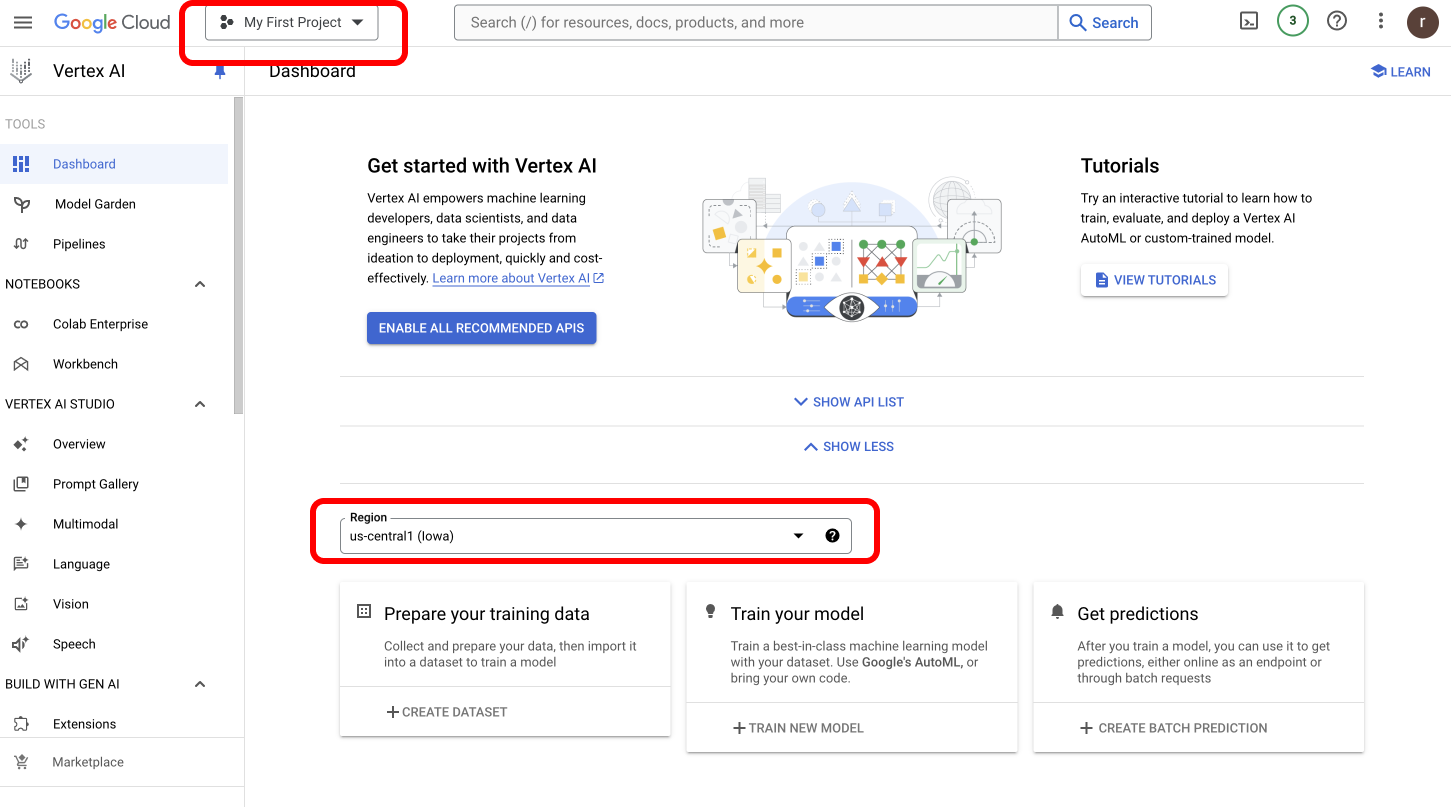
### How to Find Your Google Vertex Project Details
To obtain your **Vertex Project ID and Region,** [navigate to Google Vertex Dashboard](https://console.cloud.google.com/vertex-ai).
* You can copy the **Project ID** located at the top left corner of your screen.
* Find the **Region dropdown** on the same page to get your Vertex Region.
 ### Get Your Service Account JSON
* [Follow this process](https://cloud.google.com/iam/docs/keys-create-delete) to get your Service Account JSON.
When selecting Service Account File as your authentication method, you'll need to:
1. Upload your Google Cloud service account JSON file
2. Specify the Vertex Region
This method is particularly important for using self-deployed models, as your service account must have the `aiplatform.endpoints.predict` permission to access custom endpoints.
Learn more about permission on your Vertex IAM key [here](https://cloud.google.com/vertex-ai/docs/general/iam-permissions).
**For Self-Deployed Models**: Your service account **must** have the `aiplatform.endpoints.predict` permission in Google Cloud IAM. Without this specific permission, requests to custom endpoints will fail.
### Using Project ID and Region Authentication
For standard Vertex AI models, you can simply provide:
1. Your Vertex Project ID (found in your Google Cloud console)
2. The Vertex Region where your models are deployed
This method is simpler but may not have all the permissions needed for custom endpoints.
***
## Next Steps
The complete list of features supported in the SDK are available on the link below.
You'll find more information in the relevant sections:
1. [Add metadata to your requests](/product/observability/metadata)
2. [Add gateway configs to your Vertex AI requests](/product/ai-gateway/configs)
3. [Tracing Vertex AI requests](/product/observability/traces)
4. [Setup a fallback from OpenAI to Vertex AI APIs](/product/ai-gateway/fallbacks)
### Get Your Service Account JSON
* [Follow this process](https://cloud.google.com/iam/docs/keys-create-delete) to get your Service Account JSON.
When selecting Service Account File as your authentication method, you'll need to:
1. Upload your Google Cloud service account JSON file
2. Specify the Vertex Region
This method is particularly important for using self-deployed models, as your service account must have the `aiplatform.endpoints.predict` permission to access custom endpoints.
Learn more about permission on your Vertex IAM key [here](https://cloud.google.com/vertex-ai/docs/general/iam-permissions).
**For Self-Deployed Models**: Your service account **must** have the `aiplatform.endpoints.predict` permission in Google Cloud IAM. Without this specific permission, requests to custom endpoints will fail.
### Using Project ID and Region Authentication
For standard Vertex AI models, you can simply provide:
1. Your Vertex Project ID (found in your Google Cloud console)
2. The Vertex Region where your models are deployed
This method is simpler but may not have all the permissions needed for custom endpoints.
***
## Next Steps
The complete list of features supported in the SDK are available on the link below.
You'll find more information in the relevant sections:
1. [Add metadata to your requests](/product/observability/metadata)
2. [Add gateway configs to your Vertex AI requests](/product/ai-gateway/configs)
3. [Tracing Vertex AI requests](/product/observability/traces)
4. [Setup a fallback from OpenAI to Vertex AI APIs](/product/ai-gateway/fallbacks)