> ## Documentation Index
> Fetch the complete documentation index at: https://docs.portkey.ai/docs/llms.txt
> Use this file to discover all available pages before exploring further.
# Cache (Simple & Semantic)
**Simple** caching is available for all plans.
**Semantic** caching is available for [**Production**](https://portkey.ai/pricing) and [**Enterprise**](https://portkey.ai/docs/product/enterprise-offering) users.
Speed up and save money on your LLM requests by storing past responses in the Portkey cache. There are 2 cache modes:
* **Simple:** Matches requests verbatim. Perfect for repeated, identical prompts. Works on **all models** including image generation models.
* **Semantic:** Matches responses for requests that are semantically similar. Ideal for denoising requests with extra prepositions, pronouns, etc. Works on any model available on `/chat/completions`or `/completions` routes.
Portkey cache serves requests upto **20x times faster** and **cheaper**.
## Enable Cache in the Config
To enable Portkey cache, just add the `cache` params to your [config object](/api-reference/config-object#cache-object-details).
Caching will not work if the `x-portkey-debug: "false"` header is included in the request
## Simple Cache
```sh theme={"system"}
"cache": { "mode": "simple" }
```
### How it Works
Simple cache performs an exact match on the input prompts. If the exact same request is received again, Portkey retrieves the response directly from the cache, bypassing the model execution.
***
## Semantic Cache
```sh theme={"system"}
"cache": { "mode": "semantic" }
```
### How it Works
Semantic cache considers the contextual similarity between input requests. It uses cosine similarity to ascertain if the similarity between the input and a cached request exceeds a specific threshold. If the similarity threshold is met, Portkey retrieves the response from the cache, saving model execution time. Check out this [blog](https://portkey.ai/blog/reducing-llm-costs-and-latency-semantic-cache/) for more details on how we do this.
Semantic cache is a "superset" of both caches. Setting cache mode to "semantic" will work for when there are simple cache hits as well.
To optimise for accurate cache hit rates, Semantic cache only works with requests with less than 8,191 input tokens, and with number of messages (human, assistant, system combined) less than or equal to 4.
### Ignoring the First Message in Semantic Cache
When using the `/chat/completions` endpoint, Portkey requires at least **two** message objects in the `messages` array. The first message object, typically used for the `system` message, is not considered when determining semantic similarity for caching purposes.
For example:
```JSON theme={"system"}
messages = [
{ "role": "system", "content": "You are a helpful assistant" },
{ "role": "user", "content": "Who is the president of the US?" }
]
```
In this case, only the content of the `user` message ("Who is the president of the US?") is used for finding semantic matches in the cache. The `system` message ("You are a helpful assistant") is ignored.
This means that even if you change the `system` message while keeping the `user` message semantically similar, Portkey will still return a semantic cache hit.
This allows you to modify the behavior or context of the assistant without affecting the cache hits for similar user queries.
### [Read more how to set cache in Configs](/product/ai-gateway/cache-simple-and-semantic#how-cache-works-with-configs).
***
## Setting Cache Age
You can set the age (or "ttl") of your cached response with this setting. Cache age is also set in your Config object:
```json theme={"system"}
"cache": {
"mode": "semantic",
"max_age": 60
}
```
In this example, your cache will automatically expire after 60 seconds. Cache age is set in **seconds**.
* **Minimum** cache age is **60 seconds**
* **Maximum** cache age is **90 days** (i.e. **7776000** seconds)
* **Default** cache age is **7 days** (i.e. **604800** seconds)
***
## Organization-Level Cache TTL Settings
Organization administrators can now define the default cache TTL (Time to Live) for all API keys and workspaces within the organization. This provides centralized control over cache expiration to align with data retention policies.
**How to Configure Organization Cache TTL**
1. Navigate to Admin Settings
2. Select Organization Properties
3. Scroll to Cache Settings
4. Enter your desired default cache TTL value (in seconds)
5. Click Save
### How Organization-Level Cache TTL Works
1. **Default Value**: The value set at the organization level serves as both the maximum and default TTL value.
2. **Precedence Rules**:
* If no `max_age` is specified in the request, the organization-level default value is used.
* If the `max_age` value in a request is greater than the organization-level default, the organization-level value takes precedence.
* If the `max_age` in a request is less than the organization-level default, the lower request value is honored.
3. The max value of Organisation Level Cache TTL is 25923000 seconds.
This feature helps organizations implement consistent cache retention policies while still allowing individual requests to use shorter TTL values when needed.
## Force Refresh Cache
Ensure that a new response is fetched and stored in the cache even when there is an existing cached response for your request. Cache force refresh can only be done **at the time of making a request**, and it is **not a part of your Config**.
You can enable cache force refresh with this header:
```sh theme={"system"}
"x-portkey-cache-force-refresh": "True"
```
```sh theme={"system"}
curl https://api.portkey.ai/v1/chat/completions \
-H "Content-Type: application/json" \
-H "x-portkey-api-key: $PORTKEY_API_KEY" \
-H "x-portkey-virtual-key: open-ai-xxx" \
-H "x-portkey-config: cache-config-xxx" \
-H "x-portkey-cache-force-refresh: true" \
-d '{
"messages": [{"role": "user","content": "Hello!"}]
}'
```
```py theme={"system"}
from portkey_ai import Portkey
portkey = Portkey(
api_key="PORTKEY_API_KEY",
virtual_key="open-ai-xxx",
config="pp-cache-xxx"
)
response = portkey.with_options(
cache_force_refresh = True
).chat.completions.create(
messages = [{ "role": 'user', "content": 'Hello!' }],
model = 'gpt-4'
)
```
```JS theme={"system"}
import Portkey from 'portkey-ai';
const portkey = new Portkey({
apiKey: "PORTKEY_API_KEY",
config: "pc-cache-xxx",
virtualKey: "open-ai-xxx"
})
async function main(){
const response = await portkey.chat.completions.create({
messages: [{ role: 'user', content: 'Hello' }],
model: 'gpt-4',
}, {
cacheForceRefresh: true
});
}
main()
```
* Cache force refresh is only activated if a cache config is **also passed** along with your request. (setting `cacheForceRefresh` as `true` without passing the relevant cache config will not have any effect)
* For requests that have previous semantic hits, force refresh is performed on ALL the semantic matches of your request.
***
## Cache Namespace: Simplified Cache Partitioning
Portkey generally partitions the cache along all the values passed in your request header. With a custom cache namespace, you can now ignore metadata and other headers, and only partition the cache based on the custom strings that you send.
This allows you to have finer control over your cached data and optimize your cache hit ratio.
### How It Works
To use Cache Namespaces, simply include the `x-portkey-cache-namespace` header in your API requests, followed by any custom string value. Portkey will then use this namespace string as the sole basis for partitioning the cache, disregarding all other headers, including metadata.
For example, if you send the following header:
```sh theme={"system"}
"x-portkey-cache-namespace: user-123"
```
Portkey will cache the response under the namespace `user-123`, ignoring any other headers or metadata associated with the request.
```JS theme={"system"}
import Portkey from 'portkey-ai';
const portkey = new Portkey({
apiKey: "PORTKEY_API_KEY",
config: "pc-cache-xxx",
virtualKey: "open-ai-xxx"
})
async function main(){
const response = await portkey.chat.completions.create({
messages: [{ role: 'user', content: 'Hello' }],
model: 'gpt-4',
}, {
cacheNamespace: 'user-123'
});
}
main()
```
```Python theme={"system"}
from portkey_ai import Portkey
portkey = Portkey(
api_key="PORTKEY_API_KEY",
virtual_key="open-ai-xxx",
config="pp-cache-xxx"
)
response = portkey.with_options(
cache_namespace = "user-123"
).chat.completions.create(
messages = [{ "role": 'user', "content": 'Hello!' }],
model = 'gpt-4'
)
```
```sh theme={"system"}
curl https://api.portkey.ai/v1/chat/completions \
-H "Content-Type: application/json" \
-H "x-portkey-api-key: $PORTKEY_API_KEY" \
-H "x-portkey-virtual-key: open-ai-xxx" \
-H "x-portkey-config: cache-config-xxx" \
-H "x-portkey-cache-namespace: user-123" \
-d '{
"messages": [{"role": "user","content": "Hello!"}]
}'
```
In this example, the response will be cached under the namespace `user-123`, ignoring any other headers or metadata.
***
## Cache in Analytics
Portkey shows you powerful stats on cache usage on the Analytics page. Just head over to the Cache tab, and you will see:
* Your raw number of cache hits as well as daily cache hit rate
* Your average latency for delivering results from cache and how much time it saves you
* How much money the cache saves you
## Cache in Logs
On the Logs page, the cache status is updated on the Status column. You will see `Cache Disabled` when you are not using the cache, and any of `Cache Miss`, `Cache Refreshed`, `Cache Hit`, `Cache Semantic Hit` based on the cache hit status. Read more [here](/product/observability/logs).
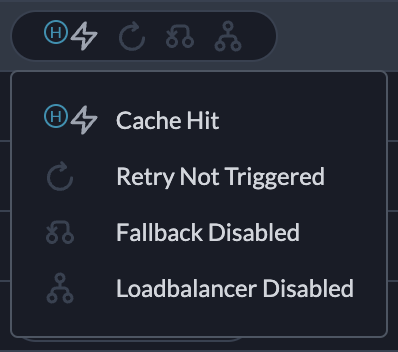 For each request we also calculate and show the cache response time and how much money you saved with each hit.
***
## How Cache works with Configs
You can set cache at two levels:
* **Top-level** that works across all the targets.
* **Target-level** that works when that specific target is triggered.
```json theme={"system"}
{
"cache": {"mode": "semantic", "max_age": 60},
"strategy": {"mode": "fallback"},
"targets": [
{"virtual_key": "openai-key-1"},
{"virtual_key": "openai-key-2"}
]
}
```
```json theme={"system"}
{
"strategy": {"mode": "fallback"},
"targets": [
{
"virtual_key": "openai-key-1",
"cache": {"mode": "simple", "max_age": 200}
},
{
"virtual_key": "openai-key-2",
"cache": {"mode": "semantic", "max_age": 100}
}
]
}
```
You can also set cache at **both levels (top & target).**
In this case, the **target-level cache** setting will be **given preference** over the **top-level cache** setting. You should start getting cache hits from the second request onwards for that specific target.
If any of your targets have `override_params` then cache on that target will not work until that particular combination of params is also stored with the cache. If there are **no** `override_params`for that target, then **cache will be active** on that target even if it hasn't been triggered even once.
For each request we also calculate and show the cache response time and how much money you saved with each hit.
***
## How Cache works with Configs
You can set cache at two levels:
* **Top-level** that works across all the targets.
* **Target-level** that works when that specific target is triggered.
```json theme={"system"}
{
"cache": {"mode": "semantic", "max_age": 60},
"strategy": {"mode": "fallback"},
"targets": [
{"virtual_key": "openai-key-1"},
{"virtual_key": "openai-key-2"}
]
}
```
```json theme={"system"}
{
"strategy": {"mode": "fallback"},
"targets": [
{
"virtual_key": "openai-key-1",
"cache": {"mode": "simple", "max_age": 200}
},
{
"virtual_key": "openai-key-2",
"cache": {"mode": "semantic", "max_age": 100}
}
]
}
```
You can also set cache at **both levels (top & target).**
In this case, the **target-level cache** setting will be **given preference** over the **top-level cache** setting. You should start getting cache hits from the second request onwards for that specific target.
If any of your targets have `override_params` then cache on that target will not work until that particular combination of params is also stored with the cache. If there are **no** `override_params`for that target, then **cache will be active** on that target even if it hasn't been triggered even once.