> ## Documentation Index
> Fetch the complete documentation index at: https://docs.portkey.ai/docs/llms.txt
> Use this file to discover all available pages before exploring further.
# Realtime API
> Use OpenAI's Realtime API with logs, cost tracking, and more!
This feature is available on all Portkey [plans](https://portkey.ai/pricing).
[OpenAI's Realtime API](https://platform.openai.com/docs/guides/realtime) while the fastest way to use multi-modal generation, presents its own set of problems around logging, cost tracking and guardrails.
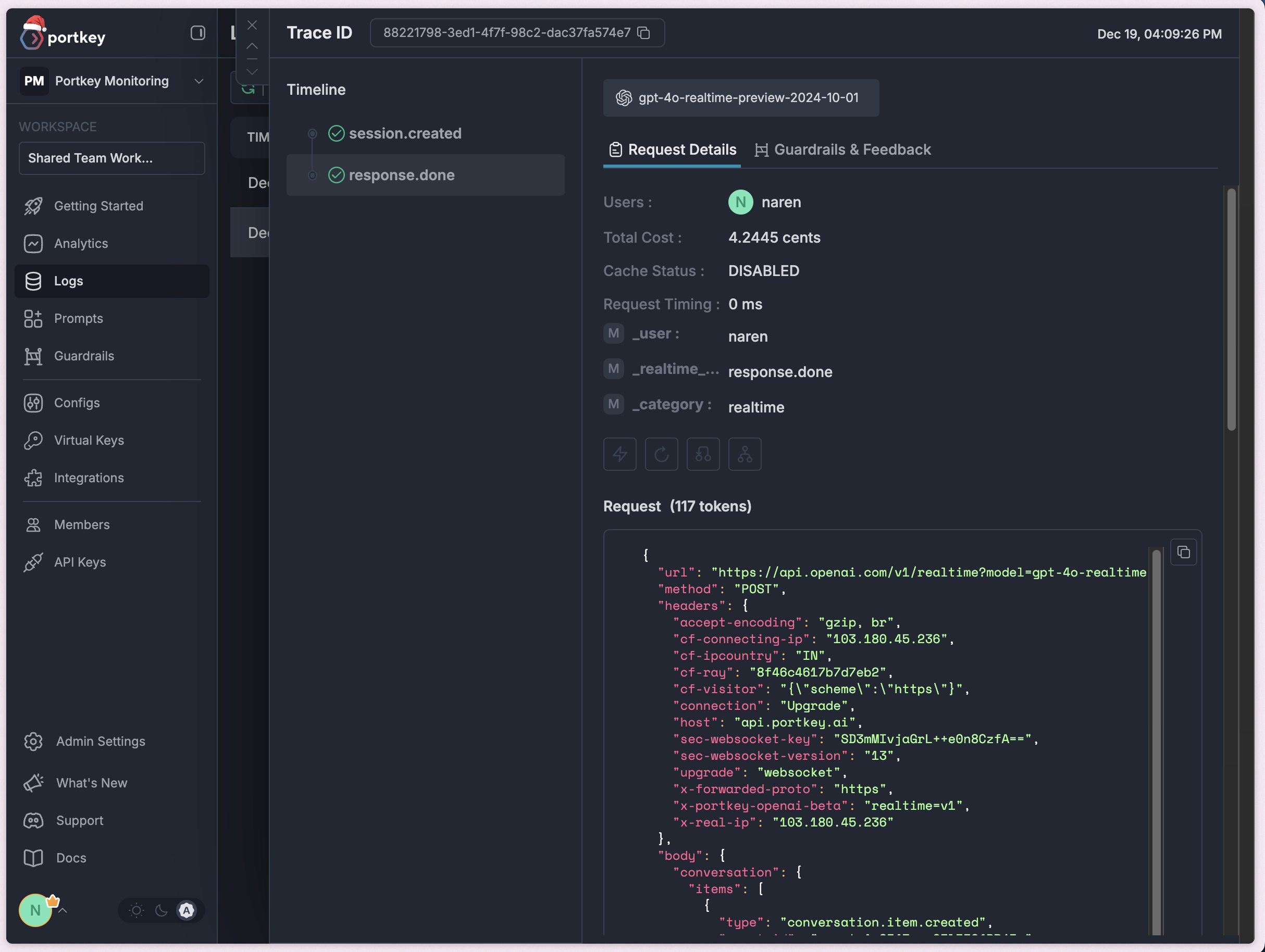
Portkey's AI Gateway provides a solution to these problems with a seamless integration. Portkeys logging is unique in that it captures the entire request and response, including the model's response, cost, and guardrail violations.
### Here's how to get started:
```python theme={"system"}
from portkey_ai import AsyncPortkey as Portkey, PORTKEY_GATEWAY_URL
import asyncio
async def main():
client = Portkey(
api_key="PORTKEY_API_KEY",
virtual_key="VIRTUAL_KEY",
base_url=PORTKEY_GATEWAY_URL,
)
async with client.beta.realtime.connect(model="gpt-4o-realtime-preview-2024-10-01") as connection: #replace with the model you want to use
await connection.session.update(session={'modalities': ['text']})
await connection.conversation.item.create(
item={
"type": "message",
"role": "user",
"content": [{"type": "input_text", "text": "Say hello!"}],
}
)
await connection.response.create()
async for event in connection:
if event.type == 'response.text.delta':
print(event.delta, flush=True, end="")
elif event.type == 'response.text.done':
print()
elif event.type == "response.done":
break
asyncio.run(main())
```
```javascript theme={"system"}
// coming soon
```
```javascript theme={"system"}
// requires `yarn add ws @types/ws`
import OpenAI from 'openai';
import { OpenAIRealtimeWS } from 'openai/beta/realtime/ws';
import { createHeaders, PORTKEY_GATEWAY_URL } from 'portkey-ai';
const headers = createHeaders({
provider: "openai",
apiKey: "PORTKEY_API_KEY",
virtualKey: 'VIRTUAL_KEY'
})
const openai = new OpenAI({
baseURL: PORTKEY_GATEWAY_URL,
defaultHeaders: headers
});
const rt = new OpenAIRealtimeWS({ model: 'gpt-4o-realtime-preview-2024-12-17', options: {headers: headers} }, openai);
// access the underlying `ws.WebSocket` instance
rt.socket.on('open', () => {
console.log('Connection opened!');
rt.send({
type: 'session.update',
session: {
modalities: ['text'],
model: 'gpt-4o-realtime-preview',
},
});
rt.send({
type: 'conversation.item.create',
item: {
type: 'message',
role: 'user',
content: [{ type: 'input_text', text: 'Say a couple paragraphs!' }],
},
});
rt.send({ type: 'response.create' });
});
rt.on('error', (err) => {
// in a real world scenario this should be logged somewhere as you
// likely want to continue procesing events regardless of any errors
throw err;
});
rt.on('session.created', (event) => {
console.log('session created!', event.session);
console.log();
});
rt.on('response.text.delta', (event) => process.stdout.write(event.delta));
rt.on('response.text.done', () => console.log());
rt.on('response.done', () => rt.close());
rt.socket.on('close', () => console.log('\nConnection closed!'));
```
```python theme={"system"}
import asyncio
from openai import AsyncOpenAI
from portkey_ai import createHeaders, PORTKEY_GATEWAY_URL
async def main():
headers = createHeaders(provider="openai", api_key="PORTKEY_API_KEY", virtual_key="VIRTUAL_KEY")
client = AsyncOpenAI(
base_url=PORTKEY_GATEWAY_URL,
)
async with client.beta.realtime.connect(model="gpt-4o-realtime-preview", extra_headers=headers) as connection: #replace with the model you want to use
await connection.session.update(session={'modalities': ['text']})
await connection.conversation.item.create(
item={
"type": "message",
"role": "user",
"content": [{"type": "input_text", "text": "Say hello!"}],
}
)
await connection.response.create()
async for event in connection:
if event.type == 'response.text.delta':
print(event.delta, flush=True, end="")
elif event.type == 'response.text.done':
print()
elif event.type == "response.done":
break
asyncio.run(main())
```
```sh theme={"system"}
# we're using websocat for this example, but you can use any websocket client
websocat "wss://api.portkey.ai/v1/realtime?model=gpt-4o-realtime-preview-2024-10-01" \
-H "x-portkey-provider: openai" \
-H "x-portkey-virtual-key: VIRTUAL_KEY" \
-H "x-portkey-OpenAI-Beta: realtime=v1" \
-H "x-portkey-api-key: PORTKEY_API_KEY"
# once connected, you can send your messages as you would with OpenAI's Realtime API
```
For advanced use cases, you can use configs ([https://portkey.ai/docs/product/ai-gateway/configs#configs](https://portkey.ai/docs/product/ai-gateway/configs#configs))
If you would not like to store your API Keys with Portkey, you can pass your openai key in the `Authorization` header.
## Fire Away!
You can see your logs in realtime with neatly visualized traces and cost tracking.
 ## Next Steps
* [For more info on realtime API, refer here](https://platform.openai.com/docs/guides/realtime)
* [Portkeys OpenAI Integration](/integrations/llms/openai)
* [Logs](/product/observability/logs)
* [Traces](/product/observability/traces)
* [Guardrails](/product/guardrails)
## Next Steps
* [For more info on realtime API, refer here](https://platform.openai.com/docs/guides/realtime)
* [Portkeys OpenAI Integration](/integrations/llms/openai)
* [Logs](/product/observability/logs)
* [Traces](/product/observability/traces)
* [Guardrails](/product/guardrails)