> ## Documentation Index
> Fetch the complete documentation index at: https://docs.portkey.ai/docs/llms.txt
> Use this file to discover all available pages before exploring further.
# Remote MCP
> Portkey's AI gateway has MCP server support that many foundational model providers offer.
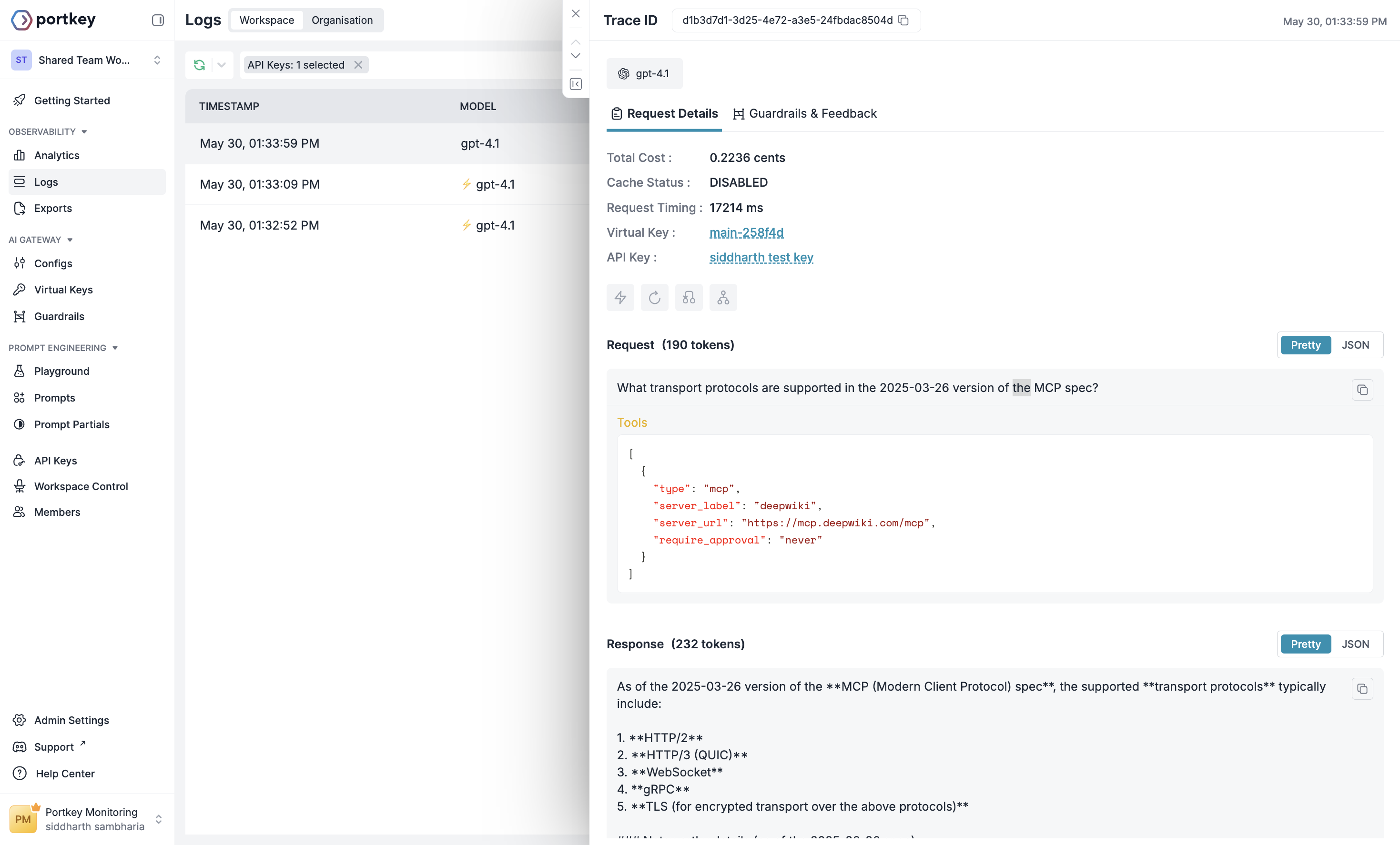
[Model Context Protocol](https://modelcontextprotocol.io/introduction) (MCP) is an open protocol that standardizes how applications provide tools and context to LLMs. The MCP tool in the Responses API allows developers to give the model access to tools hosted on **Remote MCP servers**. These are MCP servers maintained by developers and organizations across the internet that expose these tools to MCP clients, like the Responses API.
Portkey Supports using MCP server via the Response API. Calling a remote MCP server with the Responses API is straightforward. For example, here's how you can use the [DeepWiki](https://deepwiki.com/) MCP server to ask questions about nearly any public GitHub repository.
## Example MCP request
A Responses API request to OpenAI with MCP tools enabled.
```bash cURL theme={"system"}
curl https://api.portkey.ai/v1/responses \
-H "Content-Type: application/json" \
-H "x-portkey-api-key: $PORTKEY_API_KEY" \
-H "x-portkey-virtual-key: $OPENAI_VIRTUAL_KEY" \
-d '{
"model": "gpt-4.1",
"tools": [
{
"type": "mcp",
"server_label": "deepwiki",
"server_url": "https://mcp.deepwiki.com/mcp",
"require_approval": "never"
}
],
"input": "What transport protocols are supported in the 2025-03-26 version of the MCP spec?"
}'
```
```javascript OpenAI Node SDK theme={"system"}
import OpenAI from "openai";
import { PORTKEY_GATEWAY_URL, createHeaders } from 'portkey-ai'
const client = new OpenAI({
apiKey: "xx", // Can be left blank when using virtual keys
baseURL: PORTKEY_GATEWAY_URL,
defaultHeaders: createHeaders({
apiKey: "PORTKEY_API_KEY",
virtualKey: "OPENAI_VIRTUAL_KEY"
})
});
const resp = await client.responses.create({
model: "gpt-4.1",
tools: [
{
type: "mcp",
server_label: "deepwiki",
server_url: "https://mcp.deepwiki.com/mcp",
require_approval: "never",
},
],
input: "What transport protocols are supported in the 2025-03-26 version of the MCP spec?",
});
console.log(resp.output_text);
```
```python OpenAI Python SDK theme={"system"}
from openai import OpenAI
from portkey_ai import PORTKEY_GATEWAY_URL, createHeaders
client = OpenAI(
api_key="xx", # Can be left blank when using virtual keys
base_url=PORTKEY_GATEWAY_URL,
default_headers=createHeaders(
api_key="PORTKEY_API_KEY",
virtual_key="OPENAI_VIRTUAL_KEY"
)
)
resp = client.responses.create(
model="gpt-4.1",
tools=[
{
"type": "mcp",
"server_label": "deepwiki",
"server_url": "https://mcp.deepwiki.com/mcp",
"require_approval": "never",
},
],
input="What transport protocols are supported in the 2025-03-26 version of the MCP spec?",
)
print(resp.output_text)
```
```typescript Portkey Node SDK theme={"system"}
import Portkey from 'portkey-ai';
const portkey = new Portkey({
apiKey: "PORTKEY_API_KEY",
virtualKey: "OPENAI_VIRTUAL_KEY"
});
const resp = await portkey.responses.create({
model: "gpt-4.1",
tools: [
{
type: "mcp",
server_label: "deepwiki",
server_url: "https://mcp.deepwiki.com/mcp",
require_approval: "never",
},
],
input: "What transport protocols are supported in the 2025-03-26 version of the MCP spec?",
});
console.log(resp.output_text);
```
```python Portkey Python SDK theme={"system"}
from portkey_ai import Portkey
portkey = Portkey(
api_key="PORTKEY_API_KEY",
virtual_key="OPENAI_VIRTUAL_KEY"
)
resp = portkey.responses.create(
model="gpt-4.1",
tools=[
{
"type": "mcp",
"server_label": "deepwiki",
"server_url": "https://mcp.deepwiki.com/mcp",
"require_approval": "never",
},
],
input="What transport protocols are supported in the 2025-03-26 version of the MCP spec?",
)
print(resp.output_text)
```
 ## MCP Server Authentication
Unlike the DeepWiki MCP server, most other MCP servers require authentication. The MCP tool in the Responses API gives you the ability to flexibly specify headers that should be included in any request made to a remote MCP server. These headers can be used to share API keys, oAuth access tokens, or any other authentication scheme the remote MCP server implements.
The most common header used by remote MCP servers is the `Authorization` header. This is what passing this header looks like:
Use Stripe MCP tool
```bash cURL theme={"system"}
curl https://api.portkey.ai/v1/responses \
-H "Content-Type: application/json" \
-H "x-portkey-api-key: $PORTKEY_API_KEY" \
-H "x-portkey-virtual-key: $OPENAI_VIRTUAL_KEY" \
-d '{
"model": "gpt-4.1",
"input": "Create a payment link for $20",
"tools": [
{
"type": "mcp",
"server_label": "stripe",
"server_url": "https://mcp.stripe.com",
"headers": {
"Authorization": "Bearer $STRIPE_API_KEY"
}
}
]
}'
```
```javascript OpenAI Node SDK theme={"system"}
import OpenAI from "openai";
import { PORTKEY_GATEWAY_URL, createHeaders } from 'portkey-ai'
const client = new OpenAI({
apiKey: "xx", // Can be left blank when using virtual keys
baseURL: PORTKEY_GATEWAY_URL,
defaultHeaders: createHeaders({
apiKey: "PORTKEY_API_KEY",
virtualKey: "OPENAI_VIRTUAL_KEY"
})
});
const resp = await client.responses.create({
model: "gpt-4.1",
input: "Create a payment link for $20",
tools: [
{
type: "mcp",
server_label: "stripe",
server_url: "https://mcp.stripe.com",
headers: {
Authorization: "Bearer $STRIPE_API_KEY"
}
}
]
});
console.log(resp.output_text);
```
```python OpenAI Python SDK theme={"system"}
from openai import OpenAI
from portkey_ai import PORTKEY_GATEWAY_URL, createHeaders
client = OpenAI(
api_key="xx", # Can be left blank when using virtual keys
base_url=PORTKEY_GATEWAY_URL,
default_headers=createHeaders(
api_key="PORTKEY_API_KEY",
virtual_key="OPENAI_VIRTUAL_KEY"
)
)
resp = client.responses.create(
model="gpt-4.1",
input="Create a payment link for $20",
tools=[
{
"type": "mcp",
"server_label": "stripe",
"server_url": "https://mcp.stripe.com",
"headers": {
"Authorization": "Bearer $STRIPE_API_KEY"
}
}
]
)
print(resp.output_text)
```
```typescript Portkey Node SDK theme={"system"}
import Portkey from 'portkey-ai';
const portkey = new Portkey({
apiKey: "PORTKEY_API_KEY",
virtualKey: "OPENAI_VIRTUAL_KEY"
});
const resp = await portkey.responses.create({
model: "gpt-4.1",
input: "Create a payment link for $20",
tools: [
{
type: "mcp",
server_label: "stripe",
server_url: "https://mcp.stripe.com",
headers: {
Authorization: "Bearer $STRIPE_API_KEY"
}
}
]
});
console.log(resp.output_text);
```
```python Portkey Python SDK theme={"system"}
from portkey_ai import Portkey
portkey = Portkey(
api_key="PORTKEY_API_KEY",
virtual_key="OPENAI_VIRTUAL_KEY"
)
resp = portkey.responses.create(
model="gpt-4.1",
input="Create a payment link for $20",
tools=[
{
"type": "mcp",
"server_label": "stripe",
"server_url": "https://mcp.stripe.com",
"headers": {
"Authorization": "Bearer $STRIPE_API_KEY"
}
}
]
)
print(resp.output_text)
```
To prevent the leakage of sensitive keys, the Responses API does not store the values of **any** string you provide in the `headers` object. These values will also not be visible in the Response object created. Additionally, because some remote MCP servers generate authenticated URLs, we also discard the *path* portion of the `server_url` in our responses (i.e. `example.com/mcp` becomes `example.com`). Because of this, you must send the full path of the MCP `server_url` and any relevant `headers` in every Responses API creation request you make.
## MCP Server Authentication
Unlike the DeepWiki MCP server, most other MCP servers require authentication. The MCP tool in the Responses API gives you the ability to flexibly specify headers that should be included in any request made to a remote MCP server. These headers can be used to share API keys, oAuth access tokens, or any other authentication scheme the remote MCP server implements.
The most common header used by remote MCP servers is the `Authorization` header. This is what passing this header looks like:
Use Stripe MCP tool
```bash cURL theme={"system"}
curl https://api.portkey.ai/v1/responses \
-H "Content-Type: application/json" \
-H "x-portkey-api-key: $PORTKEY_API_KEY" \
-H "x-portkey-virtual-key: $OPENAI_VIRTUAL_KEY" \
-d '{
"model": "gpt-4.1",
"input": "Create a payment link for $20",
"tools": [
{
"type": "mcp",
"server_label": "stripe",
"server_url": "https://mcp.stripe.com",
"headers": {
"Authorization": "Bearer $STRIPE_API_KEY"
}
}
]
}'
```
```javascript OpenAI Node SDK theme={"system"}
import OpenAI from "openai";
import { PORTKEY_GATEWAY_URL, createHeaders } from 'portkey-ai'
const client = new OpenAI({
apiKey: "xx", // Can be left blank when using virtual keys
baseURL: PORTKEY_GATEWAY_URL,
defaultHeaders: createHeaders({
apiKey: "PORTKEY_API_KEY",
virtualKey: "OPENAI_VIRTUAL_KEY"
})
});
const resp = await client.responses.create({
model: "gpt-4.1",
input: "Create a payment link for $20",
tools: [
{
type: "mcp",
server_label: "stripe",
server_url: "https://mcp.stripe.com",
headers: {
Authorization: "Bearer $STRIPE_API_KEY"
}
}
]
});
console.log(resp.output_text);
```
```python OpenAI Python SDK theme={"system"}
from openai import OpenAI
from portkey_ai import PORTKEY_GATEWAY_URL, createHeaders
client = OpenAI(
api_key="xx", # Can be left blank when using virtual keys
base_url=PORTKEY_GATEWAY_URL,
default_headers=createHeaders(
api_key="PORTKEY_API_KEY",
virtual_key="OPENAI_VIRTUAL_KEY"
)
)
resp = client.responses.create(
model="gpt-4.1",
input="Create a payment link for $20",
tools=[
{
"type": "mcp",
"server_label": "stripe",
"server_url": "https://mcp.stripe.com",
"headers": {
"Authorization": "Bearer $STRIPE_API_KEY"
}
}
]
)
print(resp.output_text)
```
```typescript Portkey Node SDK theme={"system"}
import Portkey from 'portkey-ai';
const portkey = new Portkey({
apiKey: "PORTKEY_API_KEY",
virtualKey: "OPENAI_VIRTUAL_KEY"
});
const resp = await portkey.responses.create({
model: "gpt-4.1",
input: "Create a payment link for $20",
tools: [
{
type: "mcp",
server_label: "stripe",
server_url: "https://mcp.stripe.com",
headers: {
Authorization: "Bearer $STRIPE_API_KEY"
}
}
]
});
console.log(resp.output_text);
```
```python Portkey Python SDK theme={"system"}
from portkey_ai import Portkey
portkey = Portkey(
api_key="PORTKEY_API_KEY",
virtual_key="OPENAI_VIRTUAL_KEY"
)
resp = portkey.responses.create(
model="gpt-4.1",
input="Create a payment link for $20",
tools=[
{
"type": "mcp",
"server_label": "stripe",
"server_url": "https://mcp.stripe.com",
"headers": {
"Authorization": "Bearer $STRIPE_API_KEY"
}
}
]
)
print(resp.output_text)
```
To prevent the leakage of sensitive keys, the Responses API does not store the values of **any** string you provide in the `headers` object. These values will also not be visible in the Response object created. Additionally, because some remote MCP servers generate authenticated URLs, we also discard the *path* portion of the `server_url` in our responses (i.e. `example.com/mcp` becomes `example.com`). Because of this, you must send the full path of the MCP `server_url` and any relevant `headers` in every Responses API creation request you make.