> ## Documentation Index
> Fetch the complete documentation index at: https://docs.portkey.ai/docs/llms.txt
> Use this file to discover all available pages before exploring further.
# Access Control Management
> With customizable user roles, API key management, and comprehensive audit logs, Portkey provides the flexibility and control needed to ensure secure collaboration & maintain a strong security posture
This is a Portkey [**Enterprise**](https://portkey.ai/docs/product/enterprise-offering) plan feature.
At Portkey, we understand the critical importance of access control and data security for enterprise customers. Our platform provides a robust and flexible access control management system that enables you to safeguard your sensitive information while empowering your teams to collaborate effectively.
## 1. Isolated and Customizable Organizations
Portkey's enterprise version allows you to create multiple `organizations`, each serving as a secure and isolated environment for your teams or projects. This multi-tenant architecture ensures that your data, logs, analytics, prompts, virtual keys, configs, guardrails, and API keys are strictly confined within each `organization`, preventing unauthorized access and maintaining data confidentiality.
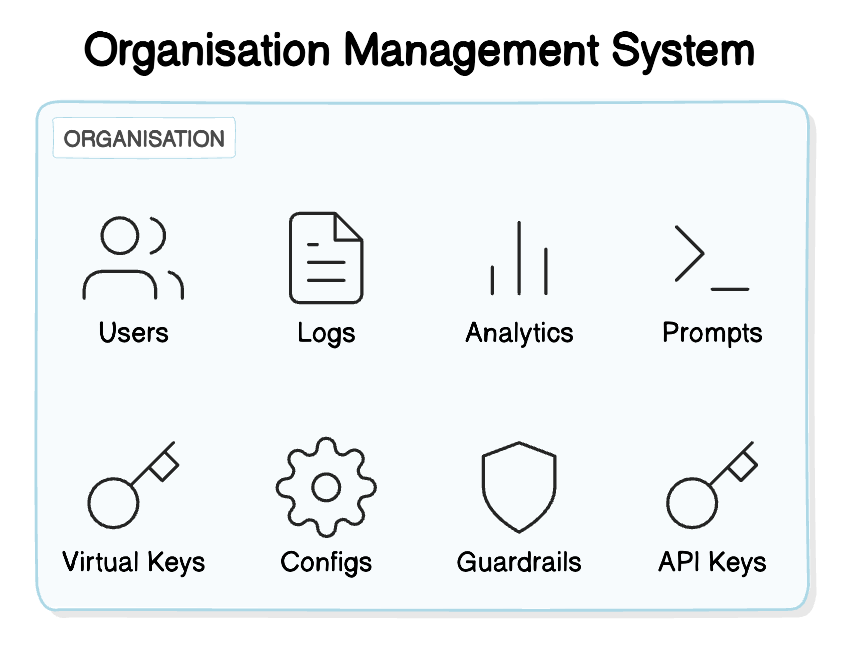 With the ability to create and manage multiple organizations, you can tailor access control to match your company's structure and project requirements. Users can be assigned to specific organizations, and they can seamlessly switch between them using Portkey's intuitive user interface.
 ## 2. Fine-Grained User Roles and Permissions
Portkey offers a comprehensive Role-Based Access Control (RBAC) system that allows you to define and assign user roles with granular permissions. By default, Portkey provides three roles: `Owner`, `Admin`, and `Member`, each with a predefined set of permissions across various features.
* `Owners` have complete control over the organization, including user management, billing, and all platform features.
* `Admins` have elevated privileges, allowing them to manage users, prompts, configs, guardrails, virtual keys, and API keys.
* `Members` have access to essential features like logs, analytics, prompts, configs, and virtual keys, with limited permissions.
| Feature | Owner Role | Admin Role | Member Role |
| ------------------ | ------------------------------------------- | ------------------------------------------- | -------------------------- |
| Logs and Analytics | View, Filter, Group | View, Filter, Group | View, Filter, Group |
| Prompts | List, View, Create, Update, Delete, Publish | List, View, Create, Update, Delete, Publish | List, View, Create, Update |
| Configs | List, View, Create, Update, Delete | List, View, Create, Update, Delete | List, View, Create |
| Guardrails | List, View, Create, Update, Delete | List, View, Create, Update, Delete | List, View, Create, Update |
| Virtual Keys | List, Create, Edit, Duplicate, Delete, Copy | List, Create, Edit, Duplicate, Delete, Copy | List, Copy |
| Team | Add users, assign roles | Add users, assign roles | - |
| Organisation | Update | Update | - |
| API Keys | Create, Edit, Delete, Update, Rotate | Create, Edit, Delete, Update, Rotate | - |
| Billing | Manage | - | - |
You can easily add team members to your organization and assign them appropriate roles based on their responsibilities. Portkey's user-friendly interface simplifies the process of inviting users and managing their roles, ensuring that the right people have access to the right resources.
## 2. Fine-Grained User Roles and Permissions
Portkey offers a comprehensive Role-Based Access Control (RBAC) system that allows you to define and assign user roles with granular permissions. By default, Portkey provides three roles: `Owner`, `Admin`, and `Member`, each with a predefined set of permissions across various features.
* `Owners` have complete control over the organization, including user management, billing, and all platform features.
* `Admins` have elevated privileges, allowing them to manage users, prompts, configs, guardrails, virtual keys, and API keys.
* `Members` have access to essential features like logs, analytics, prompts, configs, and virtual keys, with limited permissions.
| Feature | Owner Role | Admin Role | Member Role |
| ------------------ | ------------------------------------------- | ------------------------------------------- | -------------------------- |
| Logs and Analytics | View, Filter, Group | View, Filter, Group | View, Filter, Group |
| Prompts | List, View, Create, Update, Delete, Publish | List, View, Create, Update, Delete, Publish | List, View, Create, Update |
| Configs | List, View, Create, Update, Delete | List, View, Create, Update, Delete | List, View, Create |
| Guardrails | List, View, Create, Update, Delete | List, View, Create, Update, Delete | List, View, Create, Update |
| Virtual Keys | List, Create, Edit, Duplicate, Delete, Copy | List, Create, Edit, Duplicate, Delete, Copy | List, Copy |
| Team | Add users, assign roles | Add users, assign roles | - |
| Organisation | Update | Update | - |
| API Keys | Create, Edit, Delete, Update, Rotate | Create, Edit, Delete, Update, Rotate | - |
| Billing | Manage | - | - |
You can easily add team members to your organization and assign them appropriate roles based on their responsibilities. Portkey's user-friendly interface simplifies the process of inviting users and managing their roles, ensuring that the right people have access to the right resources.
 ## 3. Secure and Customizable API Key Management
Portkey provides a secure and flexible API key management system that allows you to create and manage multiple API keys with fine-grained permissions. Each API key can be customized to grant specific access levels to different features, such as metrics, completions, prompts, configs, guardrails, virtual keys, team management, and API key management.
| Feature | Permissions | Default |
| --------------------------- | ----------------------------- | -------- |
| Metrics | Disabled, Enabled | Disabled |
| Completions (all LLM calls) | Disabled, Enabled | Enabled |
| Prompts | Disabled, Read, Write, Delete | Read |
| Configs | Disabled, Read, Write, Delete | Disabled |
| Guardrails | Disabled, Read, Write, Delete | Disabled |
| Virtual Keys | Disabled, Read, Write, Delete | Disabled |
| Users (Team Management) | Disabled, Read, Write, Delete | Disabled |
By default, a new organization is provisioned with a master API key that has all permissions enabled. Owners and admins can edit and manage these keys, as well as create new API keys with tailored permissions. This granular control enables you to enforce the principle of least privilege, ensuring that each API key has access only to the necessary resources.
Portkey's API key management system provides a secure and auditable way to control access to your organization's data and resources, reducing the risk of unauthorized access and data breaches.
## Audit Logs
Portkey maintains detailed audit logs that capture all administrative activities across the platform. These logs provide visibility into actions related to prompts, configs, guardrails, virtual keys, team management, organization updates, and API key modifications.
Each log entry includes information about the user, the action performed, the affected resource, and a timestamp. This ensures traceability and accountability, helping teams monitor changes and investigate any unauthorized activity.
Audit logs can be filtered by user, action type, resource, and time range, making it easy to track specific events. Organizations can use this data to enforce security policies, ensure compliance, and maintain operational integrity.
## 3. Secure and Customizable API Key Management
Portkey provides a secure and flexible API key management system that allows you to create and manage multiple API keys with fine-grained permissions. Each API key can be customized to grant specific access levels to different features, such as metrics, completions, prompts, configs, guardrails, virtual keys, team management, and API key management.
| Feature | Permissions | Default |
| --------------------------- | ----------------------------- | -------- |
| Metrics | Disabled, Enabled | Disabled |
| Completions (all LLM calls) | Disabled, Enabled | Enabled |
| Prompts | Disabled, Read, Write, Delete | Read |
| Configs | Disabled, Read, Write, Delete | Disabled |
| Guardrails | Disabled, Read, Write, Delete | Disabled |
| Virtual Keys | Disabled, Read, Write, Delete | Disabled |
| Users (Team Management) | Disabled, Read, Write, Delete | Disabled |
By default, a new organization is provisioned with a master API key that has all permissions enabled. Owners and admins can edit and manage these keys, as well as create new API keys with tailored permissions. This granular control enables you to enforce the principle of least privilege, ensuring that each API key has access only to the necessary resources.
Portkey's API key management system provides a secure and auditable way to control access to your organization's data and resources, reducing the risk of unauthorized access and data breaches.
## Audit Logs
Portkey maintains detailed audit logs that capture all administrative activities across the platform. These logs provide visibility into actions related to prompts, configs, guardrails, virtual keys, team management, organization updates, and API key modifications.
Each log entry includes information about the user, the action performed, the affected resource, and a timestamp. This ensures traceability and accountability, helping teams monitor changes and investigate any unauthorized activity.
Audit logs can be filtered by user, action type, resource, and time range, making it easy to track specific events. Organizations can use this data to enforce security policies, ensure compliance, and maintain operational integrity.
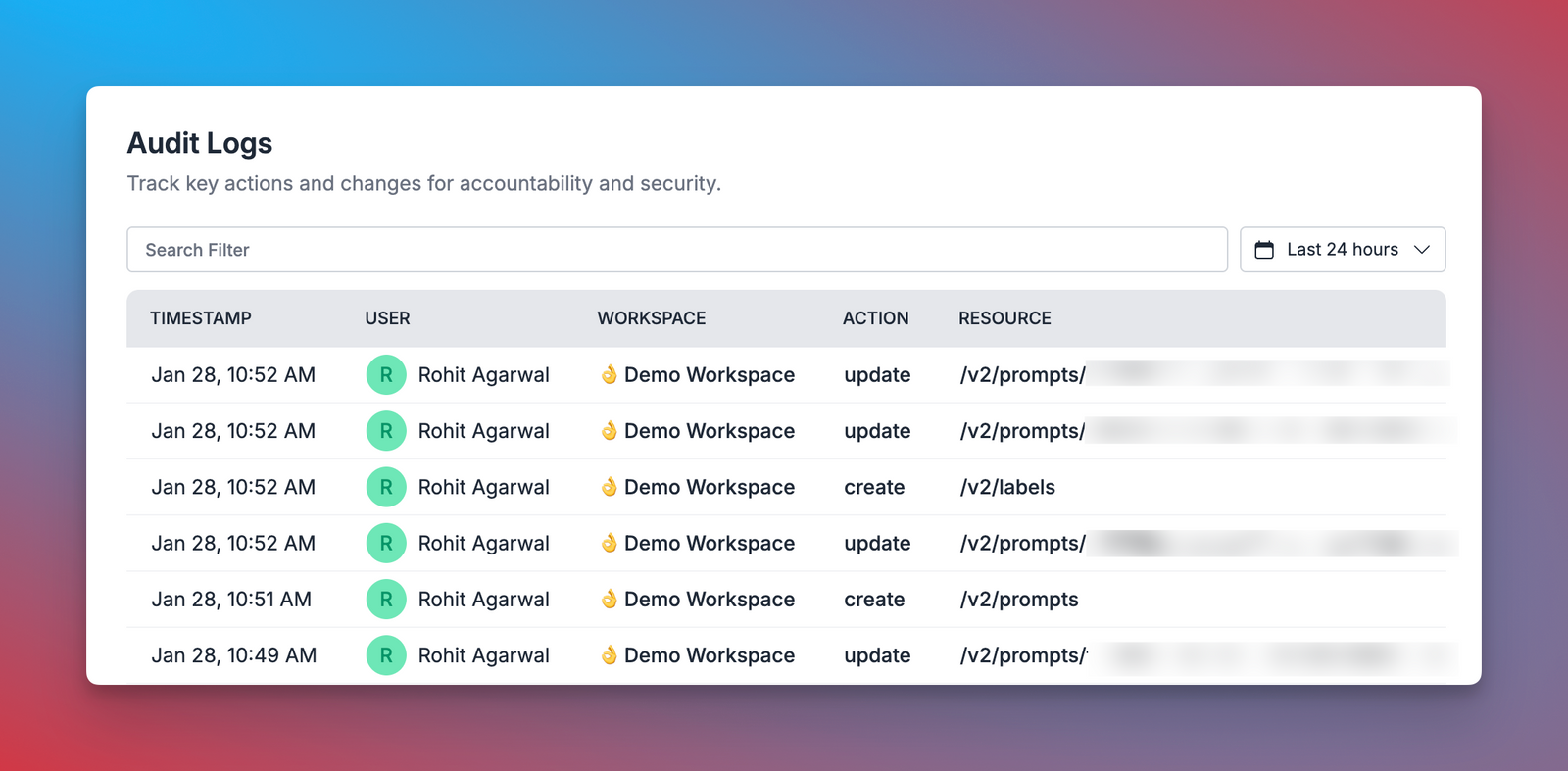 Portkey’s audit logging system provides a clear and structured way to review platform activity, ensuring security and compliance across all operations.