> ## Documentation Index
> Fetch the complete documentation index at: https://docs.portkey.ai/docs/llms.txt
> Use this file to discover all available pages before exploring further.
# Guardrails for Embedding Requests
> Apply security and data validation measures to vector embedding requests to protect sensitive information and ensure data quality.
Portkey's guardrails aren't limited to chat completions - they can also be applied to embedding requests. This means you can protect your embedding workflows with the same robust security measures you use for your other LLM interactions.
## Why Use Guardrails for Embeddings?
Vector embeddings form the backbone of modern AI applications, transforming text into numerical representations that power semantic search, recommendation systems, and RAG pipelines. However, unprotected embedding workflows create significant business risks that technical leaders cannot ignore.
Without proper guardrails, sensitive customer data can leak into vector databases, toxic content can contaminate downstream systems, and resources are wasted embedding low-quality inputs. Protecting these workflows is essential because:
1. **Data leakage prevention**: Stop PII, PHI, or sensitive information from being sent to embedding models
2. **Data quality control**: Ensure only clean, formatted data gets embedded
3. **Cost optimization**: Avoid unnecessary API calls for data that doesn't meet your criteria
4. **Compliance**: Maintain regulatory compliance by filtering problematic content
By implementing guardrails at the embedding stage, you create a critical safety layer that protects your entire AI pipeline. For technical teams already building with embeddings, Portkey's guardrails integrate seamlessly with existing workflows while providing the security measures that enterprise applications demand.
## How It Works
Guardrails for embeddings are applied at the "before request" stage, examining your text before it's sent to the embedding model:
```mermaid theme={"system"}
flowchart LR
App[Your Application] --> Portkey[Portkey Gateway]
Portkey --> Guardrails[Guardrail Checks]
Guardrails -->|Pass| Success[/Success\nStatus: 240/]
Guardrails -->|Fail + Deny=false| Warning[/Warning\nStatus: 446/]
Guardrails -->|Fail + Deny=true| Blocked[/Blocked\nStatus: 446/]
Success --> LLM[LLM Provider]
Warning --> LLM
class Success success
class Warning warning
class Blocked danger
```
1. Your application sends text to Portkey for embedding
2. Portkey's guardrails analyze the text before sending to the LLM provider
3. If the text passes all checks, it's sent to the embedding model
4. If it fails, the configured [guardrail action](/product/guardrails) is taken (deny, feedback, etc.)
## Supported Guardrails for Embeddings
You can use any of Portkey's "before request" guardrails with embedding requests:
Protect user privacy by preventing PII from being embedded
Filter content based on custom pattern matching
Block embedding requests with specific words/phrases
Ensure embeddings meet appropriate length requirements
Detect and block code snippets from being embedded
Implement your own custom guardrail logic
Utilize guardrails from Pangea, Pillar, and other partners
Prevent healthcare data from entering embedding systems
Filter out harmful content before embedding
[Learn More...](/product/guardrails)
## Setting Up Embedding Guardrails
### 1. Create a Guardrail
Follow the standard process to create a guardrail in Portkey:
* Navigate to the `Guardrails` page and click `Create`
* Select the appropriate check from available guardrails (e.g., PII Detection, Regex Match)
* Configure the check parameters & set desired actions for failed checks
* Save the guardrail to get its ID
Make sure to select guardrails that support the `beforeRequestHook` since embeddings only use pre-request validation.
### 2. Add the Guardrail to Your Config
Add your guardrail ID to the `before_request_hooks` in your Portkey [config](/product/ai-gateway/configs):
```json theme={"system"}
{
"input_guardrails": ["gr-xxx", "gr-yyy", ...]
}
```
### 3. Use the Config with Embedding Requests
```python theme={"system"}
# Initialize Portkey with your config
portkey = Portkey(
api_key="PORTKEY_API_KEY",
config="pc-xxx" # Config with embedding guardrails
)
# Make your embedding request
response = portkey.embeddings.create(
input="Your text string goes here",
model="text-embedding-3-small"
)
```
```javascript theme={"system"}
// Initialize Portkey with your config
const portkey = new Portkey({
apiKey: "PORTKEY_API_KEY",
config: "pc-xxx" // Config with embedding guardrails
});
// Make your embedding request
const response = await portkey.embeddings.create({
input: "Your text string goes here",
model: "text-embedding-3-small"
});
```
```python theme={"system"}
from openai import OpenAI
from portkey.api_client.openai import createHeaders
client = OpenAI(
api_key="OPENAI_API_KEY",
base_url="PORTKEY_GATEWAY_URL",
default_headers=createHeaders(
provider="openai",
api_key="PORTKEY_API_KEY",
config="pc-xxx" # Config with embedding guardrails
)
)
# Make your embedding request
response = client.embeddings.create(
input="Your text string goes here",
model="text-embedding-3-small"
)
```
```bash theme={"system"}
curl https://api.portkey.ai/v1/embeddings \
-H "Content-Type: application/json" \
-H "Authorization: Bearer $OPENAI_API_KEY" \
-H "x-portkey-api-key: $PORTKEY_API_KEY" \
-H "x-portkey-config: pc-xxx" \
-d '{
"model": "text-embedding-3-small",
"input": "Your text string goes here"
}'
```
## Common Use Cases
* **Protecting Against PII in Embeddings**: When building search systems or RAG applications, you need to ensure no personally identifiable information is inadvertently embedded:
* **Filtering Code from Document Embeddings**: If you're building a knowledge base that shouldn't include code snippets:
* **Size-Based Filtering**: Ensure only appropriately sized documents get embedded:
* **Custom Regex Filtering**: Create domain-specific filters using regex patterns:
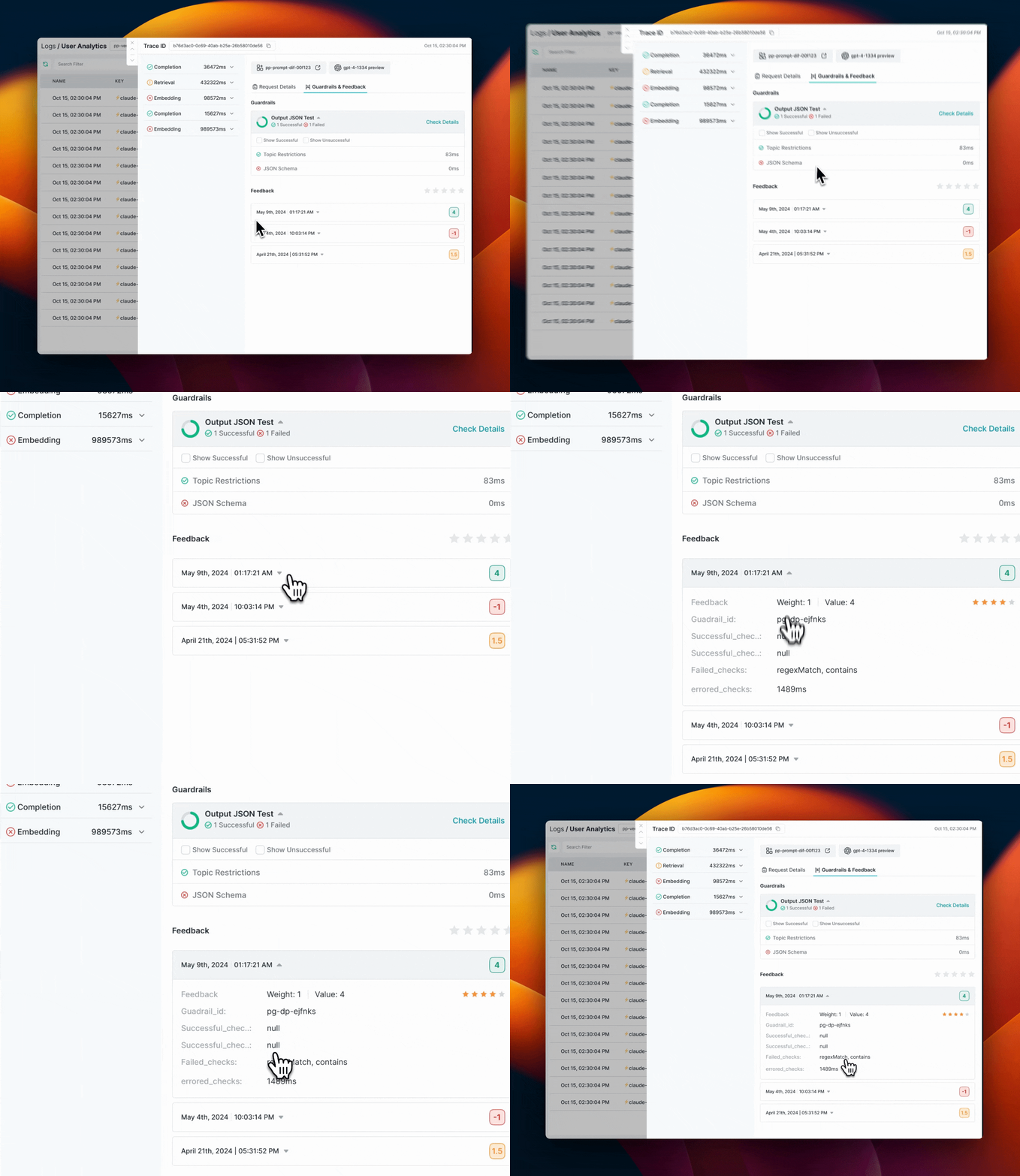
## Monitoring and Logs
All guardrail actions on embedding requests are logged in the Portkey dashboard, just like other guardrail activities. You can:
* See which embedding requests were blocked
* View detected issues (PII, regex matches, etc.)
* Track guardrail performance over time
* Export logs for compliance reporting
 ## Get Support
If you're implementing guardrails for embeddings and need assistance, reach out to the Portkey team on the [community forum](https://discord.gg/portkey-llms-in-prod-1143393887742861333).
## Learn More
* [Portkey Guardrails Overview](/product/guardrails)
* [List of Guardrail Checks](/product/guardrails/list-of-guardrail-checks)
* [Creating Raw Guardrails in JSON](/product/guardrails/creating-raw-guardrails-in-json)
## Get Support
If you're implementing guardrails for embeddings and need assistance, reach out to the Portkey team on the [community forum](https://discord.gg/portkey-llms-in-prod-1143393887742861333).
## Learn More
* [Portkey Guardrails Overview](/product/guardrails)
* [List of Guardrail Checks](/product/guardrails/list-of-guardrail-checks)
* [Creating Raw Guardrails in JSON](/product/guardrails/creating-raw-guardrails-in-json)