Cursor best practices for enterprise teams

Cursor has become one of the most widely adopted AI coding tools in enterprise engineering organizations. The individual productivity gains are real.
But operational control across teams is a different problem entirely. Platform teams now face a new challenge: scattered API keys, invisible token spend, no budget controls, and compliance gaps.
This best practices playbook is for platform teams running Cursor across dozens or hundreds of engineers, and how they can implement them.

What Cursor is and why teams are adopting it at scale
Cursor is an AI-first code editor built on a VS Code fork, designed for AI-native development workflows. It integrates large language models directly into the development environment for autocomplete, multi-file edits, codebase-aware chat, and agent-driven tasks that can plan and implement changes across a repository.
Teams typically access Cursor through one of several plans, depending on how they want to manage usage and billing:
Plan | Best for | What it includes |
Free | Exploration and evaluation | Limited premium requests and basic AI features |
Pro | Individual developers | Higher request limits and access to more capable models |
Teams | Engineering teams | Centralized billing, usage analytics, SSO, and admin controls |
Enterprise | Large organizations | Custom pricing, expanded quotas, SCIM provisioning, and enhanced compliance controls |
Many teams also use Cursor in Bring Your Own Key (BYOK) mode, connecting directly to providers like OpenAI, Anthropic, Bedrock, or Vertex AI and paying per API usage.
Where Cursor's native tooling falls short at scale
At enterprise scale, five core operational gaps emerge. These are infrastructure and governance gaps, not issues with how developers use Cursor.
Vendor lock-in
Cursor connects to whatever provider credentials a developer supplies. Switching providers, models, or accounts requires updating configurations on individual machines. There is no centralized way to manage provider selection, failover, or traffic distribution at the team level.
Invisible spends due to silos
With subscription plans, usage is opaque at the org level. With BYOK, every developer's spend is siloed to their own key. There is no centralized, cross-provider view of usage by team, project, or environment, and no real-time visibility into which workflows or teams are driving cost.
Teams also run into unused usage problems, where prepaid credits, committed spend, or reserved capacity with one provider go underutilized because usage is spread across individual developer keys instead of being centrally routed and optimized.
Credential sprawl and data exposure risks
When developers use their own API keys, those keys end up stored in environment files, shared in Slack, or committed to repositories. As adoption grows, this turns into a credential management problem rather than a developer workflow problem. There is no built-in credential hierarchy for provider API keys, no scoped keys per team or project, and no audit trail showing which key made which request.
Additionally,teams often have no visibility into what data is being sent to which model provider. Source code, internal documentation, or sensitive data can be included in prompts without any centralized filtering, logging, or policy enforcement, which creates data security and compliance risks.
Runaway costs
There is no native mechanism to set budget caps per team or project before a session begins. A single long-running agent session on a frontier model can consume a significant amount of tokens without any warning or enforcement.
No restriction over model usage
Role-based access exists at the IDE and workspace level, but not at the model and provider access layer. Teams cannot easily restrict access to specific models, route routine tasks to cheaper models, or centrally enforce model usage policies.
All of these issues appear for the same reason: Cursor is being used as a shared system, but there is no control layer between Cursor and the model providers.
Cursor best practices: Add a gateway between Cursor and your LLM providers
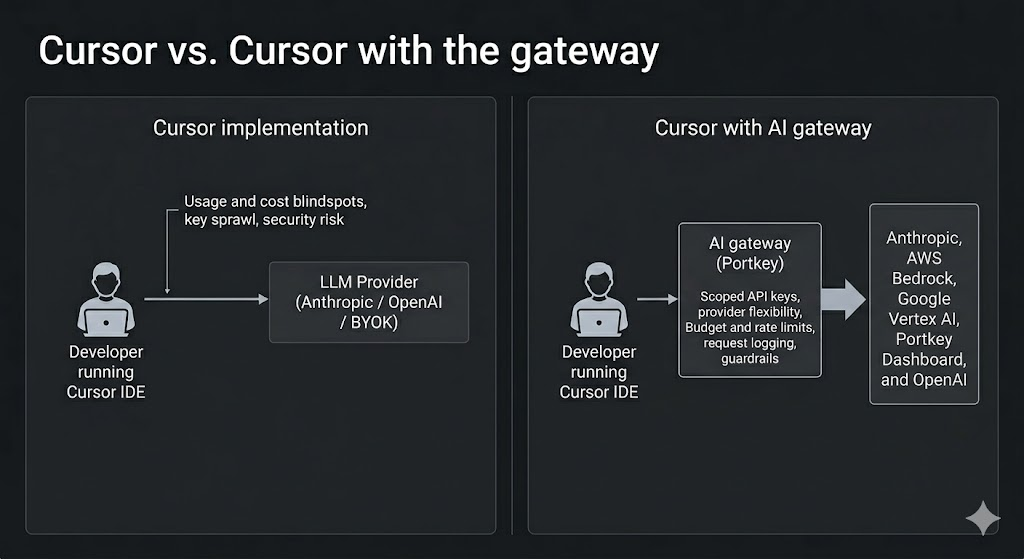
The architectural solution to the problems above is to introduce an AI gateway between Cursor and your LLM providers. The gateway becomes the control plane that applies policy, logs usage, routes requests, and enforces limits before any request reaches a model.
Here are six implementation-ready cursor best practices:
Practice 1: Provider flexibility and failback
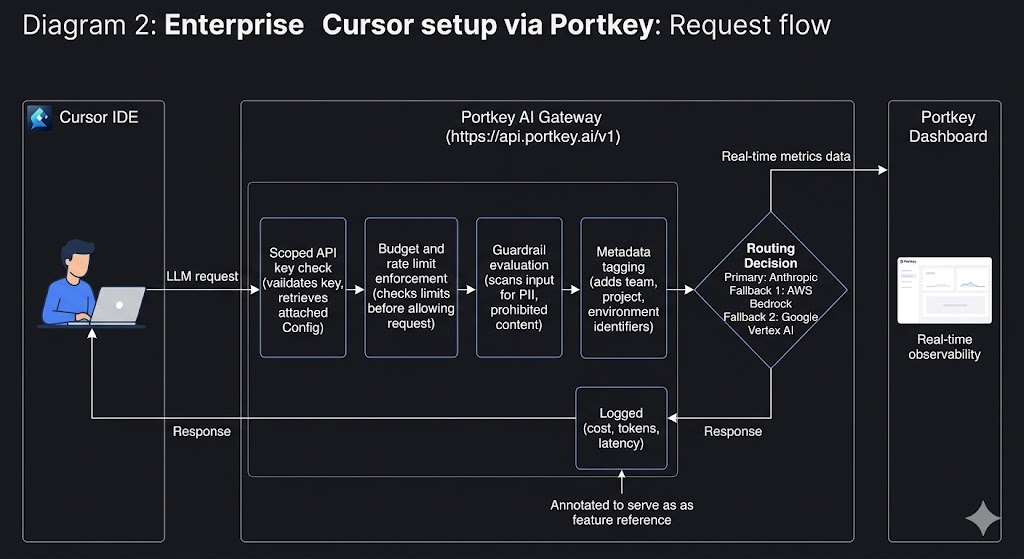
Instead of sending requests directly from Cursor to a single provider, requests go through the gateway. This gateway can route traffic to multiple providers such as Anthropic, Google Gemini, Google Vertex AI, Azure OpenAI, AWS Bedrock, and others. Teams can configure routing logic, load balancing, and automatic fallbacks so that if a primary provider is unavailable or rate-limited, requests are routed to a backup provider automatically.
Practice 2: Centralized credential management
Provider API keys are stored centrally in the gateway instead of being distributed to developers. The developers use scoped API keys per users, team or project that inherit provider access. Access can be revoked or rotated from a single place without touching developer machines.
Practice 3: Budget limits and rate limits before coding starts
Budget limits can be set per API key, user, team or project before access is distributed. Rate limits can prevent any single developer or team from overwhelming shared provider capacity. This is especially important when multiple teams share the same Bedrock or Vertex AI quotas.
Practice 4: Full request logging with cost attribution
Every request can be logged with metadata such as team, project, developer, model, token usage, cost, and latency. This allows teams to attribute AI spend accurately and investigate usage spikes or anomalies.
Practice 5: Guardrails on inputs and outputs
With the LLM gateway, you can apply PII guardrails, content filtering, and custom security rules to prompts and responses before they reach the provider or return to the developer. This reduces the risk of sensitive data exposure and helps enforce organizational policies.
Practice 6: Model access governance
Teams can define which models specific teams or developers are allowed to use, and routing logic can be updated centrally without requiring changes to individual developer setups.
The key idea is that developers continue using Cursor exactly as they do today. However, model access, routing, budgets, and guardrails are enforced at the infrastructure layer instead of relying on individual developer configuration.
How Portkey makes this operational model possible
The best practices described above require an operational layer between Cursor and your LLM providers. This is where Portkey acts as an AI gateway that sits between Cursor and model providers. The platform helps turn model access into a controlled, observable infrastructure layer instead of a direct connection from each developer’s machine.
Once Cursor is connected to Portkey, these policies, like routing, budgets, guardrails, logging, and access control, can be enforced centrally.
From the developer’s perspective, nothing changes. From the platform team’s perspective, model access becomes centralized, observable, and governed.
Connecting Cursor to Portkey
The Cursor integration follows a simple pattern:
- Add your model providers in Portkey and configure routing, budgets, and guardrails
- Generate a scoped Portkey API
- Define routing logic, fallback providers, and limits
- In Cursor Settings, enable the OpenAI API Key option
- Enter the Portkey API key and override the base URL to https://api.portkey.ai/v1
- Verify the connection and start using Cursor normally
All Cursor traffic now routes through Portkey, where policies, logging, routing, and guardrails are applied automatically.
Scaling Cursor Across Engineering Teams: Governance Patterns That Work
Once Cursor traffic flows through a gateway, platform teams can implement governance patterns that make usage predictable and manageable across the organization.
Identity and access | SSO, admin controls, team management | Scoped API keys per team/project |
IDE governance | Privacy mode, Team Rules, IDE policies | Not applicable |
LLM routing | Not available | Fallbacks, load balancing, conditional routing |
Budget controls | Per-user request accounting (Teams plan) | Per-team and per-project budget limits, rate limits |
Observability | Basic usage metrics | Detailed logs with prompts, tokens, cost, latency, metadata tags |
Guardrails | Not available | PII detection, content filtering, prompt injection blocking |
Provider management | BYOK or Cursor credits | Centralized provider keys, multi-provider access |
Audit trails | Limited | Complete request/response audit logs |
Building AI coding infrastructure that holds up in production
If you are running Cursor across multiple teams, start by routing one team through Portkey, setting budget limits, and enabling request logging and fallback routing.
Once the control layer is in place, you can expand usage across the organization without losing visibility, control, or cost predictability.
Explore the Cursor integration docs to see the setup process or book a personalized demo for an enterprise deployment walkthrough.
FAQs
Q: Can I use Portkey with Cursor without switching away from my existing LLM provider?
Yes. Portkey works alongside your existing providers.
Q: What happens when a team hits their budget limit set in Portkey?
Alerts are sent as teams approach their budget thresholds so action can be taken before limits are reached. Budgets can be adjusted or reset at any time without changing developer configurations.
Q: How is this different from Cursor's built-in Teams or Enterprise plan?
Cursor handles IDE governance such as SSO and workspace policies. Portkey handles the LLM infrastructure layer, including routing, budgets, observability, and guardrails.
Q: Do developers need to change anything about how they use Cursor after the gateway is set up?
No. Only the API key and base URL change in Cursor settings. The developer workflow remains the same.