
OpenAI Responses API vs. Chat Completions vs. Anthropic Messages API
A side-by-side comparison of OpenAI's Chat Completions, Responses API, and Anthropic's Messages API, covering key differences, use cases, and how to avoid vendor lock-in with Portkey.
The LLM API landscape has never been more fragmented, or more consequential. As teams move from prototypes to production, the choice of which API format to build on shapes your vendor flexibility, your codebase complexity, and how quickly you can swap models when something better comes along.
Today, three API formats dominate how AI Agents talk to LLMs:
- OpenAI's Chat Completions API — the de facto standard, universally supported
- OpenAI's Responses API — the newer, agent-oriented evolution with built-in tools and state management
- Anthropic's Messages API — Claude's native interface, with capabilities like extended thinking and prompt caching
Each was designed with different goals in mind. Understanding the differences affects how you build, how you scale, and how locked in you are to a single provider.
Portkey supports all three natively, and that's where standardization starts to matter.

Open AI Responses API vs. Chat Completions vs. Messages API: At a glance
| Chat Completions | Responses API | Messages API | |
|---|---|---|---|
| Provider | OpenAI | OpenAI | Anthropic |
| Endpoint | POST /v1/chat/completions |
POST /v1/responses |
POST /v1/messages |
| Design goal | Stateless text generation | Agentic workflows with built-in tools | Claude-native capabilities |
| State management | Manual | Optional server-side (with store: true) |
Manual |
| Streaming | ✅ | ✅ | ✅ |
| Tool / function calling | ✅ | ✅ (with built-in tools) | ✅ |
| Built-in web search | ❌ | ✅ | ✅ (via server tools) |
| Extended thinking | ❌ | ❌ | ✅ (Claude only) |
| Prompt caching | ❌ | ❌ | ✅ (with cache_control) |
| Computer use | ❌ | ✅ | ✅ |
| Ecosystem compatibility | Widest | Growing | Claude-specific |
What makes each endpoint different
Chat Completions: the universal standard
Chat Completions (POST /v1/chat/completions) is where everything started. You send an array of messages, each with a role (system, user, assistant, or tool for tool call results) and the model replies. It's stateless by design, so you own the conversation history and pass it with every request.
This simplicity is its biggest strength. Because the model has no memory between calls, you have full control over what context it sees. And because practically every major provider has adopted this format, code written against Chat Completions works across OpenAI, Anthropic (via adapters), Gemini, Mistral, Bedrock, and other models with minimal changes.
What it does well:
- Widest ecosystem of tools, frameworks, and libraries
- Predictable, well-understood response format
- Easiest path to switching providers or running multi-provider setups
What it doesn't do:
- No built-in tools. Web search, code execution, file search all need external orchestration
- No native support for extended reasoning or prompt caching
- No server-side state, you manage conversation history entirely
The response object returns choices, where each choice contains a message with role: "assistant" and content. Tool calls come back in tool_calls. Clean and predictable, which is why it became the lingua franca of LLM APIs.
When to use it: When your use case is primarily text generation i.e., chatbots, summarization, classification, content generation, Q&A. It's the right default if you're using frameworks like LangChain or LlamaIndex that abstract over providers, or if cross-provider portability matters.
Responses API: built for agents
The Responses API (POST /v1/responses) takes a different approach. It's designed to run agentic loops as the model can call multiple built-in tools (web search, file search, code interpreter, computer use, remote MCP servers) within a single API request, without you orchestrating each step.
State management comes in two forms. With previous_response_id, you chain responses by referencing a prior response ID and the model picks up context without you resending the full history, but you're still tracking the ID yourself. The newer Conversations API goes further, maintaining a durable conversation object server-side that automatically accumulates turns across sessions.
What it does well:
- Built-in tools that run within a single request, no external orchestration needed
previous_response_idchains turns without resending prior tokens- Designed for multi-step agentic workflows where context and tool results accumulate
- Better cache utilization compared to Chat Completions for repeated context
What it doesn't do:
- Natively available on OpenAI models only (though Portkey makes it work across providers)
- More complex response structure,
outputis an array of typed items rather than a single message - Overkill for simple single-turn completions
When to use it: When you're building autonomous agents that use built-in tools, or multi-turn workflows where you want to reduce token overhead across turns. It's the right choice when agentic behavior and tool use are core to your application.
Messages API: Claude's native interface
Anthropic's Messages API (POST /v1/messages) is designed around how Claude works. While it shares surface similarities with Chat Completions, it exposes capabilities that are specific to Claude and don't exist in OpenAI's formats.
What it does well:
- Extended thinking: Claude returns
type: "thinking"content blocks before the final answer, exposing its reasoning process. - Prompt caching: Fine-grained
cache_controllets you cache specific content blocks (with 5-minute or 1-hour TTLs), reducing latency and cost significantly for repeated context - Rich content blocks: The
contentarray supports text, images, PDFs, tool use, thinking blocks, and citations pointing to source documents - Stop reason granularity:
stop_reasoncan beend_turn,max_tokens,stop_sequence,tool_use,pause_turn, orrefusal - Native web search: Pass
{"type": "web_search_20250305", "name": "web_search"}in thetoolsarray and Claude handles execution server-side, returning results in aserver_tool_useresponse block
What it doesn't do:
- No server-side state management (you manage history yourself)
- Not natively compatible with non-Anthropic providers without a translation layer
The response object returns a content array of typed blocks. A single response might include a thinking block, a text block, and a tool_use block in sequence. Citations on text blocks tell you exactly which document or character range the model drew from.
When to use it: When you're building specifically on Claude and need extended thinking for complex reasoning, prompt caching for document-heavy workloads, or reasoning transparency in your application.
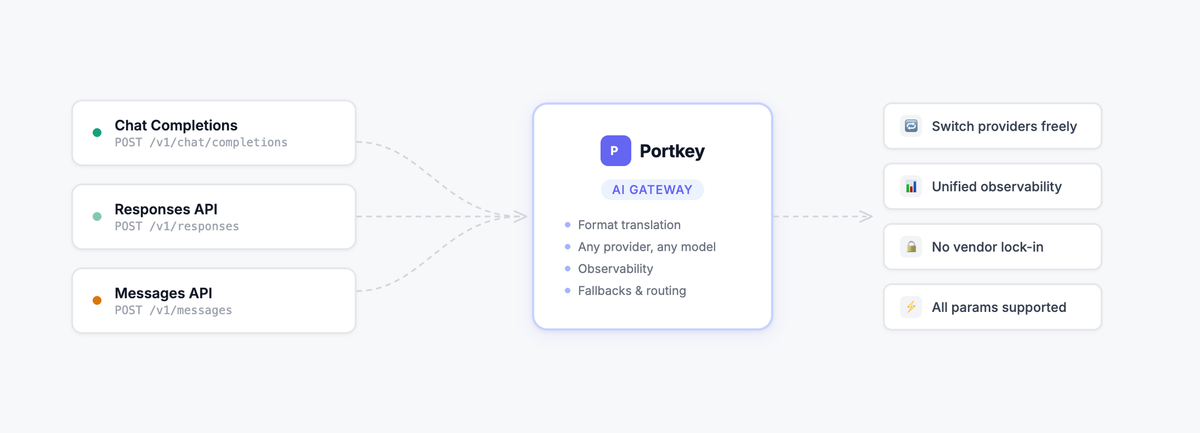
How Portkey supports all three
Most teams end up needing more than one of these formats. You might use Chat Completions for a general assistant, the Responses API for an autonomous agent, and Claude's Messages API for a document reasoning pipeline, all in the same AI Agent.
Building direct integrations with each provider means separate SDKs, separate observability, and code that breaks every time you want to try a new model.
Portkey sits between your application and every provider, handling the translation so you don't have to.
The best part: you can use any of the three API formats with any provider and model.
Want to use the Messages API format but route to a Gemini model? Portkey handles the transformation. Want Chat Completions format but call a Claude model? Same thing.
Beyond format flexibility, Portkey adds what direct API access can't give you:
- Observability: Every request logged, traced, and searchable across all providers and API formats
- Fallbacks and load balancing: Route to a backup provider if your primary is down or rate-limited
- Prompt management: Version, test, and deploy prompts centrally
- Cost tracking: Unified spend view across providers and models
- Governance: Enterprise controls over which teams access which models
Making calls with each API through Portkey
Chat Completions
from portkey_ai import Portkey

portkey = Portkey(api_key="PORTKEY_API_KEY")

response = portkey.chat.completions.create(
    model="@openai-provider/gpt-5.2",
    messages=[{"role": "user", "content": "Explain quantum computing in simple terms"}]
)

print(response.choices[0].message.content)
Responses API
from portkey_ai import Portkey

portkey = Portkey(api_key="PORTKEY_API_KEY")

response = portkey.responses.create(
    model="@openai-provider/gpt-4o",
    input="Explain quantum computing in simple terms"
)

print(response.output_text)
Messages API
import anthropic

client = anthropic.Anthropic(
    api_key="PORTKEY_API_KEY",
    base_url="https://api.portkey.ai"
)

message = client.messages.create(
    model="@anthropic-provider/claude-sonnet-4-5-20250514",
    max_tokens=1024,
    messages=[{"role": "user", "content": "Explain quantum computing in simple terms"}]
)

print(message.content[0].text)
Switching providers without changing your code
The real payoff is when you want to swap providers.
To move from OpenAI to Claude on Responses, all you need to do is change the provider name and model:
from portkey_ai import Portkey

portkey = Portkey(api_key="PORTKEY_API_KEY")

response = portkey.responses.create(
    model="@anthropic-provider/claude-sonnet-4-5-20250514",
    input="Explain quantum computing in simple terms"
)

print(response.output_text)
Your application code, your observability, your fallback logic, none of it changes. The format stays the same and Portkey's universal API handles the translation to whichever provider you're routing to.
Getting started
All three API formats work through Portkey with a single configuration change, pointing your SDK's base URL at Portkey's gateway. From there, routing, translation, observability, and reliability are handled for you.
Get started with Portkey | Read the docs
To see how explore how Portkey can support your AI strategy, book a demo here.