

Stop hardcoding API keys in your AI apps
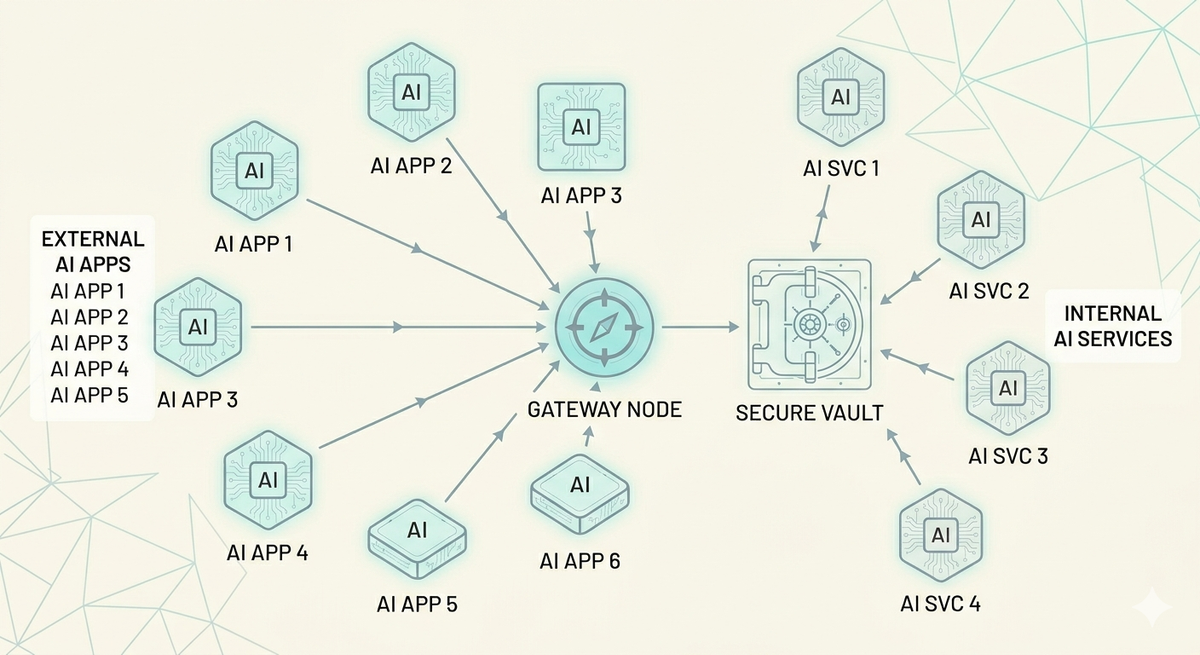
Every team building with LLMs has API keys to manage. OpenAI, Anthropic, Google, Azure, AWS Bedrock, Mistral; each provider issues its own credentials, and each integration needs a key to work.
The default approach is simple: copy the key, paste it into your app config, and move on.
But as AI usage grows across the org, so does the number of keys. No one has a complete picture of where every key lives. Rotation means manually updating credentials across every system that uses them and hoping you didn't miss one🤞
Why AI credentials fall through the cracks
Security teams already have infrastructure for this.
AWS Secrets Manager, Azure Key Vault, HashiCorp Vault, most enterprises run at least one of these, with policies for rotation, access control, and audit logging already in place.
But the AI stack usually sits outside of it. A developer grabs an API key from a provider dashboard, drops it into an environment variable or config file, and the app goes live. When a new team needs access, they get the key over Slack or a shared doc. When a new provider gets added, another key enters the mix the same way.
Over time, this creates a parallel secrets ecosystem that security teams can't see or govern. Keys don't get rotated because no one's sure which apps will break. Access isn't scoped because the same key is shared across teams and environments. And when something goes wrong, there's no quick way to find every place that credential is used and revoke it.
Compliance audits require demonstrable control over credential lifecycle, where keys are stored, who can access them, when they were last rotated. When credentials are scattered across apps and config files, proving that control is hard.
What's the fix?
Not another secrets manager. But making sure your AI stack actually uses the one you already have.
Instead of each application connecting directly to a model provider with hardcoded credentials, you put an AI gateway. Your apps call the gateway. The gateway calls the model provider. And the credentials the gateway needs? It pulls them directly from your vault at runtime.
Step 1: Replace dozens of provider keys with one gateway credential.
Instead of each application connecting directly to a model provider with its own credentials, you put an AI gateway in between. Your apps call the gateway. The gateway calls the model provider.
Portkey's AI Gateway sits between your applications and every LLM provider, OpenAI, Anthropic, Google, Azure, Bedrock, Mistral, open-source models and gives you a single API to access all providers.
One endpoint, one auth pattern, one place to configure routing, fallbacks, load balancing, and caching. Your apps authenticate with Portkey using one credential, and the gateway handles the rest. No more scattered keys across every app that talks to an LLM.
Step 2: Keep those keys in your vault with secret references.
Instead of entering provider API keys directly into Portkey, you give it a reference to a secret stored in AWS Secrets Manager, Azure Key Vault, or HashiCorp Vault. When the gateway needs to call a provider, it fetches the credential from your vault at runtime, uses it, and never stores it.
Portkey's control plane, the API and dashboard, only ever sees the reference configuration: which vault, which secret path, how to authenticate. The actual key never touches Portkey's storage. The data plane fetches the secret directly from your vault and caches it for 5 minutes to avoid hitting your secret manager on every request. After the TTL expires, the next call triggers a fresh fetch.
Rotate a key in your vault, and every app picks it up automatically within minutes. No redeployments, no config changes, no Slack messages asking who has the new key. Your security team manages credentials the way they already do, with the rotation policies, access controls, and audit trails they've already built and the AI stack just works with it.
Secret references work with the three most widely deployed secret managers in enterprise environments.
AWS Secrets Manager supports three authentication modes: direct access keys, assumed IAM roles for cross-account setups, and Portkey's service role where your secret's resource policy grants Portkey access directly. Assumed roles are the cleanest option for organizations that want to avoid sharing long-lived credentials entirely.
Azure Key Vault supports Entra ID (service principal) authentication, managed identity for Azure-hosted deployments, and default credentials for simpler setups.
HashiCorp Vault supports token-based auth, AppRole for machine-to-machine authentication, and Kubernetes auth for workloads running in k8s clusters.
When you retrieve a secret reference through the API, sensitive auth fields are automatically masked and you'll see masked_aws_secret_access_key instead of the actual value. The original credentials are never exposed in API responses.
Scoping credentials across teams and environments
In larger organizations, not every team should have access to every credential. A staging team shouldn't be using production keys, and a product team shouldn't have access to credentials meant for infrastructure workloads.
Secret references handle this with workspace scoping. By default, a reference is available to all workspaces in your org. But you can restrict it to specific workspaces when creating or updating the reference, pass a list of workspace IDs or slugs, and only those teams can use it.
This means you can have prod-openai-key scoped to your production workspace and staging-openai-key scoped to staging. Same system, same vault, clear boundaries. If you need to revert to org-wide access, setting allow_all_workspaces back to true removes the restrictions.
If you're already on Portkey, head to the Secret References in your left panel to create your first reference. Your vault already has the policies, rotation schedules, and audit trails your security team trusts. Secret references let your AI stack use them too.
If you're evaluating Portkey for your team, book a demo to see how secret references and the broader security model fit into your infrastructure.