
Tool Provisioning in MCP Servers: Controlling AI Agent Access in Production

MCP servers make it easy for agents to discover and invoke tools. That works well when a single team builds and tests agents. Problems start when the same MCP servers are shared across teams, environments, and production workloads.
Tool provisioning then becomes an access control problem. Teams need to decide which agents can see which tools, which tools can run in which environments, and how tool usage is logged and controlled. This article explains how MCP servers expose tools and how teams manage tool access in production.
What MCP servers actually expose to agents
Before you can govern tool access, you need a precise picture of what MCP servers surface to agents.
Tools vs. resources vs. prompts
MCP servers expose three capability types.
Tools are executable functions that agentsinvokeautonomously: querying databases, calling internal APIs, writing to file systems, triggering SaaS workflows, and modifying application state. Tools are the primary risk surface because they carry out actions, not just return data.
Resources are file-like data sources that agents can read.
Prompts are pre-written instruction templates. Neither executes logic directly.
The governance focus here is on tools.
The discovery lifecycle
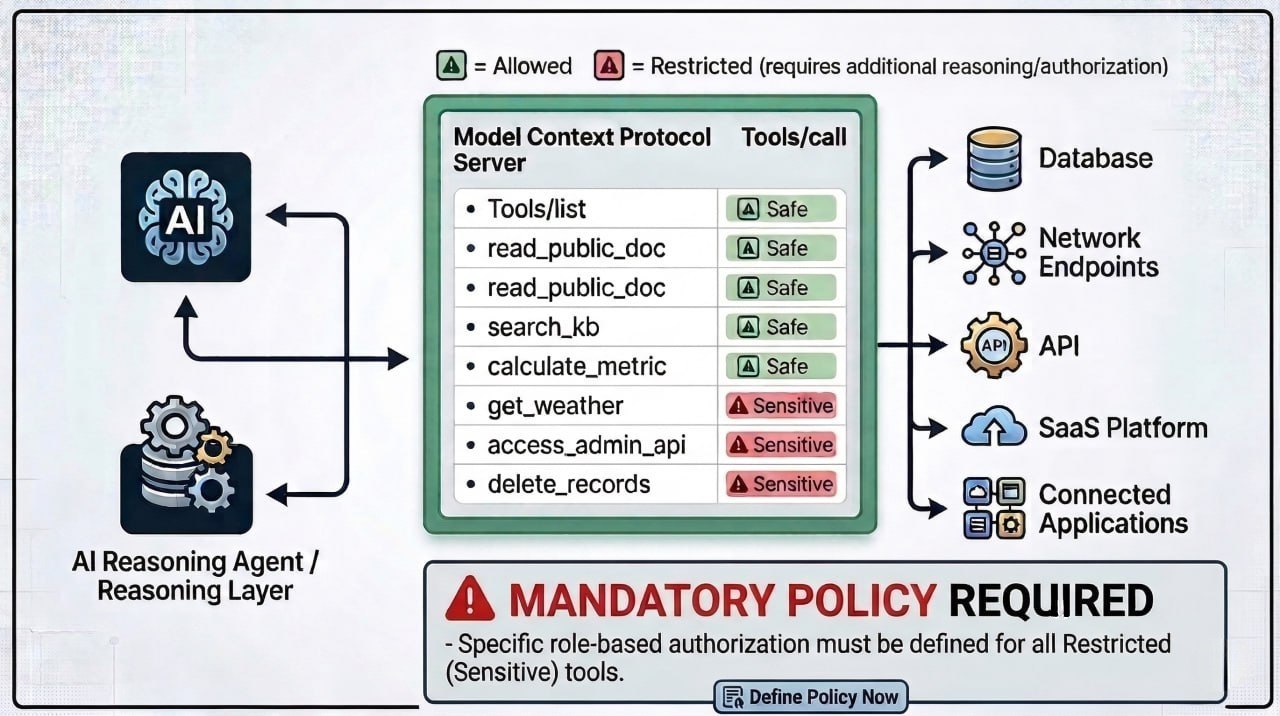
When an agent connects to an MCP server, it:
- Calls
tools/listto enumerate every exposed tool - Selects a tool based on its current task
- Invokes it via
tools/call, reaching the target system: database, internal API, SaaS platform, file system
This flow creates a direct governance problem. Without restrictions, any connected agent sees every tool on the server. There is no native scoping in the default setup.
A single MCP server exposes a mix of read-only query tools alongside tools that modify state, trigger workflows, or reach sensitive internal systems. The tools/list response does not distinguish between them. Every tool lands in the same flat list.
That’s usually fine when one team owns the server. It becomes a problem when multiple teams and agents connect to the same MCP server and inherit the same tool surface by default.
Why unrestricted tool access breaks in production
MCP tool discovery and invocation flow
Once multiple agents, teams, and workloads share the same MCP infrastructure, the open-by-default model produces compounding operational failures.
- Over-permissioned agents. An agent scoped to customer-facing queries can discover and attempt to invoke internal admin tools it was never meant to reach. The agent isn’t doing anything incorrectly; it's simply choosing from the tool list it was given.
- Credential sprawl. Tools connecting to databases and APIs require credentials. Without centralized management, those credentials end up hardcoded in agent configurations or scattered across environment files with no revocation path. If a key is compromised, the blast radius is unclear.
- No audit trail. Tool invocations happen silently. Compliance teams cannot answer who called what, when, or with what parameters. Reconstructing agent activity requires piecing together raw traces not designed for audit.
- No team isolation. A data engineering workspace and a customer support workspace can share an MCP server, but they should not share an identical tool surface.
Open tool discovery works in development. In shared production infrastructure, it creates access, security, and audit problems very quickly.
The two levels of tool provisioning in MCP servers
Tool provisioning operates at two distinct levels, each with a defined scope and owner.
Organization-level provisioning
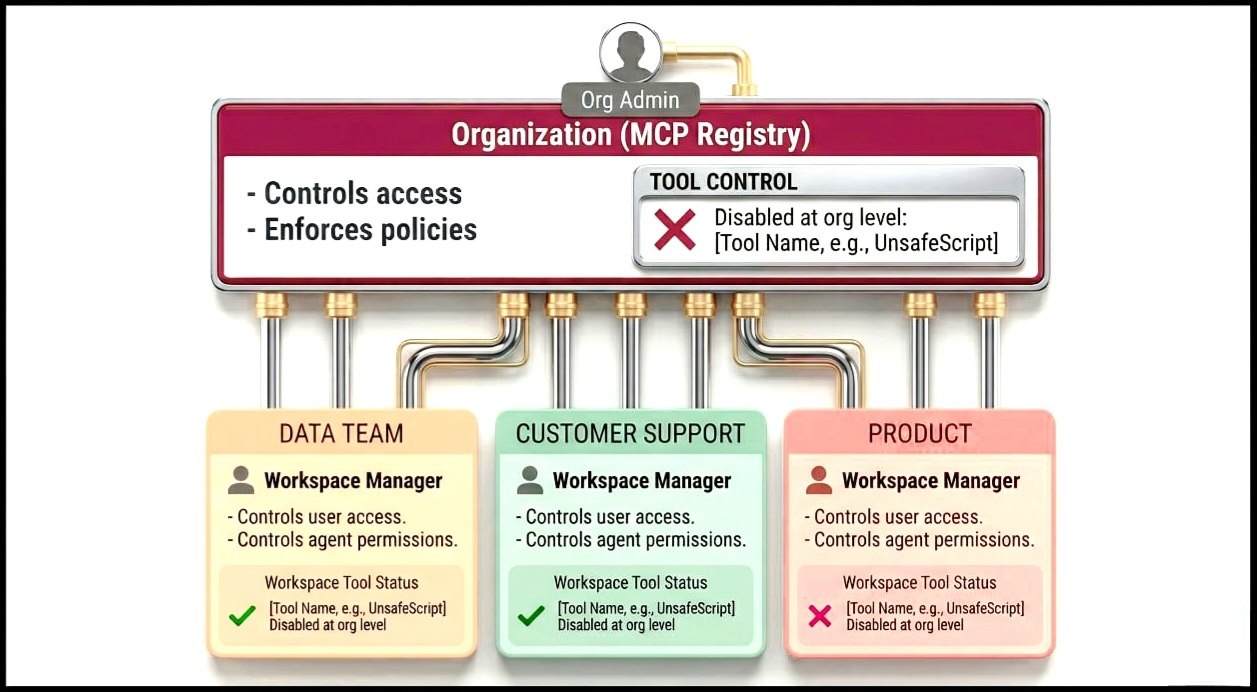
At the organization level, an MCP Registry serves as the org-wide catalog of registered MCP servers. Org admins and owners control which servers are available to which workspaces, and which tools within those servers are enabled or disabled across the organization.
This layer acts as the outer boundary. If a tool is disabled here, it is unavailable everywhere, regardless of workplace settings. This is where teams typically block dangerous operations, disable deprecated functionality, and restrict experimental tools before they reach production workspaces.
Workspace-level provisioning
Two-level tool provisioning model
Within a workspace, managers and admins control which users and agents can access specific MCP servers and their tools. This is where team-level scoping happens: the data team's workspace exposes a different tool surface than the customer support team's, even on the same underlying MCP server.
In practice, this is what allows multiple teams to share the same MCP server without sharing the same level of access. Each workspace sees only the tools and servers that are relevant to that team’s work.
| Level | Controlled by | Scope | Use case |
|---|---|---|---|
| Organization (MCP registry) | Org admins | Org-wide | Block dangerous tools, enable servers per workspace |
| Workspace (MCP servers) | Workspace managers | Workspace-only | Restrict user/agent access within a team |
Org-level decisions set the ceiling; workspace decisions operate within it. No workspace manager can surface a tool that an org admin has disabled.
Auto-provisioning settings let org admins decide whether new workspaces inherit access to a given MCP server by default or must be explicitly enabled. Getting this right early matters, since it prevents access sprawl from reproducing with every additional team.
A useful way to think about this model is: organization-level provisioning controls what is possible, and workspace-level provisioning controls who can actually use it.
Credential management and authentication at the tool layer
Tools that connect to real systems need credentials. The question is where those credentials live and who controls them.
Credentials embedded in agent code cannot be rotated without redeployment. Credentials scattered across configurations have no single revocation path: if a key is compromised, there is no clean cutoff. Agents passing credentials directly to tools bypass any centralized audit or policy layer entirely.
The correct model: Credentials live at the AI gateway layer, not inside agent code. The gateway authenticates to downstream systems on behalf of agents. Agents present a gateway-issued token. The credential does not need to live inside the agent.
Revoking access at the gateway cuts off every agent relying on that credential instantly, with no redeployment and no config hunting.
Authentication confirms who is connecting to the system. Authorization controls which tools an identity can actually reach once connected. Enterprise identity provider integration handles authentication. The tool provisioning policy handles authorization.
Policy enforcement, rate limits, and auditability across tool invocations
Structural access control defines who can reach what. Runtime governance defines what happens at the moment of invocation. In production, both layers need to operate together; defining access alone is not enough if nothing enforces it at runtime.
Policy checks before execution. Before a tool call reaches its target, the gateway evaluates whether that invocation is permitted under the current policy. Policies can vary per tool, per workspace, or per environment: a tool permitted in staging can be blocked in production. A valid, authenticated agent can still be blocked by a policy restricting that tool for that specific workload.
Audit logs and traceability. Every tool invocation should produce a structured log entry capturing which agent called which tool, with what parameters, at what time, and what the outcome was. This is what observability for agent workloads requires: logs queryable by workspace and user context, not just raw request traces.
The audit trail is what makes trust scalable. Teams will not grant agents access to sensitive tools unless they can verify that access is being used appropriately.
How Portkey's MCP gateway handles tool provisioning at scale
Portkey's MCP gateway implements tool provisioning and access control at a centralized gateway layer, rather than inside individual agents or MCP servers.
Capability-level control: The MCP registry lists all tools, resources, and prompts exposed by a server, and org admins can enable or disable specific capabilities.
Two-level provisioning: Organization-level controls determine which workspaces can access an MCP server and which tools are available at all, while workspace-level controls determine which users and agents can access those tools.
Access control and authentication: Workspace access is controlled per MCP server, and user access is managed within each workspace. Portkey supports role-based access controls and integrates with enterprise identity providers.
Runtime governance: Policy checks, rate limits, budgets, and audit logs are enforced at the gateway before tool execution, so every tool call is logged and evaluated against policy.
The main advantage of this model is that tool access, credentials, policies, and logs are controlled in one place, instead of being implemented separately across agents and MCP servers.
For full implementation details, see tool provisioning in Portkey's MCP gateway.
Govern your MCPs
Teams that establish centralized provisioning early avoid retrofitting access control later, when dozens of agents, multiple environments, and compliance requirements did not exist at the start.
If you're looking to implement MCP gateway for your organization, request a personalized demo today.
FAQs
What is tool provisioning in MCP servers?
Defining which tools an MCP server exposes to which agents, under what access conditions.
How is tool provisioning different from MCP authentication?
Authentication confirms identity. Provisioning controls what tools the identity can reach once connected. They are distinct layers and need separate governance.
Can different teams access different tools on the same MCP server?
Yes. Workspace-level scoping handles this. Each workspace accesses a different tool subset from the same server, within org-level boundaries.
What happens when a tool is disabled in the MCP registry?
It is hidden from agents during discovery and returns errors on direct calls. No workspace setting overrides an org-level disable.
How do rate limits work for MCP tool access?
Configurable per MCP server. They prevent runaway agent loops from causing cost spikes or availability issues on tools hitting external APIs or production databases.
Do credentials for tools need to live inside agent code?
No. Centralized credential management at the gateway is the correct model. Revocation at the gateway cuts off all dependent agents instantly, without touching agent code.
Do I need a gateway to govern MCP tool access?
Not strictly, but without one, governance logic has to live inside every individual agent or MCP server separately. That approach does not scale, cannot be enforced consistently, and produces no unified audit trail. A gateway centralizes all of it in one layer.