
Understanding MCP Authorization
Learn why MCP authorization matters, how access is enforced at the server boundary, and best practices for securing MCP in production environments.
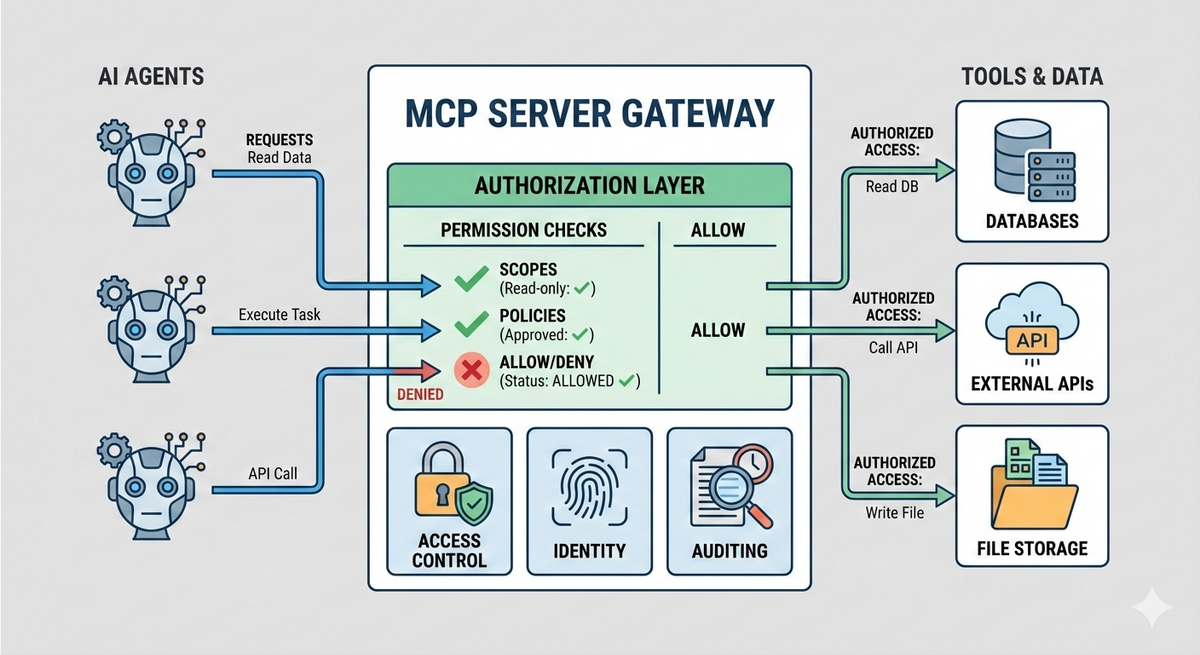
MCP makes it possible for AI models and agents to interact with external tools, APIs, and data sources through a standardized interface. As MCP moves from local experimentation to shared servers, registries, and production deployments, one question becomes unavoidable: who is allowed to do what, and under which conditions?
This is where authorization comes in.
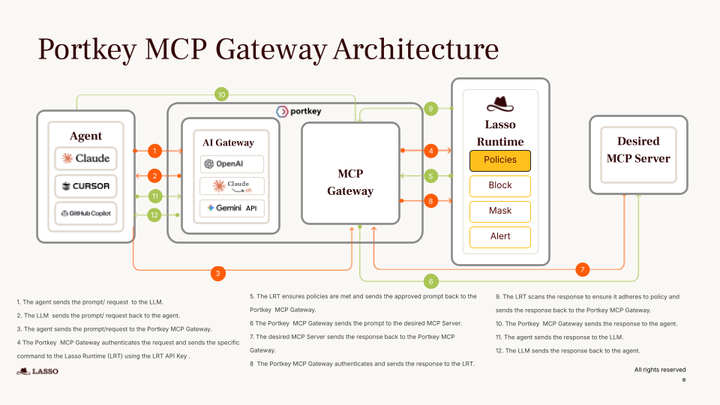
That’s why we built the MCP Gateway: a centralized control layer to run MCP-powered agents in production.
Check it out!
Why MCP needs authorization
MCP introduces a powerful execution layer between AI clients and real systems. Once a client is connected to an MCP server, it can discover tools, invoke actions, and access data dynamically often without hard-coded call paths or predefined workflows.
That flexibility changes the security model.
MCP turns intent into capability
In traditional applications, developers explicitly wire which APIs can be called and under what conditions. With MCP, an AI client can decide at runtime which tools to invoke based on model outputs.
Without authorization controls, this effectively means:
- Every connected client can attempt to use every exposed tool
- Tool access is governed by availability, not permission
- Risk scales with the number of tools, not the number of users
Early MCP setups often relied on implicit trust. A local MCP server, a single user, and a small set of non-destructive tools can make broad access feel acceptable during experimentation. In these environments, the cost of a mistake is low, and security boundaries are often assumed rather than enforced.
In shared development environments, internal platforms serving multiple teams, central MCP registries, or production agents with real side effects, implicit trust no longer holds. Simply knowing that a client connected to a server is not sufficient.
At that point, systems must explicitly define which tools a client is allowed to invoke, which resources it can access, and which actions are prohibited altogether.
AI agents further amplify authorization risk because they behave very differently from traditional API consumers. Rather than following fixed call paths, agents explore their environment. They may enumerate available tools, retry failed actions with modified inputs, or chain multiple tools together in ways the developer did not anticipate.
This exploratory behavior is useful for capability discovery, but it also increases the likelihood of unintended outcomes.
Without clear authorization boundaries, that exploration can easily cross into unsafe territory. Agents may access data they were not meant to see, perform unintended writes or deletions, or overuse high-privilege or high-cost tools.
Authorization is what constrains this behavior, ensuring that even when agents explore, they do so within well-defined and enforceable limits.
How MCP authorization works
MCP authorization is built around a simple but strict principle: the server is the final authority. Clients may discover capabilities and attempt tool calls, but it is always the MCP server that decides whether a request is allowed to proceed.
Authorization is evaluated at request time, not assumed at connection time. This distinction matters because MCP clients, especially agents, can change behavior dynamically.
In practice, authorization decisions are derived from identity and context. The server receives an authenticated request, extracts information about the caller (such as user, service, workspace, or environment), and evaluates that against its authorization rules. Those rules determine which tools are visible, which resources can be accessed, and which operations are explicitly denied.
Unlike static API integrations, MCP authorization is not just about endpoint access. It often operates at a finer granularity: tool-level permissions, action-level constraints, and contextual limits based on metadata. This allows the same MCP server to safely serve multiple clients with different levels of access, without duplicating infrastructure or exposing unnecessary capabilities.
Another important aspect is that authorization in MCP is continuous. Permission is not granted once and assumed forever. Each tool invocation can be independently authorized, logged, and audited. This makes it possible to revoke access, tighten policies, or introduce new constraints without redeploying clients or retraining agents.
Taken together, MCP authorization acts as the control plane that sits between AI decision-making and real-world execution. It ensures that no matter how flexible or autonomous a client becomes, its actions remain bounded by explicit, enforceable rules.
Authorization models and patterns in MCP
MCP does not mandate a single authorization mechanism, but most real-world deployments converge on a few common patterns. These patterns are shaped by two constraints:
- MCP servers need strong control over tool execution,
- and clients—especially agents—must be able to operate without embedding long-lived secrets.
One widely adopted approach is token-based authorization, often aligned with OAuth 2.1 semantics for HTTP-based MCP servers. In this model, a client authenticates through an identity provider and receives a short-lived access token. That token encodes scopes or claims describing what the client is allowed to do. Each MCP request carries the token, and the server evaluates it before allowing any tool invocation.
Another common pattern is scoped capability access. Instead of granting blanket access to an MCP server, tokens or credentials are limited to a specific subset of tools or actions. For example, a client may be allowed to call read-only tools but not tools that mutate data or trigger external side effects.
In multi-tenant or platform scenarios, role-based and attribute-based authorization becomes important. Rather than authorizing individual clients one by one, servers define roles or policies tied to attributes such as workspace, environment, team, or workload type. When a request arrives, the server evaluates these attributes and applies the appropriate policy.
Some deployments also separate authentication from execution authority. A client may authenticate as a known identity, but receive a more limited execution token when interacting with specific MCP servers. This avoids passing high-privilege credentials downstream and ensures that even trusted clients operate under constrained permissions when invoking tools.
Best practices for MCP authorization
- Apply least privilege by default
Expose only the tools and actions a client truly needs. High-impact or side-effecting tools should always require stricter permissions. - Use short-lived, scoped tokens
Avoid long-lived secrets. Expiring tokens with explicit scopes reduce blast radius and support easy revocation. - Authorize using context, not just identity
Enforce policies based on workspace, environment, tenant, workload type, and request metadata—not just who the client is. - Enforce authorization on every tool call
Do not rely on connect-time checks. Evaluate permissions per invocation to contain agent exploration. - Delegate access safely
Mint constrained execution tokens for agents instead of passing upstream credentials through them. - Make authorization auditable
Log who invoked which tool, under what policy, and why the request was allowed or denied.
Conclusion
MCP makes it easy for AI clients and agents to interact with real systems, but that flexibility comes with risk. Authorization is what turns MCP from a powerful abstraction into a production-ready interface.
Strong MCP authorization means enforcing clear, contextual permissions at the server boundary, so tools are accessible without being overexposed, and agents can operate without inheriting excessive privilege. This is especially important as MCP moves into shared platforms, registries, and production workloads.
Platforms like Portkey’s MCP Gateway build these controls in by default, combining MCP connectivity with scoped access, centralized policy enforcement, and full auditability.
The result is an MCP setup that supports experimentation and autonomy, while still meeting the security and governance expectations of real-world deployments. If you're looking to get started with MCP in your organization, connect with Portkey today!