

What is a virtual MCP server: Need, benefits, use cases
As teams use more MCP servers, virtual MCP servers help simplify provisioning by combining tools into a single interface. See how they help, and use cases.
MCP adoption inside organizations has moved quickly beyond single-developer setups.
What started as a convenient way to connect an AI client to a handful of tools is now being used across:
- Multiple internal teams
- Shared agent platforms
- SaaS and third-party MCP servers
- Central MCP registries and hubs
Each team brings its own MCP servers. Each server exposes its own set of tools. And each client or agent ends up wiring directly into multiple MCP sources.
The need for a virtual MCP server
When MCP servers multiply across teams and providers, the growing challenge is it’s composition and provisioning.
MCP registries help you find available servers. But they don’t help you answer questions like:
- Which tools should this agent actually see?
- How do we group tools that belong together?
- How do we provision MCP access consistently across teams?
The virtual MCP server sits one layer above the MCP registry to solve this.
What is a virtual MCP server?
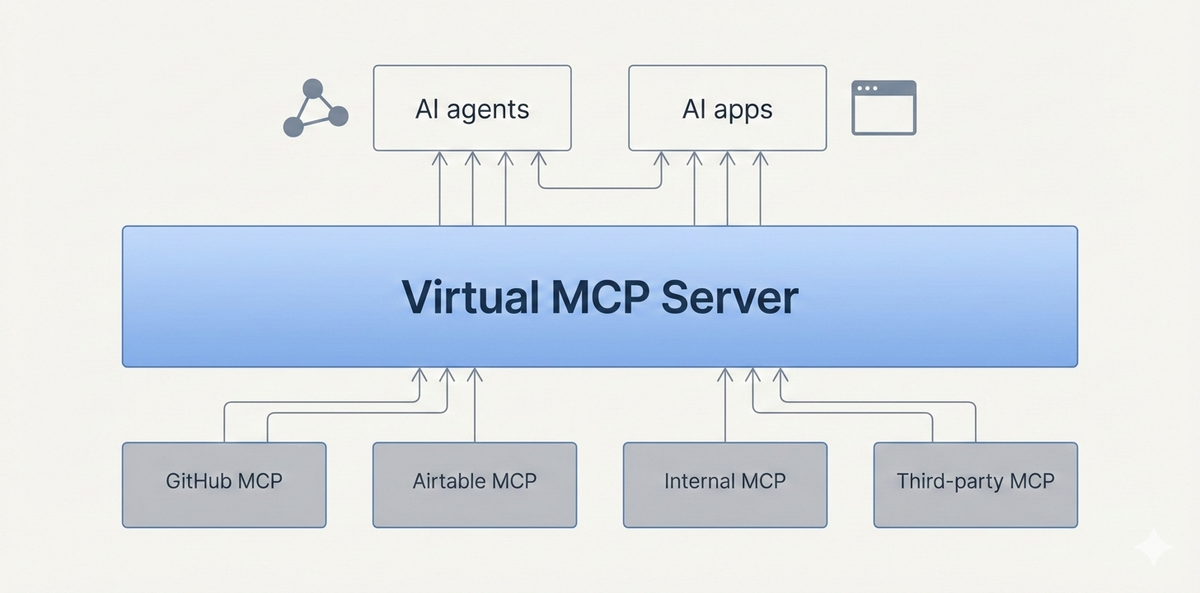
A virtual MCP Server lets you create a combine a set of MCP tools from multiple MCP servers.
From the client’s point of view, there is just one MCP server to connect to.
Behind the scenes, that virtual server maps to:
- Multiple underlying MCP servers
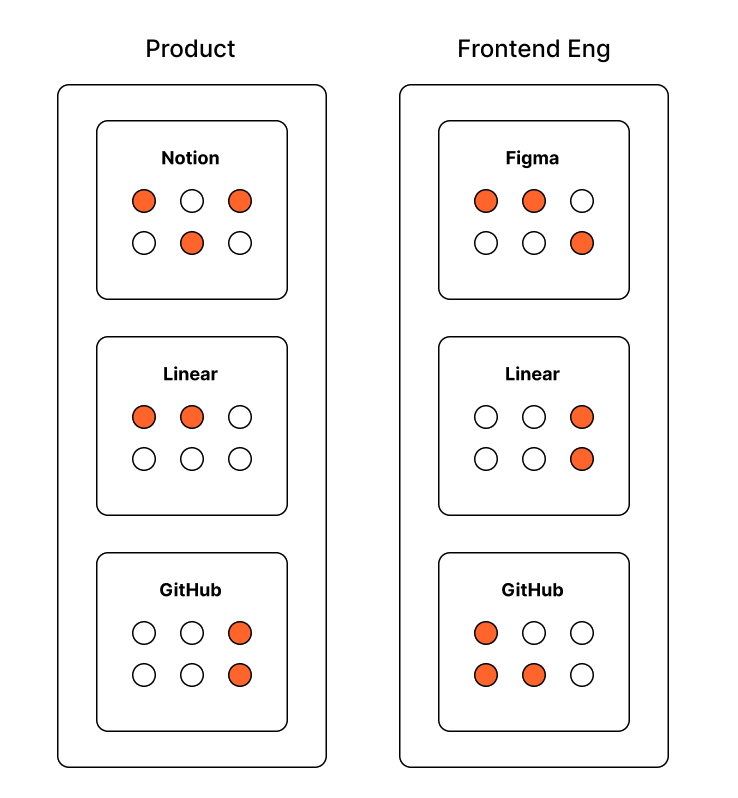
- A curated subset of tools from each
- A predefined structure that matches how teams and agents actually work
This changes how MCP is provisioned. Rather than wiring every client to many MCP servers, platform teams can:
- Create virtual MCP servers per app, agent, or workflow
- Group related tools together once
- Reuse those groupings across environments and teams
Common use cases for virtual MCP servers
Virtual MCP servers are typically adopted when MCP usage needs to be simplified, scoped, or standardized across teams and environments.
- Task-specific tool bundles for agents
Expose only the exact tools an agent needs, even when those tools come from multiple MCP servers.
- Simplified onboarding for internal teams
Give teams a single MCP endpoint with a curated tool set instead of asking them to wire multiple MCP servers manually. - Environment-specific MCP configurations
Use different virtual MCP servers for development, staging, and production without changing client or agent code. - Safer consumption of third-party MCP servers
Consume external or community MCP servers through a controlled layer that limits exposed tools. - Stable MCP interfaces despite upstream changes
Pin tool definitions and MCP server versions to avoid breaking agents when source MCPs evolve.
Virtual MCP servers still need governance
As virtual MCP servers become the primary way teams consume MCP, they naturally turn into a critical control point.
They sit between agents and real systems, aggregating tools from internal and third-party MCP servers and exposing them through a single interface. At this layer, questions around access, visibility, and safety start to matter more than simple connectivity.
Teams need to know which agents or applications can use a given virtual MCP, how those tools are being invoked in practice, and whether usage is behaving as expected. Without governance, virtual MCP servers risk becoming another blind spot powerful, but hard to reason about once they’re in production.
Where platforms like Portkey come in
Platforms like Portkey provide the infrastructure needed to operate virtual MCP servers safely at scale.
Portkey’s MCP Gateway acts as a control plane for MCP usage, giving teams visibility into tool calls, latency, and failures while enforcing consistent access boundaries across environments. Instead of managing MCP composition in isolation, platform teams can treat virtual MCP servers as part of their broader AI platform, alongside models, routing, and observability.
This makes it possible to roll out MCP across teams without losing control or adding operational overhead.
If you’re already working with multiple MCP servers, the next step is treating MCP as platform infrastructure.
To see how Portkey’s MCP Gateway helps teams run and govern MCP servers, book a demo with us.