

GitHub Copilot best practices for teams

GitHub Copilot feels simple when a few developers use it. When entire teams depend on it every day, and platform engineers are expected to explain who is using it, how requests are routed, and where usage actually shows up across environments, things start to get complex.
At this stage, Copilot becomes a part of your shared LLM infrastructure, and reliability, visibility, and control start to matter more than convenience.
For teams running GitHub Copilot at scale, this best practices playbook explains how you can shift your view from individual usage patterns to platform-level decision making.
What GitHub Copilot is and how teams access it today
GitHub Copilot is an AI pair programmer built into VS Code, JetBrains IDEs, Visual Studio, and similar environments.
It uses LLMs to generate code completions, support chat-based workflows, and assist with agent-driven coding tasks.
As teams scale usage, how Copilot is accessed determines how much control you actually have. Teams typically use GitHub Copilot through two access models:
1. Subscription-based access (standard team rollout)
Most organizations begin with GitHub-managed plans.
Plan | Price | Access model | What teams manage |
Copilot Business | $19/user/month | GitHub account authentication with organization-level policies | Team rollout, access policies, and premium request usage |
Copilot Enterprise | $39/user/month | Enterprise-level controls with expanded governance capabilities | Enterprise-wide policy enforcement and structured usage management |
2. Custom model or API-based access (bring-your-own-model workflows)
Some teams route Copilot Chat through custom endpoints connected to external or internal model providers.
Access approach | What teams configure | What it enables |
Custom endpoint routing | External provider credentials or internal model infrastructure | Alignment with existing LLM platforms and infrastructure-level flexibility |
This model is common in environments already managing shared LLM infrastructure across teams.
GitHub Copilot also now includes agent mode, Copilot Cloud Agent, and coding agents that execute multi-step tasks. These workflows consume premium requests faster than standard completions, which makes usage patterns more important as adoption grows across teams.
Where GitHub Copilot’s native controls break down at scale
As teams adopt the tool, operational gaps begin to surface, making it clear why GitHub Copilot best practices need to move into platform responsibilities.
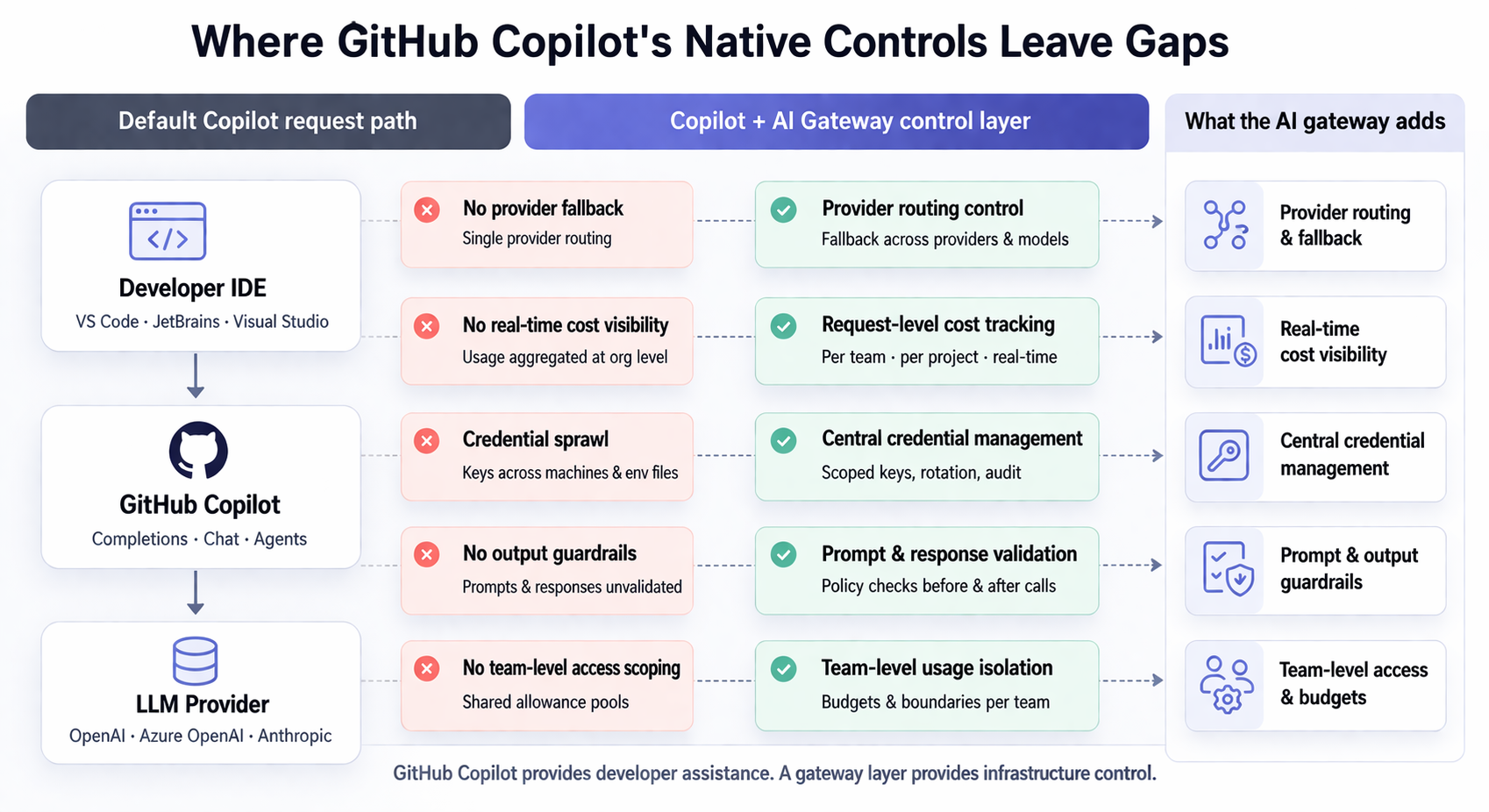
Limited provider flexibility
GitHub Copilot works with a limited set of providers path. With growing teams, there's less flexibility in how requests are routed or how model selection is handled across environments.
Usage blind spots and fragemented visibility
Usage data is mostly visible at the organization level. That works for overall tracking, but teams often need more granular visibility to understand how requests are distributed across projects, workflows, or environments. When usage patterns shift, tracing them back to specific sources can take additional effort.
There’s limited built-in breakdown by team or feature, and agent-driven workflows can be harder to analyze without request-level context.
Credential sprawl
Custom endpoint routing introduces flexibility but also spreads credentials across developer machines and internal tooling environments.
Juggling access, rotation, and revocation becomes a shared responsibility across systems rather than a single control point. This is manageable early on, but grows in complexity as usage expands.
Security and compliance gaps
Prompts and generated responses are not centrally inspected before leaving the development environment or returning from providers.
As adoption grows, teams may want more consistent ways to validate prompts and outputs against internal policies. Without a centralized layer, these checks are typically implemented at the application or workflow level.
GitHub Copilot best practices: Building the control layer your team actually needs
As these patterns show up across teams, the need for a control layer between GitHub Copilot and model providers becomes more apparent.
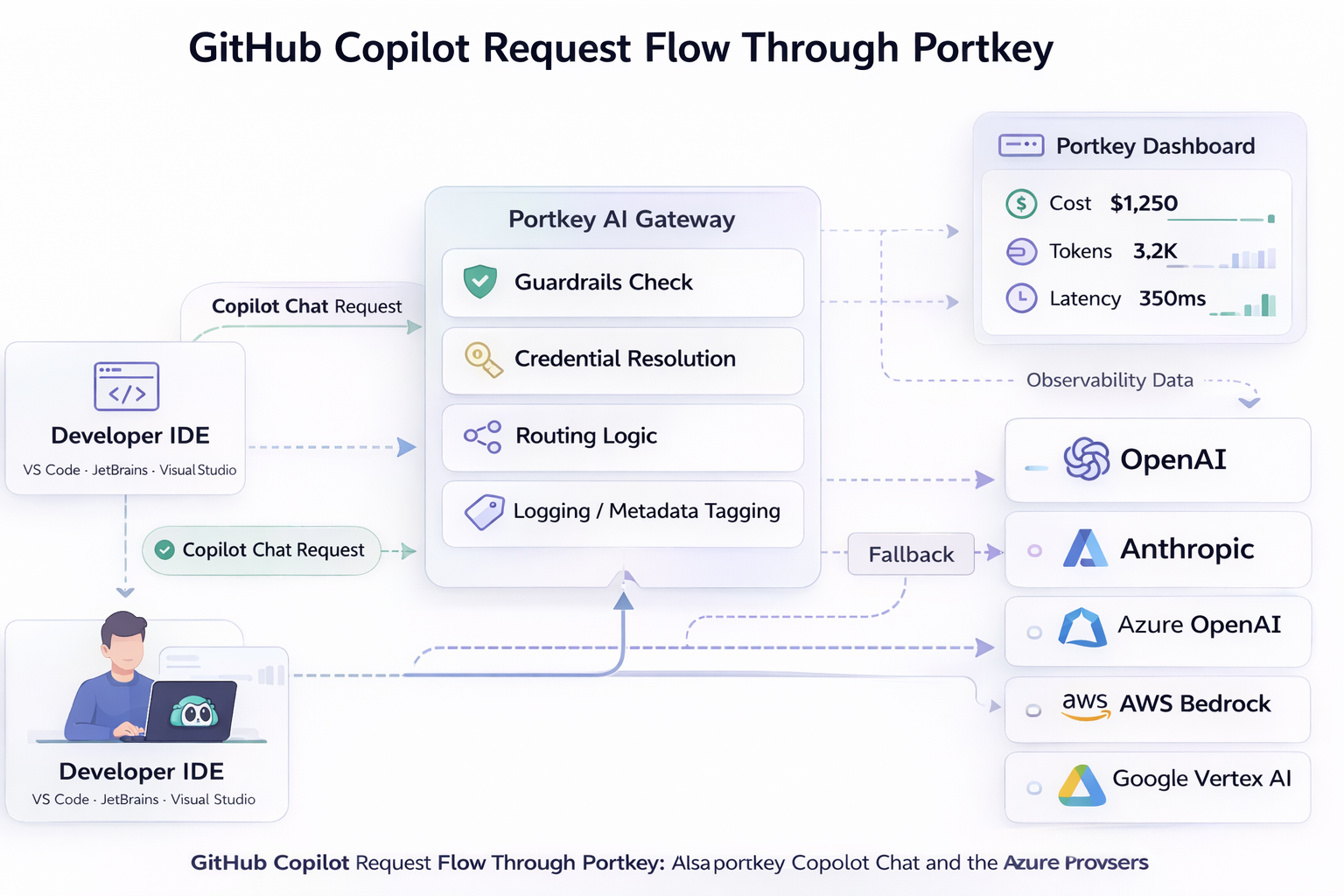
Portkey's AI gateway sits between the copilot and the LLMs and MCP, so all your calls are monitored, secured and attributed to a user/API key.
Github copilot best practices:
Practice 2: Build a credential hierarchy
Store provider API keys on the gateway and issue scoped keys to each user/service. Each API keys is now tied to the user, and the provider API keys is now stored safely, and not distributed.
Practice 1: Request loggging
With centralized observability, all your tool calls and LLM requests are routed through the gateway.
Usage logs identify who generated each request. You can also attach team, project, developer, and environment metadata to every Copilot request. This turns usage tracking from guesswork into something you can look up instantly.
Practice 3: Select providers as required.
Admins can restrict access to certain models for users or workspaces, depending on the usage. Users can also switch between scoped models, based on the type of request.
Practice 4: Set budget limits and rate limits independently
A team can remain within budget but still consume shared provider capacity during burst sessions. Separate limits keep usage predictable across teams sharing provider quotas.
You can apply budgets on the organization, team, user or API key level, going as granular as possible.
Practice 5: Apply guardrails to prompts and generated outputs
Validate prompts before requests leave the network and inspect responses before they return to developers. Filter sensitive patterns, block injection-style instructions, and enforce token limits. This ensures policies are enforced without relying on developer behavior.
Embracing shared LLM infrastructure: What comes next
For teams already running the tool across multiple environments, a practical way to embrace GitHub Copilot best practices can be to route one team through Portkey first.
With that layer in place, expanding across teams without losing control over visibility and cost control becomes easier.
Explore the GitHub Copilot integration documentation to see how you can set it up for your team or book a demo for enterprise deployment guidance.
FAQs
Can I enforce per-team budget limits for GitHub Copilot usage?
Yes. On Portkey's AI gateway, create team-scoped provider configurations in Portkey’s Model Catalog. Assign budget and rate limits at the department or workspace level so usage stays within defined capacity.
How do we get cost attribution by team when using GitHub Copilot at the org level?
Tag Copilot Chat requests with team, project, and environment metadata. Use Portkey’s analytics dashboard to filter usage by these tags and generate accurate cost attribution across departments in seconds.
Can teams control Copilot usage without restricting developer productivity?
Yes. Budgets, metadata tracking, routing rules, and guardrails operate at the infrastructure layer. Developers keep their existing Copilot experience while platform teams manage governance underneath usage.