

Semantic caching thresholds and why they matter
Learn how to set semantic caching thresholds, manage TTL, handle multi-turn queries, and monitor silent failures in production LLM apps.

LLM apps waste a surprising amount of time and money answering the same question over and over again because users ask it in slightly different ways. A basic cache does not help here. It only works when the input text is identical. In real usage, that almost never happens.
Semantic caching fixes this by matching meaning instead of wording. It turns each query into a vector and checks whether a similar intent has already been answered. If it has, the system returns the cached response instead of calling the model again.
🔎 AWS found that semantic caching reduced cost by up to 86% and improved latency by 88%, with cache hits returning in milliseconds instead of seconds.
However, the similarity threshold controls whether any of this works. It defines how close two queries need to be before the system reuses a response. If that threshold is too strict, most requests miss the cache. If it is too loose, the system starts returning answers that do not quite fit.
But don’t worry, this post’s got you covered. It’ll explain how semantic caching works, how to set the right threshold, and how to handle the real production issues that follow, including stale data, multi-turn context, and monitoring cache performance.
How semantic caching works
Before getting into embeddings, it’s important to separate three caching approaches that are often conflated but solve very different problems.
All three approaches operate at different layers and can be used together.
Exact-match caching is the simplest form. The system stores a response and only reuses it if the exact same input appears again. That works well for structured data, but breaks down completely with natural language, where users rarely phrase things the same way twice.
Prompt caching is a provider feature you enable through an API setting. It reduces the cost of reprocessing shared context, like system prompts or long instructions. This improves efficiency, but it does not help with reusing answers across different user queries.
Meanwhile, semantic caching is something you build or adopt at the application or gateway layer. It prevents redundant model calls by reusing responses for queries that mean the same thing.
For example, “What’s your return policy?”, “How do I return something?”, and “Can I send this back?” would all miss an exact-match cache because the wording is different. With semantic caching, these questions map to the same intent and reuse a single stored response.
From query to cache hit in four steps
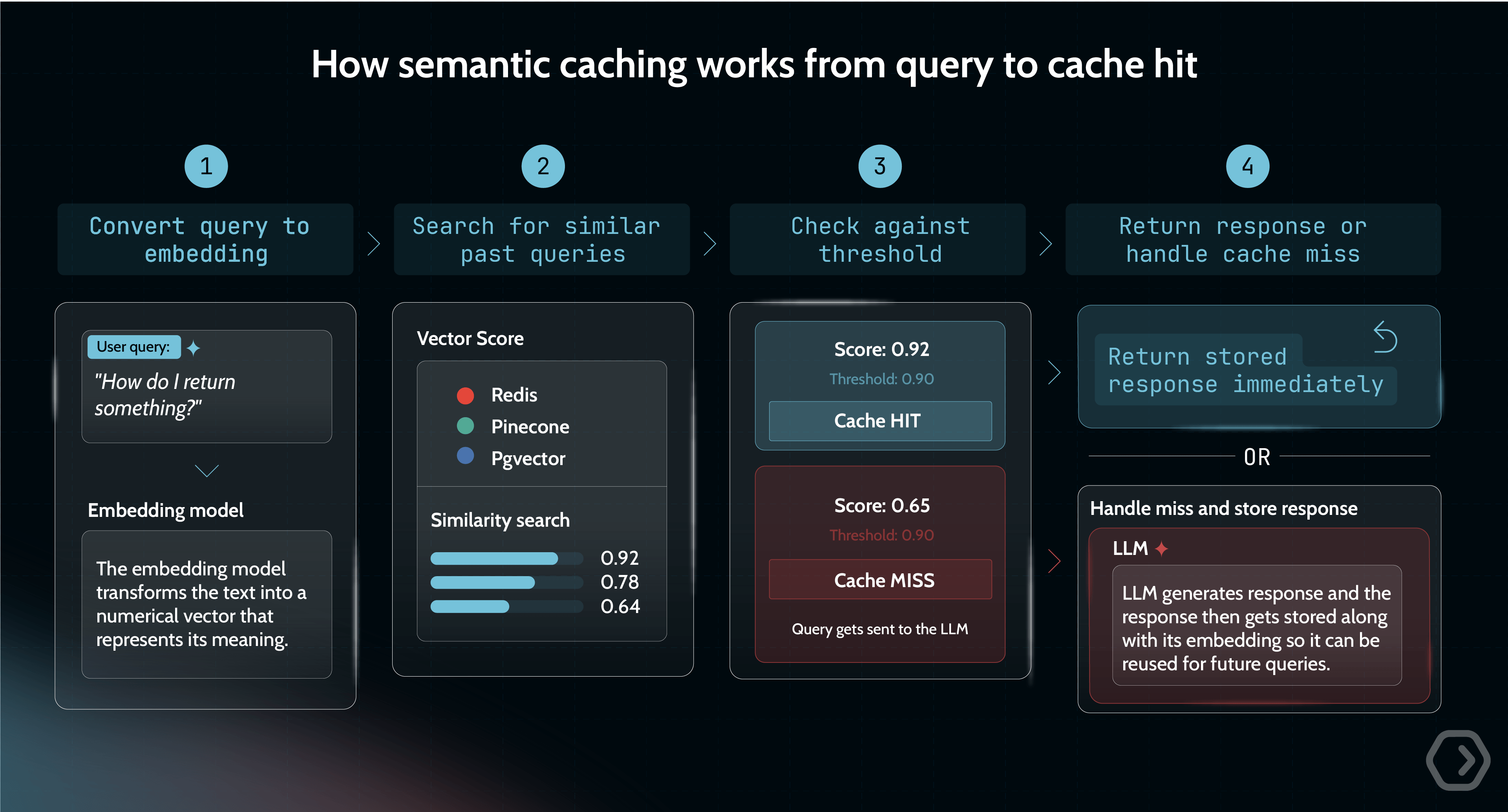
To understand how this works in practice, it helps to break down what happens at runtime:
- Convert the query into an embedding: Every incoming query is first passed through an embedding model, which transforms the text into a numerical vector that represents its meaning.
- Search for similar past queries: The system queries a vector store (such as Redis, Pinecone, pgvector, etc.) to find embeddings that are close in meaning. This is done using a similarity metric like cosine similarity, for example, which has a mathematical range of −1 to 1. A score of 1 means identical direction, 0 means orthogonal, and −1 means diametrically opposed. In practice, text embeddings tend to produce positive scores, but this is model-dependent behavior, not a mathematical guarantee.
- Decide whether it is a cache hit: The system compares the best match against a configured similarity threshold. If the score exceeds that threshold, it is treated as a cache hit, and the stored response is returned immediately.
- Handle the cache miss: If no match meets the threshold, the request is sent to the LLM. Latency at this step varies widely by model, prompt length, and whether you measure time-to-first-token or full response time. The response is then stored along with its embedding so it can be reused in future requests.
This setup introduces two components that traditional caches do not require: an embedding model to generate vectors and a vector store capable of efficient similarity search.
Choosing the right similarity threshold for your use case
Most teams assume a stricter similarity threshold is safer, but the data shows that that’s not always true.
AWS tested multiple thresholds on real chatbot queries using Claude 3 Haiku and Titan Embeddings. The results highlight how much performance depends on where you set the cutoff.
Moving from a strict threshold of 0.99 to a more permissive 0.75 barely changes accuracy, with less than a one percentage point difference. At the same time, cost savings increase by roughly 70 percentage points. This means you can allow significantly more cache reuse without meaningfully degrading quality for general chatbot scenarios.
But this only holds when “similar” queries truly lead to the same answer.
In domain-specific systems, that assumption breaks. In medical or legal use cases, small wording differences can change the meaning entirely. A cached response that is slightly off can be harmful.
The same issue shows up in technical documentation. Queries like “How to fix Error A” and “How to fix Error B” may look similar in embeddings, but they require completely different fixes.
So the real risk is how much your domain can tolerate small mismatches in meaning.
How to choose your tuning threshold
A practical way to approach this is to treat threshold selection as an evaluation problem:
Start with a threshold between 0.90 and 0.95. This range gives you a strong baseline where reuse is meaningful without introducing obvious errors. From there, build a validation set that reflects your real usage. Include two types of pairs. Queries that clearly express the same intent, and queries that look similar but should produce different answers.
Run these through your cache and lower the threshold gradually. At each step, track the false positive rate, which is when the system reuses a response it should not. This is the metric that matters most.
Once false positives start to exceed roughly 3% to 5%, you have reached the limit of your embedding model. At that point, adjusting the threshold further will not help. The model itself cannot reliably separate “same intent” from “similar but different.” Fixing that requires improving or replacing the embedding model.
Portkey takes a more opinionated production approach to threshold tuning. Instead of relying on arbitrary values, it recommends starting around 0.95 similarity and validating performance through backtesting on real traffic. Based on learnings from over 250 million cache requests, teams are advised to test on roughly 5,000 queries and adjust until accuracy consistently stays above 99%. In practice, Portkey applies a high-confidence threshold before returning cache hits, with tests reporting around 99% user-rated accuracy.
This differs from a fully DIY setup. Portkey does not expose user-configurable thresholds. Similarity confidence is managed internally rather than exposed as a tuning knob. Teams that want to experiment across a wider range of thresholds, like the 0.5 to 0.99 range used in benchmarks, will need a self-managed setup.
Ready to get started?
Create your account and start building in minutes
TTL, invalidation, and keeping cached responses fresh
A semantic cache can return a correct match, but an outdated answer. That’s why you need to manage when cached responses expire or are refreshed using the following three mechanisms.
Time-based expiration (TTL)
TTL defines how long a cached response is considered valid before it expires automatically. The right TTL depends entirely on how often the underlying data changes.
Short TTLs reduce the risk of stale answers but lower your cache hit rate. Longer TTLs improve reuse but increase the chance of serving outdated information.
A critical best practice is adding random jitter to TTL values. Without it, many entries expire simultaneously, causing a spike of cache misses and LLM calls (the “thundering herd” problem). Jitter spreads expirations over time and stabilizes system load..
Event-triggered invalidation
Unlike TTL, which expires entries passively over time, event-triggered invalidation actively removes cache entries in response to specific changes in underlying data or systems. This ensures the cache reflects real-world updates as they happen.
For example, when a pricing update occurs, all related cached responses should be immediately cleared rather than waiting for TTL expiry. This approach prevents serving outdated answers within the TTL window and is essential for highly dynamic data.
💡 In production systems like Portkey, cache behavior is controlled through TTL settings, and requests can also use Force Refresh to bypass an existing cached response.
Why multi-turn conversations break naive caching
Semantic caching works best when queries are self-contained, but multi-turn conversations and RAG pipelines rarely behave that way. In these settings, meaning is distributed across prior messages, so caching each query in isolation can produce answers that are technically correct yet contextually wrong.
Consider one conversation where the system caches the query “What is the largest lake in North America?” Later, in a separate discussion about stadiums, a user asks, “What is the second largest?” A naive semantic cache may match this to the earlier geography query and return “Lake Huron.” The retrieval is semantically similar at the surface level, but completely wrong in intent because the conversational context is missing.
There are two main ways to address this:
- Context-aware embedding, where the system embeds not just the latest user message but also the relevant conversational history retrieved from memory. This ensures the embedding reflects actual intent rather than isolated phrasing, which is why AWS recommends applying semantic caching to the combined query and context. The trade-off is that longer inputs generate more unique embeddings, reducing cache hit rates. As conversations grow, caching becomes less effective and may need to be bypassed.
- Query rewriting, where a lightweight model rewrites follow-up questions into standalone queries before cache lookup. For example, “What is the second largest?” becomes “What is the second largest stadium in the US?” This avoids embedding long context while preserving intent, improving reuse.
RAG pipelines face the same issue because retrieved documents effectively modify the query. Caching only the raw question ignores this augmentation and risks mismatches.
Monitoring a semantic cache in production
The hardest problem with semantic caching is that failures are invisible by default. Unlike typical system errors, nothing breaks. A cache miss simply falls through to the LLM and returns a normal response. More dangerously, a bad cache hit returns an incorrect answer with full confidence and a 200 OK status. Without explicit instrumentation, you cannot tell whether the system is working or silently degrading. Even performance signals can mislead – cache hits are significantly faster than misses, but this latency gap is only visible if you track hits and misses separately.
To make these issues observable, you need cache-specific metrics:
- The cache hit ratio provides a baseline efficiency signal, but it is not sufficient on its own.
- Distribution of similarity measures whether matches are strong or barely clear the threshold.
- The latency differential between hits and misses helps confirm that the cache is actually delivering performance gains.
Most importantly, you need a way to estimate false positives, typically through sampling and evaluation using humans or LLM-based judges.
High hit rates can also hide serious problems. If 90% of requests are fast cache hits and 10% are slow or failing LLM calls, average latency looks healthy while real user experience suffers. To avoid this, monitor P99 latency for cache misses separately so fallback-path issues are not masked.
In some cases, the safest approach is to bypass caching entirely. This includes real-time queries such as inventory or pricing, safety-critical outputs, and multi-step agent workflows where one incorrect cached step can corrupt everything downstream.
This is where platforms like Portkey go beyond basic caching by providing per-request cache status in logs and response metadata. The Logs UI surfaces statuses such as Cache hit or a miss while the analytics dashboard provides visibility into hit rate, latency savings, and cost savings, making cache performance measurable and easy to monitor.
⭐ One large food delivery platform handling tens of millions of AI requests used Portkey’s caching, routing, and fallbacks to cut LLM spend by over $500K.
Putting semantic caching to work
Semantic caching is a layer you add to your LLM stack, and there are multiple ways to implement it depending on how much control you want.
Semantic caching can be implemented across a broad tooling landscape, each option balancing control and operational overhead. Open-source libraries like GPTCache offer flexibility for teams that want full control over embeddings and storage. Cloud-managed options such as Amazon ElastiCache and Azure Cosmos DB provide scalable, production-ready infrastructure with less setup. Dedicated vector-backed caches built on Redis are also common.
For teams prioritizing speed and observability, AI gateways like Portkey offer managed semantic caching with built-in analytics, cross-provider support, and minimal integration overhead.
Explore Portkey’s semantic caching to see how you can reduce cost, control quality, and ship faster without managing the infrastructure yourself!
Ready to get started?
Create your account and start building in minutes