
Introducing the MCP Gateway
Your interns need three approvals to touch production. Your AI agents? Zero.
With MCP, agents can take real action – connect to databases, trigger workflows, access internal systems. The protocol just works.
But here's what we kept hearing from teams actually running MCP in production: "How do I let more people use this without losing control?"
That's the problem we built the MCP Gateway to solve.
The pattern we kept seeing
Over the past few months, we've watched MCP go from "interesting experiment" to "core infrastructure" at companies using Portkey. The adoption curve has been steep — MCP servers are now how modern agents interact with tools and data.
The pattern is clear across early adopters: internal MCP servers exposing company systems, third-party vendor servers, and open-source tools, all flowing through the incredible agent workflows!
But as teams scaled from 2-3 MCP servers to 20-30, we keep hearing the same problems.
Authentication becomes a mess. Third-party servers use OAuth. Internal servers integrate with Okta or Entra ID. Agents end up juggling credentials for both, and the list keeps growing. One team told us they had 14 different auth mechanisms across their MCP servers.
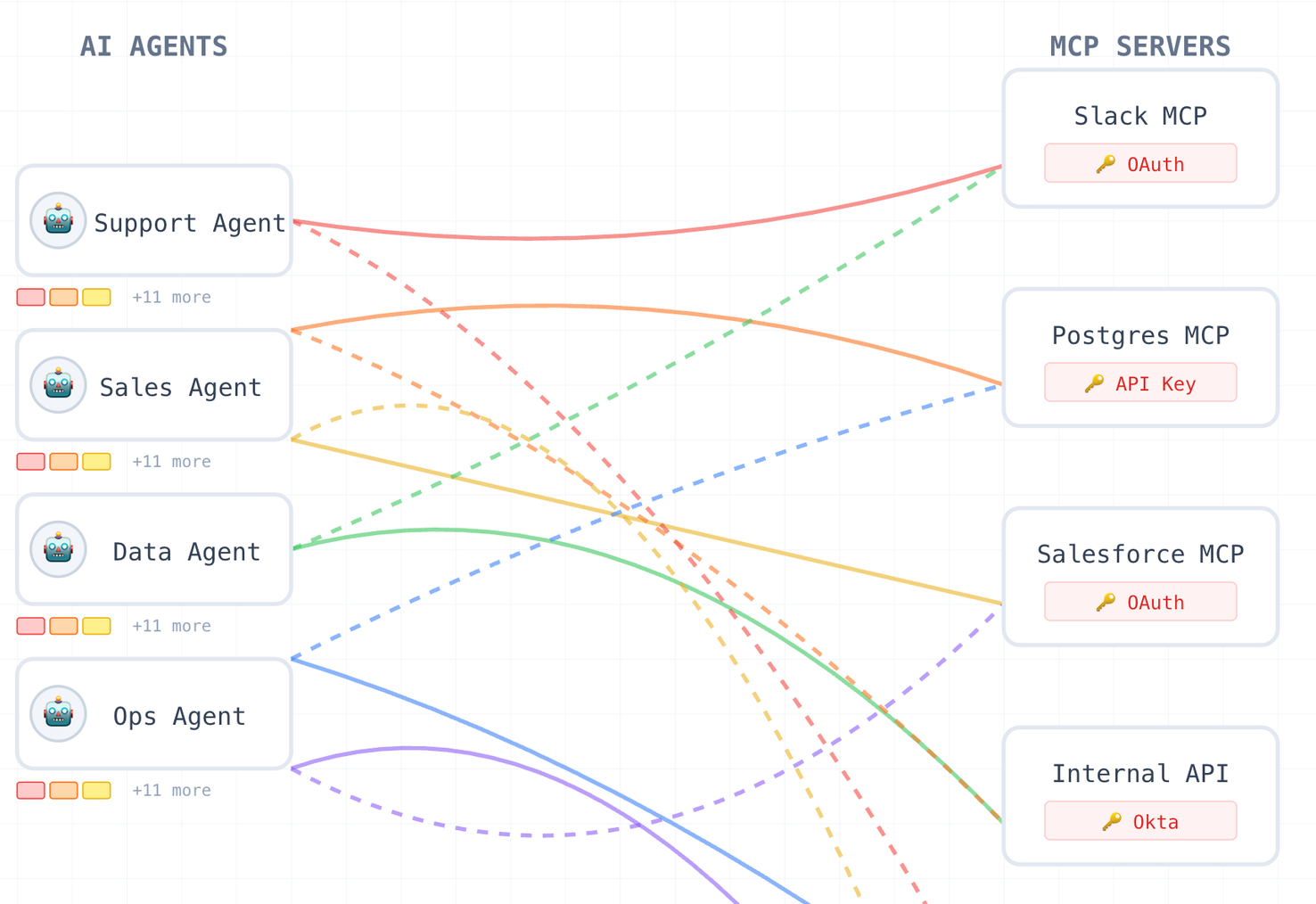
Access control didn't exist. Either everyone could use everything, or someone had to manually manage permissions at the server level. Neither scales.
Nobody knew what was actually happening. Usage data lived with each MCP server. Understanding which tools were being used, by which agents, with what impact – that required stitching together logs from a dozen sources.
Changes were scary. Rotating credentials, updating access, enforcing new policies - all of it meant touching individual servers or redeploying agents. Teams just... didn't.
Wait, we're not being naysayers here (we built a whole product on it!). MCP is a great protocol. But there's no operational layer for platform teams to manage it.
What we built
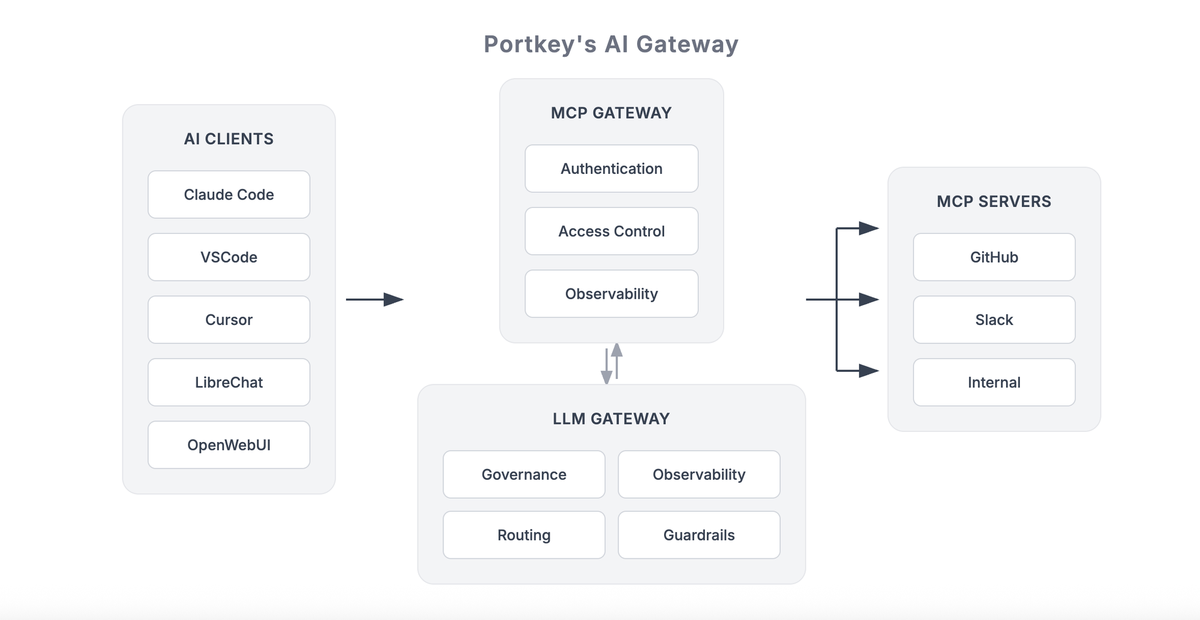
The MCP Gateway sits between your agents and your MCP servers. It moves operational concerns (auth, access control, policies, observability) out of individual servers into a shared control plane managed by platform teams.
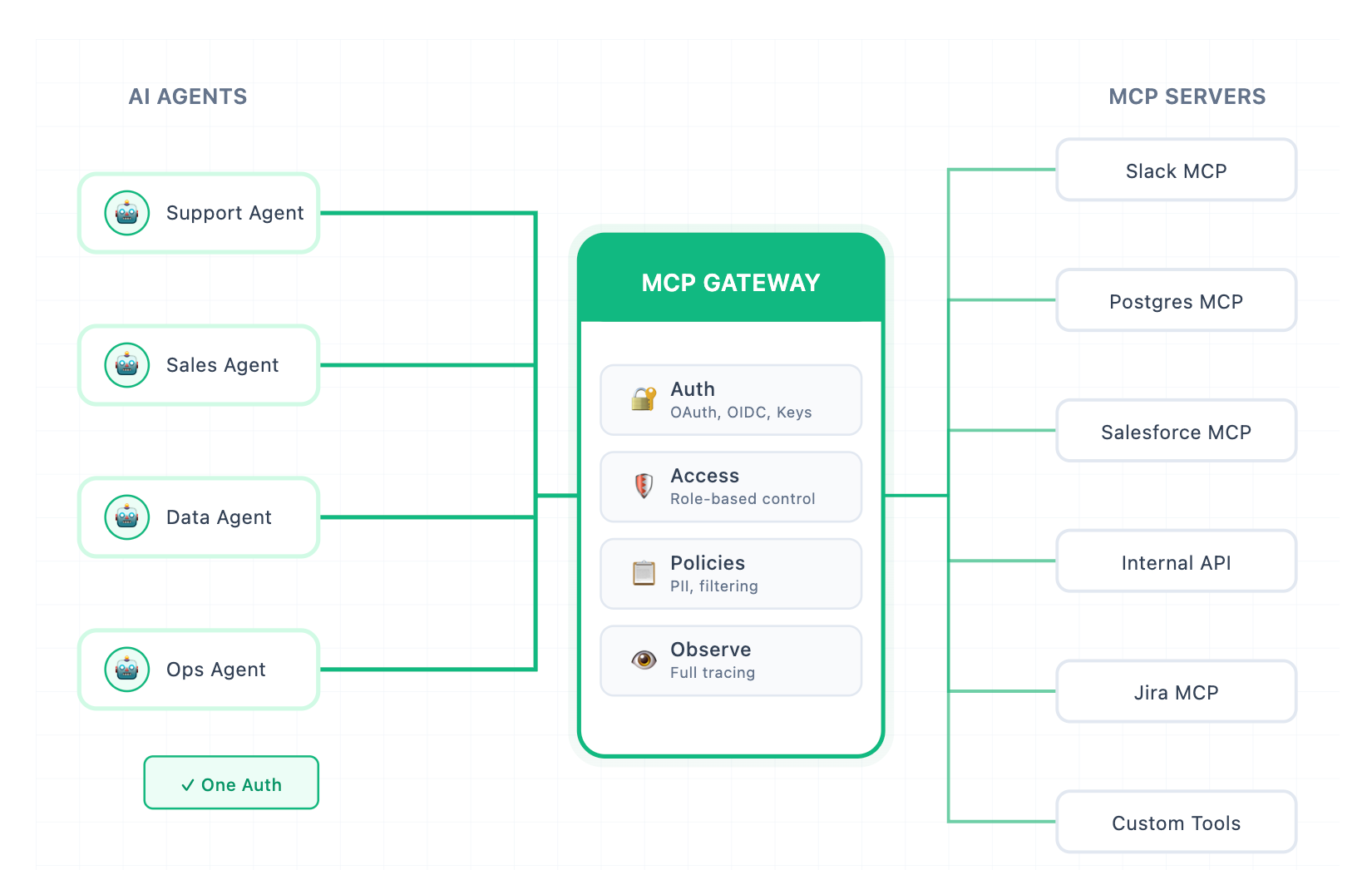
What this means is:
Auth Happens Once
Instead of agents managing credentials for every MCP server, they authenticate with the gateway.
The gateway handles upstream auth with each MCP server – OAuth flows, API keys, custom headers, whatever each server requires.
For internal MCP servers, you don't distribute credentials at all. Access is managed at the org/workspace/team level.
For enterprise identity(Okta, Entra ID, any OIDC provider), users authenticate with existing credentials.
For third-party servers, OAuth and API keys are managed at the gateway, not scattered across agent configs.
Access control that actually works
Authentication gets agents in the door. Authorization determines what they can do once inside.
The gateway enforces access at multiple levels:
- Organizations, workspaces, and teams;
- Individual users or agents;
- Specific MCP servers;
- and even individual tools within those servers
Internal systems stay tightly scoped. Common utilities are broadly available. And you change permissions without redeploying anything.
This sounds basic, but it's the thing that was blocking most teams from broader MCP adoption. Platform teams couldn't say yes because they had no way to scope access.
A registry so you know what exists
Every MCP server gets registered once and becomes part of a controlled inventory. You can see which tools each server exposes, who owns them, how they're being used, and by which agents.
The registry provides a clear view of:
- Internal, external, and third-party MCP servers
- The tools each server exposes
- Ownership and intended scope
- Usage across agents and teams
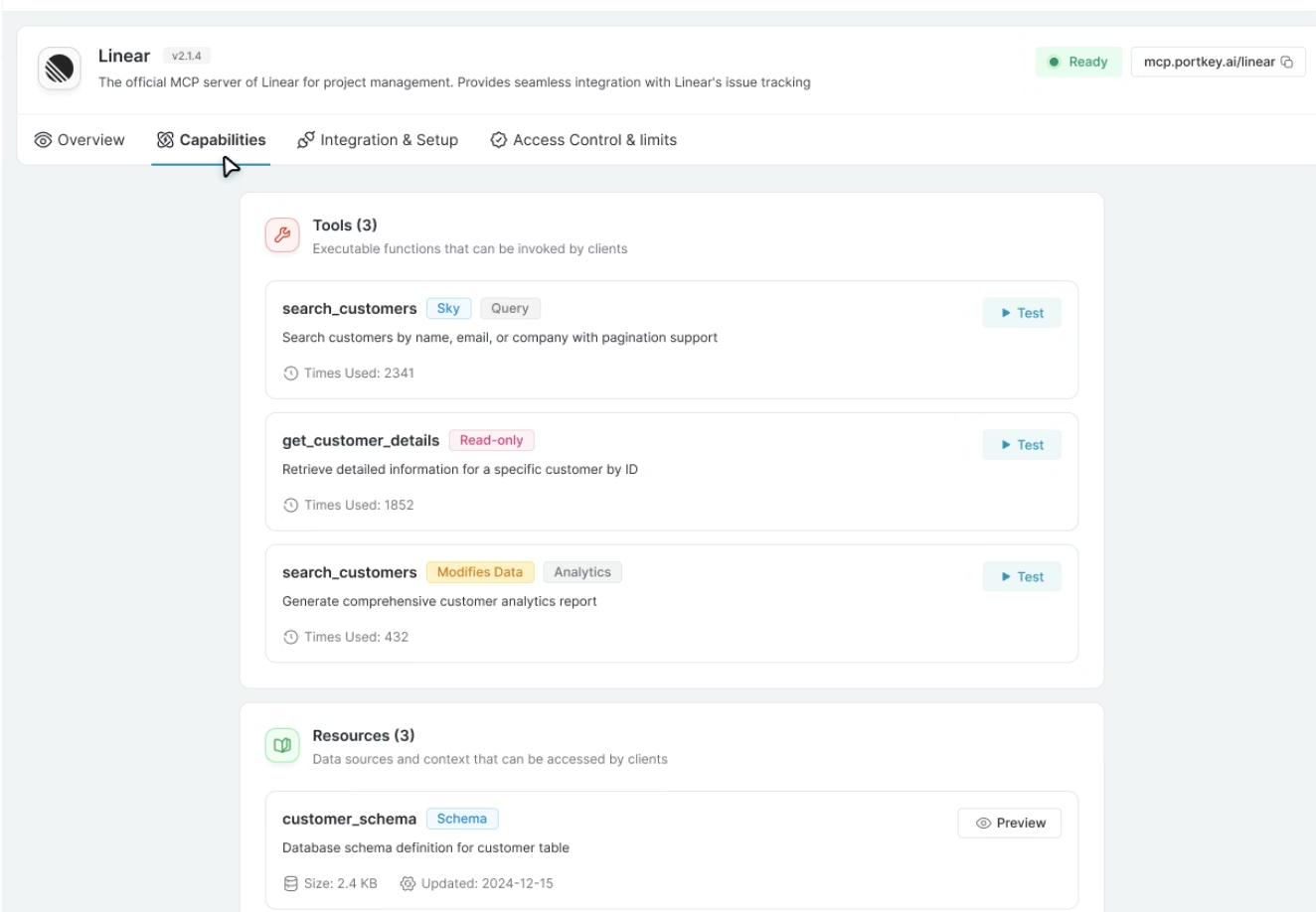
This might be my favorite part. Before, MCP servers were hidden dependencies buried in agent code. Now platform teams can actually see what's deployed, what's being used, and what's sitting idle.
Policies at the access layer
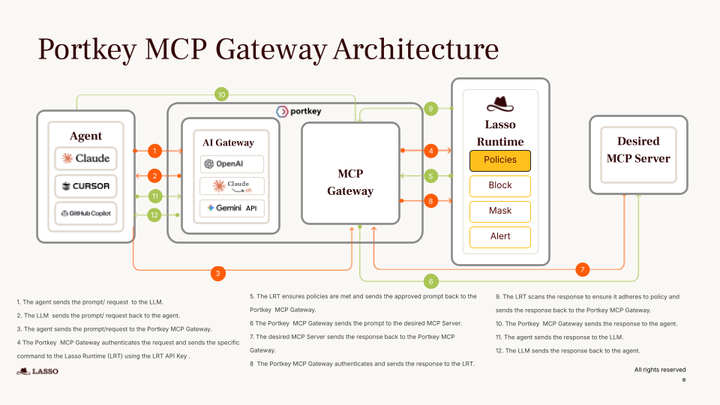
The gateway applies policies before requests reach LLMs or MCP servers.
Centralized guardrails enforce PII redaction, content filtering, and compliance policies across entities. They apply uniformly across every agent and human interaction.
Risky tool calls can be blocked by defining which tools can take which actions. You can prevent unauthorized invocations right before they execute.
Consistent policies across LLMs and MCP enable you to use a single control plane to govern both model interactions and tool usage.
Observability that connects the dots
Portkey’s MCP Gateway provides end-to-end observability across the full agent execution path.
Every MCP interaction is captured in context:
- Which agent made the request
- Which MCP server and tool were invoked
- What parameters were passed
- How the call behaved and whether it succeeded or failed
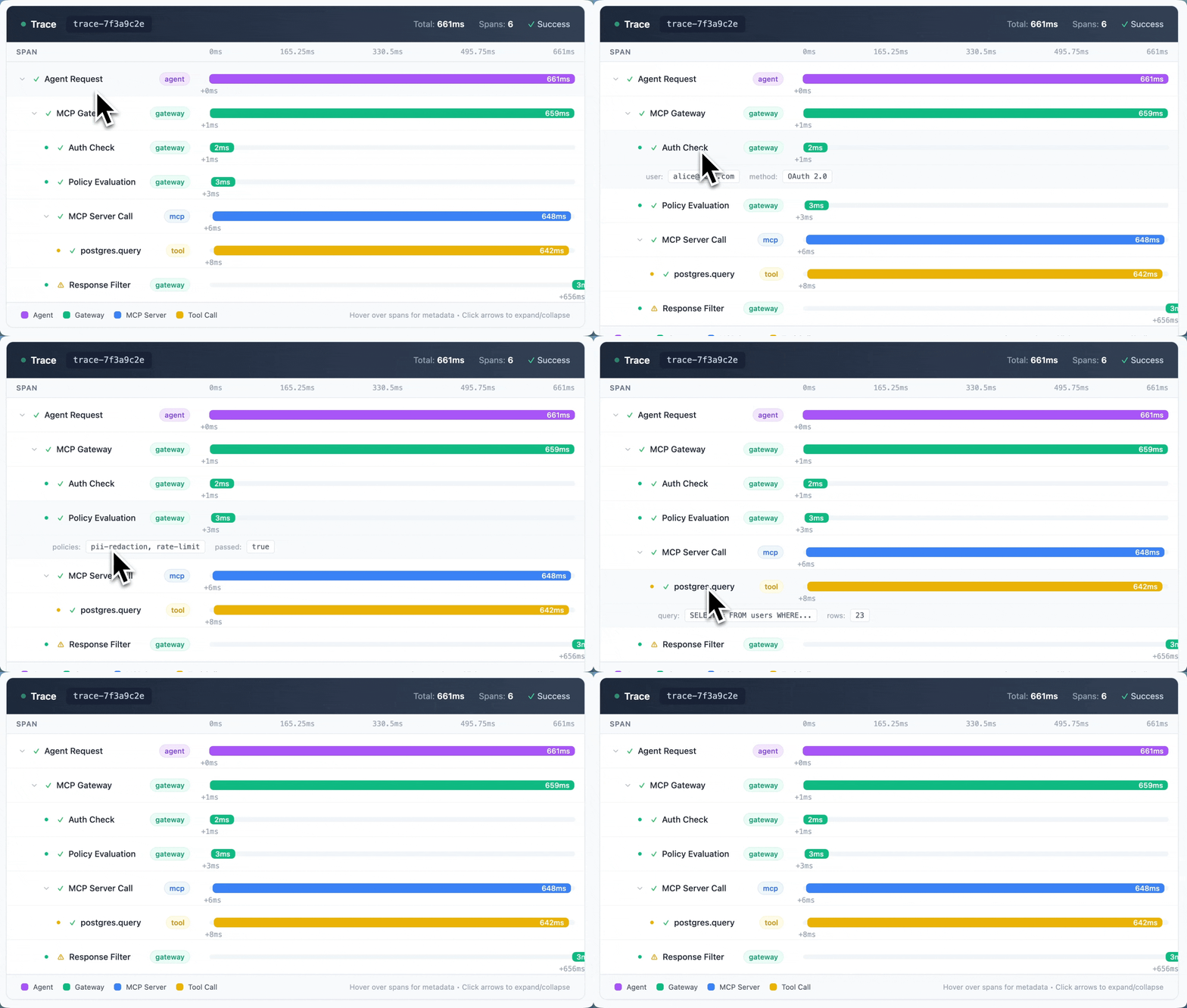
This correlates with LLM activity, so you get a single view of how agents reason, act, and interact with tools.
When something breaks, you can trace it back to the exact tool call or policy decision that caused it. That's been huge for teams debugging agent failures in production.
What this unlocks for platform teams
With the gateway in place, MCP becomes infrastructure you can actually operate:
- Safe sharing of MCP servers and tools across teams
- Clear ownership and lifecycle management for MCP capabilities
- Security and compliance policies are enforced centrally
- And teams can iterate without embedding control logic into every agent.
But the most significant unlock is that MCP can finally go from isolated usage to org-wide adoption without operational risk. That's what lets platform teams say yes.
Built on production infrastructure
The gateway runs on the same infrastructure that processes 4 trillion tokens monthly for Fortune 50 companies.
It integrates directly with Portkey's AI Gateway – models, MCP servers, tools, policies, observability, all through one control plane.
And it's fully open source. Inspect the code. Run it in your environment. Extend it. No opaque infrastructure in critical paths. No vendor lock-in.
Get Started
MCP has changed how agents access tools. The challenge is no longer protocol support. It’s access control, policy enforcement, visibility, and security. These are platform problems, and they require platform solutions.
The MCP Gateway is open source and ready to run. Try it with your existing MCP servers, or book a demo if you want to talk through your setup.
We're also in the community if you have questions or want to share what you're building.