

What are vision models?Vision models are artificial intelligence systems that combine both vision and language modalities to process images and natural language text. These models are typically trained on large image and text datasets with different structures based on the pre-training objective.
Vision Chat Completion Usage
Portkey supports the OpenAI signature to define messages with images as part of the API request. Images are made available to the model in two main ways: by passing a link to the image or by passing the base64 encoded image directly in the request.
Here’s an example using OpenAI’s gpt-4o model
NodeJS
Python
OpenAI NodeJS
OpenAI Python
cURL
import Portkey from 'portkey-ai';
// Initialize the Portkey client
const portkey = new Portkey({
apiKey: "PORTKEY_API_KEY", // Replace with your Portkey API key
provider:"@PROVIDER"
});
// Generate a chat completion with streaming
async function getChatCompletionFunctions(){
const response = await portkey.chat.completions.create({
model: "gpt-4o-mini",
messages: [{
role: "user",
content: [
{ type: "text", text: "What is in this image?" },
{
type: "image_url",
image_url: {
url: "https://upload.wikimedia.org/wikipedia/commons/thumb/d/dd/Gfp-wisconsin-madison-the-nature-boardwalk.jpg/2560px-Gfp-wisconsin-madison-the-nature-boardwalk.jpg",
},
},
],
}],
});
console.log(response)
}
await getChatCompletionFunctions();
from portkey_ai import Portkey
# Initialize the Portkey client
portkey = Portkey(
api_key="PORTKEY_API_KEY", # Replace with your Portkey API key
provider="@PROVIDER"
)
response = client.chat.completions.create(
model="gpt-4o",
messages=[{
"role": "user",
"content": [
{"type": "text", "text": "What's in this image?"},
{
"type": "image_url",
"image_url": {
"url": "https://upload.wikimedia.org/wikipedia/commons/thumb/d/dd/Gfp-wisconsin-madison-the-nature-boardwalk.jpg/2560px-Gfp-wisconsin-madison-the-nature-boardwalk.jpg",
},
},
],
}],
)
print(response)
import OpenAI from 'openai'; // We're using the v4 SDK
import { PORTKEY_GATEWAY_URL, createHeaders } from 'portkey-ai'
const openai = new OpenAI({
apiKey: 'OPENAI_API_KEY', // defaults to process.env["OPENAI_API_KEY"],
baseURL: PORTKEY_GATEWAY_URL,
defaultHeaders: createHeaders({
provider: "openai",
apiKey: "PORTKEY_API_KEY" // defaults to process.env["PORTKEY_API_KEY"]
})
});
// Generate a chat completion with streaming
async function getChatCompletionFunctions(){
const response = await openai.chat.completions.create({
model: "gpt-4o-mini",
messages: [{
role: "user",
content: [
{ type: "text", text: "What is in this image?" },
{
type: "image_url",
image_url: {
url: "https://upload.wikimedia.org/wikipedia/commons/thumb/d/dd/Gfp-wisconsin-madison-the-nature-boardwalk.jpg/2560px-Gfp-wisconsin-madison-the-nature-boardwalk.jpg",
},
},
],
}],
});
console.log(response)
}
await getChatCompletionFunctions();
from openai import OpenAI
from portkey_ai import PORTKEY_GATEWAY_URL, createHeaders
openai = OpenAI(
api_key='OPENAI_API_KEY',
base_url=PORTKEY_GATEWAY_URL,
default_headers=createHeaders(
provider="openai",
api_key="PORTKEY_API_KEY"
)
)
response = openai.chat.completions.create(
model="gpt-4o-mini",
messages=[{
"role": "user",
"content": [
{"type": "text", "text": "What's in this image?"},
{
"type": "image_url",
"image_url": {
"url": "https://upload.wikimedia.org/wikipedia/commons/thumb/d/dd/Gfp-wisconsin-madison-the-nature-boardwalk.jpg/2560px-Gfp-wisconsin-madison-the-nature-boardwalk.jpg",
},
},
],
}],
)
print(resonse)
curl "https://api.portkey.ai/v1/chat/completions" \
-H "Content-Type: application/json" \
-H "x-portkey-api-key: $PORTKEY_API_KEY" \
-H "x-portkey-provider: openai" \
-H "Authorization: Bearer $OPENAI_API_KEY" \
-d '{
"model": "gpt-4o-mini",
"messages": [
{
"role": "user",
"content": [
{
"type": "text",
"text": "What is in this image?"
},
{
"type": "image_url",
"image_url": {
"url": "https://upload.wikimedia.org/wikipedia/commons/thumb/d/dd/Gfp-wisconsin-madison-the-nature-boardwalk.jpg/2560px-Gfp-wisconsin-madison-the-nature-boardwalk.jpg"
}
}
]
}
],
"max_tokens": 300
}'
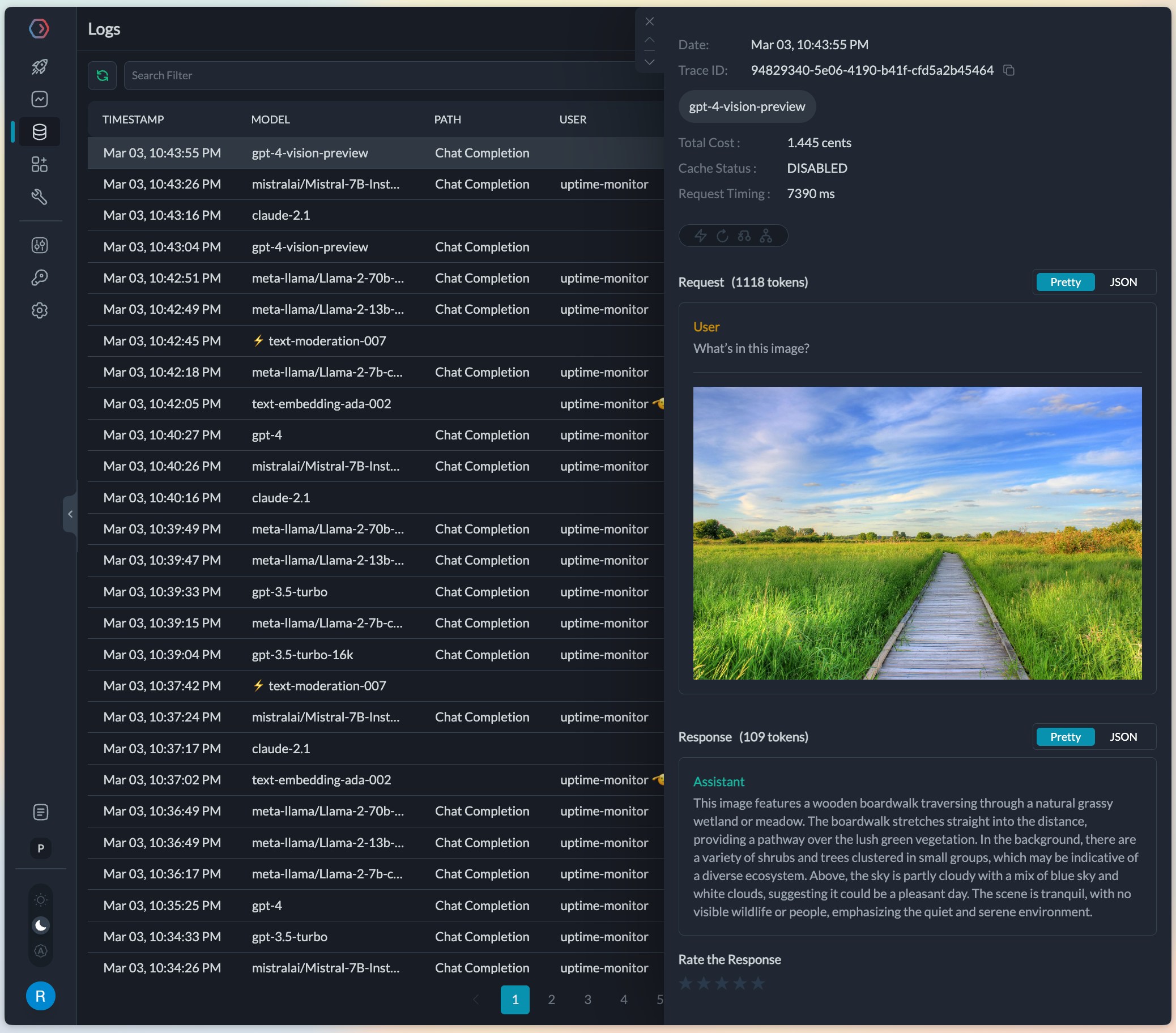
On completion, the request will get logged in the logs UI where any image inputs or outputs can be viewed. Portkey will automatically load the image URLs or the base64 images making for a great debugging experience with vision models.
Creating prompt templates for vision models
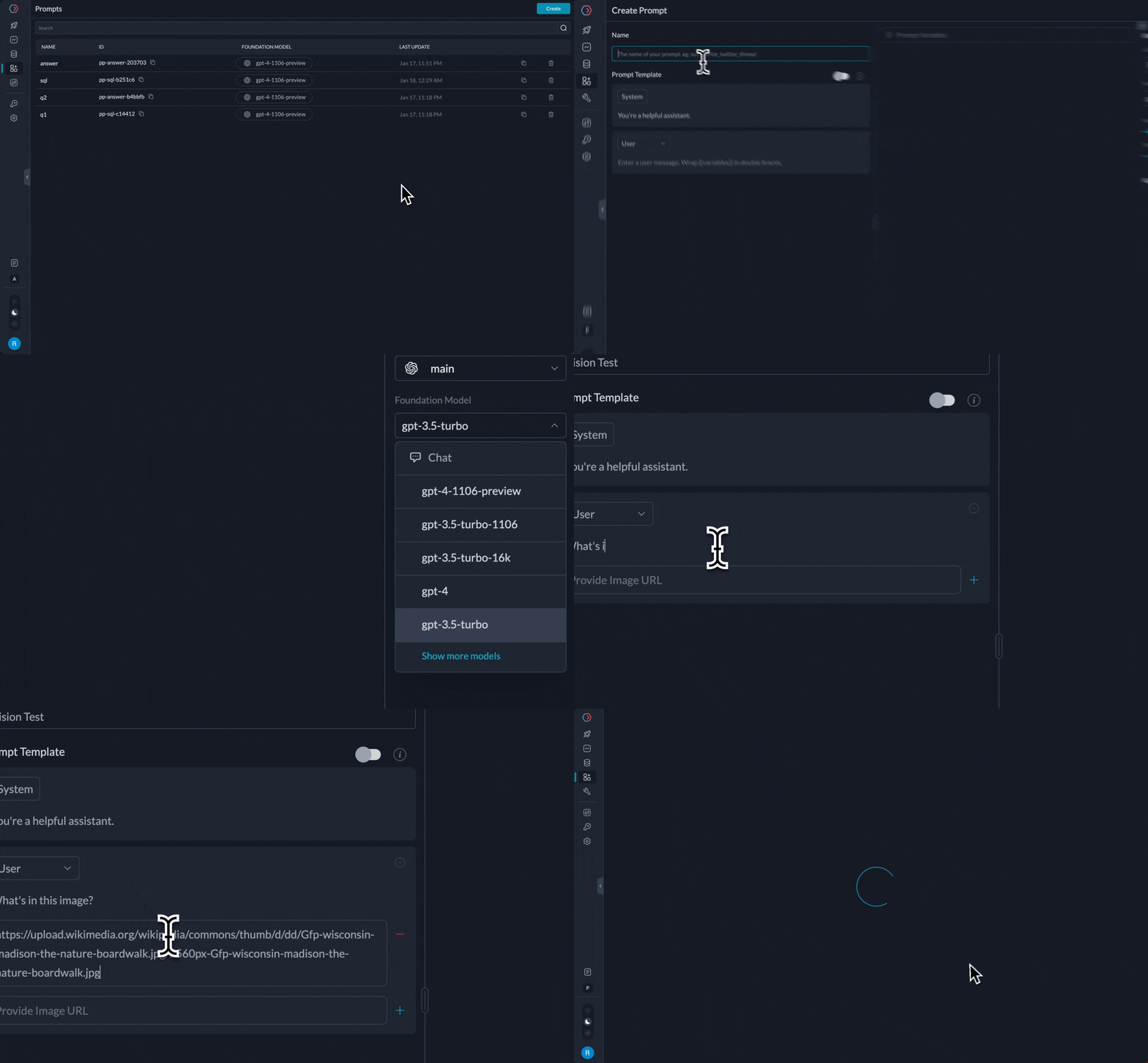
Portkey’s prompt library supports creating templates with image inputs. If the same image will be used in all prompt calls, you can save it as part of the template’s image URL itself. Or, if the image will be sent via the API as a variable, add a variable to the image link.
Supported Providers and Models
Portkey supports all vision models from its integrated providers as they become available. The table below shows some examples of supported vision models. Please raise a request or a PR to add a provider to the AI gateway.
| Provider | Models | Functions |
|---|
| OpenAI | gpt-4-vision-preview, gpt-4o, gpt-4o-mini | Create Chat Completion |
| Azure OpenAI | gpt-4-vision-preview, gpt-4o, gpt-4o-mini | Create Chat Completion |
| Gemini | gemini-1.0-pro-vision , gemini-1.5-flash, gemini-1.5-flash-8b, gemini-1.5-pro | Create Chat Completion |
| Anthropic | claude-3-sonnet, claude-3-haiku, claude-3-opus, claude-3.5-sonnet, claude-3.5-haiku | Create Chat Completion |
| AWS Bedrock | anthropic.claude-3-5-sonnet anthropic.claude-3-5-haiku anthropic.claude-3-5-sonnet-20240620-v1:0 | Create Chat Completion |
For a complete list of all supported provider (including non-vision LLMs), check out our providers documentation.