

Screenshots on this page show the previous product branding and navigation. The workflow they
illustrate is current; the interface around it has since been rebranded to Prisma AIRS.
Introduction
CrewAI is a framework for orchestrating role-playing, autonomous AI agents designed to solve complex, open-ended tasks through collaboration. It provides a robust structure for agents to work together, leverage tools, and exchange insights to accomplish sophisticated objectives. The AI Gateway enhances CrewAI with production-readiness features, turning your experimental agent crews into robust systems by providing:- Complete observability of every agent step, tool use, and interaction
- Built-in reliability with fallbacks, retries, and load balancing
- Cost tracking and optimization to manage your AI spend
- Access to 3,000+ LLMs through a single integration
- Guardrails to keep agent behaviour safe and compliant
CrewAI Official Documentation
Learn more about CrewAI’s core concepts and features
Installation & Setup
1
Install the required packages
Generate API Key
Create an AI Gateway API key with optional budget/rate limits from the Strata Cloud Manager. You can also attach configurations for reliability, caching, and more to this key. More on this later.
3
Configure CrewAI with the AI Gateway
The integration is simple - you just need to update the LLM configuration in your CrewAI setup:
Production Features
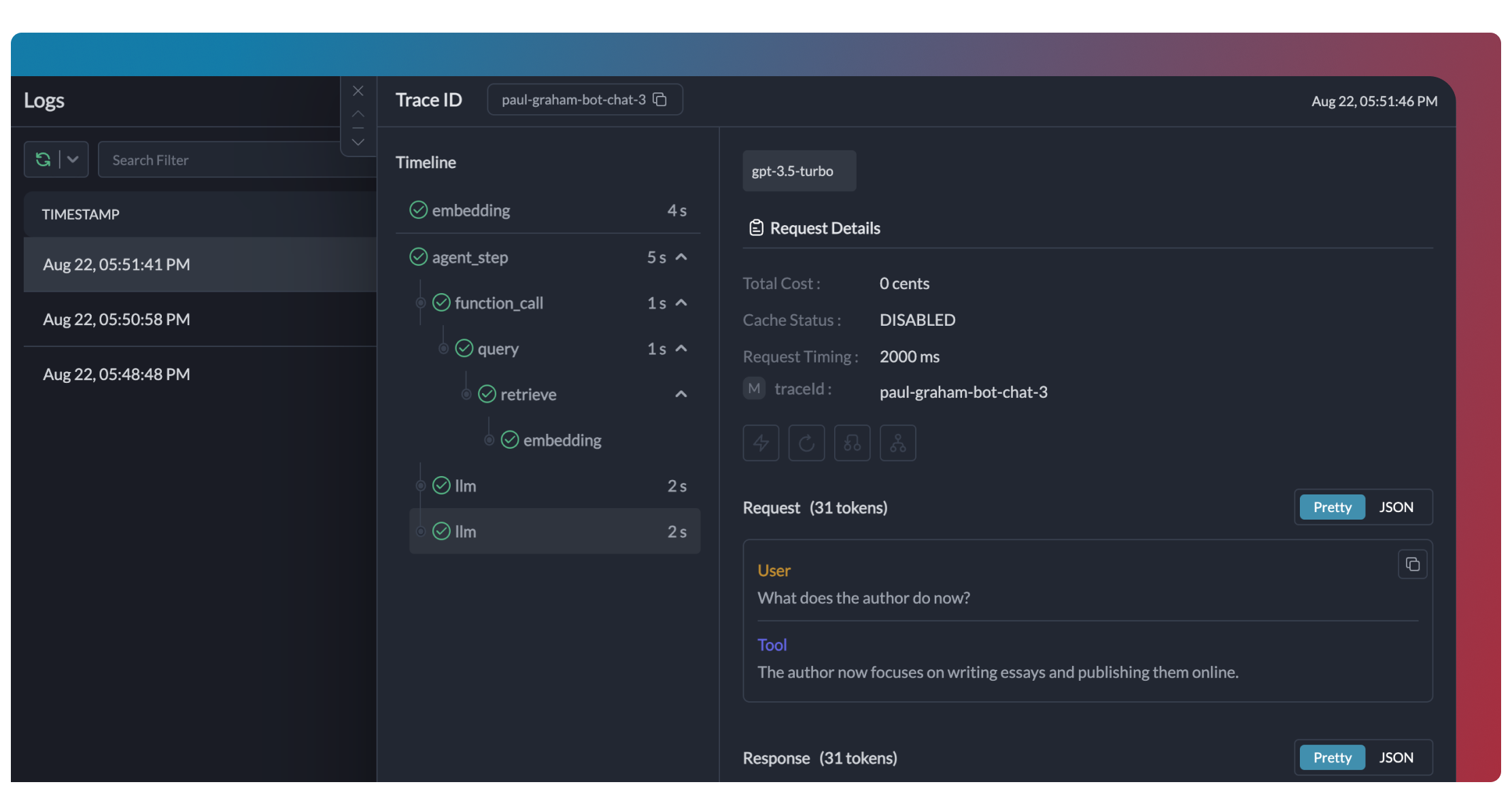
1. Enhanced Observability
The AI Gateway provides comprehensive observability for your CrewAI agents, helping you understand exactly what’s happening during each execution.- Traces
- Logs
- Metrics & Dashboards
- Metadata Filtering


2. Reliability - Keep Your Crews Running Smoothly
When running crews in production, things can go wrong - API rate limits, network issues, or provider outages. The AI Gateway’s reliability features ensure your agents keep running smoothly even when problems occur. It’s simple to enable fallback in your CrewAI setup by using an AI Gateway Config: This configuration will automatically try Claude if the GPT-4o request fails, ensuring your crew can continue operating.Automatic Retries
Handles temporary failures automatically. If an LLM call fails, the AI Gateway will retry the same request for the specified number of times - perfect for rate limits or network blips.
Request Timeouts
Prevent your agents from hanging. Set timeouts to ensure you get responses (or can fail gracefully) within your required timeframes.
Conditional Routing
Send different requests to different providers. Route complex reasoning to GPT-4, creative tasks to Claude, and quick responses to Gemini based on your needs.
Fallbacks
Keep running even if your primary provider fails. Automatically switch to backup providers to maintain availability.
Load Balancing
Spread requests across multiple API keys or providers. Great for high-volume crew operations and staying within rate limits.
3. Guardrails for Safe Crews
Guardrails ensure your CrewAI agents operate safely and respond appropriately in all situations. Why Use Guardrails? CrewAI agents can experience various failure modes:- Generating harmful or inappropriate content
- Leaking sensitive information like PII
- Hallucinating incorrect information
- Generating outputs in incorrect formats
- Detect and redact PII in both inputs and outputs
- Filter harmful or inappropriate content
- Validate response formats against schemas
- Check for hallucinations against ground truth
- Apply custom business logic and rules
Learn More About Guardrails
Explore the AI Gateway’s guardrail features to enhance agent safety
4. User Tracking with Metadata
Track individual users through your CrewAI agents using the AI Gateway’s metadata system. What is Metadata in the AI Gateway? Metadata allows you to associate custom data with each request, enabling filtering, segmentation, and analytics. The special_user field is specifically designed for user tracking.
Filter Analytics by User
With metadata in place, you can filter analytics by user and analyze performance metrics on a per-user basis:

Filter analytics by user
- Per-user cost tracking and budgeting
- Personalized user analytics
- Team or organisation-level metrics
- Environment-specific monitoring (staging vs. production)
Learn More About Metadata
Explore how to use custom metadata to enhance your analytics
5. Caching for Efficient Crews
Implement caching to make your CrewAI agents more efficient and cost-effective:- Simple Caching
- Semantic Caching
Simple caching performs exact matches on input prompts, caching identical requests to avoid redundant model executions.
6. Model Interoperability
CrewAI supports multiple LLM providers, and the AI Gateway extends this capability by providing access to over 200 LLMs through a unified interface. You can easily switch between different models without changing your core agent logic: The AI Gateway provides access to LLMs from providers including:- OpenAI (GPT-4o, GPT-4 Turbo, etc.)
- Anthropic (Claude 3.5 Sonnet, Claude 3 Opus, etc.)
- Mistral AI (Mistral Large, Mistral Medium, etc.)
- Google Vertex AI (Gemini 1.5 Pro, etc.)
- Cohere (Command, Command-R, etc.)
- AWS Bedrock (Claude, Titan, etc.)
- Local/Private Models
Supported Providers
See the full list of LLM providers supported by the AI Gateway
Set Up Governance for CrewAI
Why Governance? If you are using CrewAI inside your organisation, you need to consider several governance aspects:- Cost Management: Controlling and tracking AI spending across teams
- Access Control: Managing which teams can use specific models
- Usage Analytics: Understanding how AI is being used across the organisation
- Security & Compliance: Maintaining your organisation’s security standards
- Reliability: Ensuring consistent service across all users
1
Create LLM Integrations
Go to Integrations in Strata Cloud Manager, choose your LLM and connect to it. Save and copy the generated provider ID.
2
Create Default Config
Configs in the AI Gateway define how your requests are routed, with features like advanced routing, fallbacks, and retries.To create your config: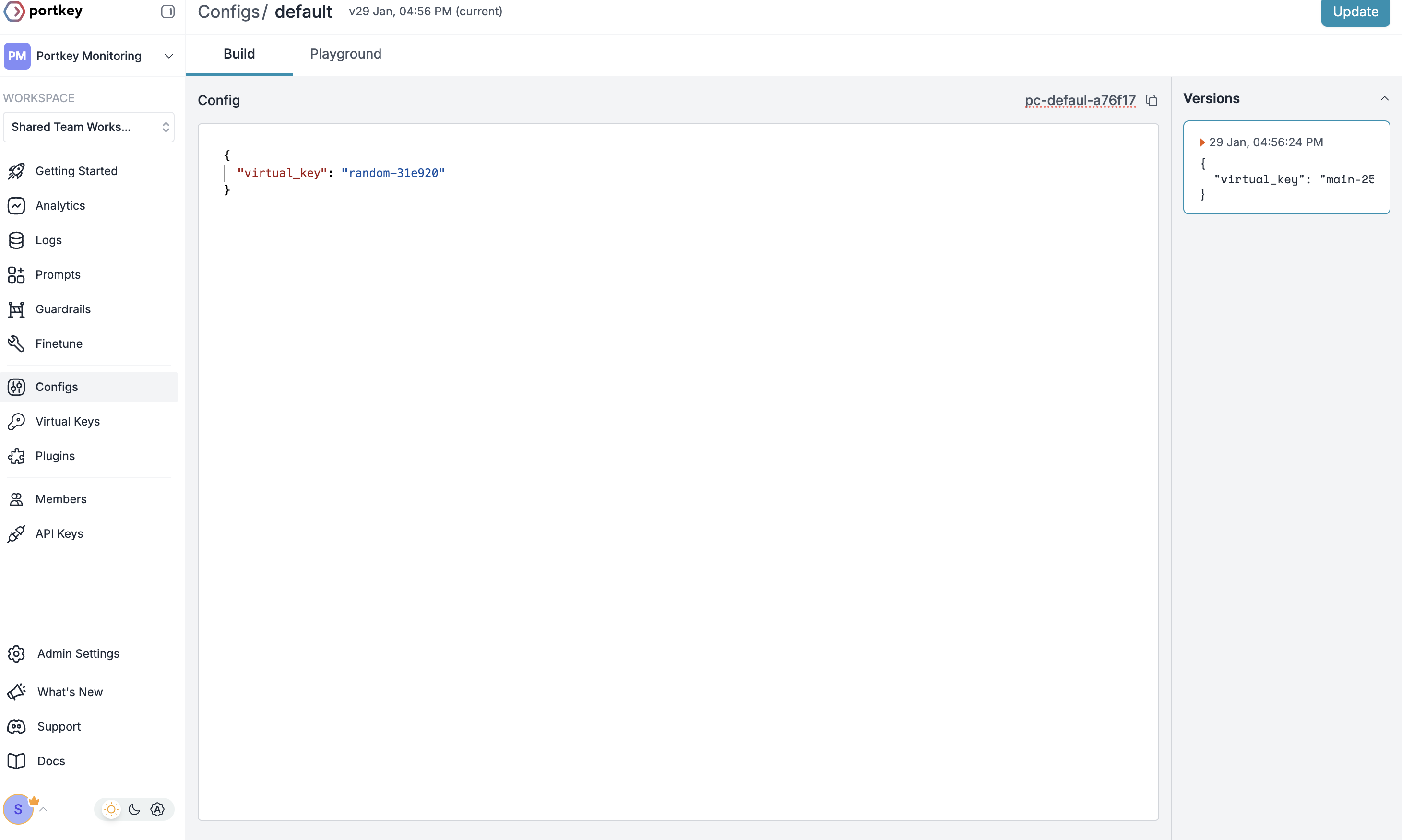
- Go to Configs in Strata Cloud Manager
- Create new config with:
- Save and note the Config name for the next step
3
Configure AI Gateway API Key
Now create an AI Gateway API key and attach the config you created in Step 2: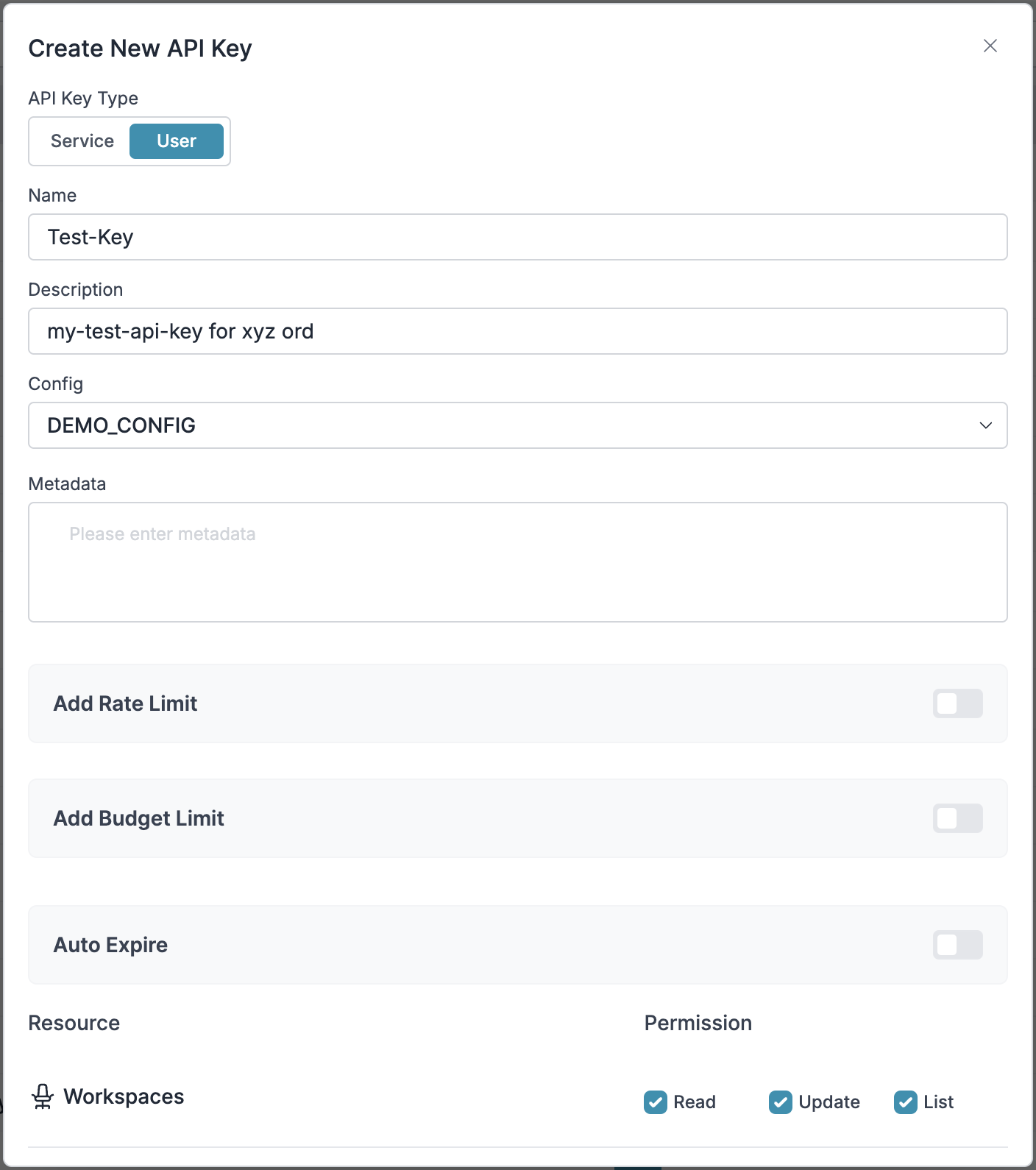
- Go to API Keys in the AI Gateway and Create new API key
- Select your config from
Step 2 - Generate and save your API key
4
Connect to CrewAI
After setting up your AI Gateway API key with the attached config, connect it to your CrewAI agents:
Step 1: Implement Budget Controls & Rate Limits
Step 1: Implement Budget Controls & Rate Limits
Step 1: Implement Budget Controls & Rate Limits
Enable granular control over LLM access at the team/department level. This helps you:- Set up budget limits
- Prevent unexpected usage spikes using Rate limits
- Track departmental spending
Setting Up Department-Specific Controls:
- Navigate to Integrations in Strata Cloud Manager and create a new LLM integration
- Provision this integration for each department with budget limits and rate limits
- Configure department-specific limits
Step 2: Define Model Access Rules
Step 2: Define Model Access Rules
Step 2: Define Model Access Rules
As your AI usage scales, controlling which teams can access specific models becomes crucial. AI Gateway Configs provide this control layer with features like:Access Control Features:
- Model Restrictions: Limit access to specific models
- Data Protection: Implement guardrails for sensitive data
- Reliability Controls: Add fallbacks and retry logic
Example Configuration:
Here’s a basic configuration to route requests to OpenAI, specifically using GPT-4o:Configs can be updated anytime to adjust controls without affecting running applications.
Step 3: Implement Access Controls
Step 3: Implement Access Controls
Step 3: Implement Access Controls
Create User-specific API keys that automatically:- Track usage per user/team with metadata
- Apply appropriate configs to route requests
- Collect relevant metadata to filter logs
- Enforce access permissions
Step 4: Deploy & Monitor
Step 4: Deploy & Monitor
Step 4: Deploy & Monitor
After distributing API keys to your team members, your CrewAI setup is ready to go. Each team member can now use their designated API keys with appropriate access levels and budget controls.Monitor usage in Strata Cloud Manager:- Cost tracking by department
- Model usage patterns
- Request volumes
- Error rates
What’s Available
Your CrewAI integration now has:- Departmental budget controls
- Model access governance
- Usage tracking & attribution
- Security guardrails
- Reliability features
Frequently Asked Questions
How does the AI Gateway enhance CrewAI?
How does the AI Gateway enhance CrewAI?
The AI Gateway adds production-readiness to CrewAI through comprehensive observability (traces, logs, metrics), reliability features (fallbacks, retries, caching), and access to 3,000+ LLMs through a unified interface. This makes it easier to debug, optimize, and scale your agent applications.
Can I use the AI Gateway with existing CrewAI applications?
Can I use the AI Gateway with existing CrewAI applications?
Yes! The AI Gateway integrates seamlessly with existing CrewAI applications. You just need to update your LLM configuration code with the gateway-enabled version. The rest of your agent and crew code remains unchanged.
Does the AI Gateway work with all CrewAI features?
Does the AI Gateway work with all CrewAI features?
The AI Gateway supports all CrewAI features, including agents, tools, human-in-the-loop workflows, and all task process types (sequential, hierarchical, etc.). It adds observability and reliability without limiting any of the framework’s functionality.
Can I track usage across multiple agents in a crew?
Can I track usage across multiple agents in a crew?
Yes, the AI Gateway allows you to use a consistent
trace_id across multiple agents in a crew to track the entire workflow. This is especially useful for complex crews where you want to understand the full execution path across multiple agents.How do I filter logs and traces for specific crew runs?
How do I filter logs and traces for specific crew runs?
The AI Gateway allows you to add custom metadata to your LLM configuration, which you can then use for filtering. Add fields like
crew_name, crew_type, or session_id to easily find and analyze specific crew executions.Can I use my own API keys with the AI Gateway?
Can I use my own API keys with the AI Gateway?
Yes! The AI Gateway uses your own API keys for the various LLM providers. It securely stores them, allowing you to easily manage and rotate keys without changing your code.
Resources
CrewAI Docs
Official CrewAI documentation