

Screenshots on this page show the previous product branding and navigation. The workflow they
illustrate is current; the interface around it has since been rebranded to Prisma AIRS.
Getting Started
Installation
Setting up
The AI Gateway integrates seamlessly with DSPy’s newLM interface, allowing you to use 3,000+ LLMs with detailed cost insights. Simply configure the LM with the AI Gateway URL and your AI Gateway API key.
Grab your AI Gateway API key from here.
openai/@PROVIDER_SLUG/MODEL_NAME where:
@PROVIDER_SLUGis your provider’s slug in the AI Gateway (found in Model Catalog)MODEL_NAMEis the specific model you want to use
openai/@openai-provider-slug/gpt-4oopenai/@anthropic-provider-slug/claude-3-sonnet-20240320openai/@aws-bedrock-slug/anthropic.claude-3-sonnet-20240229-v1:0
Let’s make your first Request
Here’s a simple example demonstrating DSPy with AI Gateway integration:Request Details: Information about the specific request, including the model used, input, and output.Metrics: Performance metrics such as latency, token usage, and cost.Logs: Detailed logs of the request, including any errors or warnings.Traces: A visual representation of the request flow, especially useful for complex DSPy modules.
AI Gateway Features with DSPy
1. Interoperability
The AI Gateway’s Unified API enables you to easily switch between 1600+ language models. Simply change the provider slug and model name in your model string:2. Logs and Traces
The AI Gateway provides detailed tracing for each request. This is especially useful for complex DSPy modules with multiple LLM calls. You can view these traces in Strata Cloud Manager to understand the flow of your DSPy application.
3. Metrics
The AI Gateway’s Observability suite helps you track key metrics like cost and token usage, which is crucial for managing the high cost of DSPy operations. The observability dashboard helps you track 40+ key metrics, giving you detailed insights into your DSPy runs.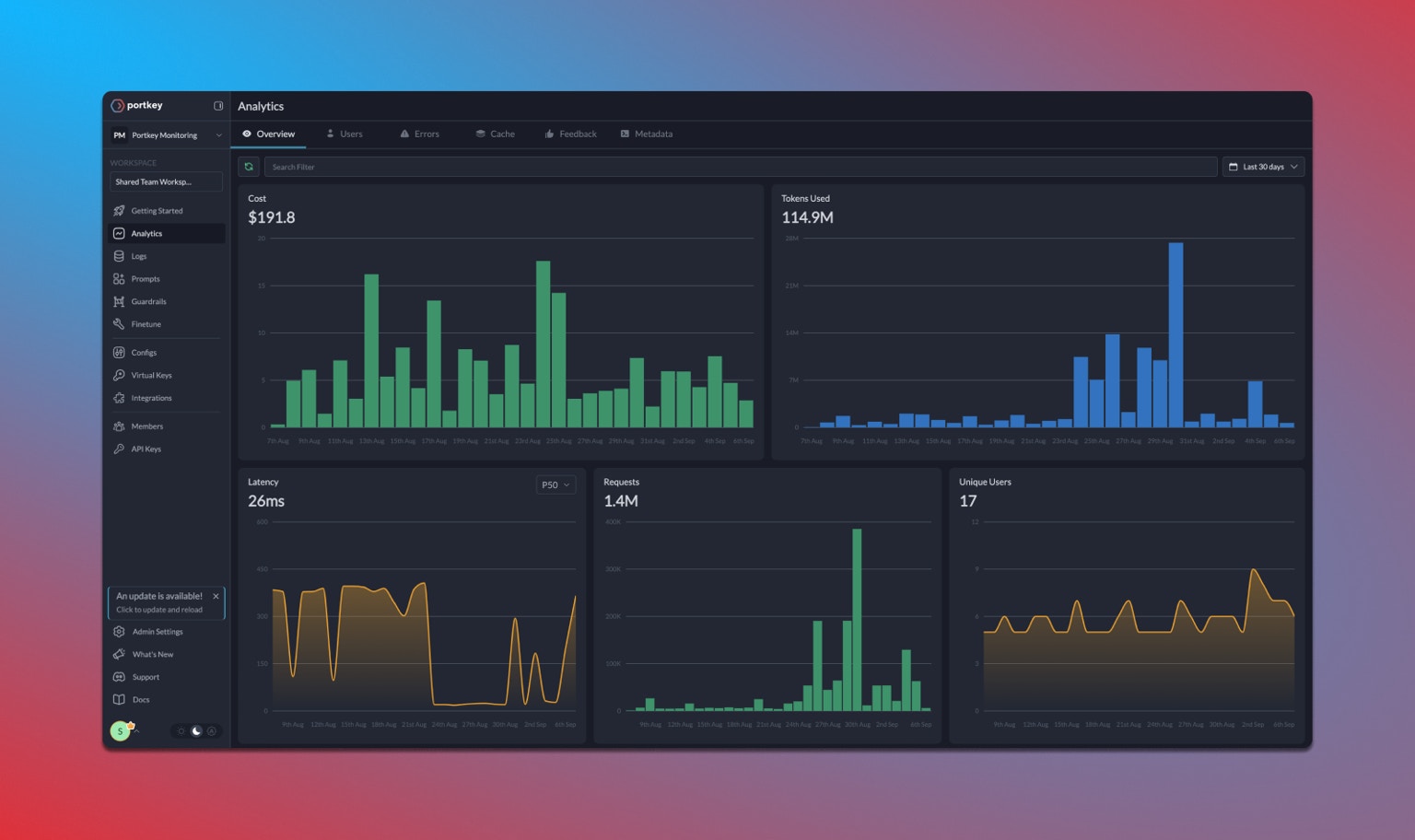
4. Advanced Configuration
While the basic setup is simple, you can still access advanced AI Gateway features by configuring them in your Config or through Strata Cloud Manager:- Caching: Enable semantic or simple caching to reduce costs
- Fallbacks: Set up automatic fallbacks between providers
- Load Balancing: Distribute requests across multiple API keys
- Retries: Configure automatic retry logic
- Rate Limiting: Set rate limits for your API usage
Advanced Example: RAG with DSPy and AI Gateway
Here’s a complete example showing how to build a RAG system with DSPy and the AI Gateway:Troubleshooting
Finding Provider Slugs
Finding Provider Slugs
Provider slugs can be found in your AI Gateway’s Model Catalog. .
Model Name Format
Model Name Format
Always use the exact model name as specified by the provider. For example:
- OpenAI:
gpt-4o,gpt-3.5-turbo - Anthropic:
claude-3-opus-20240229,claude-3-sonnet-20240320 - AWS Bedrock:
anthropic.claude-3-sonnet-20240229-v1:0
Missing LLM Calls in Traces
Missing LLM Calls in Traces
DSPy uses caching for LLM calls by default, which means repeated identical requests won’t generate new API calls or new traces. To ensure you capture every LLM call:
- Disable Caching: For full tracing during debugging, turn off DSPy’s caching
- Use Unique Inputs: Make sure each run uses different inputs to avoid triggering the cache
- Clear the Cache: If you need to test the same inputs again, clear DSPy’s cache between runs
- Verify Configuration: Confirm that your DSPy setup is correctly configured with AI Gateway Remember to manage caching wisely in production to strike the right balance between thorough tracing and performance efficiency.
Next Steps
- Explore more LLM providers available through the AI Gateway
- Set up advanced routing for reliability and performance
- Configure caching to reduce costs