

Screenshots on this page show the previous product branding and navigation. The workflow they
illustrate is current; the interface around it has since been rebranded to Prisma AIRS.
Usage
AI Gateway Features
Now that you have Anthropic Computer Use set up, let’s explore the features the AI Gateway provides to ensure secure, efficient, and cost-effective AI-assisted development.1. Comprehensive Metrics
Using the AI Gateway you can track 40+ key metrics including cost, token usage, response time, and performance across all your LLM providers in real time. Filter these metrics by developer, team, or project using custom metadata.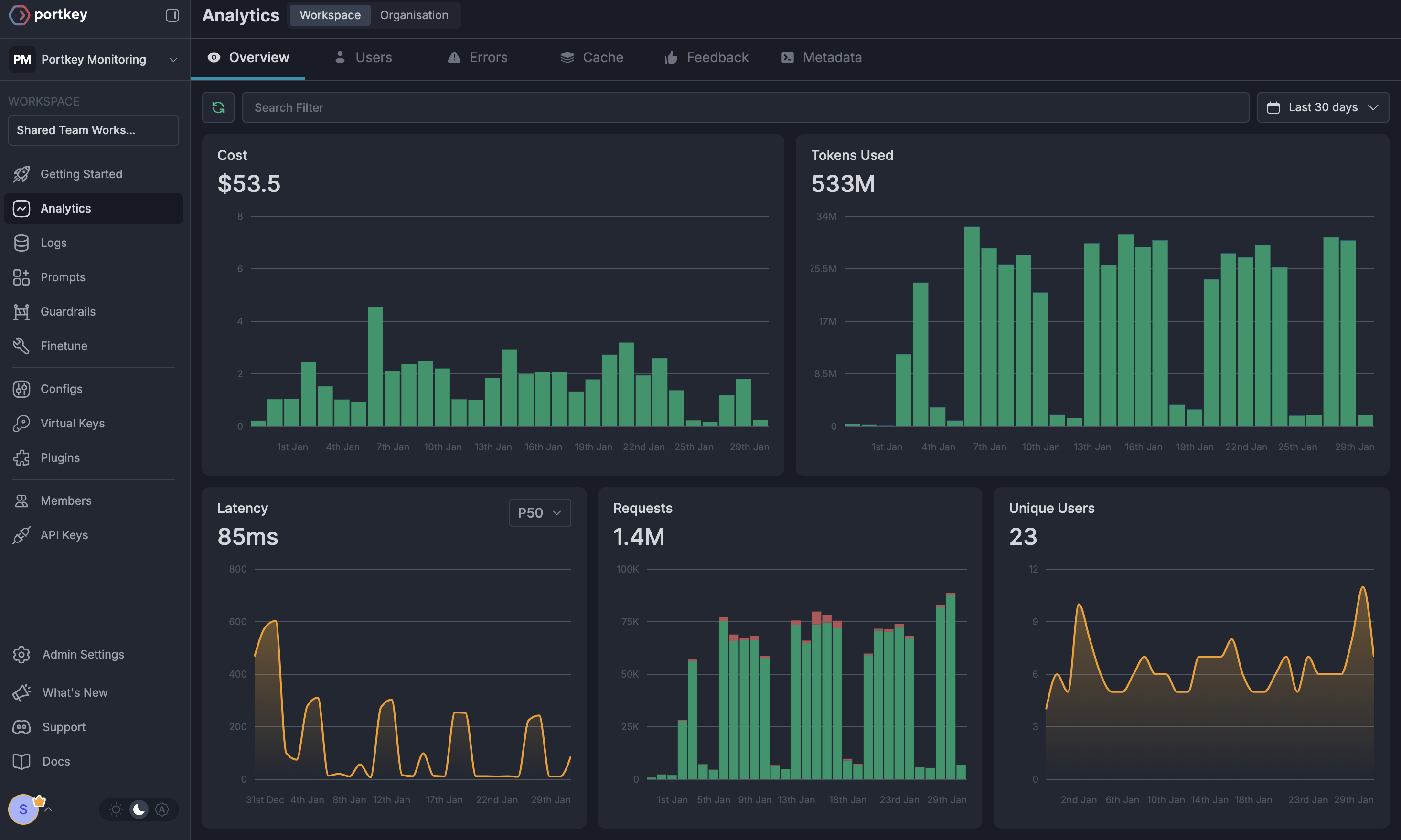
2. Advanced Logs
The AI Gateway’s logging dashboard provides detailed logs for every request made by Anthropic Computer Use. These logs include:- Complete request and response tracking
- Code context and generation metrics
- Developer attribution
- Cost breakdown per coding session
3. Unified Access to 3,000+ LLMs
Easily switch between 3,000+ LLMs for different coding tasks. Use GPT-4 for complex architecture decisions, Claude for detailed code reviews, or specialized models for specific languages - all through a single interface.4. Advanced Metadata Tracking
Track coding patterns and productivity metrics with custom metadata:- Language and framework usage
- Code generation vs completion tasks
- Time-of-day productivity patterns
- Project-specific metrics
Custom Metadata
5. Access Management
Budget Controls
Set and manage spending limits per developer or team. Prevent budget overruns with automatic cutoffs.
Single Sign-On (SSO)
SSO integration for seamless developer onboarding and offboarding.
Organisation Management
Hierarchical structure with teams, projects, and role-based access control for development organisations.
Access Rules & Audit Logs
Comprehensive audit logging for security compliance and code generation tracking.
6. Reliability Features
Fallbacks
Automatically switch between models if one fails, ensuring uninterrupted coding.
Conditional Routing
Route requests based on code complexity or language requirements.
Load Balancing
Distribute requests across multiple API keys or providers.
Caching
Cache common code patterns to reduce costs and improve response times.
Smart Retries
Automatic retry handling for failed requests with exponential backoff.
Budget Limits
Enforce spending limits to control development costs.
7. Advanced Guardrails
Protect your codebase and enhance security with real-time checks on AI interactions:- Prevent exposure of API keys and secrets
- Block generation of malicious code patterns
- Enforce coding standards and best practices
- Custom security rules for your organisation
- License compliance checks
Guardrails
Implement real-time protection for your development environment with automatic detection and filtering of sensitive code, credentials, and security vulnerabilities.
FAQs
How do I track costs per developer?
How do I track costs per developer?
The AI Gateway provides several ways to track developer costs:
- Use metadata tags to identify developers
- Set up developer-specific API keys
- View detailed analytics in the dashboard
What happens if a developer exceeds their budget?
What happens if a developer exceeds their budget?
When a developer reaches their budget limit:
- Further requests will be blocked
- The developer and admin receive notifications
- Coding history remains available
- Admins can adjust limits as needed
Can I use Anthropic Computer Use with local or self-hosted models?
Can I use Anthropic Computer Use with local or self-hosted models?
Yes! The AI Gateway supports local models through Ollama and other self-hosted solutions. Configure your local endpoint as a custom provider in the AI Gateway and use it with Anthropic Computer Use just like any other provider.
How do I ensure code security with AI assistance?
How do I ensure code security with AI assistance?
The AI Gateway provides multiple security layers:
- Guardrails to prevent sensitive data exposure
- Request/response filtering
- Audit logs for all interactions
- Custom security rules
- PII detection and masking