

Get Started with Tavily
Explore Tavily’s search API, docs, and account setup.
What Tavily Online Search Does
Tavily Online Search runs before the model request is sent:- A user sends a prompt that needs current or web-grounded information.
- Portkey intercepts the request in a
before_request_hook. - The Tavily plugin turns the prompt into a search query and calls Tavily’s search API.
- Tavily returns ranked web results with optional answer text, raw content, images, favicons, and usage metadata.
- Portkey injects that search context into the request and forwards the enriched prompt to the LLM.
Set Up Tavily Online Search in Portkey
1. Enable the Tavily Plugin
- Go to
Settings→Pluginsin Portkey. - Find Tavily and click Enable.
- Paste your Tavily API key from the Tavily dashboard.
- Save your plugin settings.
2. Create a Tavily Guardrail
- Open the
Guardrailspage and clickCreate. - Search for Tavily Online Search and click
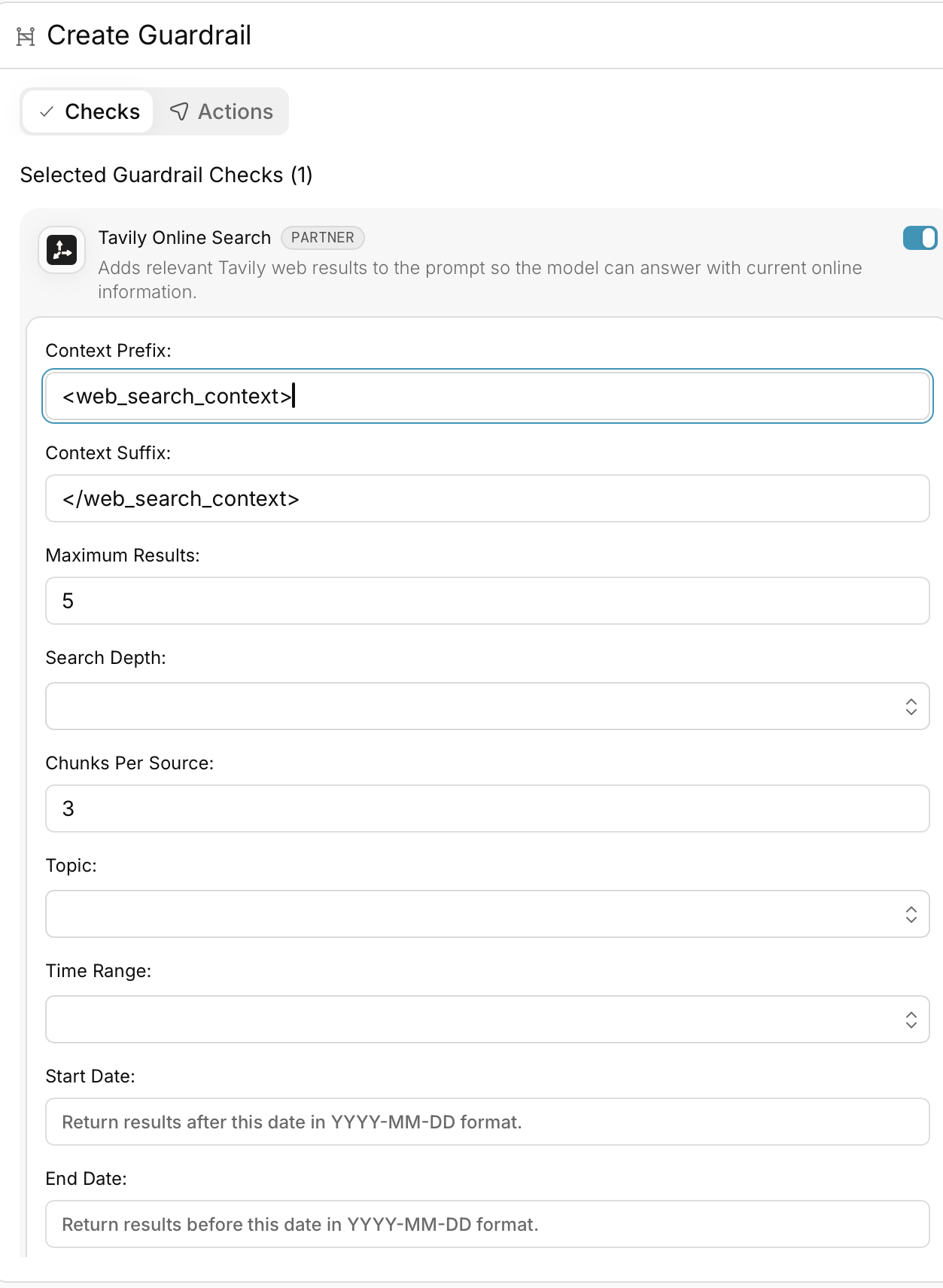
Add. - Configure the search behavior for your use case.
Core settings
- Context Prefix — text inserted before Tavily search results. Default:
<web_search_context> - Context Suffix — text inserted after Tavily search results. Default:
</web_search_context> - Max Results — number of search results to inject. Default:
5 - Timeout — max wait time in milliseconds for Tavily. Default:
30000
Search tuning
- Search Depth —
basic,advanced,fast, orultra-fast - Chunks Per Source — only applied when search depth is
advancedorfast - Topic —
general,news, orfinance - Auto Parameters — let Tavily automatically choose
topicandsearch_depth - Exact Match — require exact query matching
Freshness and geography
- Time Range —
day,week,month,year(ord,w,m,y) - Start Date / End Date —
YYYY-MM-DD - Country — only applied when topic is
general
Content enrichment
- Include Answer —
false,true,basic, oradvanced - Include Raw Content —
false,true,markdown, ortext - Include Images — return query-level and result-level images
- Include Image Descriptions — only used when images are enabled
- Include Favicon — attach source favicons
- Include Usage — return Tavily credit usage data
Domain and safety controls
- Include Domains — allowlist specific domains
- Exclude Domains — block specific domains
-
Safe Search — only applied when search depth is
basicoradvanced -
Set any
actionsyou want on the guardrail, then save it.
Guardrail Actions let you compose multiple checks into one workflow. Learn more here.
3. Add the Guardrail to a Config
When you save the guardrail, Portkey gives you a Guardrail ID. Add that ID to theinput_guardrails array in your Portkey config:
Tavily Online Search works only as an input guardrail. It enriches the prompt before the model call, so it runs through
before_request_hooks, not after_request_hooks.4. Use the Config in Requests
- NodeJS
- Python
- OpenAI Compatible
How Portkey Injects Tavily Results
For chat requests, Portkey appends the Tavily block to the existingsystem message. If there is no system message, it creates one. For completion requests, Portkey prepends the search block to the prompt.
A typical injected block looks like this:
- title
- URL
- result text (
content, orraw_contentas fallback) - optional score
- optional raw content
- optional favicon
- optional images
Best Practices
- Keep queries concise. Aim to stay under 400 characters. Write search-style queries, not long prompt-style instructions.
- Break complex prompts into focused searches. If the user asks about multiple topics, split them into narrower searches instead of overloading one query.
- Choose search depth deliberately. Use
basicfor general-purpose search,advancedfor specific detailed questions,fastwhen low latency matters, andultra-fastonly when speed is the top priority. - Use
advancedfor high-precision retrieval. When you need very specific information, pairsearch_depth: advancedwithchunks_per_sourceto surface more relevant snippets from each source. - Add freshness filters when recency matters. For current events, use
topic: newsand combine it withtimeRangeor explicitstartDate/endDatevalues. - Keep domain filters short and relevant. Use
includeDomainsorexcludeDomainsonly when they improve result quality. Usecountryonly for general-topic searches. - Keep
maxResultsmodest. Higher values can reduce average result quality and add unnecessary prompt context. - Use raw content sparingly.
includeRawContentcan improve grounding, but it also increases prompt size. When you need deeper extraction, first discover sources with search, then fetch the chosen pages separately. - Use
autoParameterscarefully. It helps with broad or ambiguous queries, but it may choose more expensive search settings unless you override them. - Use exact match only for verbatim names or phrases. When you need exact retrieval, wrap the phrase in quotes and enable
exactMatch. - Pair Tavily with output guardrails. Tavily improves input grounding; output guardrails help validate the final model response.
Monitoring and Logs
Tavily-enriched requests are visible in the Portkey dashboard. You can inspect:- whether Tavily was triggered for the request
- the search query that was generated
- the sources returned by Tavily
- how much extra prompt context was added
- usage and credit metadata when
includeUsageis enabled
Frequently Asked Questions
Does this work with every model behind Portkey?
Does this work with every model behind Portkey?
Yes. Tavily runs at the gateway layer, so the same search workflow can be used with OpenAI, Anthropic, Google, Mistral, self-hosted models, and any other provider available through Portkey.
What happens if Tavily returns no results?
What happens if Tavily returns no results?
The request still goes through to the model, but without added search context.
How fresh are Tavily's results?
How fresh are Tavily's results?
Tavily is designed for current web retrieval. For breaking topics and news workflows, you can tighten freshness further with
timeRange, startDate, and endDate.When should I use auto parameters?
When should I use auto parameters?
Use
autoParameters when you want Tavily to choose the best topic and depth automatically. Leave it off when you need predictable behavior or tighter control over latency and cost.How do images behave?
How do images behave?
If image retrieval is enabled, Portkey can inject query-level images and result-level images into the search context. The plugin limits prompt image injection to the first five valid images.
How is this different from built-in browsing tools?
How is this different from built-in browsing tools?
Native browsing is usually tied to one provider or model family. Tavily on Portkey gives you a retrieval layer that stays consistent across providers, with configurable depth, filtering, formatting, and observability.
Get Support
If you run into issues with the Portkey setup, reach out to Portkey support. For Tavily account, billing, or API-specific questions, use the Tavily support paths in your dashboard.Learn More
Portkey is now PRISMA AIRS AI Gateway. See it in action.
Contact Us